Freedom251 › Game Library Managers

Playnite
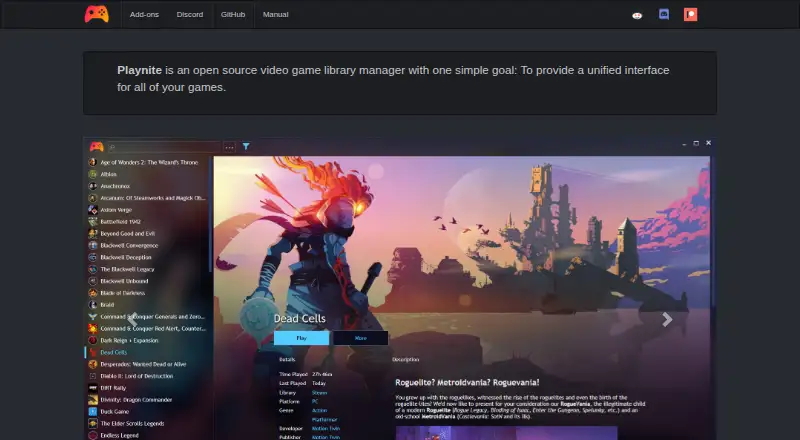
What Playnite is
Playnite is a free, open-source game library manager for Windows that brings games from multiple libraries and console emulators into one interface. It can link Steam, Epic, Origin, GOG, Battle.net, and Ubisoft Connect, including games that are not installed on the PC. A wide range of console emulators is supported, so collections can also include emulator-managed games. Themes and extensions let users customize the interface and add functions through plugins or script extensions. Fullscreen mode supports controllers and is recommended for a couch or console-like gaming setup. Playnite can retrieve descriptions, release dates, genres, and cover art through metadata providers, which are extensions that use third-party services. It can also automatically download metadata for games, including custom games, with covers and descriptions among the examples. Library information is kept locally on the PC; Playnite says it does not store user information on remote servers. It can run from portable storage without system dependencies. The software is available at no cost under the MIT license, and no features are locked behind a paywall.
Who it suits
Playnite suits Windows users who want one library interface for games from several PC stores and console emulators. It also fits players who want controller support, metadata tools, or the option to customize their library with themes and extensions.
What it does well
- Unifies libraries from six named game stores.
- Supports a wide variety of console emulators.
- Fullscreen mode supports controllers.
- Themes, plugins, and script extensions are supported.
- Game metadata can include descriptions, dates, genres, and cover art.
- Free and open source under the MIT license.
What to know first
- Available for Windows only.
- Community extensions are not reviewed by the development team.
- Third-party add-ons may affect performance or usability.
- Library information is stored locally, with no cloud sync.
Limits
Playnite has no features locked behind a paywall. Community extensions are not reviewed by the development team, and third-party add-ons may cause performance or usability issues.
Plans
| Plan | Billed and limits | Price |
|---|---|---|
| Playnite | No features locked behind a paywall · open source under the MIT license | Free |
As playnite.link lists them, read 5 Oct 2026. The maker's own page has the final word.
Getting started
- Visit https://playnite.link/.
- Use Playnite on Windows.
- Link supported game libraries, including Steam, Epic, Origin, GOG, Battle.net, or Ubisoft Connect.
- Add emulator-managed games if relevant to your collection.
- Customize the interface with themes or extensions as needed.
Verdict
Choose Playnite if you want a free Windows library for games across supported stores and emulators, with controller-friendly fullscreen mode and customization options. Take care when choosing community extensions: they are not reviewed by the development team, and third-party add-ons can affect performance or usability.
Questions
How much does Playnite cost?
Playnite is free: its listed plan is free.
Is Playnite open source?
Yes. It is open source under the MIT license.
Which platforms does Playnite support?
The listed platform is Windows.
Which game stores can it link?
It names Steam, Epic, Origin, GOG, Battle.net, and Ubisoft Connect, including games that are not installed.
Does Playnite support controllers and emulators?
Yes. It supports a wide variety of console emulators, and Fullscreen mode supports controllers.
Where is game library information stored?
Playnite says library information is stored locally on the PC and that it does not store user information on remote servers.
Facts from Playnite's own pages
- Customization
- Playnite supports customizable themes and extensions, including plugins and script extensions. · playnite.link, 5 Oct 2026
- Emulation
- Playnite supports a wide variety of console emulators. · playnite.link, 5 Oct 2026
- Extension limitation
- The add-ons page warns that third-party add-ons may cause performance or usability issues depending on which ones are used. · playnite.link, 5 Oct 2026
- Extension security
- The documentation says community extensions are not reviewed by the Playnite development team and advises caution when installing them. · api.playnite.link, 5 Oct 2026
- Fullscreen mode
- Fullscreen mode offers controller support and is recommended for a couch or console-like gaming experience. · api.playnite.link, 5 Oct 2026
- Game libraries
- The homepage names Steam, Epic, Origin, GOG, Battle.net, and Ubisoft Connect as libraries Playnite can link, including games that are not installed. · playnite.link, 5 Oct 2026
- IGDB
- The homepage says Playnite can automatically download metadata for games, including custom games, and names covers and descriptions as examples. · playnite.link, 5 Oct 2026
- Metadata
- Playnite can obtain game metadata such as descriptions, release dates, genres, and cover art through metadata providers, which are extensions using third-party services. · api.playnite.link, 5 Oct 2026
- Portable use
- Playnite can run from portable storage without requiring system dependencies. · playnite.link, 5 Oct 2026
- Privacy
- The homepage says Playnite stores library information locally on the PC and does not store user information on remote servers. · playnite.link, 5 Oct 2026
- Purpose
- Playnite is an open source video game library manager that provides a unified interface for games. · playnite.link, 5 Oct 2026
- Support
- The help overview directs users to the Playnite Discord server, subreddit, and official issues tracker for assistance or reporting issues. · api.playnite.link, 5 Oct 2026
Where Playnite stands on Freedom251
- Game Library Managers#27 of 40
- Game launchers#46 of 68
- Game Launcher Software#21 of 24