Freedom251 › Gym Access Control Software

re:membr Access Control
What re:membr Access Control is
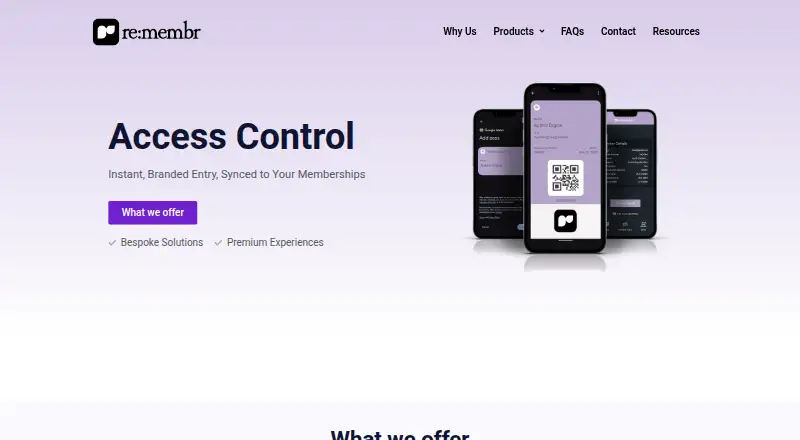
re:membr Access Control manages entry for gyms, event venues, co-working hubs, private clubs, and other membership organisations. Members can check in with a physical scanner, QR code, digital wallet pass, or ID-based check-in. Passes are emailed when members join, and QR codes can appear in confirmation or welcome emails. The system works with Apple Wallet, Google Wallet, iOS, Android, tablets, and scanners. Check-ins sync to re:membr, where access is validated in real time and expired or unpaid memberships can be blocked. Organisations can define access rules by time, zone, or membership type, and support guests, groups, one-time visitors, and multiple locations. Passes can be printed on plastic cards; temporary passes can be printed on receipt paper using Bluetooth thermal printers. Attendance history can be exported to CSV or Excel for compliance or reporting. Organisations can add their logo, colours, and welcome text. The maker also lists integrations with Shopify, Stripe, and in-store POS systems. Pricing is available on request; the access control page displays no amount.
Who it suits
It suits clubs, associations, hospitality venues, and private communities that need to validate member entry or manage guest access. Its check-in options span scanners, mobile wallets, QR codes, and ID-based entry.
What it does well
- Check-in supports scanners, QR codes, wallets, and ID
- Validates memberships in real time
- Set rules by time, zone, or membership type
- Export attendance history to CSV or Excel
What to know first
- Pricing is available on request
- No price is displayed on the access control page
Getting started
- Visit the re:membr Access Control page and request a plan.
- Choose the check-in methods and compatible devices for your organisation.
- Set access rules by time, zone or membership type.
- Send members their emailed passes, or include QR codes in welcome or confirmation emails.
- Use the web, iOS or Android service with tablets or scanners.
re:membr Access Control is an entry system for organisations that need to check membership status as well as admit guests. It is a strong fit for clubs and venues with varied entry rules; buyers who need a price before engaging a provider should look elsewhere.
Overview
Designed for gyms, event venues, co-working hubs and private clubs, the system combines membership validation with credential choices, visitor access and attendance records. Its best case is an organisation managing different member entitlements across people or locations. The trade-off is custom pricing: prospective customers must request a plan to assess cost.
Key features
Members can check in using a scanner, unique QR code, Apple Wallet or Google Wallet pass, or ID-based check-in. Passes are emailed when a member joins, and QR codes can also be included in welcome or confirmation emails. This range lets a venue accommodate phone-based and physical entry, though organisations will need to decide which methods suit their own check-in flow.
Check-ins sync with re:membr for real-time validation, which can block expired or unpaid memberships. Access rules can vary by time, zone or membership type, making the system relevant to venues with distinct areas or schedules. Guest, group, one-time visitor and multi-location access extend it beyond member-only entry.
Attendance history is exportable to CSV or Excel, a practical option for reporting and compliance. Plastic cards can serve as member passes, while Bluetooth thermal printers can produce temporary passes on receipt paper. Organisations can add their logo, colours and welcome text. The platform describes the experience as contactless and secure and says members may use a secure ID.
Compatibility includes iOS, Android, tablets and scanners, with Apple Wallet and Google Wallet support. The maker also describes integrations with Shopify, Stripe and in-store POS systems across its platform. Its support team assists with technical issues, general inquiries and troubleshooting.
Pricing
re:membr Access Control is paid, with custom pricing. The Request Plan call to action means buyers need to contact the provider before comparing costs; no plan tiers, seat limits or quotas are established here.
Platforms
The system supports Android, iOS and web, and the access control page also names tablets and scanners as compatible devices. Wallet passes work with Apple Wallet and Google Wallet.
Who it's for
Clubs are the clearest fit, with associations, hospitality venues and private communities also identified as users. It suits organisations needing live membership checks alongside guest entry, multiple locations or differentiated access rules. It is less suitable for buyers who require transparent pricing before contacting a vendor.
Pros and cons
- Pros: Multiple check-in methods, including wallet, QR, scanner and ID, give venues options for member entry.
- Pros: Real-time validation and rules by time, zone or membership type support controlled access and can block expired or unpaid members.
- Pros: Guest access, multiple locations and CSV or Excel attendance exports cover visitor management and record-keeping needs.
- Cons: Custom pricing makes cost comparison difficult until an organisation requests a plan.
Alternatives
Gym Access Control Software is a useful place to compare options for gym entry systems.
Choose Seam if a freemium option, free trial and API access matter; its Unit Access plan costs $5 a month and includes five actions per device per day.
FitManager Control is a Windows alternative with a free plan, but it requires a reception PC, Wiegand RFID reader with USB converter and USB relay board.
Beckon Access offers a free plan and a €99 a month Club management Add-on covering memberships, contracts, user accounting, SEPA direct debit and online payments.
Consider Gantner Fitness Check-In and Access Control, Nexkey, Sentry Interactive or StillHous Access Control as other paid access-control options.
Swiftlane is another paid option, with a free plan and trial; its Motion Detection Video Clips plan costs $30 a month per intercom device and includes up to 300 clips per day, 15-second clips and 30-day cloud retention.
Verdict
Choose re:membr Access Control if your club or venue needs real-time membership validation, several credential choices and visitor access across locations. The main reason to look elsewhere is custom pricing: without a quote, it is difficult to judge whether the feature set fits your budget.
Verdict
re:membr combines membership validation with several check-in methods, visitor access, and attendance exports. Organisations should request a plan to learn the price.
Questions
How much does re:membr Access Control cost?
Pricing is on request. The page offers a “Request Plan” call to action but displays no price.
Which check-in methods are supported?
Members can check in using a physical scanner, unique QR code, digital wallet pass or ID-based check-in.
Does it work with Apple Wallet and Google Wallet?
Yes. The access control page lists support for both wallets.
Which devices and platforms are compatible?
The page lists iOS, Android, tablets and scanners, and the platform is available on web, Android and iOS.
Can the system manage guests and multiple locations?
Yes. It supports guest, group and multi-location access, including one-time guests.
What integrations are listed?
The maker describes integrations with Shopify, Stripe and in-store POS systems across its platform.
Facts from re:membr Access Control's own pages
- Attendance records
- Attendance history can be viewed and logs exported to CSV or Excel for compliance or reporting. · remembr.com.au, 3 Oct 2026
- Branding and access rules
- Organisations can add their logo, colours, and welcome text, and set access rules by time, zone, or membership type. · remembr.com.au, 3 Oct 2026
- Branding and rules
- Organisations can add their logo, colours, and welcome text, and set access rules by time, zone, or membership type. · remembr.com.au, 2 Oct 2026
- Check-in
- Members can check in using a physical scanner, a unique QR code, a digital wallet pass, or ID-based check-in. · remembr.com.au, 2 Oct 2026
- Check-in methods
- Members can check in with a physical scanner, a unique QR code, a digital wallet pass, or ID-based check-in. · remembr.com.au, 3 Oct 2026
- Device compatibility
- The access control page says the system is compatible with iOS, Android, tablets, and scanners. · remembr.com.au, 3 Oct 2026
- Guest and location access
- The product supports access for one-time guests, groups, and multiple locations. · remembr.com.au, 3 Oct 2026
- Headquarters
- The contact page lists the address as 1/84 West Street, North Sydney. · remembr.com.au, 3 Oct 2026
- Integrations
- The maker describes Shopify, Stripe, and in-store POS integrations for syncing sales, inventory, and checkout data across online and in-person channels. · remembr.com.au, 3 Oct 2026
- Intended users
- The maker describes re:membr as built for clubs and also identifies associations, hospitality venues, and private communities as users. · remembr.com.au, 2 Oct 2026
- Membership sync
- Check-ins sync automatically with the re:membr platform, which validates access in real time and can block expired or unpaid members. · remembr.com.au, 3 Oct 2026
- Pass delivery
- Access passes are emailed when a member joins, and QR codes can be included in confirmation or welcome emails. · remembr.com.au, 3 Oct 2026
- Pricing availability
- The access control page directs prospective customers to request a plan and does not state a price. · remembr.com.au, 3 Oct 2026
- Printed passes
- Member passes can be printed on plastic cards, and temporary passes can be printed on receipt paper with a Bluetooth thermal printer. · remembr.com.au, 3 Oct 2026
- Purpose
- The digital access control system manages entry for gyms, event venues, co-working hubs, and private clubs. · remembr.com.au, 3 Oct 2026
- Security statement
- The access control page describes the experience as contactless and secure, and says members may use a secure ID. · remembr.com.au, 2 Oct 2026
- Support
- The maker says its support team assists with technical support, general inquiries, and troubleshooting. · remembr.com.au, 3 Oct 2026
- Wallets and devices
- The access control page says it works with Apple Wallet, Google Wallet, iOS, Android, tablets, and scanners. · remembr.com.au, 2 Oct 2026
- Wallet support
- The page lists Apple Wallet and Google Wallet support. · remembr.com.au, 3 Oct 2026
Where re:membr Access Control stands on Freedom251
- Gym Access Control Software#22 of 24