Freedom251 › Photo Viewer Software

qView
What qView is
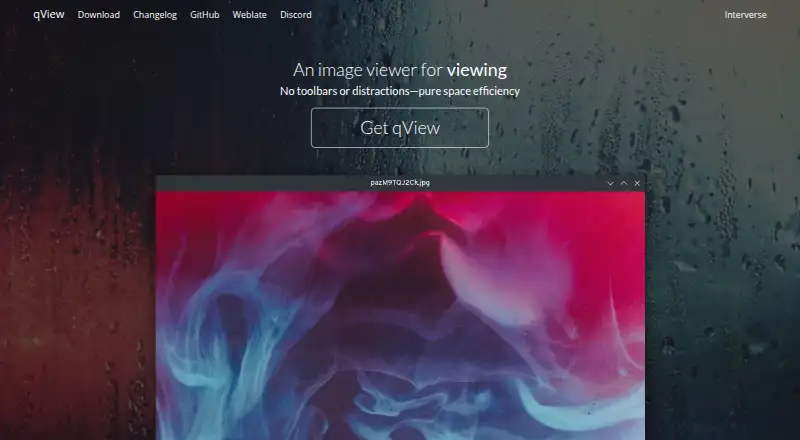
qView is a free, open-source image viewer for Linux, macOS, and Windows. Its minimal interface shows the image and a title bar without toolbars. Supported common formats include BMP, GIF, JPG, PNG, TIFF, and WebP; RAW image support and color management are also listed. For browsing, qView includes animated GIF controls, file history, rotation, mirroring, and multithreaded preloading. Preferences can be configured, and the maker describes the viewer as quick to open and light on memory and CPU. qView is based on Qt5 and licensed under GPLv3. Download options vary by system: Windows offers a 64-bit installer for Windows 10 or later, plus 32-bit and standalone downloads; the installer requires Visual C++ 2015 or later. macOS options include a DMG for macOS 12 or later, a legacy download for macOS 10.13 or later, and Homebrew installation. Linux choices include distribution packages, AppImage, Flatpak, and a source tarball. The download page also links to bug reporting, Discord, translation contributions, and nightly builds.
Who it suits
qView suits people who want a minimal viewer for common image formats, including RAW images. Its rotation, mirroring, and animated GIF controls may suit users who want basic browsing adjustments.
What it does well
- Free plan costs nothing.
- Supports BMP, GIF, JPG, PNG, TIFF, and WebP.
- RAW image support and color management are listed.
- Available for Linux, macOS, and Windows.
- Includes rotation, mirroring, and file history.
What to know first
- Windows installer requires Visual C++ 2015 or later.
- The macOS DMG requires macOS 12 or later.
- No free trial is listed.
Plans
| Plan | Billed and limits | Price |
|---|---|---|
| qView | Completely free and open source · GPLv3 | Free |
As interversehq.com lists them, read 8 Oct 2026. The maker's own page has the final word.
Getting started
- Visit https://interversehq.com/qview/.
- Choose a download or installation route for Windows, macOS, or Linux.
- On Windows, use the installer, 32-bit, or standalone download; the installer requires Visual C++ 2015 or later.
- On macOS, use the DMG, legacy download, or Homebrew option.
- On Linux, choose a listed distribution package, AppImage, Flatpak, or source tarball.
qView is a deliberately minimal image viewer for people who want files on screen without a toolbar-heavy workspace. It suits users who move among common formats and RAW images on Linux, macOS, or Windows and still want practical browsing controls. Its strongest case is focused viewing with low stated resource use; it is less suitable when you need product integrations or a broader photo-management environment.
Overview
qView puts the image and a title bar at the center of the interface, leaving out persistent toolbars and other visual clutter. That restraint makes it a sensible companion for opening pictures quickly, especially on machines where a lightweight viewer is preferable to a full catalog or editor. The project is free and open-source software built with Qt5 under the GPLv3 license, giving users a clearly defined license for using and redistributing it.
The maker says qView opens quickly and uses little memory and CPU. That positioning favors quick checks, folder-by-folder browsing, and machines where a larger application would be unnecessary. qView is a viewer rather than a stated photo-management suite, and no integrations with other products are identified.
Key features
- Everyday format coverage: BMP, GIF, JPG, PNG, TIFF, and WebP support covers the formats common in ordinary image folders.
- RAW and color management: RAW image support and color management make qView more relevant to photographers than a viewer restricted to basic web formats, although the published feature set does not describe editing or catalog tools.
- Browsing controls: File history helps return to recently viewed images, while multithreaded preloading is intended to keep navigation through a folder responsive.
- Animated GIF controls: Dedicated controls are useful when a GIF needs more than a static first-frame inspection.
- Transformations: Rotation and mirroring handle common orientation fixes without turning the viewer into an editor.
- Configurable preferences: Settings let users adapt the application to their viewing habits while preserving the uncluttered default presentation.
Pricing
| Plan | Price | What it includes |
|---|---|---|
| qView | free | Completely free and open source; GPLv3 |
There is no paid tier and no free trial because the single plan is free software rather than a time-limited evaluation. That makes it a straightforward choice for personal, educational, commercial, or other use cases that accept the GPLv3 terms. There are no stated seat limits, quotas, renewal charges, or subscription commitments to budget for.
Platforms
qView runs on Windows, macOS, and Linux. Windows users can choose a 64-bit installer for Windows 10 and later, 32-bit and standalone downloads, and should note that the installer requires Visual C++ 2015 or newer. macOS downloads include a DMG for macOS 12 and later, a legacy option for macOS 10.13 and later, and Homebrew installation. Linux users have unusually broad packaging choices: AUR, Fedora, openSUSE, Ubuntu PPA, Void, AppImage, Flatpak, and a source tarball.
The download page also links to bug reporting, a Discord server, translation contributions, and nightly builds. Those routes are useful to users who want to follow development or help the project, while nightly builds are better suited to readers comfortable with less conservative software versions.
Who it's for
Choose qView if you want a fast, spare window for inspecting images across desktop operating systems, including RAW files, and value open-source licensing. Its history, preload, GIF, rotation, mirroring, and preference controls cover practical viewing tasks without imposing a catalog-style workspace.
Look elsewhere if your priority is an integrated photo library, editing workflow, or connections to other products: qView's published positioning centers on viewing and does not describe those capabilities. Users on older systems should also match the stated Windows and macOS requirements to their machine before downloading.
Pros and cons
Pros
- Truly free and GPLv3-licensed: There is no subscription, trial expiry, or paid feature ladder.
- Minimal presentation: Showing the image and title bar without toolbars keeps attention on the file.
- Broad desktop reach: Windows, macOS, and Linux packaging includes multiple Linux distribution methods.
- Useful viewer depth: RAW support, color management, GIF controls, history, transformations, and preloading go beyond bare file opening.
Cons
- Not a stated management suite: No cataloging, editing, or product integrations are described, limiting it as a complete photo workflow.
- Version requirements vary: Windows installer users need Visual C++ 2015 or newer, and macOS downloads split between newer and legacy system versions.
- Lean interface may omit discoverability: Users accustomed to visible toolbars may prefer a more feature-dense viewer.
Alternatives
ImageGlass is worth considering when you want a freemium alternative with a free plan and free trial across Linux, macOS, and Windows.
XnConvert fits readers who need an image utility with a free private, educational, and non-profit plan and separate company licensing.
Geeqie is another free, GPLv2 option for users comparing open-source image viewers on the same three desktop platforms.
nomacs suits readers seeking a free GPLv3 viewer for private and commercial use.
Pineapple Pictures is an alternative when an MIT-licensed viewer and optional paid access to experimental additional formats appeal to you.
QTerminal is a free GPL-2.0-or-later Linux/macOS application, but it is a terminal rather than an image viewer.
ApolloOne is the macOS-only option for readers who prefer a free version with a 14-day purchase reminder and a paid annual edition.
FastStone Image Viewer is the Windows-only alternative, with free personal and educational use and a separate commercial license.
For a broader comparison, browse the Photo Viewer Software list.
Verdict
qView is the right pick for anyone who wants a genuinely free, open-source viewer that opens common and RAW images quickly in a restrained interface across Windows, macOS, or Linux. Its practical browsing controls and configurable preferences add substance without clutter. Look elsewhere when your priority is a full photo-management or editing environment, because qView's focus remains deliberately narrow.
Verdict
qView focuses on image viewing with a minimal interface and includes browsing controls, format support, and configurable preferences. Download choices differ by operating system and have stated version requirements.
Questions
How much does qView cost?
qView costs nothing and is completely free and open source under GPLv3.
Which platforms does it support?
qView supports Windows, macOS, and Linux.
What image formats does qView support?
Listed common formats include BMP, GIF, JPG, PNG, TIFF, and WebP. qView also supports RAW images.
Is qView open source?
Yes. It is based on Qt5 and licensed under GPLv3.
How can I install qView?
Windows offers 64-bit installer, 32-bit, and standalone downloads. macOS offers a DMG, a legacy download, and Homebrew; Linux options include distribution packages, AppImage, Flatpak, and a source tarball.
Does qView offer a free trial?
No. qView is offered free.
Facts from qView's own pages
- Configuration
- qView offers configurable preferences. · interversehq.com, 8 Oct 2026
- Features
- Features include animated GIF controls, file history, rotation and mirroring, and multithreaded preloading. · interversehq.com, 8 Oct 2026
- Formats
- Supported common formats include BMP, GIF, JPG, PNG, TIFF, and WebP. · interversehq.com, 8 Oct 2026
- Integrations
- The download page lists package repositories and Homebrew as installation options; it does not state integrations with other products. · interversehq.com, 8 Oct 2026
- Interface
- Its interface is designed to show the image and a titlebar without clutter or toolbars. · interversehq.com, 8 Oct 2026
- License
- The maker describes qView as free and open-source software based on Qt5 under the GPLv3 license. · interversehq.com, 8 Oct 2026
- Linux
- Linux distribution options include AUR, Fedora, openSUSE, Ubuntu PPA, Void, AppImage, Flatpak, and a source tarball. · interversehq.com, 8 Oct 2026
- macOS
- The download page offers a DMG for macOS 12+, a legacy download for macOS 10.13+, and installation through Homebrew. · interversehq.com, 8 Oct 2026
- Performance
- The maker says qView opens quickly and uses little memory and CPU. · interversehq.com, 8 Oct 2026
- Purpose
- qView is an image viewer designed to be practical and minimal. · interversehq.com, 8 Oct 2026
- Support
- The download page links to bug reporting, a Discord server, translation contributions, and nightly builds. · interversehq.com, 8 Oct 2026
- Windows
- The download page offers a 64-bit installer for Windows 10+, plus 32-bit and standalone downloads; the installer requires Visual C++ 2015+. · interversehq.com, 8 Oct 2026
Where qView stands on Freedom251
- Photo Viewer Software#16 of 34
- File Reader Software#14 of 24