Freedom251 › Restaurant Waitlist Software
queue1
What queue1 is
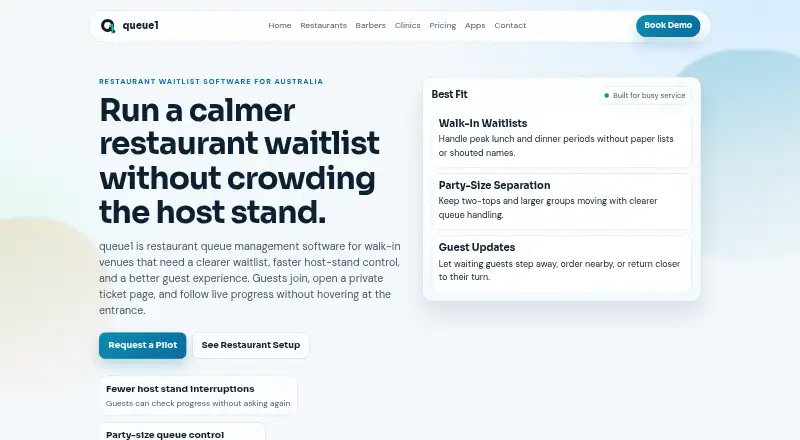
queue1 provides queue management for restaurants, clinics, salons, and other walk-in venues. Staff use queue1 Controller to issue tickets, call the next ticket, and update the “Now serving” status. Venues can run separate queues for different party sizes or service types.
Guests can check in by scanning a QR code, which opens a private ticket page on their phone, or use a ticket link in a browser to follow queue progress without installing an app. Guest notifications are available where supported; the Growth plan includes push notifications. The site says ticket pages use unique, hard-to-guess links and production traffic is protected with HTTPS/TLS. Queue state is saved to support recovery after restarts or interruptions. Normal operation on venue Wi-Fi requires an active internet connection. The free Demo is limited to 100 tickets and uses two Android devices, one for Display and one for Controller. A screen of 10 inches or larger is recommended for the guest-facing Display. Growth costs A$50 a month and includes a customized restaurant name and logo, live queue sync, push notifications, monthly reports, and priority support. Enterprise pricing is custom.
Who it suits
queue1 suits restaurants, clinics, salons, and other walk-in venues that need staff to manage one or more queues while guests follow progress from a browser. The free Demo can suit a venue evaluating the workflow with two Android devices and up to 100 tickets.
What it does well
- Supports separate queues for party sizes or service types.
- Guests can follow a private ticket link without installing an app.
- QR codes open private ticket pages on guests’ phones.
- Queue state is saved for recovery after interruptions.
- Growth includes live queue sync, push notifications, reports, and priority support.
What to know first
- The free Demo is limited to 100 tickets.
- The Demo setup uses two Android devices, one Display and one Controller.
- Normal operation on venue Wi-Fi requires an active internet connection.
- Growth costs A$50 a month.
Limits
The free Demo allows up to 100 tickets and uses two Android devices, one for Display and one for Controller. Growth costs A$50 a month and includes customized restaurant name and logo, live queue sync, push notifications, monthly queue reports, and priority support.
Plans
| Plan | Billed and limits | Price |
|---|---|---|
| Demo | Maximum 100 tickets · Setup uses 2 Android devices | Free |
| Growth | A$50/month (AUD) · Customized restaurant name and logo · Live queue sync · Push notifications · Monthly queue reports · Priority support | A$50 a month |
| Enterprise | Custom · Multi-site rollout · Custom SLAs · Integration advisory | On request |
As queue1.au lists them, read 8 Oct 2026. The maker's own page has the final word.
Getting started
- Open the queue1 restaurants website.
- Start with the free Demo, or choose Growth at A$50 a month for its listed additions.
- Set up two Android devices for the Demo: one Display and one Controller.
- Use a screen of 10 inches or larger for the guest-facing Display, as recommended.
- Have staff issue tickets and call the next ticket in queue1 Controller.
- Let guests scan a QR code or open their private ticket link in a browser.
queue1 is a staff-controlled queue system for restaurants, clinics, salons, and other walk-in venues. It suits operators who want visitors to follow their place in a browser, without requiring an app, while employees manage tickets from Android devices. The main trade-off is scale: the free Demo is useful for a small setup or proof of concept, but a busy or multi-site operation will need a paid plan.
Overview
queue1 Controller lets staff issue tickets, call the next ticket, and change the “Now serving” status. Guests receive a private ticket page that opens in a phone browser, either from a direct link or a QR code. This keeps the operational controls with employees while allowing guests to step away from the counter and check progress themselves.
Multiple queues can separate party sizes or service types, which is more useful than a single line for venues handling distinct services. Queue state is saved so a restart or interruption can be recovered without rebuilding the queue from scratch. Normal operation on venue Wi-Fi still requires an active internet connection, so saved state is a recovery aid rather than an offline mode.
Key features
- Browser-based guest tracking: Visitors can monitor their private ticket page without installing software. Unique, hard-to-guess links and HTTPS/TLS protect the page and its traffic, an appropriate approach when queue status should not be openly searchable.
- Staff ticket controls: Controller covers the essential actions—issuing tickets, calling the next one, and updating Now serving—without shifting those decisions to guests.
- Multiple queues: Separate lines for party sizes or service types help restaurants and other venues avoid forcing unlike requests into one queue.
- QR check-in and notifications: A QR code can open the ticket page on a guest’s phone. Notifications are supported where available, while Growth specifically adds push notifications for a more proactive alert.
- Saved queue state: Persistence after restarts reduces the risk of losing an active line during an interruption, although connectivity remains necessary for ordinary use.
- Device guidance: The guest-facing Display is recommended on a screen of at least 10 inches. The free demonstration uses two Android devices, one for Display and one for Controller.
Pricing
queue1 uses a freemium structure with a free trial and a free Demo. Demo costs nothing and is limited to a maximum of 100 tickets; its setup uses two Android devices. That cap makes it appropriate for evaluating the workflow or running a small, low-volume queue, not for a venue that routinely exceeds 100 guests.
Growth costs A$50 a month, billed A$50/month (AUD). It adds a customized restaurant name and logo, live queue sync, push notifications, monthly queue reports, and priority support. This is the practical tier for an operating venue that needs coordinated updates and reporting rather than a basic demonstration. The recurring fee is justified only if those additions matter to daily service; smaller venues can stay with Demo while within its ticket limit.
Enterprise has custom pricing and is aimed at multi-site rollouts. It adds custom SLAs and integration advisory, making it the relevant choice for organizations coordinating several locations or requiring an agreed service commitment. There is no published fixed price to compare against Growth.
Platforms
queue1 supports Android and the web. Staff-facing setup depends on Android devices for the free Demo’s Display and Controller arrangement, while guests use browser ticket pages on their phones. Venues should plan for an active internet connection on their Wi-Fi during normal operation.
Who it's for
Choose queue1 for a restaurant or walk-in service with staff-managed ticket issuance, several service lines, and guests who prefer a browser to an app download. Clinics and salons can also benefit when different service types need separate queues. It is less suitable for operators needing an offline queue, a free allowance above 100 tickets, or a broad native-mobile experience for guests.
Pros and cons
Pros
- No guest installation: Private browser pages and QR entry reduce friction for visitors.
- Flexible line structure: Multiple queues handle different party sizes or services.
- Operational recovery: Saved queue state helps preserve work after interruptions.
- Growth support: Live sync, push notifications, reports, custom branding, and priority support address ongoing venue operations.
Cons
- Small free ceiling: Demo stops at 100 tickets and requires two Android devices.
- Connectivity dependency: Normal Wi-Fi use needs an active internet connection.
- Limited platform scope: The product supports Android and web rather than an iOS staff platform.
- Enterprise cost uncertainty: Multi-site features require a custom quote.
Alternatives
For a wider comparison of restaurant-focused tools, see Restaurant Waitlist Software.
- Carbonara App is a better fit if you need Android, iOS, and web support with a free allowance of 50 bookings per month and paid booking tiers.
- NextMe suits teams that prioritize SMS quotas, with a free plan allowing 100 SMS per month and one user.
- Waitlist Me is preferable for a basic guest list and same-day reservations, though its free plan has no notifications and limited customization.
- Waitwhile is worth choosing when one location, 50 visits per month, two-way customer messages, and team notifications match your needs.
- digiQueue offers a free-forever queue with standard and priority lines, QR joining, SMS notifications, and a real-time dashboard.
- EazyQ fits a smaller operation capped at five concurrent queue places, 100 customers per month, and one staff seat on its free plan.
- Shokken is an alternative for manual entry, QR self-join, browser tracking, and public menus on its free tier.
- TablesReady is suited to venues needing up to 100 parties and 150 messages per month on its free plan.
Verdict
queue1 is a focused choice for walk-in venues that want employees to control tickets while guests privately track progress in a browser. Its strongest reasons to choose it are multiple queues, QR access, and a clear upgrade path to live sync and push notifications. Look elsewhere if your operation needs offline use, iOS staff support, or a larger free allowance than 100 tickets.
Verdict
Choose queue1 if your walk-in venue needs staff ticket controls and browser-based guest queue tracking, with the option to add multiple queues. The free Demo is capped at 100 tickets; venues needing Growth features pay A$50 a month, while Enterprise pricing is custom.
Questions
What does queue1 cost?
The Demo is free. Growth is A$50 a month. Enterprise is billed custom, with no price listed.
What is included in the free Demo?
The Demo is limited to 100 tickets and uses two Android devices: one for Display and one for Controller.
Which platforms does queue1 support?
Android and web are listed.
Can guests join or track a queue online?
Yes. Guests can use a private browser ticket link or scan a QR code that opens a private ticket page.
Does queue1 send guest notifications?
Guest notifications are available where supported. The Growth plan includes push notifications.
What does Growth add?
Growth includes a customized restaurant name and logo, live queue sync, push notifications, monthly queue reports, and priority support.
Facts from queue1's own pages
- Demo device limit
- The free demo is limited to 100 tickets and uses two Android devices, one for Display and one for Controller. · queue1.au, 8 Oct 2026
- Display sizing
- The site recommends a screen 10 inches or larger for the guest-facing Display device. · queue1.au, 8 Oct 2026
- Guest ticket pages
- Guests can use a private ticket link in their browser to follow queue progress without installing an app. · queue1.au, 8 Oct 2026
- Headquarters
- Australia · queue1.au, 28 Sept 2026
- Multiple queues
- The product supports multiple queues for different party sizes or service types. · queue1.au, 8 Oct 2026
- Network requirement
- For normal operation on venue Wi-Fi, the venue network should have an active internet connection. · queue1.au, 8 Oct 2026
- Notifications
- Guests can get notifications where supported, and the Growth plan includes push notifications. · queue1.au, 8 Oct 2026
- Purpose
- queue1 provides queue management for restaurants, clinics, salons, and other walk-in venues. · queue1.au, 8 Oct 2026
- QR check-in
- A QR code can open a private ticket page on a guest’s phone. · queue1.au, 8 Oct 2026
- Recovery
- Queue state is saved so operations can recover after restarts or interruptions. · queue1.au, 8 Oct 2026
- Security
- The site says ticket pages use unique, hard-to-guess links and production traffic is protected with HTTPS/TLS. · queue1.au, 8 Oct 2026
- Staff controls
- Staff use queue1 Controller to issue tickets, call the next ticket, and update “Now serving.” · queue1.au, 8 Oct 2026
- Support
- The Growth plan includes priority support. · queue1.au, 8 Oct 2026
Where queue1 stands on Freedom251
- Restaurant Waitlist Software#6 of 24