Freedom251 › Restaurant Waitlist Software
digiQueue
What digiQueue is
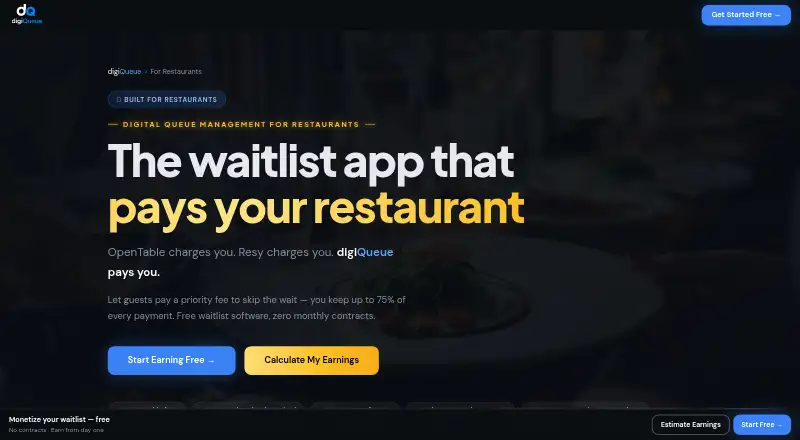
digiQueue gives restaurants digital queue management and lets guests pay a restaurant-set fee to skip a wait. Guests can join from a mobile browser without downloading an app or creating an account. The restaurant offering lists standard and priority queues, QR codes, SMS notifications, and a real-time dashboard. Staff can scan QR passes with a phone or tablet, and the service is described as working on any phone or tablet. Restaurants connect Stripe to receive priority payments, which are described as automatically deposited and secured by Stripe. The Free Forever plan gives the restaurant 25% of priority payments. The Priority Plan gives the restaurant 75%, adds reservations and multi-queue management, and charges $0.01 per outgoing notification; no monthly fee is listed. The maker says setup takes under 10 minutes and does not require a credit card. The service is listed for Android, iOS, and web.
Who it suits
digiQueue suits restaurants that want guests to join a queue through their phones and offer paid priority access. The Priority Plan may suit restaurants that also want reservations and multi-queue management.
What it does well
- Guests can join without an app or account
- Includes standard and priority queues
- QR codes, SMS notifications, and a real-time dashboard
- Staff can scan passes using a phone or tablet
- Free plan is listed at $0/month, always
What to know first
- Free plan gives restaurants 25% of priority payments
- Priority Plan charges $0.01 per outgoing notification
- No free trial is listed
Limits
Free Forever gives restaurants 25% of priority payments. Priority Plan charges $0.01 per outgoing notification, while the page lists no monthly fee.
Plans
| Plan | Billed and limits | Price |
|---|---|---|
| Free Forever | $0/month, always · Full queue management · Standard + Priority Queue · QR code + SMS notifications · Real-time dashboard · Restaurant keeps 25% of priority payments | Free |
| Priority Plan | per outgoing notification · Everything in Starter · Reservation system · Restaurant keeps 75% of priority payments · Priority support · Multi-queue management | $0.01, paid once |
As digiqueue.me lists them, read 14 Oct 2026. The maker's own page has the final word.
Getting started
- Open the digiQueue restaurant page.
- Choose Free Forever or the Priority Plan.
- Connect Stripe to receive priority payments.
- Set up queues and QR codes for guests to join.
- Have staff scan QR passes from a phone or tablet.
digiQueue is a restaurant queue and check-in service that lets guests pay a restaurant-set fee for priority access. It suits venues looking to add paid queue-jumping without requiring guests to install an app or create an account. The trade-off is that the free plan gives the restaurant just 25% of priority payments.
Overview
Guests join from a mobile browser, while staff manage standard and priority queues through a real-time dashboard. This keeps guest entry simple and gives restaurants a way to offer ordinary and paid access side by side. QR codes and SMS notifications support check-in and guest updates; staff can scan QR passes with a phone or tablet.
Restaurants connect Stripe to receive priority payments, which digiQueue says are deposited automatically and secured through Stripe. Paid priority is therefore part of the queue service, but the free plan's revenue share is a significant cost if guests use it often: the restaurant keeps only 25% of those payments.
Key features
- Standard and priority queues: Both are included in the free plan, letting a venue offer paid access without paying a monthly subscription. The restaurant's 25% share, however, may be a poor fit if priority fees become a meaningful revenue stream.
- Browser check-in and QR codes: Guests can join without an app or account, and staff can scan passes using a phone or tablet. This suits restaurants seeking a low-friction check-in process rather than requiring guests to adopt a dedicated app.
- SMS notifications and dashboard: SMS updates accompany a real-time dashboard, giving staff a digital view of queue activity and a way to notify guests. On the Priority Plan, each outgoing notification costs $0.01, so messaging volume affects operating cost.
- Reservations and multi-queue management: These are Priority Plan features, alongside priority support. They make the paid plan more relevant to restaurants that need reservations in addition to queue management or need to manage multiple queues.
- Stripe payments: Restaurants connect Stripe for priority payments; digiQueue says the payments are automatically deposited and Stripe-secured. That provides a built-in payment route, but the revenue share still differs sharply by plan.
Pricing
digiQueue uses a freemium model, with no free trial. Its free plan is genuinely ongoing, and setup is described as taking under 10 minutes with no credit card required.
- Free Forever — free, billed $0/month, always: Includes full queue management, standard and priority queues, QR codes, SMS notifications, and a real-time dashboard. The restaurant keeps 25% of priority payments. It is the sensible starting point for a venue that wants to try digital queue management at no monthly charge, but the revenue share is the key concession.
- Priority Plan — $0.01, paid once, billed per outgoing notification: Includes everything in Starter, plus a reservation system, 75% of priority payments retained by the restaurant, priority support, and multi-queue management. There is no monthly fee, but each outgoing notification costs $0.01. This is better suited to restaurants that need reservations or multiple queues, or expect priority revenue to justify the higher share retained; venues sending many notifications should account for the per-message charge.
The plan description calls the free tier “Free Forever,” while the Priority Plan refers to “everything in Starter”; the free tier is otherwise named “Free Forever.”
Platforms
digiQueue is available on Android, iOS, and the web. The restaurant page says it works on any phone or tablet, and staff can scan QR passes from either device type. Guests can check in through a mobile browser without downloading an app.
Who it's for
digiQueue is a strong fit for restaurants that want online queue entry, SMS notifications, and optional paid priority in one service, especially when avoiding guest app installs matters. The free plan keeps fixed monthly cost at zero, while the Priority Plan adds reservations and multi-queue management. It is less compelling for a restaurant focused on retaining most priority revenue without paying a share, or one whose notification volume would make per-message charges a concern.
Pros and cons
- Pros: Guests can join by mobile browser without an app or account, reducing friction at check-in; the free plan includes standard and priority queues with QR codes, SMS, and a live dashboard; the Priority Plan raises the restaurant's share of priority payments to 75% and adds reservations and multi-queue management.
- Cons: The free plan leaves the restaurant only 25% of priority payments; Priority Plan notifications cost $0.01 each, so message volume adds variable cost; its listed plan features do not establish a fixed monthly price for the Priority Plan.
Alternatives
For a broader comparison, see Restaurant Waitlist Software.
- Carbonara App is worth comparing if a booking allowance is central: its free plan includes 50 bookings per month, and it offers a free trial.
- NextMe may suit venues that prefer an explicit SMS allowance: its free plan includes 100 SMS per month for one user, and it offers a free trial.
- Waitlist Me is an option for a basic guest list and same-day reservations, though its free plan has no notifications and limited customization.
- Waitwhile is worth considering when a stated location and visit cap is useful: its free plan covers one location and 50 visits per month, with two-way customer messages and team notifications by email and push.
- EazyQ may fit a venue with modest concurrent demand: its free plan caps the queue at five concurrent customers and includes one staff seat.
- queue1 offers a free demo capped at 100 tickets and set up using two Android devices; consider it if those terms suit your needs.
- Shokken is another freemium option, with a free plan that includes QR self-join, browser tracking, core waitlist tools, and public menus.
- TablesReady may be preferable for a defined free messaging allowance: its free plan covers 150 messages per month and up to 100 parties, and it offers a free trial.
Verdict
Choose digiQueue if your restaurant wants browser-based check-in and paid priority, with QR codes, SMS, and a real-time dashboard and no monthly fee on the free tier. The Priority Plan is the better fit when reservations, multiple queues, or a larger retained share of priority payments matter. Look elsewhere if keeping more priority revenue without a per-notification charge is the priority.
Verdict
digiQueue combines guest queue check-in with paid priority access and offers a free plan alongside a per-notification Priority Plan. Restaurants should compare the different revenue shares and notification charge with the queue and reservation features they need.
Questions
Is digiQueue free?
Yes. Free Forever costs nothing, billed at $0/month always, and includes queue management, standard and priority queues, QR codes, SMS notifications, and a real-time dashboard.
How much does the Priority Plan cost?
It costs $0.01, paid once, charged per outgoing notification. The page lists no monthly fee.
Which platforms does it support?
digiQueue is listed for Android, iOS, and web. The maker says it works on any phone or tablet.
Do guests need an app or account?
No. Guests can join from a mobile browser without downloading an app or creating an account.
What payment service does it use?
Restaurants connect Stripe to receive priority payments. The page describes payments as Stripe-secured and automatically deposited.
Who makes digiQueue?
Thompson Technology LLC identifies itself as the company behind digiQueue and as a Service-Disabled Veteran-Owned Small Business.
Facts from digiQueue's own pages
- Analytics
- The dashboard reports earnings, conversion rates and demand patterns in real time. · digiqueue.me, 14 Oct 2026
- Architecture
- The maker describes one multi-vertical system supporting restaurant tables, airport passenger flow, port vessel queues, government check-in and DJ requests. · digiqueue.me, 14 Oct 2026
- Capacity management
- Real-time controls are provided to manage flow and reduce overcrowding. · digiqueue.me, 14 Oct 2026
- Company
- The maker identifies Thompson Technology LLC as the company behind digiQueue and describes it as a Service-Disabled Veteran-Owned Small Business. · digiqueue.me, 3 Oct 2026
- Company identity
- The product is associated with Thompson Technology LLC, also described on the site as Thompson Tech LLC. · digiqueue.me, 14 Oct 2026
- Device support
- The restaurant page says the system works on any phone or tablet and staff can scan passes from those devices. · digiqueue.me, 14 Oct 2026
- Federal registration
- The immigration page states that Thompson Technology LLC is SAM.gov registered and gives UEI HDU6VJW7J8A1. · digiqueue.me, 14 Oct 2026
- Free-plan economics
- The free tier has no monthly or setup fee but digiQueue keeps 75% of each priority payment. · digiqueue.me, 14 Oct 2026
- G2 profile status
- G2 marks the digiQueue profile as vendor-managed with limited profile features. · g2.com, 14 Oct 2026
- Government deployment
- The government offering is described as requiring no hardware, app download or IT-infrastructure changes. · digiqueue.me, 14 Oct 2026
- Guest access
- Guests can join from a mobile browser without downloading an app or creating an account. · digiqueue.me, 3 Oct 2026
- Guest app requirement
- Guests can join from a mobile browser without downloading an app or creating an account. · digiqueue.me, 14 Oct 2026
- Industry coverage
- The maker markets digiQueue for restaurants, airports, ports, government offices, nightclubs, events, venues, clinics, retail, universities and cruises. · digiqueue.me, 14 Oct 2026
- Licence
- AlternativeTo lists digiQueue as a proprietary freemium product rather than open source. · alternativeto.net, 14 Oct 2026
- Limit: pricing discrepancy
- The G2 product description lists the paid tier at $0.02 per outgoing SMS, while the maker’s restaurant page lists $0.01 per outgoing notification. · g2.com, 14 Oct 2026
- Limit: review evidence
- G2 says digiQueue has too few reviews to provide purchasing insights. · g2.com, 14 Oct 2026
- Messaging cost
- The Priority Plan charges $0.01 per outgoing notification, and the page lists no monthly fee. · digiqueue.me, 3 Oct 2026
- Notable news
- A June 17, 2026 company blog post said digiQueue was pursuing airport, restaurant-group and nightlife opportunities and had added government-contracting infrastructure. · digiqueue.me, 14 Oct 2026
- Notifications
- The service sends real-time SMS and push notifications, including table-ready updates. · digiqueue.me, 14 Oct 2026
- Origin
- The maker says digiQueue began as a restaurant waitlist product in Florida’s Panhandle. · digiqueue.me, 14 Oct 2026
- Paid-plan economics
- The paid tier charges $0.01 per outgoing SMS notification and has no stated monthly minimum or annual commitment. · digiqueue.me, 14 Oct 2026
- Payment integration
- Restaurants connect Stripe and receive automatic deposits for priority payments. · digiqueue.me, 14 Oct 2026
- Payment security
- The restaurant page describes payments as Stripe-secured. · digiqueue.me, 14 Oct 2026
- Port integration limit
- The port workflow is advertised as requiring no new AIS or VTS integration. · digiqueue.me, 14 Oct 2026
Where digiQueue stands on Freedom251
- Restaurant Waitlist Software#3 of 24