Freedom251 › Build Automation Software
qmake
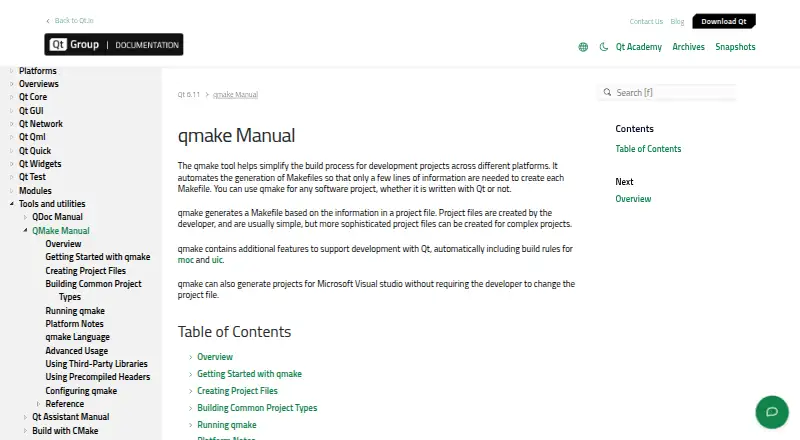
What qmake is
qmake manages build processes by expanding project files into Makefiles for applications, libraries, and other components. Its .pro files can describe source files, configuration, libraries, and include paths. qmake supplies build rules for Qt's moc and uic tools, with templates for applications, libraries, and plugins. Projects can refer to third-party libraries and include paths, and qmake can use pkg-config for supported libraries such as D-Bus and ogg. It can also generate Microsoft Visual Studio project files and, on macOS, Xcode project files. Platform notes describe iOS support for universal binaries, frameworks, and bundles. In Qt 6, qmake remains supported for building Qt applications, but it cannot compile custom Qt plugins or libraries that depend on Qt 5 build-system internals. Qt warns that building an untrusted project can execute code on the build machine because developer tools treat processed projects as trusted input. Qt offers commercial and open-source licensing; the Community Edition is available under LGPL or GPL terms, with source-code obligations and limited access to some Qt capabilities.
Who it suits
qmake suits developers building Qt applications and managing project configuration through .pro files. It may also suit teams that need Makefiles or IDE project files across supported platforms.
What it does well
- Project files specify sources, libraries, and include paths.
- Includes build rules for Qt moc and uic tools.
- Templates cover applications, libraries, and plugins.
- Can generate Visual Studio and Xcode project files.
- Community Edition is available under LGPL or GPL terms.
What to know first
- Qt 6 qmake cannot build certain custom plugins or libraries.
- Building an untrusted project can execute code on the build machine.
- Community Edition has source-code obligations and limited capabilities.
Limits
The free Qt Community Edition has source-code obligations under LGPL or GPL terms and limited access to some Qt capabilities. In Qt 6, qmake cannot compile custom Qt plugins or libraries that rely on Qt 5 build-system internals.
Plans
| Plan | Billed and limits | Price |
|---|---|---|
| Qt Community Edition | Open-source use under LGPL or GPL · source code must be open to copy, modify, and distribute · limited access to some Qt capabilities | Free |
As doc.qt.io lists them, read 11 Oct 2026. The maker's own page has the final word.
Getting started
- Open the qmake manual at https://doc.qt.io/qt-6/qmake-manual.html.
- Choose the Qt Community Edition, available free under LGPL or GPL terms.
- Create a `.pro` project file describing source files, configuration, libraries, and include paths.
- Use qmake to expand the project file into a Makefile.
qmake is a Qt-focused build generator for developers who want project settings kept in readable .pro files and expanded into Makefiles. It is best suited to Qt application and library teams that also need platform-specific project output, while projects outside the Qt ecosystem may find its scope too narrow.
Overview
qmake turns declarations of source files, configuration, libraries, and include paths into Makefiles. That project-file approach keeps build definitions in one structured place and avoids maintaining Makefiles by hand. It is a sensible fit when Qt is central to the codebase and the team wants Qt-aware conventions, but it is not positioned as a universal build orchestrator for every language or toolchain.
The tool comes from the Qt ecosystem, whose first public framework release dates to 1995. Qt Group is headquartered in Espoo, Finland. That long-standing context may reassure teams standardizing on Qt, although the practical decision still depends on the Qt version and the project types being built.
Key features
Qt-aware build rules
qmake automatically adds rules for Qt's moc and uic tools. For Qt applications, this folds two recurring Qt code-generation steps into the generated build rather than requiring separate rule definitions. The benefit is specific: a Qt project gets a more coherent build description, while a non-Qt project gains little from this integration.
Project templates and dependencies
Templates cover applications, libraries, and plugins, giving common Qt project shapes a defined starting point. A .pro file can also name third-party libraries and include paths, and qmake can use pkg-config for supported libraries such as D-Bus and ogg. That is useful for projects whose dependencies already fit those conventions, but it does not remove the need to understand each library's own setup.
IDE and mobile output
Beyond Makefiles, qmake can generate Microsoft Visual Studio project files and, on macOS, Xcode project files. Teams can therefore keep one project description while producing files for those IDE environments. Its iOS support includes creating universal binaries, frameworks, and bundles, making it more relevant to Qt mobile targets than a Makefile-only generator.
Qt 6 boundary
qmake remains supported for building Qt applications in Qt 6, but it cannot compile custom Qt plugins or libraries that depend on Qt 5 build-system internals. Plugin-heavy or internally extended Qt 6 projects should treat this as a decisive compatibility check rather than assuming every older qmake workflow carries forward.
Build security
qmake treats processed projects as trusted input. Building an untrusted project can execute code on the build machine, so teams need to vet project files before invoking the build. Qt describes application security as shared among developers, Qt Group and Qt Project, and operators or device manufacturers. Vulnerability reports for open-source Qt are directed to [email protected]; Qt says it has no current bug bounty program.
Pricing
qmake is free. The Qt Community Edition costs free and permits open-source use under LGPL or GPL terms. Source code must be open to copy, modify, and distribute, and access to some Qt capabilities is limited. This is a strong fit for qualifying open-source projects; teams needing restricted source or capabilities outside that allowance should examine Qt's commercial licensing rather than assume the community terms apply.
Platforms
qmake supports iOS, Linux, macOS, and Windows. Its multi-platform project generation is most valuable when a Qt codebase targets several of those systems and the team wants shared project descriptions. The iOS-specific output features further distinguish it for Qt mobile builds.
Who it's for
Choose qmake for Qt developers maintaining applications, libraries, or supported plugin workflows who want .pro-based configuration, automatic moc and uic rules, and generated Makefiles or IDE projects. It also suits open-source teams that can meet LGPL or GPL obligations.
Look elsewhere when the project is not Qt-centered, when a Qt 6 build requires custom plugins or libraries tied to Qt 5 internals, or when untrusted build inputs cannot be safely reviewed. qmake's strengths are tightly connected to its Qt assumptions.
Pros and cons
Pros
- Qt tooling is integrated: moc and uic rules are included automatically, reducing separate build-rule work in Qt projects.
- One project description serves several outputs: qmake can produce Makefiles, Visual Studio projects, and macOS Xcode projects.
- Useful dependency declarations: .pro files handle libraries and include paths, with pkg-config support for libraries such as D-Bus and ogg.
- Broad target coverage: iOS, Linux, macOS, and Windows are supported, with iOS bundle, framework, and universal-binary capabilities.
Cons
- Qt 6 plugin limitation: custom plugins or libraries relying on Qt 5 build-system internals cannot be compiled.
- Trusted-input risk: an untrusted project may execute code during the build, requiring careful review before use.
- Community licensing constraints: the free edition requires LGPL or GPL open-source terms and limits access to some Qt capabilities.
- Qt-centric scope: projects without Qt-specific needs may not gain enough from its specialized rules.
Alternatives
For a broader directory of build tools, see Build Automation Software.
- fastlane is a free, MIT-licensed option for teams targeting Android and iOS as well as desktop platforms.
- Qbs is another free Qt-adjacent choice, with commercial, LGPL 3, and GPL 2 licensing.
- Bazel suits readers seeking Google's open-source build and test tool on Linux, macOS, or Windows.
- FASTBuild is a free, open-source build system where commercial use and redistribution are permitted under its license terms.
- Ninja is the focused pick when fast, small build execution and a downloadable binary or source build matter most.
- Nx fits teams wanting a freemium, self-hosted or web-capable workflow with a free Hobby plan, monthly credits, contributor and CI-connection caps.
- SCons is a free MIT-licensed alternative for users who want permission to use, modify, or redistribute without charge.
- Shake is a free BSD-licensed option installed with Haskell Stack.
Verdict
qmake is a focused choice for Qt teams that want declarative .pro files, automatic Qt build rules, and generated project files across supported platforms. Its free Community Edition can work well for open-source development. Look elsewhere if Qt 6 custom plugin compatibility, unrestricted licensing, or builds involving untrusted project files are central requirements.
Verdict
qmake provides a project-file-based way to generate Makefiles and related IDE project files. The Qt 6 limitation and the warning about untrusted projects are important considerations for build workflows.
Questions
How much does qmake cost?
The Qt Community Edition is free.
Is qmake open source?
The Community Edition is available under LGPL or GPL terms. Its plan description says source code must be open to copy, modify, and distribute.
Which platforms does qmake support?
The listed platforms are iOS, Linux, macOS, and Windows.
What does qmake do with project files?
It expands `.pro` project files into Makefiles. The files can specify source files, configuration, libraries, and include paths.
Can qmake generate IDE project files?
It can generate Microsoft Visual Studio project files and, on macOS, Xcode project files.
What limitation applies in Qt 6?
qmake remains supported for Qt application builds, but cannot compile custom Qt plugins or libraries that rely on Qt 5 build-system internals.
Facts from qmake's own pages
- Build security
- Qt warns that developer tools such as qmake treat processed projects as trusted input, so building an untrusted project can execute code on the build machine. · doc.qt.io, 11 Oct 2026
- Headquarters
- Espoo, Finland · doc.qt.io, 28 Sept 2026
- IDE project generation
- qmake can generate Microsoft Visual Studio project files and, on macOS, Xcode project files. · doc.qt.io, 11 Oct 2026
- Licensing
- Qt offers commercial and open-source licensing, with the Community Edition available under LGPL or GPL terms. · qt.io, 11 Oct 2026
- Maker and location
- Qt Group is headquartered in Espoo, Finland, and its company history page says the first public Qt Framework version was released in 1995. · qt.io, 11 Oct 2026
- Mobile targets
- The platform notes describe qmake features for iOS, including creating universal binaries, frameworks, and bundles. · doc.qt.io, 11 Oct 2026
- Project files
- qmake project files use `.pro` files that can specify source files, configuration, libraries, and include paths. · doc.qt.io, 11 Oct 2026
- Project types
- qmake has templates for building applications, libraries, and plugins. · doc.qt.io, 11 Oct 2026
- Purpose
- qmake manages the build process for applications, libraries, and other components by expanding project files into Makefiles. · doc.qt.io, 11 Oct 2026
- Qt 6 limitation
- In Qt 6, qmake remains supported for building Qt applications but cannot compile custom Qt plugins or libraries that rely on Qt 5 build-system internals. · doc.qt.io, 11 Oct 2026
- Qt tools
- qmake automatically includes build rules for Qt's moc and uic tools. · doc.qt.io, 11 Oct 2026
- Security reporting
- Qt directs reports about open-source Qt vulnerabilities to [email protected] and says it does not currently have a bug bounty program. · doc.qt.io, 11 Oct 2026
- Security responsibility
- Qt describes application security as a shared responsibility among application developers, Qt Group and Qt Project, and operators or device manufacturers. · doc.qt.io, 11 Oct 2026
- Third-party libraries
- Project files can specify third-party libraries and include paths, and qmake can use pkg-config for supported libraries such as D-Bus and ogg. · doc.qt.io, 11 Oct 2026
Where qmake stands on Freedom251
- Build Automation Software#19 of 42