Freedom251 › Build Automation Software
Ninja
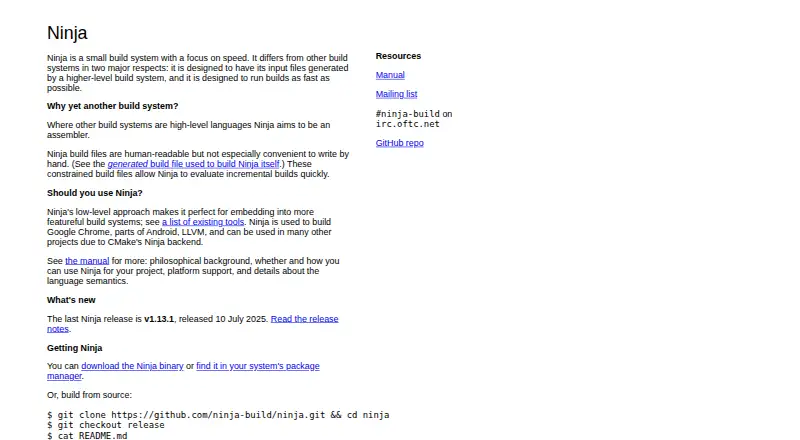
What Ninja is
Ninja is a small build system designed to evaluate incremental builds quickly. It takes file interdependencies as input, then runs the commands needed to build targets. A separate program is expected to generate those input files; GN and CMake can do so, and the manual also identifies Premake as a possible fit. Ninja runs builds in parallel by default, based on the number of CPUs in the system, and can discover extra dependencies such as C and C++ headers from compiler-generated information. It has no built-in rules, including rules for compiling C code, and offers little support for hand-written build files or build-time decisions such as conditionals. Official binaries are available for Linux, Mac, and Windows, and package-manager installation is documented. The project identifies Apache-2.0 as its license and describes Ninja as a standalone executable without a public API. The site identifies v1.13.1, released 10 July 2025, as the last release. The software is free, with a downloadable binary or the option to build from source.
Who it suits
Ninja may suit developers using a higher-level build system to generate build inputs and who want parallel incremental builds. It is less suited to workflows that need hand-written rules or build-time customization within the build system.
What it does well
- Runs builds in parallel by default.
- Can discover C and C++ header dependencies.
- GN and CMake can generate Ninja input files.
- Binaries are available for Linux, Mac, and Windows.
- The project identifies Apache-2.0 as its license.
What to know first
- It has no built-in rules for compiling C code.
- A separate program must generate its input files.
- It has no public API.
- The site identifies v1.13.1 as its last release.
Plans
| Plan | Billed and limits | Price |
|---|---|---|
| Ninja | Small build system focused on speed · downloadable binary or build from source | Free |
As ninja-build.org lists them, read 11 Oct 2026. The maker's own page has the final word.
Getting started
- Visit the Ninja project website.
- Choose an official prebuilt binary for Linux, Mac, or Windows, or use a documented package manager.
- Use GN, CMake, or another suitable higher-level build system to generate Ninja input files.
- Run Ninja to execute the commands for the requested build targets.
Overview
Ninja is a free build system for developers who want fast incremental builds and already use a higher-level tool to define their build inputs. Its CPU-based parallel execution and focus on dependency tracking are compelling; its reliance on generated files makes it a poor fit for teams seeking a standalone, customizable build language.
Key features
Ninja reads file interdependencies and runs the commands required to build targets. It is designed to keep incremental builds quick, including in very large projects, so teams that rebuild frequently can spend less time waiting for unchanged work to be repeated.
Builds run in parallel by default, using the number of CPUs on the system. Ninja can also discover additional dependencies from compiler-generated information, including C and C++ header dependencies. That helps keep rebuilds responsive while accounting for headers that affect compiled outputs.
GN and CMake can generate Ninja input files, and the manual also names Premake as a possible fit. The inputs are human-readable, but Ninja is intended for a generator to create them; writing them by hand is not especially convenient. Ninja has no built-in rules, such as rules for compiling C code, and offers little syntax for hand-written build files. It also lacks build-time customization and decision-making features such as conditionals. These trade-offs make it a focused execution engine, not a complete build configuration system.
Ninja is a standalone executable, not a library, and has no public API. Its license is Apache-2.0. The project names Google Chrome, parts of Android, and LLVM among projects built with Ninja.
Pricing
Ninja is free. Its plan costs nothing and provides the small build system as a downloadable binary or something users can build from source. There is no free trial because the software is free; no paid tier or seat-based plan is described. Official prebuilt binaries are available for Linux, Mac, and Windows, and the project documents installation through package managers.
Platforms
Ninja supports Linux, macOS, and Windows. Its manual also describes support for Unix-like systems and names Mac OS X and FreeBSD; Linux has seen the most testing. That makes it a practical option across common desktop development environments, though Linux is the platform with the strongest testing history.
Who it's for
Ninja suits developers and build-tool maintainers who already rely on a generator such as GN or CMake and value quick incremental and parallel builds. It is less suitable for people who want to author build logic directly in a rich build language, define their own compilation rules inside the tool, or make conditional decisions during a build.
For installation and project support, the site points users to package managers, while the project README offers binaries or source builds. The project site also links to a mailing list and lists the #ninja-build IRC channel on irc.oftc.net. The site identifies v1.13.1, released 10 July 2025, as the last release.
Pros and cons
Pros
- Fast incremental-build focus: Ninja is built to evaluate incremental work quickly, including in very large projects, which benefits developers rebuilding often.
- Parallel by default: It uses the system's CPU count to run builds in parallel without requiring that behavior to be configured manually.
- Compiler dependency discovery: It can track extra dependencies such as C and C++ headers from compiler-generated information.
- Free and cross-platform: It costs nothing and offers prebuilt binaries for Linux, Mac, and Windows.
Cons
- Requires generated inputs: Ninja is designed to work with a separate program, so it is not a self-contained choice for defining a build.
- Limited build language: It has no built-in rules and little hand-written syntax, which constrains users who want to express build logic directly.
- No build-time customization: Features such as conditionals are absent, making Ninja a poor fit when build decisions need to happen inside the build system.
- Executable only: With no library or public API, it is not intended to be embedded as a build component.
Alternatives
Choose Bazel if you want an open-source build and test tool from Google rather than Ninja's generator-dependent execution system. FASTBuild is another free, open-source option, with commercial use and redistribution permitted under its license terms. For a broader alternative set, browse Build Automation Software.
fastlane is free and open source under the MIT license, with support for Android, iOS, Linux, macOS, and Windows. Qbs is free and spans those platforms too; its licensing options include commercial licenses, LGPL version 3, and GPL version 2. qmake offers a free Qt Community Edition under LGPL or GPL, with source-code sharing requirements and limited access to some Qt capabilities.
SCons is a free option under the MIT license, which permits use, modification, or redistribution without charge. Shake is free, open source under the BSD license, and installed with Haskell Stack. Nx may suit teams seeking a freemium build platform: its free Hobby plan is free forever and includes 50,000 credits reset monthly, 5 contributors, 10 concurrent CI connections, and community support.
Verdict
Choose Ninja if your existing build generator can produce its inputs and fast incremental, CPU-parallel execution is the priority. Its focused design is a strength when the generator supplies the missing rules and configuration, but a reason to look elsewhere if you need a build system that authors and customizes the full build on its own.
Verdict
Ninja focuses on running generated build inputs in parallel and handling incremental dependencies. Its design depends on a separate input generator and lacks built-in rules and build-time customization features.
Questions
Is Ninja free?
Yes. Ninja is listed as free, with a plan price of $0.
Which platforms does Ninja support?
Prebuilt binaries are available for Linux, Mac, and Windows. The manual describes Unix-like system and Windows support, and says Ninja has seen the most testing on Linux.
Does Ninja include rules for compiling C code?
No. Ninja has no built-in rules such as rules for compiling C code; a separate program generates the input files it uses.
Which programs can generate Ninja files?
GN and CMake can generate Ninja files. The manual also names Premake as a possible fit.
Is Ninja open source?
The project repository identifies its license as Apache-2.0.
Is Ninja a library or does it have an API?
The project describes Ninja as a standalone executable rather than a library, with no public API.
Facts from Ninja's own pages
- Build behavior
- Builds run in parallel by default, using the number of CPUs on the system. · ninja-build.org, 11 Oct 2026
- Dependencies
- Ninja supports discovering extra dependencies at build time, including C and C++ header dependencies. · ninja-build.org, 11 Oct 2026
- Dependency handling
- Ninja supports discovering C/C++ header dependencies from compiler-generated dependency information. · ninja-build.org, 11 Oct 2026
- Designed use
- Ninja is intended to work with a separate program that generates its input files. · ninja-build.org, 11 Oct 2026
- Download
- Official prebuilt binaries are available for Linux, Mac, and Windows, and the project also documents installation through package managers. · github.com, 11 Oct 2026
- Downloads
- The project README says binaries are available for Linux, Mac, and Windows. · github.com, 11 Oct 2026
- Generated inputs
- Ninja is designed for a higher-level build system to generate its input files, which are human-readable but not especially convenient to write by hand. · ninja-build.org, 11 Oct 2026
- How it works
- Ninja takes file interdependencies as input and runs the commands needed to build targets. · ninja-build.org, 11 Oct 2026
- Incremental builds
- Ninja aims for very fast incremental builds, including for very large projects. · ninja-build.org, 11 Oct 2026
- Integrations
- GN and CMake can generate Ninja files; the manual also names Premake as a possible fit. · ninja-build.org, 11 Oct 2026
- License
- The project repository identifies its license as Apache-2.0. · github.com, 11 Oct 2026
- Notable limit
- Ninja has no built-in rules, such as rules for compiling C code. · ninja-build.org, 11 Oct 2026
- Notable limits
- Ninja has no built-in rules, little syntax for hand-written build files, and no build-time customization or decision-making features such as conditionals. · ninja-build.org, 11 Oct 2026
- Parallel builds
- Builds run in parallel by default, based on the number of CPUs on the system. · ninja-build.org, 11 Oct 2026
- Platforms
- The manual says Ninja works on Unix-like systems and Windows, and runs on Mac OS X and FreeBSD. · ninja-build.org, 11 Oct 2026
- Platform support
- The manual says Ninja works on Unix-like systems and Windows, and runs on Mac OS X and FreeBSD; it has seen the most testing on Linux. · ninja-build.org, 11 Oct 2026
- Purpose
- Ninja is a small build system designed to evaluate incremental builds quickly. · ninja-build.org, 11 Oct 2026
- Release
- The project site identifies v1.13.1, released 10 July 2025, as the last Ninja release. · ninja-build.org, 11 Oct 2026
- Standalone executable
- The project README describes Ninja as a standalone executable rather than a library, with no public API. · github.com, 11 Oct 2026
- Support
- The project site links to a mailing list and lists the #ninja-build IRC channel on irc.oftc.net. · ninja-build.org, 11 Oct 2026
- Use cases
- The site says Ninja is used to build Google Chrome, parts of Android, and LLVM. · ninja-build.org, 11 Oct 2026
Where Ninja stands on Freedom251
- Build Automation Software#17 of 42