Freedom251 › Build Automation Software

Meson
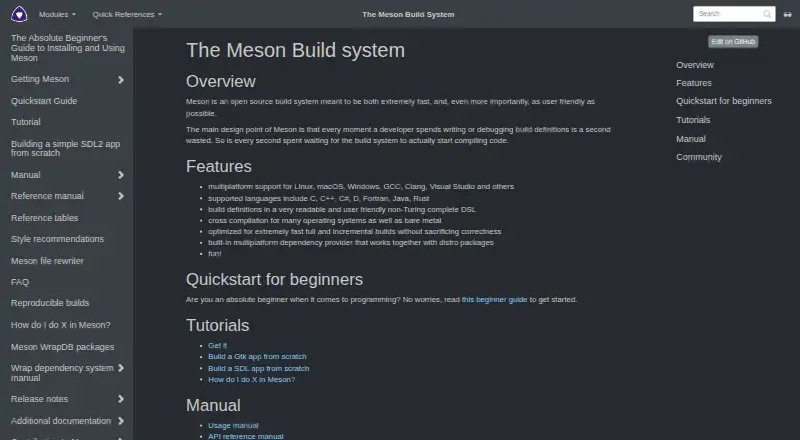
What Meson is
Meson is an open-source build system for projects written in C, C++, C#, D, Fortran, Java, and Rust. It runs on Linux, macOS, and Windows, and supports cross-compilation for many operating systems and bare-metal targets. Build definitions use a readable domain-specific language that is not Turing complete. Ninja is the default backend; Visual Studio and Xcode backends are available for native IDE integration. Meson also provides a multiplatform dependency provider for distribution packages and an introspection API with JSON descriptions of targets, dependencies, tests, and build options. Listed IDE integrations include CLion, Eclipse CDT, GNOME Builder, KDevelop, Qt Creator, and a VS Code/Codium extension. Install options include pip, GitHub release downloads, and a Windows MSI that bundles Meson, Ninja, and Python. Meson is implemented in Python 3 and requires Python 3.10 or newer. The default Ninja backend requires the Ninja executable; Visual Studio and Xcode backends do not. Meson is free.
Who it suits
Meson suits developers building software in its listed languages across Linux, macOS, or Windows. It may also fit teams wanting native IDE integration or cross-compilation support.
What it does well
- Supports seven listed programming languages.
- Cross-compiles for many systems and bare metal.
- Offers Visual Studio and Xcode backends.
- Provides JSON build introspection for IDEs and tools.
What to know first
- Requires Python 3.10 or newer.
- Default backend requires the Ninja executable.
- Build definitions do not support wildcard source lists.
Plans
| Plan | Billed and limits | Price |
|---|---|---|
| Meson | Open source build system | Free |
As mesonbuild.com lists them, read 5 Oct 2026. The maker's own page has the final word.
Getting started
- Open the Meson website or choose pip, a GitHub release, or the Windows MSI installation route.
- Install Python 3.10 or newer.
- Install Meson and, if using the default backend, ensure the Ninja executable is available.
- Choose Ninja, Visual Studio, or Xcode as the backend; Visual Studio and Xcode can be used without Ninja.
- Use the documented IDE integrations or introspection API to connect Meson with your development tools.
Verdict
Meson combines a readable build-definition language with multiple backends, IDE integrations, and cross-compilation support. Account for its Python requirement and the Ninja dependency when using the default backend.
Questions
Is Meson free?
Yes. It is open source, and its listed Meson plan costs nothing.
Which operating systems does Meson support?
Its listed platforms are Linux, macOS, and Windows. It also supports cross compilation for many operating systems and bare-metal targets.
Which programming languages does Meson support?
The site lists C, C++, C#, D, Fortran, Java, and Rust.
Does Meson require Ninja?
Ninja is needed for the default backend. Visual Studio and Xcode backends can be used without Ninja.
How can I install Meson?
Installation options include pip, GitHub release downloads, and a Windows MSI bundling Meson, Ninja, and Python. Meson requires Python 3.10 or newer.
Does Meson support wildcard source lists?
No. Meson does not support wildcard source lists in build definitions.
Facts from Meson's own pages
- Backends
- Ninja is the default backend; Visual Studio and Xcode backends are also available for native IDE integration. · mesonbuild.com, 5 Oct 2026
- Build definitions
- Build definitions use a readable, user friendly DSL that is not Turing complete. · mesonbuild.com, 5 Oct 2026
- Build dependency
- The Ninja executable is needed for the default Ninja backend, while Visual Studio and Xcode backends can be used without Ninja. · mesonbuild.com, 5 Oct 2026
- Cross compilation
- Meson supports cross compilation for many operating systems and bare metal. · mesonbuild.com, 5 Oct 2026
- Dependency downloads
- Wrap dependencies are downloaded only when a configured wrap file and an explicit subproject or dependency fallback invocation are both present. · mesonbuild.com, 5 Oct 2026
- Dependency provider
- Meson includes a multiplatform dependency provider that works with distribution packages. · mesonbuild.com, 5 Oct 2026
- IDE API
- Meson provides an introspection API and JSON files describing targets, dependencies, tests, and build options for IDE and build-tool integration. · mesonbuild.com, 5 Oct 2026
- IDE integrations
- The documentation lists integrations including CLion, Eclipse CDT, GNOME Builder, KDevelop, Qt Creator, and a VS Code/Codium extension. · mesonbuild.com, 5 Oct 2026
- Install methods
- Meson can be installed with pip, downloaded from its GitHub releases, or installed with an MSI that bundles Meson, Ninja, and Python for Windows. · mesonbuild.com, 5 Oct 2026
- Languages
- The site lists C, C++, C#, D, Fortran, Java, and Rust as supported languages. · mesonbuild.com, 5 Oct 2026
- Notable limitation
- Meson does not support wildcard source lists in build definitions because it says that rescanning globs would undermine reliable, fast builds. · mesonbuild.com, 5 Oct 2026
- Purpose
- Meson is an open source build system designed to be fast and user friendly. · mesonbuild.com, 5 Oct 2026
- Runtime requirement
- Meson is implemented in Python 3 and requires Python 3.10 or newer according to its installation page. · mesonbuild.com, 5 Oct 2026
- Security
- The site says downloading through Wraps can be disabled with the --wrap-mode=nodownload option. · mesonbuild.com, 5 Oct 2026
- Support and community
- The project directs users to the #mesonbuild Matrix or OFTC IRC channel and GitHub Discussions for general discussion. · mesonbuild.com, 5 Oct 2026
Where Meson stands on Freedom251
- Build Automation Software#13 of 42
- Game Build Automation Software#29 of 43