Freedom251 › DVD Authoring Software
PyBurn Studio
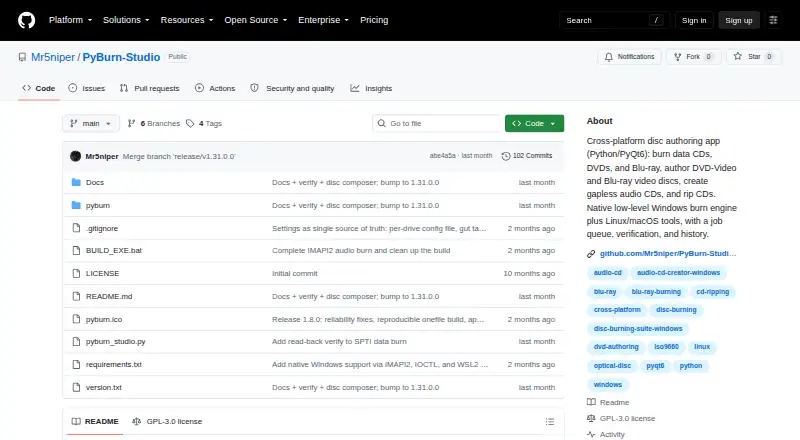
What PyBurn Studio is
PyBurn Studio is a free, open-source desktop application for burning and ripping optical discs on Linux, macOS, and Windows. Built with Python and PyQt6, it handles data, audio, and video disc projects. Users can burn files and folders to CDs, DVDs, and Blu-ray discs, arrange contents, and create ISO images. Audio CD projects accept MP3, WAV, FLAC, OGG, M4A, and AAC files; Windows supports gapless Disc-At-Once burning. The app can author video DVDs using ffmpeg and dvdauthor, and Blu-ray BDMV discs using tsMuxeR. For CD ripping, it saves tracks as MP3, FLAC, or WAV and can look up metadata through MusicBrainz. A queue runs jobs one at a time and provides progress, logs, saved history, and retry options. Data disc verification can read a disc after burning and compare it with the written image, when enabled for the drive. Windows uses built-in drive interfaces for data and audio burning and CD ripping, while DVD and Blu-ray authoring use WSL2. Linux and macOS jobs rely on command-line tools. The project is released under GNU GPL version 3.
Who it suits
It suits people who want a desktop tool for data, audio, or video disc projects across Linux, macOS, or Windows. It may also fit users who need CD ripping or data-disc verification.
What it does well
- Burns data CDs, DVDs, and Blu-ray discs
- Authors audio CDs from six listed formats
- Rips CDs to MP3, FLAC, or WAV
- Queues jobs with progress, logs, history, and retries
- Free and released under GNU GPL version 3
What to know first
- PyQt6 is required
- Blu-ray authoring requires optional tsMuxeR
- Windows DVD and Blu-ray authoring use WSL2
- Linux and macOS jobs require command-line tools
Limits
PyQt6 is required. MusicBrainz lookups depend on optional requests, and Blu-ray authoring depends on optional tsMuxeR; Windows DVD and Blu-ray authoring use WSL2.
Plans
| Plan | Billed and limits | Price |
|---|---|---|
| PyBurn Studio | No price stated · GPL-3.0 licensed | Free |
As github.com lists them, read 9 Oct 2026. The maker's own page has the final word.
Getting started
- Open the project website on GitHub.
- Install PyQt6.
- On macOS, follow the instructions to install command-line tools through Homebrew.
- Install optional requests if you want MusicBrainz lookups.
- Install tsMuxeR if you want to author Blu-ray discs.
- Choose a disc task and add it to the job queue.
Overview
PyBurn Studio is a free desktop application for authoring and ripping optical discs, aimed at users who want several disc workflows in one place. Its wide format coverage is a strong fit for mixed disc tasks, but external-tool setup makes it less appealing if you want a minimal, ready-to-run burner.
Key features
For data discs, the app burns files and folders to CD, DVD, and Blu-ray, and lets users create folders, rename entries, and arrange contents by dragging. It can also build an ISO image. That combination suits users who want to plan a disc layout before burning rather than simply send a folder to a drive. After a data burn, optional verification reads the disc back and compares it with the written image; it must be enabled per drive in Settings.
Audio CD authoring accepts MP3, WAV, FLAC, OGG, M4A, and AAC files. Windows adds gapless Disc-At-Once burning, useful for albums intended to play continuously. CD ripping produces MP3, FLAC, or WAV files, and an optional MusicBrainz connection can look up metadata. The formats and ripping tools make this a more complete audio-disc option than a burner limited to writing data.
Video support spans DVD authoring with ffmpeg and dvdauthor and Blu-ray BDMV authoring with tsMuxeR. This breadth is valuable if video discs are part of the job, but it comes with a setup burden: Blu-ray authoring requires the optional tsMuxeR tool, and some audio and video work uses ffmpeg. Simulation mode lets users explore the interface when a required tool is absent, but it cannot perform the missing job.
Jobs run one at a time in a queue, with live progress, logs, saved history, and retry options. This gives users a way to track and revisit disc work, though it does not offer simultaneous job execution.
Pricing
PyBurn Studio is free, with a published plan price of $0 and no trial period. The project is released under GPL-3.0. There are no paid tiers, seat counts, or quotas to weigh; the trade-off is that users must handle any required tools and platform-specific setup themselves.
Platforms
PyBurn Studio supports Linux, macOS, and Windows. PyQt6 is required, while requests is optional for MusicBrainz lookups. Linux and macOS rely on command-line disc tools, with dependencies varying by job; macOS setup instructions use Homebrew. On Windows, data and audio burning and CD ripping use built-in drive interfaces, while DVD and Blu-ray authoring use WSL2. That split makes Windows relatively self-contained for basic disc tasks, but video authoring still has an additional environment requirement.
Who it's for
Choose PyBurn Studio if you need one free application for data discs, audio CDs, video discs, and CD ripping, and are comfortable installing tools where a workflow requires them. It is less suited to users who want video authoring without dependency management or who only need a simple burner for occasional data discs.
Pros and cons
- Pros: Covers data CDs, DVDs, and Blu-ray alongside audio CD authoring, video discs, and CD ripping, reducing the need for separate disc-work applications.
- Pros: Data-layout controls and optional read-back verification support users who want to organize and check a data burn.
- Pros: Free and GPL-3.0 licensed, with versions for Linux, macOS, and Windows.
- Cons: Dependencies vary by operating system and task; Blu-ray authoring needs tsMuxeR, and Linux and macOS workflows rely on command-line tools.
- Cons: Windows DVD and Blu-ray authoring uses WSL2, so the broad format range does not mean every job follows the same setup path.
- Cons: Jobs run one at a time, which limits throughput when several disc jobs are queued.
Alternatives
For a DVD-focused option, compare DVD Authoring Software. DVDStyler is another free, open-source choice for Linux, macOS, and Windows; consider it if you want a similarly broad desktop platform range for DVD authoring. Open Burning Suite is also free and open source on those three platforms, making it an option to compare for disc burning.
Q DVD-Author is free GPL-2.0 software described for Linux, so it is a narrower platform match for Linux users. WinX DVD Author is a free Windows-only option whose plan says it has no limits or watermarks. DVDBuilder SDK is a freemium Windows alternative. AVS Video Editor is a freemium Windows option with a 1 year subscription priced at $49 a year. DeVeDe NG is a free Linux alternative. Scenarist SD is a paid Windows option at $99 a year.
Verdict
PyBurn Studio is a sensible pick for technically comfortable users who want a free, cross-platform suite for data, audio, and video discs plus CD ripping. Its main advantage is the range of jobs in one application; look elsewhere if your priority is a simpler setup, especially for video authoring on Linux, macOS, or Windows.
Verdict
PyBurn Studio covers data, audio, and video disc work, plus CD ripping and optional verification. Setup varies by operating system and job type, and some workflows need additional tools.
Questions
Is PyBurn Studio free?
Yes. It is free and open source under the GNU General Public License version 3.
Which operating systems does it support?
It supports Linux, macOS, and Windows. The tools used for disc jobs vary by operating system.
What disc formats can it create?
It burns data CDs, DVDs, and Blu-ray discs; authors audio CDs and video DVDs; and can create Blu-ray BDMV discs.
Can it rip audio CDs?
Yes. It can save rips as MP3, FLAC, or WAV and can look up metadata through MusicBrainz.
What does Blu-ray authoring require?
Blu-ray authoring requires the optional tsMuxeR tool. On Windows, DVD and Blu-ray authoring use WSL2.
Facts from PyBurn Studio's own pages
- Audio CDs
- It authors audio CDs from MP3, WAV, FLAC, OGG, M4A, and AAC files, including gapless Disc-At-Once burning on Windows. · github.com, 4 Oct 2026
- Audio formats
- Audio CD authoring accepts MP3, WAV, FLAC, OGG, M4A, and AAC files. · github.com, 9 Oct 2026
- Burn verification
- Data burns can be verified by reading the disc back and comparing it with the written image. · github.com, 9 Oct 2026
- CD ripping
- Audio CDs can be ripped to MP3, FLAC, or WAV, with optional MusicBrainz metadata lookup. · github.com, 9 Oct 2026
- Data disc layout
- The Data tab lets users add files and folders, create folders, rename entries, and arrange the disc contents by dragging items. · github.com, 9 Oct 2026
- Data discs
- It burns data CDs, DVDs, and Blu-ray discs from files and folders, with tools to arrange the disc contents and build an ISO image. · github.com, 4 Oct 2026
- Disc formats
- It burns data CDs, DVDs, and Blu-ray discs, authors audio CDs and video discs, and rips audio CDs. · github.com, 9 Oct 2026
- Job management
- The app queues jobs one at a time and provides progress, a global job log, persistent history, and the ability to retry jobs. · github.com, 9 Oct 2026
- License
- The project is released under the GNU General Public License, version 3. · github.com, 9 Oct 2026
- Linux and macOS requirements
- Linux and macOS use command-line disc tools, and macOS instructions specify installing tools through Homebrew. · github.com, 9 Oct 2026
- Linux and macOS tools
- On Linux and macOS, disc jobs use command-line tools, with dependencies varying by job type; macOS instructions specify installing tools through Homebrew. · github.com, 4 Oct 2026
- Maker
- The GitHub profile describes Mr5niper as a junior test engineer with experience in validation and system testing. · github.com, 4 Oct 2026
- Optional integrations
- The app can use ffmpeg for audio and video tasks and requests for optional MusicBrainz lookups; Blu-ray authoring requires tsMuxeR. · github.com, 9 Oct 2026
- Product
- PyBurn Studio is a desktop disc-authoring application built with Python and PyQt6 for burning and ripping discs on Linux and Windows. · github.com, 9 Oct 2026
- Release
- The releases page lists PyBurn Studio v1.15.0.0 as the latest release and describes a native Windows SPTI/MMC burning engine. · github.com, 9 Oct 2026
- Requirements
- PyQt6 is required; requests is optional for MusicBrainz lookups, and Blu-ray authoring requires the optional tsMuxeR tool. · github.com, 4 Oct 2026
- Security and privacy
- The opened project page does not state security certifications or compliance claims. · github.com, 9 Oct 2026
- Simulation mode
- When a required tool is missing, simulation mode lets users exercise the interface without running the disc job. · github.com, 9 Oct 2026
- Support
- The repository page exposes an Issues section for reporting project issues. · github.com, 9 Oct 2026
- Video discs
- It authors video DVDs using ffmpeg and dvdauthor, and Blu-ray BDMV discs using tsMuxeR. · github.com, 4 Oct 2026
- Windows engine
- Windows data and audio burning and CD ripping use a built-in engine; video DVD and Blu-ray authoring use WSL2 for the authoring step. · github.com, 9 Oct 2026
Where PyBurn Studio stands on Freedom251
- DVD Authoring Software#5 of 26