Freedom251 › DVD Authoring Software
DVDBuilder SDK
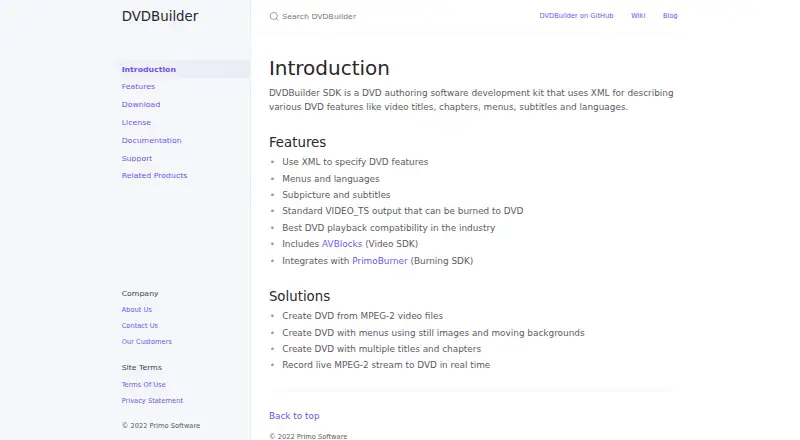
What DVDBuilder SDK is
DVDBuilder SDK is a Windows development kit for adding DVD authoring to software. Developers describe DVD structures and features with XML, including titles, chapters, menus, subtitles, and languages. Its API is available for C++ and .NET languages such as C#, F#, and VB. The SDK produces a VIDEO_TS directory with VOB, IFO, and BUP files, in NTSC or PAL and 4:3 or 16:9 formats. Supported video inputs include MPEG-2 program streams, MPEG-2 elementary video streams, and VOB files; supported audio includes MPEG-2, AC3, and DTS elementary streams. It also supports subpicture streams and Spruce STL subtitles. Menus can use still images or moving MPEG backgrounds, with up to 36 buttons per menu. The SDK includes AVBlocks, and its documentation says AVBlocks and PrimoBurner are included. DVDBuilder does not itself burn discs: burning a VIDEO_TS directory with PrimoBurner requires a separate PrimoBurner license. A license is required to use the API; demo mode limits each video title to five minutes. The listed price starts at $1,500/yr.
Who it suits
DVDBuilder SDK suits developers building Windows software that creates DVD titles, menus, chapters, and subtitle tracks. It supports C++ and .NET APIs and outputs DVD folders rather than burning discs itself.
What it does well
- API supports C++ and .NET languages
- Accepts MPEG-2 streams and VOB files
- Supports NTSC and PAL output
- Menus support up to 36 buttons
- Includes AVBlocks
What to know first
- Demo mode limits each title to five minutes
- DVDBuilder does not support DVD burning
- PrimoBurner burning requires a separate license
- Paid access starts at $1,500/yr
Limits
In demo mode, each video title is limited to five minutes. DVDBuilder does not burn discs; burning a VIDEO_TS directory with PrimoBurner requires a separate PrimoBurner license.
Getting started
- Visit the DVDBuilder website.
- Download the demo .NET or C++ SDK archive for 32-bit or 64-bit Windows.
- Choose a sample project from the Windows C++ or .NET repository.
- Set a DVDBuilder license to use the API beyond demo mode.
Overview
DVDBuilder SDK is a Windows toolkit for building DVD structures from code, with XML descriptions for titles, chapters, menus, subtitles and languages. It suits developers who need to produce DVD-Video output inside an application; it is a poor fit for anyone seeking a standalone authoring app or an all-in-one burner.
Its strengths are detailed DVD structure and format support, plus C++ and .NET APIs. The key trade-off is that authoring produces a VIDEO_TS folder, while burning requires a separate PrimoBurner license.
Key features
DVDBuilder can organize up to 99 titles into one or more title sets, with multiple chapters per title and DVD Virtual Machine commands. Menus can use still images or moving MPEG backgrounds, with up to 36 buttons per menu. That level of structure makes the SDK relevant to software that needs configurable disc navigation rather than a basic one-off DVD.
It accepts MPEG-2 program streams, MPEG-2 elementary video streams and VOB files. Audio support covers MPEG-2, AC3 and DTS elementary streams; subtitles and subpicture streams are supported, including Spruce STL subtitles, with language assignment for multiple streams. Output is a VIDEO_TS directory containing VOB, IFO and BUP files, in NTSC or PAL and 4:3 or 16:9. Blu-ray authoring is not supported.
The API is available for C++ and .NET, including C#, F# and VB. AVBlocks is included as a video SDK and MPEG-2 encoder. PrimoBurner integration provides a path to burning, but does not remove the separate license requirement. DVDBuilder itself does not burn discs.
Published solutions include authoring from MPEG-2 files, creating menus with still or moving backgrounds, building multiple titles and chapters, and recording live MPEG-2 streams to DVD in real time. Chapter tools are manual, so projects requiring automated chapter creation should look elsewhere.
Pricing
DVDBuilder is freemium, with a free plan and paid plans from $1,500/yr. A DVDBuilder license is required to use the API outside demo mode. Demo mode limits each video title to five minutes, making it useful for evaluating an integration but not for unrestricted production output. The SDK includes PrimoBurner, but burning a VIDEO_TS directory with it requires a separate PrimoBurner license.
The published starting price makes this a substantial commitment for developers who need licensed API use. It is best suited to teams whose product needs embedded DVD authoring; occasional disc creators are unlikely to benefit from paying for an SDK.
Platforms
DVDBuilder is for Windows. Supported systems include Windows 11, 10, 8.1, 8 and 7 SP1, plus Windows Server 2022, 2019, 2016 and 2012 R2. Demo .NET and C++ SDK archives are offered in 64-bit and 32-bit versions. The public samples repository organizes Windows examples by platform and language, and directs support requests to the dvdbuilder-support GitHub repository.
Who it's for
Choose DVDBuilder if you are building Windows software that needs to author standards-based DVD-Video folders with control over menus, multiple titles, chapters, audio and subtitle languages. Its API and broad DVD structure support are more useful to application developers than to people authoring a single disc by hand.
It is not the right choice for Blu-ray projects, cross-platform development, or a workflow that expects burning to be included under the DVDBuilder license. The five-minute-per-title demo limit also makes it an evaluation tool rather than a production substitute.
Pros and cons
- Pros: Supports up to 99 titles, multiple chapters, DVD Virtual Machine commands and menus with up to 36 buttons, giving developers substantial control over DVD navigation.
- Pros: C++ and .NET APIs, including C#, F# and VB, and Windows samples give development teams several integration paths.
- Pros: NTSC and PAL output, both common aspect ratios, and multiple audio and subtitle formats suit varied DVD-Video projects.
- Cons: Burning is not part of DVDBuilder; using the included PrimoBurner component to burn requires a separate license.
- Cons: Demo mode restricts each video title to five minutes, and licensed API use starts at $1,500/yr.
- Cons: Windows only, no Blu-ray authoring, and manual chapter tools narrow its fit.
Alternatives
For a general directory of authoring choices, browse DVD Authoring Software.
- PyBurn Studio is a free option for readers who want Linux or macOS support as well as Windows.
- DVDStyler is a free, open-source DVD authoring application for Windows, Linux and macOS, a better fit for cross-platform use.
- Open Burning Suite is free and open source, and supports Windows, Linux and macOS.
- Q DVD-Author is a free GPL-2.0 choice for Linux users.
- WinX DVD Author is a free Windows option with no limits or watermarks, for readers who want desktop authoring rather than an SDK.
- AVS Video Editor is a Windows freemium alternative with a listed one-year subscription at $49 a year.
- DeVeDe NG is a free Linux alternative.
- Scenarist SD is a paid Windows alternative with an annual usage license listed at $99 a year.
Verdict
DVDBuilder SDK is a strong fit for Windows developers who need programmable DVD-Video authoring, especially when their application needs complex menus, multiple titles, language-aware streams and standards-based folder output. Its development focus and flexible structure are the reasons to choose it. Look elsewhere if you need a consumer authoring tool, cross-platform support, Blu-ray, or burning without a separate PrimoBurner license.
Verdict
DVDBuilder SDK provides DVD authoring tools and VIDEO_TS output for Windows applications. A separate PrimoBurner license is needed for burning, and API use requires a DVDBuilder license outside demo mode.
Questions
What does DVDBuilder SDK cost?
It has a free plan, with paid access from $1,500/yr.
Which platforms does it support?
It supports Windows. The features page lists Windows 11, 10, 8.1, 8, 7 SP1, and Windows Server 2022, 2019, 2016, and 2012 R2.
Which programming languages can use its API?
The API is available for C++ and .NET languages, including C#, F#, and VB.
Does DVDBuilder burn DVDs?
No. DVDBuilder produces a VIDEO_TS directory; using PrimoBurner to burn it requires a separate PrimoBurner license.
What limits apply in demo mode?
Each video title is limited to five minutes. A DVD can contain up to 99 titles grouped in one or more title sets.
Who makes DVDBuilder SDK?
The product site credits Primo Software, whose contact page lists Primo Software Corp. in Glendale, California.
Facts from DVDBuilder SDK's own pages
- API
- The API is available for C++ and .NET languages including C#, F# and VB. · wiki.dvdbuilder.com, 7 Oct 2026
- API languages
- The DVDBuilder API is available for C++ and .NET languages including C#, F#, and VB. · wiki.dvdbuilder.com, 7 Oct 2026
- Audio and subtitles
- It supports MPEG-2, AC3, and DTS elementary audio, plus subpicture streams and Spruce STL subtitles, with language assignment for multiple streams. · dvdbuilder.com, 7 Oct 2026
- Bundled components
- The SDK includes AVBlocks, described as an MPEG-2 encoder, and its documentation says AVBlocks and PrimoBurner are included in the SDK. · dvdbuilder.com, 7 Oct 2026
- Burning integration
- The site says DVDBuilder integrates with PrimoBurner, described as a Burning SDK. · dvdbuilder.com, 7 Oct 2026
- Burning limit
- DVDBuilder does not support DVD burning; using PrimoBurner to burn a VIDEO_TS directory requires a separate PrimoBurner license. · wiki.dvdbuilder.com, 7 Oct 2026
- Demo limit
- In demo mode, each video title is limited to 5 minutes; a DVD can contain up to 99 titles grouped in one or more title sets. · wiki.dvdbuilder.com, 7 Oct 2026
- Demo limitation
- In demo mode, each video title is limited to 5 minutes. · wiki.dvdbuilder.com, 7 Oct 2026
- Download
- The download page lists demo .NET and C++ SDK archives in 64-bit and 32-bit Windows versions, version 3.4.0. · dvdbuilder.com, 7 Oct 2026
- DVD output
- The SDK produces standard VIDEO_TS output that can be burned to DVD. · dvdbuilder.com, 7 Oct 2026
- DVD structure
- It supports up to 99 titles, multiple chapters per title, and DVD Virtual Machine commands. · dvdbuilder.com, 7 Oct 2026
- Headquarters
- Glendale, California, United States · dvdbuilder.com, 28 Sept 2026
- Included component
- DVDBuilder includes AVBlocks, described as a Video SDK. · dvdbuilder.com, 7 Oct 2026
- License
- The documentation says a DVDBuilder license must be set to use the API; without one, it operates in demo mode. · wiki.dvdbuilder.com, 7 Oct 2026
- Maker
- The product site credits Primo Software; its contact page lists Primo Software Corp. in Glendale, California, United States. · primosoftware.com, 7 Oct 2026
- Maker and location
- The product site identifies Primo Software as the maker, and the company site lists Primo Software Corp. at a P.O. Box in Glendale, California, United States. · primosoftware.com, 7 Oct 2026
- Menus
- It can create disc and title set menus with still or moving MPEG backgrounds and up to 36 buttons per menu. · dvdbuilder.com, 7 Oct 2026
- Menus and languages
- Features include menus, languages, subpicture and subtitles. · dvdbuilder.com, 7 Oct 2026
- Output
- It outputs a VIDEO_TS directory containing VOB, IFO, and BUP files, with NTSC and PAL formats and 4:3 and 16:9 aspect ratios. · dvdbuilder.com, 7 Oct 2026
- Product
- DVDBuilder SDK is a DVD authoring software development kit that uses XML to describe DVD features such as video titles, chapters, menus, subtitles and languages. · dvdbuilder.com, 7 Oct 2026
- Samples
- The public samples repository organizes sample projects by platform and language, with C++ and .NET samples for Windows. · github.com, 7 Oct 2026
- Support
- The samples repository says to create an issue in the dvdbuilder-support GitHub repository for support. · github.com, 7 Oct 2026
- Supported operating systems
- The features page lists Windows 11, 10, 8.1, 8, 7 SP1, and Windows Server 2022, 2019, 2016, and 2012 R2. · dvdbuilder.com, 7 Oct 2026
- Use cases
- Listed solutions include creating DVDs from MPEG-2 files, authoring menus with still images and moving backgrounds, making multiple titles and chapters, and recording live MPEG-2 streams to DVD in real time. · dvdbuilder.com, 7 Oct 2026
Where DVDBuilder SDK stands on Freedom251
- DVD Authoring Software#8 of 26