
Pulsar
What Pulsar is
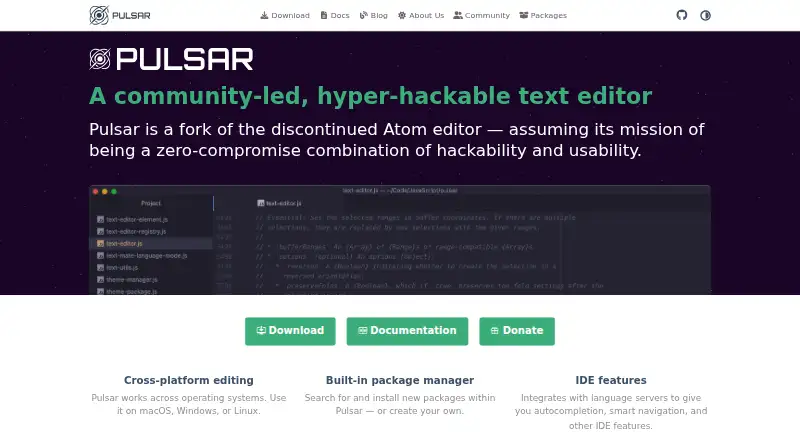
Pulsar is a free, open desktop text editor for Linux, macOS, and Windows, built as a community-led fork of the discontinued Atom editor. Its package manager lets users find and install packages or create their own. Language server support adds autocompletion, smart navigation, and other IDE features. The filesystem browser can open a single file, one project, or multiple projects in a window. Editing tools include multiple cursors, snippets, semantic selections, code folding, and syntax highlighting. Configuration files let users change keybindings, per-language settings, styles, and other appearance or behavior. Git features include switching branches, staging code, resolving merge conflicts, and viewing open GitHub pull requests. A bundled updater detects newer versions. The current release lists support for Windows 10 or later, macOS 10.15 or later, and Linux with glibc 2.31 or later. The project says the editor collects no user information and sends nothing to remote servers; backend troubleshooting logs include IP and user-agent details and are deleted after 30 days. Windows binaries are unsigned and may trigger SmartScreen warnings.
Who it suits
Pulsar suits people looking for a customizable desktop text editor with packages, language server features, and Git tools. It is available for Windows, macOS, and Linux systems meeting the listed requirements.
What it does well
- Package manager supports installing or creating packages.
- Language servers provide autocompletion and smart navigation.
- Can open multiple projects in one window.
- Includes Git branch, staging, and conflict tools.
- Free and open source.
What to know first
- Windows binaries are unsigned and may trigger SmartScreen warnings.
- Linux requires glibc 2.31 or later.
- Windows support starts at version 10; macOS at 10.15.
Plans
| Plan | Billed and limits | Price |
|---|---|---|
| Pulsar | Community-led text editor · macOS, Windows, Linux | Free |
As pulsar-edit.dev lists them, read 8 Oct 2026. The maker's own page has the final word.
Getting started
- Visit the Pulsar website.
- Choose the download for Windows, macOS, or Linux.
- Check that your system meets the current release requirements.
- Install Pulsar and use its package manager or configuration files to customize the editor.
Pulsar is a free, open-source desktop editor for developers who want to shape their coding environment rather than accept a fixed toolset. It is best suited to people who value packages, language-server assistance, project workspaces and Git controls in one application. The trade-off is a more community-driven experience and a Windows installation that can prompt a security warning.
Overview
Pulsar continues the Atom editor’s ideas after Atom was discontinued, with a community-led project focused on keeping a hackable editor current. Its open-source model removes licensing cost and supports extensive adaptation through packages and configuration files. That is a strong fit for developers who enjoy tuning their tools, while readers seeking a vendor-backed support agreement or a deliberately minimal editor may prefer another option.
The filesystem browser handles an individual file, a single project or multiple projects in one window. For work that spans repositories or related codebases, that arrangement is more practical than repeatedly switching application windows. Pulsar remains a desktop editor, not a browser workspace.
Key features
Packages and configuration
A built-in package manager searches for and installs packages, and also provides a route to create your own. This gives Pulsar a broad extension path: the editor can be adapted to a particular language or workflow instead of relying only on its default tools. Keybindings, per-language settings, styles and other behavior can be changed in configuration files. The depth is useful for experienced users, but it rewards willingness to maintain a personalized setup.
Editing and IDE assistance
Multiple cursors, snippets, semantic selections, code folding and syntax highlighting cover the everyday mechanics of source editing. Language-server integration adds autocompletion, smart navigation and other IDE-style capabilities, making Pulsar more suitable for active software development than a basic text editor. The quality of a particular language workflow will depend on the packages and language-server setup you choose, so users wanting a fixed, turnkey stack may find this less predictable.
Git and project work
Pulsar can switch branches, stage changes, resolve merge conflicts and display open GitHub pull requests. Those operations keep common repository tasks close to the code, reducing the need to move immediately to a separate Git client. The combination is especially useful for developers who work across several projects in one session.
Updates and privacy
The bundled pulsar-updater package detects newer Pulsar releases. The privacy policy says the editor collects no user information and sends nothing to remote servers. Backend requests can log an IP address and user-agent details for troubleshooting, with those logs automatically deleted after 30 days.
Pricing
Pulsar is free and open source. Its sole listed plan is Pulsar, priced at free, covering the community-led text editor on macOS, Windows and Linux. There are no paid tiers, seat charges or subscription renewals to weigh, so it suits individual developers, students and teams that need a capable editor without a license budget. The absence of a commercial plan also means there is no paid support tier or bundled service commitment.
Platforms
Pulsar has desktop releases for Windows, macOS and Linux. The current requirements are Windows 10 or later, macOS 10.15 or later, and Linux systems with glibc 2.31 or later. Windows downloads are unsigned and may trigger a Windows SmartScreen warning, an important installation consideration for managed or cautious environments.
Who it's for
Choose Pulsar if you want an open, configurable coding editor with package extensibility, language-server features, multi-project browsing and integrated Git actions. It is a natural match for developers comfortable adjusting settings and selecting their own extensions, and for users who want the same free tool across the three supported desktop systems.
Look elsewhere if you want a simpler editor with fewer configuration decisions, a commercial support contract, or signed Windows installers. Pulsar’s community channels include GitHub Discussions, Discord, Reddit, Mastodon and Lemmy, which provide places to seek help but are not a substitute for formal vendor support.
Pros and cons
Pros
- Free and open source: no license fee, seat limit or renewal cost, with an editor that can be adapted or extended.
- Strong customization: packages, custom packages, keybindings and per-language configuration support highly specific workflows.
- Useful development tooling: language servers add completion and navigation, while Git features cover branches, staging, conflicts and pull requests.
- Flexible project handling: one window can contain a file, one project or multiple projects.
- Wide desktop coverage: Windows, macOS and Linux are supported, with an updater for newer releases.
Cons
- More setup responsibility: the package-driven model and deep configuration are less appealing if you want a ready-made environment.
- Unsigned Windows binaries: SmartScreen warnings can complicate installation, especially on managed PCs.
- No commercial support tier: assistance is community-based rather than backed by a paid service contract.
Alternatives
Visual Studio Code is the better pick if you want a free editor from Microsoft with releases for Linux, macOS, Windows and the web.
Zed suits readers who want a freemium editor with a free Personal plan and 2,000 accepted edit predictions, plus external-agent or API-key support.
Neovim is preferable for users who want a free, highly configurable editor spanning desktop, Android, API and self-hosted environments.
VSCodium is another free option for Linux, macOS and Windows when you want that platform coverage without a listed paid plan.
Vim is a free alternative for readers who specifically want its traditional editor approach and donation-supported distribution.
Kate is a free cross-platform text editor for Linux, Windows and macOS.
Notepad++ is the focused choice for a free Windows text and source-code editor supporting programming and natural languages.
RJ TextEd is a free option for Windows and Linux, including commercial use.
Verdict
Pulsar is a strong choice for developers who want a free, open editor they can extend, configure and use across Windows, macOS and Linux. Its package system, language-server integration and Git workspace provide the main reasons to choose it. Look elsewhere if you need signed Windows downloads, formal vendor support or a more controlled setup with fewer decisions.
Verdict
Pulsar combines configurable editing, package support, language server features, and Git tools in a free desktop editor. Check the platform requirements, and note the unsigned Windows downloads.
Questions
Is Pulsar free and open source?
Yes. Pulsar is listed as a free, open-source editor, with a plan price of $0.
Which operating systems does Pulsar support?
The current release supports Windows 10 or later, macOS 10.15 or later, and Linux systems with glibc 2.31 or later.
Does Pulsar support extensions or packages?
Yes. Its built-in package manager can search for and install packages, or users can create their own.
What Git features does Pulsar include?
It can switch branches, stage code, resolve merge conflicts, and show open GitHub pull requests.
What does Pulsar say about privacy?
The project says the editor collects no user information and sends nothing to remote servers. Backend troubleshooting logs include IP address and user-agent details and are deleted after 30 days.
Where can users get community support?
The project points users to GitHub Discussions, Discord, Reddit, Mastodon, and Lemmy.
Facts from Pulsar's own pages
- Backend data
- The privacy policy says backend requests log IP address and user-agent details for troubleshooting, with logs automatically deleted after 30 days. · pulsar-edit.dev, 8 Oct 2026
- Built-in packages
- Pulsar includes a package manager for searching for and installing packages, or creating your own. · pulsar-edit.dev, 8 Oct 2026
- Customization
- Users can customize keybindings, per-language settings, styles, and other appearance or behavior through configuration files. · docs.pulsar-edit.dev, 8 Oct 2026
- Editing features
- Pulsar supports multiple cursors, snippets, semantic selections, code folding, and syntax highlighting. · docs.pulsar-edit.dev, 8 Oct 2026
- Editor type
- desktop · pulsar-edit.dev, 20 Sept 2026
- Extension support
- Yes · pulsar-edit.dev, 20 Sept 2026
- Git integration
- Pulsar can switch Git branches, stage code, resolve merge conflicts, and show open GitHub pull requests. · pulsar-edit.dev, 8 Oct 2026
- IDE capabilities
- Pulsar integrates with language servers to provide autocompletion, smart navigation, and other IDE features. · pulsar-edit.dev, 8 Oct 2026
- Language server support
- Yes · pulsar-edit.dev, 20 Sept 2026
- Open project
- The team describes Pulsar as a community-led project to modernize and improve Atom into a contemporary, hackable, fully open editor. · pulsar-edit.dev, 8 Oct 2026
- Supported platforms
- Windows,macOS,Linux · pulsar-edit.dev, 20 Sept 2026
- Privacy
- The privacy policy says the Pulsar Editor collects no user information and sends nothing to remote servers; the policy was last changed December 10, 2022. · pulsar-edit.dev, 8 Oct 2026
- Project and file browsing
- Its filesystem browser can open a single file, a project, or multiple projects in one window. · pulsar-edit.dev, 8 Oct 2026
- Support and community
- The project directs users to GitHub Discussions, Discord, Reddit, Mastodon, and Lemmy for community participation and support. · pulsar-edit.dev, 8 Oct 2026
- Supported systems
- The current release page lists Windows 10 or later, macOS 10.15 or later, and Linux systems with glibc 2.31 or later. · pulsar-edit.dev, 8 Oct 2026
- Update channel
- The bundled pulsar-updater package detects when a newer Pulsar version is available. · pulsar-edit.dev, 8 Oct 2026
- What it is
- Pulsar is a community-led, hyper-hackable text editor and a fork of the discontinued Atom editor. · pulsar-edit.dev, 8 Oct 2026
- Windows download limitation
- The download page says Windows binaries are unsigned and may trigger a Windows SmartScreen warning. · pulsar-edit.dev, 8 Oct 2026
Where Pulsar stands on Freedom251
- Code editors#10 of 45
- Text Editors#28 of 82
- Editor Software#15 of 32
- Go IDEs#14 of 24