Freedom251 › Presentation Sharing Software
PubHTML5
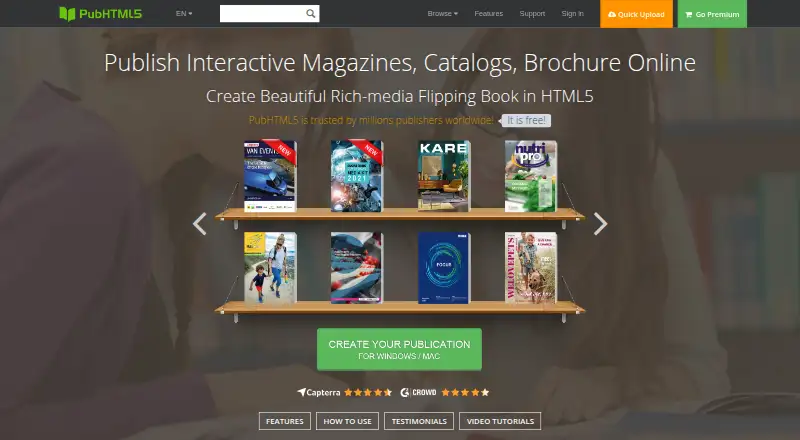
What PubHTML5 is
PubHTML5 converts PDFs and other printed material into customized online and offline HTML5 publications. It is designed for individuals and media businesses publishing magazines, catalogs, brochures, reports, ebooks, and other multi-page works. Publications can incorporate video, audio, links, animation, images, and slideshow popups. Templates and customization controls cover logos, backgrounds, colors, buttons, and navigation, while readers can access publications through a URL or embedded code. Listed integrations include Google AdSense, Google Analytics, and a WordPress flipbook plugin. PubHTML5 Metrics reports page views, time on page, zoom patterns, and widget interactions. Pro security options include password protection, restricted access, remote authentication against a user's own database, and blocking support staff from viewing private content. The free plan includes ads and a watermark, allows five uploads per day, and limits each book to 500 pages; advanced page editing to add video and audio is unavailable on that plan. Paid plans start at $12.42 a month. Uploaded publications are stored on PubHTML5 servers using Amazon S3; paid plans can publish locally or to FTP.
Who it suits
PubHTML5 suits individuals and media businesses preparing multi-page digital publications. Its customization, embedding, and analytics options may be useful to publishers who want to present and track interactive material online.
What it does well
- Publications can include video, audio, animation, and links.
- Readers can open publications by URL or embed code.
- Metrics report page views, time, zoom, and widget interactions.
- Paid plans can publish locally or to FTP.
What to know first
- Free plan has ads and a watermark.
- Free plan allows five uploads per day.
- Free books are limited to 500 pages.
- Free plan lacks advanced editing to add video and audio.
Limits
The free plan allows five uploads per day and limits each book to 500 pages. It includes ads and a watermark, and advanced page editing for adding video and audio is unavailable.
Plans
| Plan | Billed and limits | Price |
|---|---|---|
| Free | 1 user · 5 uploads per day · PDF to HTML5 conversion · ads in book · PubHTML5 watermark | Free |
| Pro | Billed monthly; billed at $180 $149 / yr · 1 user · unlimited storage and daily uploads · no ads or watermark · custom logo/branding · 5 local publications per month | $12.42 a month |
| Platinum | Billed monthly; billed at $420 $299 / yr · 3 users · unlimited storage and daily uploads · image/PDF conversion · page and animation editors · custom book/bookcase domain · batch convert · unlimited local publications | $24.92 a month |
| Enterprise | Billed monthly; billed at $1188 $999 / yr · 10 accounts · unlimited storage and uploads · image/PDF conversion · page and animation editors · custom book/bookcase domain · batch convert · command line API · unlimited local publications | $83.25 a month |
As pubhtml5.com lists them, read 30 Sept 2026. The maker's own page has the final word.
Getting started
- Open pubhtml5.com.
- Choose the Free plan or a paid plan.
- Upload a PDF or other printed material for conversion.
- Customize the publication with available templates and controls.
- Share it by URL or embed code; paid plans can also publish locally or to FTP.
Overview
PubHTML5 converts PDFs and other print-oriented material into digital publications that can be read online or offline. It is best suited to individuals and media businesses producing magazines, catalogs, brochures, reports, ebooks, and other multi-page content. Its main appeal is the combination of interactive publishing and reader metrics; the free tier’s branding and upload limits make it a constrained choice for ongoing professional publishing.
Key features
Publications can include video, audio, links, animation, images, and slideshow popups. Templates and controls for logos, backgrounds, colors, buttons, and navigation help publishers shape a consistent reading experience. Readers can open publications by URL or through an embed code, making it practical to distribute a flipbook directly or place it on a website.
Google AdSense, Google Analytics, and a WordPress flipbook plugin are among the integrations. PubHTML5 Metrics tracks page views, time on page, zoom patterns, and widget interactions. Those measures can help a publisher understand how readers engage with content, rather than relying only on a basic view count.
Pro security includes password protection, restricted publication access, authentication against a publisher’s own database, and an option to block support staff from viewing private content. The privacy policy says payment card numbers and CVV are not stored on PubHTML5 servers and passwords are encrypted before storage. Cloud publications are hosted on PubHTML5 servers using Amazon S3; paid plans can also publish locally or to FTP.
Pricing
PubHTML5 uses a freemium model. The Free plan costs nothing for one user, with PDF-to-HTML5 conversion, five uploads per day, ads in the book, and a PubHTML5 watermark. It can suit occasional publishing or an initial trial, but ads and branding limit its fit for client-facing or brand-led work. The free FAQ also sets a 500-page-per-book limit, and advanced page editing for adding video and audio is unavailable.
Pro costs $12.42 a month, billed monthly; annual billing is shown as $180 $149 / yr. It covers one user, unlimited storage and daily uploads, removes ads and watermark, adds custom logo and branding, and allows five local publications per month. This is the entry point for regular publishing that needs a cleaner branded presentation, though the local-publication quota is a meaningful constraint.
Platinum costs $24.92 a month, billed monthly; annual billing is shown as $420 $299 / yr. It supports three users and adds image/PDF conversion, page and animation editors, a custom book/bookcase domain, batch conversion, and unlimited local publications, alongside unlimited storage and daily uploads. It is better suited to a small publishing team that needs more editing and local output than Pro provides.
Enterprise costs $83.25 a month, billed monthly; annual billing is shown as $1188 $999 / yr. It supports 10 accounts and includes the Platinum editing, conversion, domain, and unlimited local-publication features, plus a command line API. It fits larger or more automated publishing operations; the higher price buys account capacity and API access rather than a different core publication format.
Support, upgrades, and cloud hosting carry no additional cost beyond the monthly or yearly plan. The pricing page also describes paid publishing options without changing the plan’s stated monthly and annual prices.
Platforms
PubHTML5 supports Android, iOS, macOS, Windows, web, API, and self-hosted use. That breadth accommodates both browser-based publishing and several desktop or mobile environments.
Who it's for
PubHTML5 is a good fit for individuals and media businesses that need to turn existing print material into branded, shareable digital publications and want engagement measures beyond page views. Its interactive media, embedding, and analytics make it more useful for active publication programs than a simple PDF link. It is less compelling for occasional users who can accept the free tier’s visible branding, or for publishers who need advanced video and audio editing without moving to a paid plan.
Pros and cons
- Pro: A publication can combine several media types, links, and popups, giving print-based content more interactive options.
- Pro: Metrics include zooms, time on page, and widget interactions, useful for assessing reader engagement.
- Pro: Paid plans offer local or FTP publishing in addition to cloud hosting, with higher tiers allowing unlimited local publications.
- Con: The free plan displays ads and a watermark, caps uploads at five per day and books at 500 pages, and lacks advanced page editing for video and audio.
- Con: Pro allows only five local publications per month; unlimited local publishing starts at Platinum.
- Con: The one-user Pro plan does not suit a team that needs shared account capacity; Platinum and Enterprise raise the allowance to three and 10 users, respectively.
Alternatives
For a different presentation-sharing category, browse Presentation Sharing Software; for tools centered on flipbooks made from PDFs, see PDF Flipbook Software.
- FlowPaper is worth considering if a single publisher workstation and a 90-day publishing window are sufficient: its free plan has no traffic or file-size limits and includes cloud hosting, but retains FlowPaper branding.
- AnyFlip may suit publishers who value a free allowance of 30,000 daily opens, five uploads per day, and 100G storage, while accepting a watermark.
- Heyzine is an option for a small collection of flipbooks: its free Basic plan permits five, with unlimited pages, 1GB storage, one account user, API access, and password protection.
- Calaméo is a freemium alternative whose free Basic plan includes basic features and basic statistics.
- FlipHTML5 may fit publishers who need a free allowance of five flipbooks per day, one account, 20 GB storage, a 500-page uploaded-file limit, and one bookcase.
- FlowVella is a presentation-focused alternative if four public presentations with up to 10 screens or slides each meet the need.
- VCASMO is another freemium option, with a free conversion service priced by converted file size and a free plan.
- Yumpu may suit publishers who want a free allowance of three uploads, Google indexing, website integration, and social sharing.
Verdict
Choose PubHTML5 if you publish magazines, catalogs, or similar multi-page material and want interactive elements, brand controls, and detailed reader engagement measures in one publishing workflow. Pro is the practical starting point for removing ads and watermarks; teams needing editing tools, custom domains, or unlimited local publications should consider Platinum. Look elsewhere if the free plan’s caps and branding are too restrictive and a paid plan’s higher-tier features do not justify the cost.
Verdict
PubHTML5 turns print-oriented files into customizable digital publications with interactive elements and reader metrics. The free plan has visible branding and upload and page limits; paid plans start at $12.42 a month.
Questions
Is there a free plan?
Yes. The Free plan costs nothing and permits one user and five uploads per day. It includes PDF-to-HTML5 conversion, ads in the book, and a PubHTML5 watermark.
How much do paid plans cost?
Paid plans start at $12.42 a month. The listed Pro plan is $12.42 a month, Platinum is $24.92 a month, and Enterprise is $83.25 a month.
Which platforms does PubHTML5 support?
Its listed platforms are Android, API, iOS, macOS, self-hosted, web, and Windows.
Can I embed publications on a website?
Yes. Readers can open publications by URL or through an embed code.
What integrations are listed?
The pricing page lists Google AdSense integration, Google Analytics tracking, and a WordPress flipbook plugin.
Where are uploaded publications stored?
Uploaded publications are stored on PubHTML5 servers using Amazon S3. Paid plans can publish locally or to FTP.
Facts from PubHTML5's own pages
- Analytics
- PubHTML5 Metrics reports engagement measures including zoom patterns, page views, time on page, and widget interactions. · pubhtml5.com, 30 Sept 2026
- Audience
- The maker describes the product for individuals and media businesses publishing magazines, catalogs, brochures, reports, ebooks, and other multi-page material. · pubhtml5.com, 30 Sept 2026
- Company
- The privacy policy identifies PubHTML5 as an international technology company incorporated in Hong Kong and gives its headquarters address in Kowloon, Hong Kong. · pubhtml5.com, 30 Sept 2026
- Customization
- The platform supports templates and customization of logos, backgrounds, colors, buttons, and navigation options. · pubhtml5.com, 30 Sept 2026
- Headquarters
- Hong Kong · pubhtml5.com, 28 Sept 2026
- Hosting and storage
- The pricing FAQ says uploaded publications are stored on PubHTML5 servers using Amazon S3, while paid plans can publish locally or to FTP. · pubhtml5.com, 30 Sept 2026
- Integrations
- The pricing page lists Google AdSense integration, Google Analytics tracking, and a WordPress flipbook plugin among its features. · pubhtml5.com, 30 Sept 2026
- Interactive content
- Publications can include video, audio, links, animation, images, and slideshow popups. · pubhtml5.com, 30 Sept 2026
- Notable limits
- The free plan has a watermark, ads, five daily uploads, and a 500-page-per-book limit; its FAQ says advanced page editing for adding video and audio is unavailable. · pubhtml5.com, 30 Sept 2026
- Platforms
- The maker offers desktop downloads for Windows and Mac and says its HTML5 publications work on iPhone, iPad, Android phones, and Android tablets. · pubhtml5.com, 30 Sept 2026
- Privacy
- The privacy policy says PubHTML5 does not store payment card numbers or CVV on its servers and that passwords are encrypted before storage. · pubhtml5.com, 30 Sept 2026
- Product
- PubHTML5 converts PDFs and other printed material into customized online and offline HTML5 digital publications. · pubhtml5.com, 30 Sept 2026
- Security
- Its Pro security feature supports password protection, restricted publication access, remote authentication against a user's own database, and blocking support staff from viewing private content. · pubhtml5.com, 30 Sept 2026
- Sharing and embedding
- Readers can access publications by URL or through an embed code on websites and other online destinations. · pubhtml5.com, 30 Sept 2026
- Support
- The pricing FAQ says support, upgrades, and cloud hosting have no additional cost beyond the monthly or yearly plan. · pubhtml5.com, 30 Sept 2026
Where PubHTML5 stands on Freedom251
- Presentation Sharing Software#7 of 27
- PDF Flipbook Software#9 of 30
- Flipbook Software#7 of 22