Freedom251 › PDF Flipbook Software
Calaméo
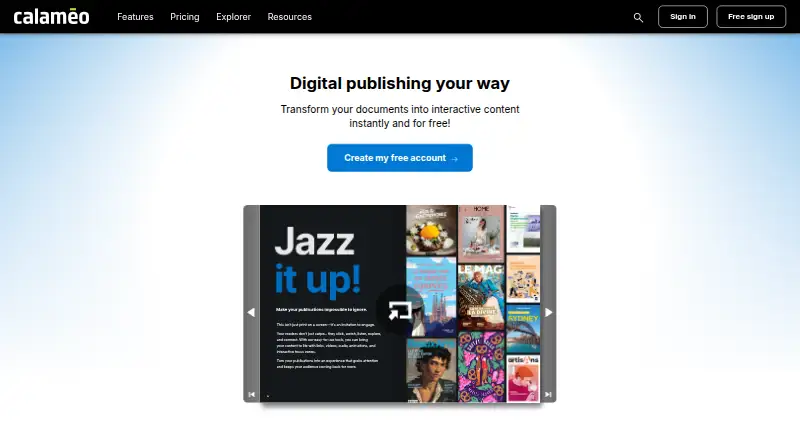
What Calaméo is
Calaméo is an online platform for converting PDFs into interactive digital publications, including magazines, brochures, catalogs, and flipbooks. Readers can view publications as a flipbook, slide presentation, or scrolling document, with features such as audio, video, links, a table of contents, search, zoom, and full-screen viewing. Publications work on computers, tablets, and smartphones through an HTML5 viewer, though the mobile viewer does not offer downloading or printing. BASIC is free, and eligible BASIC users can request one free 14-day PLATINUM trial; after it ends, the account returns to BASIC. Document limits vary by plan: BASIC allows up to 100 MB and 500 pages, PREMIUM up to 100 MB with unlimited pages, and PLATINUM up to 500 MB with unlimited pages. Private-publication caps are 5 on BASIC, 500 on PREMIUM, and 2,500 on PLATINUM. Downloads and printing require PREMIUM or PLATINUM. Integrations are exclusive to PLATINUM, while API access is available to PREMIUM and PLATINUM. Calaméo says the platform serves publishers, content creators, and businesses.
Who it suits
Calaméo may suit publishers, content creators, and businesses that want to publish and share digital documents. Its publication formats can be read on computers, tablets, and smartphones.
What it does well
- Free BASIC plan is available.
- Readers can choose three publication views.
- Publications can include audio, video, and links.
- Eligible BASIC users can request a 14-day PLATINUM trial.
- PREMIUM and PLATINUM include API access.
What to know first
- Mobile viewer does not support downloads or printing.
- Downloads and printing require PREMIUM or PLATINUM.
- Integrations are exclusive to PLATINUM accounts.
- BASIC documents are limited to 100 MB and 500 pages.
Limits
BASIC documents are limited to 100 MB and 500 pages, with up to 5 private publications. Downloading and printing require PREMIUM or PLATINUM; integrations are available only on PLATINUM. The PLATINUM trial includes 15 GB of storage, up to 100 MB per document, and 50 private publications.
Plans
| Plan | Billed and limits | Price |
|---|---|---|
| BASIC | Basic features · Basic statistics | Free |
| PLATINUM | Monthly payment is available by credit card; the subscription renews automatically. · White-label · Google Analytics · App integrations · Direct download · Unlimited printing and statistics · API | On request |
| PREMIUM | Monthly payment is available by credit card; the subscription renews automatically. · Ad-free · Customizable viewer · Subscriber access controls · Scheduled publications · Limited downloading and printing · API · Limited statistics | On request |
As calameo.com lists them, read 4 Oct 2026. The maker's own page has the final word.
Getting started
- Open the Calaméo website.
- Start with the free BASIC plan.
- Upload a PDF to convert it into an interactive publication.
- Choose a flipbook, slide presentation, or scrolling view for readers.
- If eligible, request the one free 14-day PLATINUM trial.
Calaméo is an online platform for turning PDFs into interactive publications. It is best suited to publishers, creators, and businesses that want to share magazines, brochures, or catalogs in several reader-friendly formats. Its flexible viewer is a strength, but professional distribution and control features are concentrated in paid plans.
Overview
Calaméo converts static PDFs into publications that readers can flip through, view as slides, or scroll. Audio, video, links, a table of contents, search, zoom, and full-screen viewing can make an existing document more engaging without rebuilding it. That flexibility suits editorial and promotional material; it is less compelling if a straightforward PDF download is the main goal.
Publications can be embedded, and password access controls and lead capture support more targeted sharing. The number of publications is not capped before the account reaches its storage limit, but private publications are capped by plan. Calaméo says its documents can be read on computers, tablets, and smartphones, though the mobile HTML5 viewer does not support downloads or printing.
Key features
Interactive reading
Choosing between flipbook, slide, and scrolling views lets publishers match the format to the document: a catalog can invite browsing, while a presentation can be read sequentially. Search and zoom help with longer or detailed material, and audio, video, and links add useful context. These features improve the reading experience, but they do not replace the need for a well-prepared source PDF.
Publishing controls and integrations
Password access, lead capture, custom branding, an embeddable player, and viewer analytics support business and audience-facing use. The integrations feature is exclusive to PLATINUM and includes tools such as HubSpot, Typeform, Jotform, Google Analytics, Matomo, Dropbox, Shopify, Mailchimp, and YouTube. That makes PLATINUM the relevant tier for teams connecting publications to marketing or analytics workflows; users on lower tiers should not expect those integrations.
Downloads and printing require PREMIUM or PLATINUM. PLATINUM adds direct downloads and unlimited printing without the Calaméo print watermark, while PREMIUM offers limited downloading and printing. On mobile, neither option changes the HTML5 viewer’s inability to download or print, so readers needing those actions should use another route or device.
API and safeguards
The API is available on PREMIUM and PLATINUM, with a limit of 10,000 requests per hour and 10 documents published every 15 minutes. Calaméo says it encrypts data in secure HTTPS areas, restricts employee and processor access, and processes personal data under French data-protection law and EU GDPR principles. Its Help Center covers accounts, publications, features, payments, policies, and developers, and accepts support requests.
Pricing
Calaméo uses a freemium model. BASIC costs nothing and includes basic features and basic statistics. It is a sensible starting point for occasional publishers, but the limits on private publications, document size, and pages—and the absence of download and print options—make it a constrained choice for recurring professional use.
| Plan | Price | What it includes and limits |
|---|---|---|
| BASIC | free | Basic features and basic statistics; up to 5 private publications; documents up to 100 MB and 500 pages. |
| PREMIUM | Custom pricing | Ad-free viewing, customizable viewer, subscriber access controls, scheduled publications, limited downloads and printing, API, and limited statistics; up to 500 private publications; documents up to 100 MB with unlimited pages. |
| PLATINUM | Custom pricing | White-label, Google Analytics, app integrations, direct download, unlimited printing and statistics, and API; up to 2,500 private publications; documents up to 500 MB with unlimited pages. |
PREMIUM suits publishers who need subscriber controls, scheduling, or API access but can work within limited statistics and print/download allowances. PLATINUM is the stronger fit for professional publishing that requires integrations, white-label presentation, or unrestricted printing. Both paid plans offer monthly payment by credit card and renew automatically, so buyers should account for recurring billing. BASIC users who are eligible can request one free 14-day PLATINUM trial; the account returns to BASIC afterward. The trial includes 15 GB of storage, documents up to 100 MB, and 50 private publications.
Platforms
Calaméo is available on the web, Android, and iOS, with API access for PREMIUM and PLATINUM users. The HTML5 viewer supports mobile reading, but not downloads or printing from mobile devices.
Who it's for
Calaméo is a good fit for publishers, content creators, and businesses distributing magazines, catalogs, brochures, and other documents as interactive publications. BASIC can serve light publishing needs; organizations that depend on private distribution, downloads, printing, integrations, or API access should consider a paid plan. It is not the best match when readers must print or download directly from the mobile viewer.
Pros and cons
Pros
- Three reading formats and embedded media make PDFs more adaptable to different audiences.
- No publication-count cap applies before account storage is reached, which helps publishers maintain a growing catalog.
- PLATINUM combines white-label publishing, integrations, direct downloads, unlimited printing, and statistics for professional workflows.
- The Help Center spans publishing, payments, policy, and developer topics and offers a support-request channel.
Cons
- BASIC allows only 5 private publications and limits documents to 100 MB and 500 pages.
- Downloads and printing are paywalled, and mobile readers cannot use either option in the HTML5 viewer.
- Integrations are exclusive to PLATINUM, while API access requires PREMIUM or PLATINUM.
- Paid subscriptions renew automatically, so monthly billing needs active management.
Alternatives
For a different publishing workflow, consider FlowPaper, AnyFlip, Heyzine, PubHTML5, or FlipHTML5. FlowPaper’s free plan includes one publisher workstation, 90-day publishing, cloud hosting, and no traffic or file-size limits, but keeps FlowPaper branding; it is worth considering when those publishing terms matter more than Calaméo’s higher-tier controls. AnyFlip’s free plan allows 30,000 daily opens, five uploads a day, and 100G storage, with a watermark; it may suit publishers prioritizing generous free usage quotas. Heyzine’s Basic plan offers five flipbooks, unlimited pages, 1GB storage, one user, API access, and password protection, making it an option for a small publication set that needs those controls at no charge. PubHTML5’s free plan supports one user and five uploads per day but includes ads and a watermark, so it is an alternative for users comfortable with those presentation limits. FlipHTML5’s free plan allows five flipbooks per day, one account, 20 GB storage, a 500-page uploaded-file limit, and one bookcase, which may suit users whose needs fit those caps.
For presentation-first work, FlowVella offers four public presentations with up to 10 screens or slides each on its free plan. PowerPoint for the web is another presentation option. VCASMO is another alternative.
Readers comparing categories can also browse Presentation Sharing Software and PDF Flipbook Software.
Verdict
Choose Calaméo if you need to turn PDFs into interactive publications and want readers to move between flipbook, slide, and scrolling views. Its strongest case is the combination of rich viewing options and professional publishing controls, particularly on PLATINUM. Look elsewhere if mobile downloading or printing is essential, or if the limits and recurring custom-priced paid plans do not fit your publishing needs.
Verdict
Calaméo turns PDFs into interactive publications with multiple viewing formats and media options. The free BASIC plan has document and private-publication limits; downloads, printing, integrations, and API access depend on higher plans.
Questions
Does Calaméo have a free plan?
Yes. BASIC is listed at 0.00 USD.
Is there a free trial?
Eligible BASIC users can request one free 14-day PLATINUM trial. Afterward, the account returns to BASIC.
Which platforms can readers use?
Calaméo lists Android, iOS, and web. Publications also work on computers, tablets, and smartphones through an HTML5 viewer.
Which plans include integrations?
Integrations are exclusive to PLATINUM accounts. The integrations page lists tools including HubSpot, Typeform, Google Analytics, Dropbox, Shopify, Mailchimp, and YouTube.
Which plans include API access?
API access is available to PREMIUM and PLATINUM users, with limits of 10,000 requests per hour and 10 documents published every 15 minutes.
Can readers download or print publications on mobile?
Downloading and printing are unavailable in the mobile viewer. Downloads and printing require PREMIUM or PLATINUM.
Facts from Calaméo's own pages
- API access
- The API is available to PREMIUM and PLATINUM users, with limits of 10,000 requests per hour and 10 documents published every 15 minutes. · developers.calameo.com, 4 Oct 2026
- Audience
- Calaméo says its platform serves publishers, content creators, and businesses, with documents readable on computers, tablets, and smartphones. · calameo.com, 4 Oct 2026
- Company
- Calaméo describes itself as an online platform for publishing and sharing interactive digital documents and says it was founded in 2008. · calameo.com, 4 Oct 2026
- Company scale
- Calaméo says the platform has over 12 million publications, 5 billion page views, and 7 million users. · calameo.com, 4 Oct 2026
- Document limits
- BASIC documents are limited to 100 MB and 500 pages, PREMIUM to 100 MB with unlimited pages, and PLATINUM to 500 MB with unlimited pages. · support.calameo.com, 4 Oct 2026
- Downloads and printing
- Download and print options require PREMIUM or PLATINUM; PLATINUM offers direct downloads and unlimited printing without the Calaméo print watermark. · support.calameo.com, 4 Oct 2026
- Integration availability
- Calaméo says its integrations feature is exclusive to PLATINUM accounts. · support.calameo.com, 4 Oct 2026
- Integrations
- The integrations page lists tools including HubSpot, Typeform, Jotform, Google Analytics, Matomo, Dropbox, Shopify, Mailchimp, and YouTube. · calameo.com, 4 Oct 2026
- Interactive features
- Publications can include audio, video, links, a table of contents, zoom, search, and full-screen viewing. · calameo.com, 4 Oct 2026
- Interactive formats
- Readers can view publications as a flipbook, slide presentation, or scrolling document. · support.calameo.com, 4 Oct 2026
- Mobile access
- Publications work on mobile devices through an HTML5 viewer, but downloading and printing are unavailable in that mobile viewer. · support.calameo.com, 4 Oct 2026
- PDF conversion
- The platform converts static PDFs into interactive publications such as magazines, brochures, flipbooks, and catalogs. · calameo.com, 4 Oct 2026
- Privacy and security
- Calaméo says it uses technical and organizational safeguards, restricts employee and processor access, and encrypts data in secure HTTPS areas. · calameo.com, 4 Oct 2026
- Privacy compliance
- Calaméo SAS says it processes personal data under the French Data Protection Act and EU GDPR principles. · calameo.com, 4 Oct 2026
- Product
- Calaméo is an online platform for publishing and sharing interactive digital documents. · calameo.com, 4 Oct 2026
- Professional use
- Calaméo recommends PLATINUM for professional use. · support.calameo.com, 4 Oct 2026
- Publication features
- Publications can include audio, video, links, a table of contents, search, zoom, full-screen viewing, download, and printing. · calameo.com, 4 Oct 2026
- Publication limits
- There is no stated publication-count limit up to the account storage limit; private-publication caps are BASIC 5, PREMIUM 500, and PLATINUM 2,500. · support.calameo.com, 4 Oct 2026
- Purpose
- Calaméo turns PDFs into interactive digital publications for publishing and sharing magazines, brochures, catalogs, and other documents. · calameo.com, 4 Oct 2026
- Security and privacy
- Calaméo says it processes personal data under GDPR and French data protection law and encrypts data in secure HTTPS areas. · calameo.com, 4 Oct 2026
- Storage limits
- The PLATINUM trial includes 15 GB of storage, up to 100 MB per document, and 50 private publications. · support.calameo.com, 4 Oct 2026
- Support
- The Help Center provides account, publication, feature, payment, policy, and developer sections, and lets users submit a support request. · support.calameo.com, 4 Oct 2026
- Trial
- Eligible BASIC users can request one free 14-day PLATINUM trial; afterward the account returns to BASIC. · support.calameo.com, 4 Oct 2026
Where Calaméo stands on Freedom251
- PDF Flipbook Software#2 of 30
- Presentation Sharing Software#2 of 27
- Flipbook Software#2 of 22