Freedom251 › Presentation Sharing Software
VCASMO
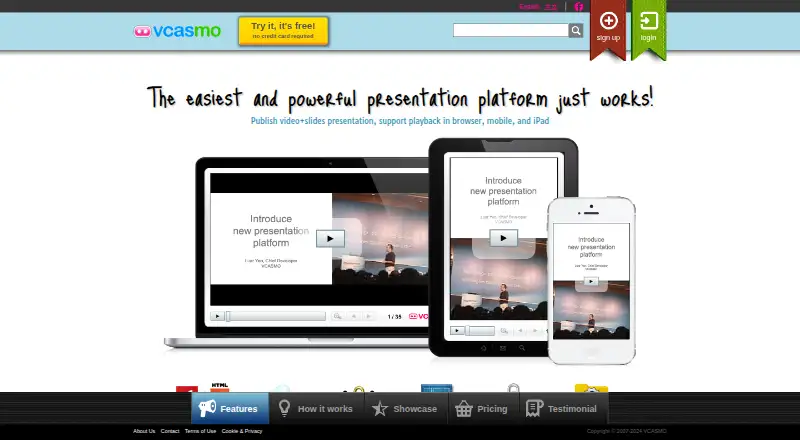
What VCASMO is
VCASMO is a multimedia presentation service for business, training, teaching, sales, seminars, and photo or video slide shows. Presentations can combine video, audio or music, PDFs, PowerPoint files, and images. A visual timeline editor synchronizes slides with video or music, and users can contribute subtitle translations and download SRT files. Presentations can be public or private, shared with friends or selected groups, password-protected, or embedded on websites and blogs using HTTPS embed code. VCASMO also offers SCORM 1.2 packages for learning management systems and an Instant-VCASMO tool combining YouTube and SlideShare embeds. Presentations can be downloaded for offline use and exported as video; its About page says exports can be uploaded to YouTube automatically. It is available on the web and iOS, with a Windows desktop app; Mac OS is marked as coming soon. The free plan costs nothing and includes 512MB storage. Standard costs $10.99 a month, and Professional costs $16.99 a month. Free accounts have a 200MB daily upload limit and 5GB monthly bandwidth.
Who it suits
VCASMO may suit presenters, educators, trainers, and sales teams combining slides with video or audio. Its subtitle, SCORM, and embedding options may also be useful for sharing presentations with learners or audiences online.
What it does well
- Combines video, audio, PDF, PowerPoint, and images.
- Timeline editor synchronizes slides with video or music.
- Presentations can be password-protected or embedded.
- Supports SCORM 1.2 packages for learning systems.
- Offline downloads and video export are available.
What to know first
- Free accounts have a 200MB daily upload limit.
- Free accounts have 5GB monthly bandwidth.
- Mac OS is marked as coming soon.
- Terms recommend offline backups and disclaim guaranteed security.
Limits
The free plan provides 512MB storage, a 200MB daily upload limit, and 5GB monthly bandwidth. Assets are retained for one month, and inactive presentations are deleted after three months; presentations are disabled if free bandwidth is exceeded. Standard has 6GB storage and 60GB monthly bandwidth, with 10 free video exports per month and US$3 per additional export.
Plans
| Plan | Billed and limits | Price |
|---|---|---|
| API conversion service | US$0.002/Mb (US$2/GB) · Conversion service priced by converted file size | Free |
| Free | 512MB storage · unlimited presentations · assets retained one month · inactive presentations deleted after three months | Free |
| Standard | US$10.99 per month · 6GB storage · 60GB monthly bandwidth · unlimited presentations · 10 free video exports per month, then US$3 each | $10.99 a month |
| Professional | US$16.99 per month · 10GB storage · 100GB monthly bandwidth · unlimited presentations · unlimited free video exports per month | $16.99 a month |
| API presentation player | US$50 / month · Unlimited usage · white label | $50 a month |
| API sequence and subtitle editor | US$50 / month · Unlimited usage · white label | $50 a month |
As vcasmo.com lists them, read 5 Oct 2026. The maker's own page has the final word.
Getting started
- Open the VCASMO website or use its iOS app.
- Choose the free plan or a paid plan.
- Create a presentation using supported media and slides.
- Use the timeline editor to synchronize slides with video or music.
- Choose presentation access settings and share or embed it.
Verdict
VCASMO offers varied ways to assemble, synchronize, and share multimedia presentations, including offline downloads and video export. Check the free account’s upload and bandwidth limits, and keep offline backups as its terms recommend.
Questions
Is VCASMO free?
Yes. The Free plan costs 0.00 USD and includes 512MB storage and unlimited presentations.
What do the paid plans cost?
Standard costs $10.99 a month. Professional costs $16.99 a month.
Which platforms does VCASMO support?
VCASMO is available on the web and iOS, and VCASMO Desktop is offered for Windows. Its page labels Mac OS as coming soon.
Can I embed presentations on a website?
Yes. VCASMO provides HTTPS embed code for websites or blogs.
Does VCASMO support learning management systems?
It offers SCORM 1.2 packages for learning management systems.
Facts from VCASMO's own pages
- Desktop platform
- VCASMO Desktop is offered for Windows, while its page labels Mac OS as coming soon. · vcasmo.com, 5 Oct 2026
- Integrations
- VCASMO offers SCORM 1.2 packages for learning management systems and an Instant-VCASMO tool that combines YouTube and SlideShare embeds. · vcasmo.com, 5 Oct 2026
- Media and slides
- Presentations can use video, audio or music, PDF, PowerPoint, and photos or images. · vcasmo.com, 5 Oct 2026
- Offline and export
- VCASMO supports offline presentation downloads and video export; its About page says exported videos can be automatically uploaded to YouTube. · vcasmo.com, 5 Oct 2026
- Plan limits
- The upgrade page says free accounts have a 200MB daily upload limit and 5GB monthly bandwidth, and presentations are disabled if free bandwidth is exceeded. · vcasmo.com, 5 Oct 2026
- Product
- VCASMO is a multimedia presentation solution for photo and video slide shows, business presentations, training, academic teaching, sales pitches, and seminars. · vcasmo.com, 5 Oct 2026
- Security and privacy
- The privacy policy says VCASMO will comply with Hong Kong's Personal Data (Privacy) Ordinance, and the homepage advertises SSL embed code. · vcasmo.com, 5 Oct 2026
- Security limitation
- The Terms of Use says VCASMO does not guarantee submissions are always secure or that files will not be lost, and recommends keeping offline backups. · vcasmo.com, 5 Oct 2026
- Sharing and embedding
- Presentations can be public, private, shared with friends or selected groups, password protected, and embedded on websites or blogs with HTTPS embed code. · vcasmo.com, 5 Oct 2026
- Subtitles
- Users can contribute subtitle translations and download subtitles as SRT files. · vcasmo.com, 5 Oct 2026
- Support
- The About page describes its email support as comprehensive. · vcasmo.com, 5 Oct 2026
- Synchronization
- Slides can be synchronized with video or music using a visual timeline editor. · vcasmo.com, 5 Oct 2026
Where VCASMO stands on Freedom251
- Presentation Sharing Software#14 of 27