Freedom251 › Presentation Sharing Software
FlowPaper
What FlowPaper is
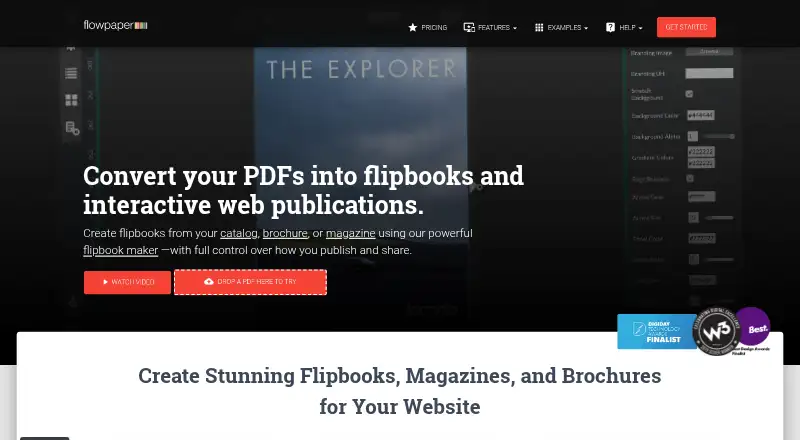
FlowPaper converts PDFs into interactive flipbooks and web publications designed for mobile viewing. Its browser viewer compresses graphics and downloads only the pages currently visible. A desktop publisher lets you add links, images, galleries, and video, including from YouTube, Vimeo, Wistia, or self-hosted locations. Publications can be hosted on FlowPaper Cloud or self-hosted; the company says self-hosting has no publication-count limit. The viewer can be integrated into a webpage or application through a JavaScript API, and FlowPaper supports page-by-page Google Analytics tracking. Higher plans list heatmaps and engagement analytics. Plans include Free, Zine at $75, paid once, Creative at $85 a month, and Enterprise at $995 a year. The listed platforms are Android, API, iOS, Linux, macOS, self-hosted, web, and Windows. FlowPaper is a Devaldi Limited product; the company describes itself as based in New Zealand.
Who it suits
FlowPaper suits publishers who want to turn PDFs into interactive web or mobile-friendly publications. It also fits teams seeking self-hosting, viewer integration, or publication analytics.
What it does well
- Viewer loads only visible pages.
- Publisher adds links, images, galleries, and videos.
- Supports Cloud or self-hosted publication hosting.
- JavaScript API supports application and webpage integration.
- Page-by-page Google Analytics tracking is available.
What to know first
- Free publishing lasts 90 days.
- Free plan includes FlowPaper branding.
- Zine is a 75.00 USD one-time fee.
- Creative costs $85 a month.
Limits
The Free plan includes one publisher workstation, FlowPaper branding, cloud hosting, and publishing for 90 days. Cloud publication quotas are 50 for Zine and 75 for Creative; the services-account FAQ lists 500 for Team and Enterprise. Self-hosting has no publication-count limit, according to FlowPaper.
Plans
| Plan | Billed and limits | Price |
|---|---|---|
| Free | free for 90 days · 1 publisher workstation · unlimited traffic · unlimited file size · FlowPaper branding · cloud hosting | Free |
| Zine | one-time fee · 1 publisher workstation · 1–3 custom domains · 50 cloud publications · basic analytics · HTML5 export · 1-year FlowPaper services | $75, paid once |
| Creative | 6-monthly or annually (save 15%) · unlimited domains and opens · 2 workstations · 75 cloud publications · heatmaps and engagement insights · HTML5 and EPUB export · Google Translate | $85 a month |
| Enterprise | billed annually · 20 workstations · 1,000 cloud publications · priority support · iOS and Android app distribution · HTML5, EPUB and app export | $995 a year |
As flowpaper.com lists them, read 14 Oct 2026. The maker's own page has the final word.
Getting started
- Visit the FlowPaper website.
- Choose the Free plan or a paid plan.
- Use the desktop publisher to add links, images, galleries, or videos.
- Publish through FlowPaper Cloud or self-host the publication.
- Embed the viewer in an application or webpage using its JavaScript API, if needed.
Overview
FlowPaper turns PDFs into interactive web publications and flipbooks, and is best suited to publishers who want more than a static document. Its viewer, hosting options and publishing tools make it a capable fit for branded digital publications, though capacity and analytics vary by plan.
The viewer compresses graphics and loads only the pages visible in a browser, while a JavaScript API and embeddable player support integration into sites and applications. You can host publications on FlowPaper Cloud or self-host them; the company says self-hosting has no publication-count limit. FlowPaper is a Devaldi Limited product, and the company describes itself as based in New Zealand. It was founded in 2010.
Key features
The desktop publisher adds links, images, galleries and video, including video from YouTube, Vimeo, Wistia or self-hosted locations. These options help turn a PDF into a richer presentation, but they matter most when the source material benefits from interactive media rather than a straightforward page-by-page reading experience.
Page-by-page Google Analytics tracking can show where readers engage with a publication. Heatmaps and engagement analytics are reserved for higher plans, so publishers who need those signals must budget for more than the entry option. Password access control, custom branding and lead capture add useful options for distributing publications to a defined audience or collecting prospective-customer interest.
FlowPaper supports web, Android, iOS, Linux, macOS and Windows, along with API integration and self-hosted deployment. The plans comparison marks every plan GDPR compliant. Devaldi says it acts as data processor for content published through FlowPaper hosting and does not resell or reuse user data or data extracted from documents.
Pricing
The free plan costs nothing and includes one publisher workstation, cloud hosting and publication for 90 days. It has no traffic or file-size limits, but publications carry FlowPaper branding, and community support is the support tier. That makes it useful for a short, low-risk evaluation, not an ongoing unbranded publication.
Zine costs $75, paid once, billed as a one-time fee. It includes one workstation, one to three custom domains, 50 cloud publications, a lifetime Zine license and one year of services. Included support is a step up from community support, but the 50-publication cloud quota and one-year services term matter if you expect to maintain or expand a large catalog.
Creative costs $85 a month. The page offers 6-Monthly or Annually billing, with 15% annual saving. It raises the allowance to two workstations, unlimited domains and opens, and 75 cloud publications, and adds heatmaps, engagement insights, and HTML5 and EPUB exports. This is the more suitable choice for teams producing publications in multiple formats or using engagement data to refine them; the recurring price and finite cloud quota are the trade-offs.
Enterprise costs $995 a year, billed annually. It includes 20 workstations, unlimited domains and opens, priority support and onboarding, plus iOS and Android app distribution. The services-account FAQ gives a 500-publication cloud quota for Team and Enterprise accounts, while the plan comparison states 1,000 cloud publications for Enterprise. That discrepancy makes it worth confirming the applicable quota before choosing it. Enterprise is aimed at larger publishing operations that need onboarding, priority support and app distribution.
FlowPaper also lists a Team plan in its services-account FAQ, with a 500-publication cloud quota, but no price or plan inclusions are provided here; its price is custom pricing.
Platforms
FlowPaper supports Android, iOS, Linux, macOS, Windows and web, as well as API integration and self-hosting. That breadth is useful for organizations choosing between hosted delivery and integration into their own environment, rather than a single-platform reading workflow.
Who it's for
FlowPaper is a strong fit for publishers, businesses and teams that already work with PDFs and want branded, interactive web editions, embedded viewing, or page-level reader analytics. Zine suits a single publisher with a modest cloud catalog; Creative better serves small teams that need exports and deeper engagement insight. Larger organizations may favor Enterprise for its workstations, support and app distribution, but should verify the cloud quota. It is less compelling for anyone who only needs a basic, short-term flipbook or wants to avoid recurring charges for ongoing publishing.
Pros and cons
- Pro: Cloud and self-hosted delivery give publishers a choice of hosting approach, and the company says self-hosting has no publication-count limit.
- Pro: Interactive media, page-level tracking and an embeddable viewer give PDFs more ways to engage readers and fit into existing sites.
- Pro: The free plan has no traffic or file-size limits, making it practical for a time-limited evaluation.
- Con: Free publications last only 90 days and carry FlowPaper branding, limiting the plan's usefulness for permanent public editions.
- Con: Cloud publication quotas range from 50 to 75 in the lower paid plans, so catalogs can outgrow the allowances even when domains or opens are unlimited.
- Con: Enterprise's cloud quota differs between the plan comparison and services-account FAQ, so buyers should confirm the limit before committing.
Alternatives
AnyFlip is worth considering if a freemium plan is a priority: its free tier allows 30,000 daily opens, five uploads a day and 100G storage, though it includes a watermark.
Heyzine is another freemium option; its free Basic plan allows five flipbooks with unlimited pages, 1GB storage, one account user, API access and password protection. Choose it when that free allowance better matches a small publication catalog.
PubHTML5 offers a free plan with one user, five uploads per day and PDF-to-HTML5 conversion, but includes ads in the book and PubHTML5 branding. It may suit a user prioritizing a free conversion workflow over an unbranded publication.
Calaméo has a free BASIC plan with basic features and basic statistics, making it a simpler alternative when those are sufficient.
FlipHTML5 has a free plan for five flipbooks per day, one account, 20 GB storage, a 500-page uploaded-file limit and one bookcase. It is an option when those free-plan caps fit the intended workload.
Yumpu offers a free plan with three uploads, Google indexing, website integration and social sharing; consider it when those distribution features are the priority.
FlowVella is a freemium presentation tool whose free plan allows four public presentations with up to 10 screens or slides each; it is the closer fit for slide-based presentations rather than PDF publications.
Flipso is a web-based freemium flipbook option.
For broader choices, browse Presentation Sharing Software, eBook Creation Software or PDF Flipbook Software.
Verdict
Choose FlowPaper if you need to turn PDFs into branded, interactive publications with flexible hosting and an integration-ready viewer. Its strongest case is the mix of media tools, analytics and self-hosting; look elsewhere if a low-cost free plan for lasting publications matters more, or if the cloud quota and Enterprise allowance cannot be confirmed for your needs.
Verdict
FlowPaper combines PDF publishing with interactive content, hosting choices, and viewer analytics. Check the plan’s publication quota and term against your publishing needs.
Questions
Is there a free plan?
Yes. Free costs nothing and includes one publisher workstation, cloud hosting, FlowPaper branding, and publishing for 90 days.
How much do the paid plans cost?
Zine costs $75, paid once, Creative costs $85 a month, and Enterprise costs $995 a year.
Which platforms does FlowPaper support?
Its listed platforms are Android, API, iOS, Linux, macOS, self-hosted, web, and Windows.
Can publications be self-hosted?
Yes. FlowPaper supports self-hosting and says it has no publication-count limit.
What analytics are available?
FlowPaper supports page-by-page Google Analytics tracking. Higher plans list heatmap and engagement analytics.
Who makes FlowPaper?
FlowPaper is a product of Devaldi Limited, which describes itself as being in New Zealand.
Facts from FlowPaper's own pages
- Analytics
- Paid tiers provide engagement analytics, with higher tiers adding heatmaps, engagement insights, team reporting or deeper analytics. · online-api.flowpaper.com, 14 Oct 2026
- Annotation extensibility
- The annotation viewer exposes JavaScript methods and supplies PHP, Java and ASP.NET examples for storing and retrieving annotations. · flowpaper.com, 14 Oct 2026
- API
- A JavaScript API exposes methods and events for integrating the viewer into an application or webpage. · flowpaper.com, 3 Oct 2026
- Cloud infrastructure
- FlowPaper says cloud publications are hosted using Amazon Web Services and Cloudflare. · online-api.flowpaper.com, 14 Oct 2026
- Company
- FlowPaper is a product of Devaldi Limited, which the company describes as being in New Zealand. · flowpaper.com, 3 Oct 2026
- Company profile
- Crunchbase lists FlowPaper as a private Auckland, New Zealand company with 1–10 employees. · crunchbase.com, 14 Oct 2026
- Documentation and support
- The help center provides step-by-step written and video guidance across setup, interactivity, publishing, security, analytics and developer topics. · flowpaper.com, 14 Oct 2026
- Embedding
- Official help covers embedding on websites, WordPress, Wix, Squarespace and email. · flowpaper.com, 14 Oct 2026
- Founded
- 2010 · flowpaper.com, 28 Sept 2026
- Headquarters
- New Zealand · flowpaper.com, 28 Sept 2026
- Hosting
- Publications can be hosted on FlowPaper Cloud or self-hosted, and the company says self-hosting has no publication-count limit. · flowpaper.com, 3 Oct 2026
- Integrations
- Capterra lists native integrations with Canva and Adobe Connect. · capterra.com, 14 Oct 2026
- Interactive content
- Publications can include links, images, videos, hotspots, expanded content, social stories and text animations. · flowpaper.com, 14 Oct 2026
- Licence
- FlowPaper is distributed under Devaldi's proprietary commercial licence, which grants limited non-transferable use and reserves other rights. · flowpaper.com, 14 Oct 2026
- Limit: crashes and renewals
- A Capterra reviewer reported crashes that lost work and alleged an unexpected subscription renewal, which the vendor attributed to a PayPal subscription profile. · capterra.com, 14 Oct 2026
- Limit: editing workflow
- Capterra reviewers report limited in-publication editing compared with dedicated PDF editors and unwanted changes when revising and republishing documents. · capterra.com, 14 Oct 2026
- Limit: interface and onboarding
- G2 review summaries mention a dated interface, difficult navigation or login, and onboarding that can take time to learn. · g2.com, 14 Oct 2026
- Limits
- FlowPaper Cloud publication quotas are 50 for Zine, 75 for Creative, and 500 for Team and Enterprise accounts in the services-account FAQ. · flowpaper.com, 3 Oct 2026
- Maker identity
- FlowPaper is a product of Devaldi Limited, a New Zealand company; the product history page says it began as FlexPaper in 2010. · flowpaper.com, 14 Oct 2026
- Mobile publishing
- FlowPaper supports fixed and reflowable layouts intended to remain readable on phones and other screen sizes. · flowpaper.com, 14 Oct 2026
- Notable release
- FlowPaper announced Desktop Publisher version 3.9.4 on March 12, 2026 to patch Chrome-related font-loading problems. · flowpaper.com, 14 Oct 2026
- Platforms
- The browser publisher runs in Chrome or Edge and is listed as compatible with Mac, Windows, and Linux; desktop publisher downloads are listed for macOS and Windows. · flowpaper.com, 3 Oct 2026
- Praise: control and self-hosting
- G2 reviewers frequently praise self-hosting and the ability to avoid vendor lock-in or recurring cloud subscriptions. · g2.com, 14 Oct 2026
- Praise: ease of use and value
- Independent reviewers repeatedly describe FlowPaper as easy to use, fast, professional-looking and good value compared with subscription competitors. · capterra.com, 14 Oct 2026
Where FlowPaper stands on Freedom251
- Presentation Sharing Software#4 of 27
- PDF Flipbook Software#6 of 30
- Flipbook Software#5 of 22
- eBook Creation Software#7 of 28