Freedom251 › Church Check-In Software
PowerChurch Check In
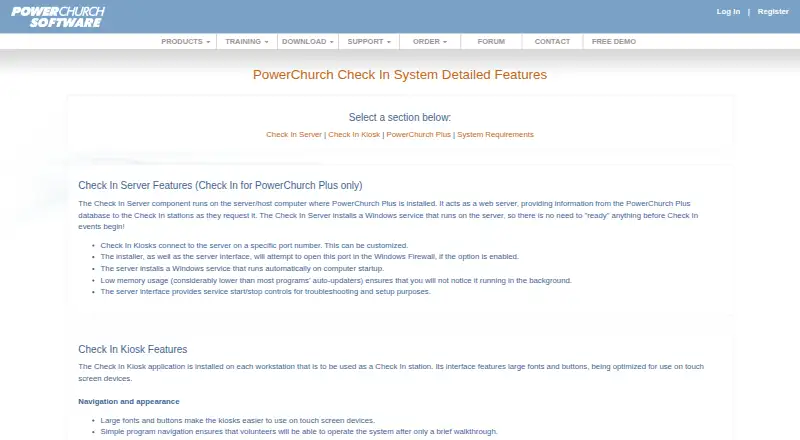
What PowerChurch Check In is
PowerChurch Check In is an add-on for PowerChurch Plus and PowerChurch Online that handles check-in, checkout, child security, and event attendance. It automatically records attendance and works with PowerChurch Membership, Activities & Skills, and Events Calendar. At check-in, a parent label receives an automatically generated security code, and the system tracks who dropped off and picked up each child. Kiosks support staffed and self-serve use; express checkout can use barcode scanning. Labels can include name badges, bag tags, parent labels, and teacher notes, with support for label printers, barcode scanners, webcams, and electronic pagers. Teachers or nursery workers can add incident notes with time and location for parents to see at checkout. Installed kiosk applications run on Windows or macOS. PowerChurch Online also supports a browser kiosk, but PowerChurch Plus does not. Online Check In costs $18 a month or $198 a year. PowerChurch Plus purchase options include upgrades and new-user editions. The product is intended for churches and other organizations, including adult activities and church-wide events.
Who it suits
It suits churches and organizations already using PowerChurch Plus or PowerChurch Online that need child check-in or event attendance records. The browser kiosk is an option for Online users; Plus users need installed kiosks.
What it does well
- Automatically records attendance in PowerChurch products.
- Tracks child drop-off and pickup.
- Supports staffed and self-serve kiosk modes.
- Incident notes are visible to parents at checkout.
- No additional cost for as many stations as needed.
What to know first
- PowerChurch Plus does not have a web kiosk.
- The Check In Server for Plus requires Windows.
- The Online web kiosk requires internet access.
- Mobile app is listed as none.
Limits
There is no free plan. PowerChurch Plus requires a Windows server and cannot use the browser kiosk; the Online browser kiosk requires internet access. Online Check In costs $18 a month or $198 a year; Plus choices are one-time purchases, from $99, paid once for eligible Version 11 upgrades.
Plans
| Plan | Billed and limits | Price |
|---|---|---|
| PowerChurch Plus Check In — Upgrade (Physical Media) | One-time purchase · For existing Check In Version 11 users upgrading to Version 14 · Installation CD and PDF manual delivered by USPS | $104, paid once |
| PowerChurch Plus Check In — New User, Bundle Discount (Physical Media) | One-time purchase · Requires PowerChurch Plus · Bundle discount with a new PowerChurch Plus license or upgrade | $139, paid once |
| PowerChurch Plus Check In — New User, Bundle Discount (Download) | One-time purchase · Requires PowerChurch Plus · Bundle discount with a new PowerChurch Plus license or upgrade | $139, paid once |
| PowerChurch Online Check In — Monthly Subscription | Monthly subscription · Requires PowerChurch Online | $18 a month |
| PowerChurch Plus Check In — New User, Standard Pricing (Download) | One-time purchase · Requires PowerChurch Plus | $189, paid once |
| PowerChurch Plus Check In — New User, Standard Pricing (Physical Media) | One-time purchase · Requires PowerChurch Plus · Installation CD and PDF manual delivered by USPS | $194, paid once |
| PowerChurch Online Check In — Yearly Subscription | Yearly subscription · Requires PowerChurch Online | $198 a year |
| PowerChurch Plus Check In — Upgrade (Download) | One-time purchase · For existing Check In Version 11 users upgrading to Version 14 | $99, paid once |
As powerchurch.com lists them, read 7 Oct 2026. The maker's own page has the final word.
Getting started
- Visit the PowerChurch Check In website.
- Choose the Online subscription or a Plus option that matches your existing PowerChurch setup.
- For PowerChurch Plus, install the Check In Server on Windows.
- Install the kiosk application on Windows or macOS, or use the browser kiosk with PowerChurch Online.
- Use the emailed installer link and PDF manual for download delivery; links remain valid for two weeks.
Verdict
PowerChurch Check In connects attendance records with PowerChurch products and offers several kiosk and label options. Check which edition and kiosk platform your organization uses before choosing a plan.
Questions
How much does PowerChurch Check In cost?
PowerChurch Online Check In costs $18 a month or $198 a year. PowerChurch Plus options are one-time purchases, with upgrade pricing from $99, paid once and new-user pricing from $139, paid once with a bundle discount.
Is there a free plan?
No. PowerChurch Check In is paid.
Which platforms does it support?
The installed kiosk application is available for Windows and macOS. PowerChurch Online users can use a web kiosk in a modern browser; PowerChurch Plus does not have that option.
What does the Online subscription require?
The Online Check In subscription requires PowerChurch Online. Its browser kiosk also requires internet access.
Does it integrate with other PowerChurch products?
It works with PowerChurch Membership, Activities & Skills, and Events Calendar, and automatically records attendance.
Can it record background checks?
PowerChurch Plus can link adult activity background checks through Protect My Ministry. PowerChurch Plus does not store the results.
Facts from PowerChurch Check In's own pages
- Background checks
- PowerChurch Plus can link adult activity background checks through Protect My Ministry and does not store the results in PowerChurch Plus. · powerchurch.com, 7 Oct 2026
- Check-in modes
- Kiosks support manned and self-serve modes, and express check-out can complete the checkout process by barcode scanning. · powerchurch.com, 7 Oct 2026
- Check-in security
- The system prints an automatically generated security code on each event's parent label and tracks who dropped off and picked up a child. · powerchurch.com, 7 Oct 2026
- Download delivery
- Download installer links are emailed, include a PDF user manual, and remain valid for two weeks. · powerchurch.com, 7 Oct 2026
- Founded
- 1984 · powerchurch.com, 28 Sept 2026
- Headquarters
- Asheville, North Carolina, United States · powerchurch.com, 28 Sept 2026
- Incident notes
- Teachers or nursery workers can record incident notes with the time and location for parents to see during checkout. · powerchurch.com, 7 Oct 2026
- Intended users
- The system is intended for churches and organizations using PowerChurch Plus or PowerChurch Online, and can also record attendance at adult activities and church-wide events. · powerchurch.com, 7 Oct 2026
- Kiosk platforms
- The installed Check In Kiosk application is available for Windows and macOS devices. · powerchurch.com, 7 Oct 2026
- Labels and hardware
- Supported hardware includes label printers, barcode scanners, webcams, and electronic pager systems, and labels can include name badges, bag tags, parent labels, and teacher notes. · powerchurch.com, 7 Oct 2026
- Platform limits
- The Check In Server for PowerChurch Plus requires Windows, while kiosks support Windows or macOS and the Online web kiosk requires internet access. · powerchurch.com, 7 Oct 2026
- PowerChurch integration
- Check In works with PowerChurch Membership, Activities & Skills, and Events Calendar, and automatically records attendance. · powerchurch.com, 7 Oct 2026
- Purpose
- PowerChurch Check In is a check-in and check-out add-on for PowerChurch Plus and PowerChurch Online, designed for child security and event attendance. · powerchurch.com, 7 Oct 2026
- Station limits
- The maker says organizations can set up as many Check In stations as needed at no additional cost, independently of concurrent user licenses. · powerchurch.com, 7 Oct 2026
- Support
- PowerChurch provides email technical support, support information, knowledge base articles, video tutorials, and remote assistance. · powerchurch.com, 7 Oct 2026
- Web kiosk
- PowerChurch Online users can use a web kiosk in a modern browser, while the web kiosk is not available for PowerChurch Plus. · powerchurch.com, 7 Oct 2026
Where PowerChurch Check In stands on Freedom251
- Church Check-In Software#38 of 42