Freedom251 › Lead Capture Software
PopupForge
What PopupForge is
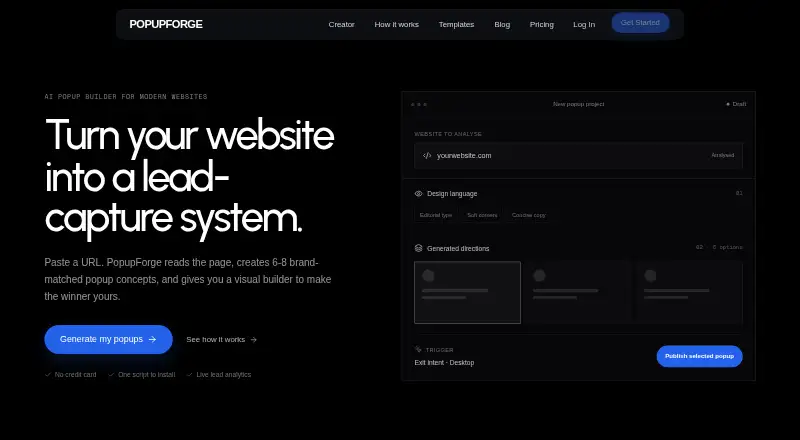
PopupForge builds brand-matched lead forms for websites and measures how visitors respond to them. It reads the visible copy, colors, typography, and visual style of a public webpage to generate popup concepts. Users can preview compositions on desktop and mobile, then edit copy, colors, fields, and triggers before publishing. Forms support multiple steps and configurable fields, with options such as immediate display, timed delay, scroll threshold, and exit intent. PopupForge tracks popup views, submissions, and conversion rate live. Publishing uses a script tag that injects an iframe, and published changes go live without redeploying the site. Leads can be routed to Slack or a signed HTTPS webhook for Zapier, Make, or a custom backend. The script works on sites that allow custom HTML or JavaScript, with guides listed for WordPress, Shopify, Webflow, Squarespace, Wix, Framer, Ghost, Carrd, and Next.js. The free plan costs nothing and allows one website, one modal, 50 submissions per month, and three AI generations total. PopupForge lists bloggers, ecommerce stores, SaaS startups, course creators, agencies, and marketers among its intended users.
Who it suits
PopupForge may suit bloggers, ecommerce stores, SaaS startups, course creators, agencies, and marketers who want lead forms on a website. The site must allow custom HTML or JavaScript for the script to work.
What it does well
- Preview popup compositions on desktop and mobile.
- Supports configurable, multi-step forms.
- Tracks views, submissions, and conversion rate live.
- Published changes do not require site redeployment.
- Routes leads to Slack or HTTPS webhooks.
What to know first
- Free plan allows one website and one modal.
- Free plan caps submissions at 50 per month.
- Free plan includes three AI generations total.
- Site must allow custom HTML or JavaScript.
Limits
The Free plan costs nothing and allows one website, one modal, 50 submissions per month, and three AI generations total. Pro allows three websites, 5,000 submissions per month, and 50 AI generations per month; Agency allows 15 websites, 50,000 submissions per month, and 200 AI generations per month.
Plans
| Plan | Billed and limits | Price |
|---|---|---|
| Free | 1 website · 1 modal · 50 submissions/month · 3 AI generations total · Basic analytics | Free |
| Pro | 3 websites · Unlimited modals · 5,000 submissions/month · 50 AI generations/month · Advanced analytics · Slack + HTTPS webhooks · Remove PopupForge branding | On request |
| Agency | 15 websites · Unlimited modals · 50,000 submissions/month · 200 AI generations/month · White-label popups · Priority support | On request |
As getpopupforge.com lists them, read 4 Oct 2026. The maker's own page has the final word.
Getting started
- Open the PopupForge website.
- Choose the Free plan or another listed plan.
- Provide a public webpage for generating popup concepts.
- Preview and edit the popup, form fields, and triggers.
- Add the script tag to a site that allows custom HTML or JavaScript.
- Route leads to Slack or a signed HTTPS webhook if needed.
Overview
PopupForge is a popup and lead-form builder for site owners and marketers who want to create targeted campaigns and follow their conversion performance. It is strongest for teams that can add a site script and want editing and publishing in one workflow; its free plan is a constrained way to start.
Key features
PopupForge can use a public page’s visible copy, colors, typography and style to generate popup concepts. Its editor previews designs on desktop and mobile and lets users change copy, colors, fields and triggers before publishing. This gives marketers a route from their existing site design to a campaign without starting from a blank canvas, but the free plan’s three AI generations are a one-time allowance rather than a monthly quota.
Forms support multiple steps and configurable fields. Campaigns can be popups or modals, shown immediately, after a delay, at a scroll threshold or on exit intent; audience targeting is also supported. Live reporting covers views, submissions and conversion rate, so teams can track whether a campaign is producing leads rather than merely appearing on the page.
Publishing uses a script tag that injects an iframe, and changes to a published popup go live without a site redeployment. PopupForge says the iframe separates its styling from the host site’s CSS. The script is suited to sites that allow custom HTML or JavaScript, with platform guides for WordPress, Shopify, Webflow, Squarespace, Wix, Framer, Ghost, Carrd and Next.js. Leads can be routed to Slack or to a signed HTTPS webhook for Zapier, Make or a custom backend. The Pro plan is the first tier with Slack and webhook integrations.
Pricing
PopupForge is freemium. Free costs nothing and includes one website, one modal, 50 submissions per month, three AI generations total and basic analytics. It is a reasonable trial for a small site or an early campaign, but the single-site and single-modal caps leave little room to run multiple initiatives, while the submission ceiling can constrain a campaign that succeeds.
Pro has custom pricing and allows three websites and unlimited modals, with 5,000 submissions and 50 AI generations per month. It adds advanced analytics, Slack and HTTPS webhooks, and removes PopupForge branding. This is the more appropriate tier for a growing marketer or small business that needs several campaigns, integration routing or more than basic reporting.
Agency has custom pricing and expands the allocation to 15 websites, unlimited modals, 50,000 submissions and 200 AI generations per month. White-label popups and priority support make it the tier aimed at agencies managing campaigns across client sites. The higher quotas are useful at that scale, but the custom pricing means readers should establish the cost before choosing it.
Platforms
PopupForge supports web publishing through a script on sites that permit custom HTML or JavaScript. Its listed guides cover common hosted site builders, ecommerce platforms and frameworks, including Shopify, WordPress and Next.js. It also lists Android, iOS, Linux, macOS, Windows, extension, API and self-hosted platforms, though its publishing workflow is specifically described as a site embed.
Who it's for
PopupForge fits bloggers, ecommerce stores, SaaS startups, course creators, agencies and marketers who need lead capture on a site and want live conversion figures. Its configurable forms and multiple trigger types suit campaigns that need more control than a single static signup box. A site owner who cannot add custom HTML or JavaScript, or who needs more than 50 monthly submissions on a free plan, should look elsewhere or budget for a paid tier.
Pros and cons
- Pros: Brand-aware AI generation and desktop/mobile previews help shape campaigns around an existing site’s look.
- Pros: Multi-step forms, configurable triggers and audience targeting support more tailored lead capture than a basic single-form approach.
- Pros: Live views, submissions and conversion-rate tracking connect campaign delivery to outcomes.
- Pros: Script-based publishing lets changes go live without redeploying the site, and the iframe is intended to isolate popup styling.
- Cons: Free is limited to one website and one modal, with 50 monthly submissions and only three AI generations in total.
- Cons: Pro and Agency prices are custom, so their cost cannot be compared directly from the published plan terms.
- Cons: Publishing depends on the site allowing custom HTML or JavaScript, which rules out sites without that access.
Alternatives
Appocalypsis is worth considering for readers seeking a free web-based option with limited functionality. BDOW! may suit a smaller email opt-in use case: its free plan allows one site, 100 conversions and 500 emails per month, alongside customizable design, visitor targeting and analytics.
Common Ninja Form Builder is an alternative for readers focused on embedding a form rather than managing a popup campaign; its free plan is limited to one form. ConvertFlow is a fit for users who want funnel campaigns: its free plan includes five campaigns, though integrations require a paid plan.
Hello Bar may work better for a site that needs a free tier with unlimited popups, which allows 5,000 views. Icegram Engage is worth comparing for self-hosted use; its free single-site Starter plan includes popups, action bars, toasts and messengers, plus basic targeting.
OptiMonk offers a different free allowance—10,000 pageviews per month, 1,000 AI credits and one domain—so it may suit readers who prioritize pageview and AI-credit quotas. Picreel is another option for campaign volume: its free plan allows up to 5,000 pageviews and unlimited campaigns, domains and popups.
Browse more options in Pop-Up Builder Software, Popup Software and Lead Capture Software.
Verdict
PopupForge is a good fit for marketers and small businesses that can install a script and want brand-matched popups, flexible lead forms and live conversion tracking in one workflow. Its clearest advantage is the combination of editing, publishing and measurement; its chief drawback is that the free plan’s quotas are tight and the paid tiers have custom pricing. Choose it when those controls matter more than predictable published pricing; look elsewhere if you need generous free usage or a known monthly cost.
Verdict
PopupForge combines popup creation, form editing, publishing, and live conversion tracking. Its free plan has limits on websites, modals, submissions, and AI generations.
Questions
Is PopupForge free?
Yes. The Free plan costs nothing and includes one website, one modal, 50 submissions per month, three AI generations total, and basic analytics.
What platforms can PopupForge be used on?
Its listed platforms are Android, API, extension, iOS, Linux, macOS, self-hosted, web, and Windows. The publishing script works on sites that allow custom HTML or JavaScript.
Which website platforms have guides?
Guides are listed for WordPress, Shopify, Webflow, Squarespace, Wix, Framer, Ghost, Carrd, and Next.js.
Can leads be sent to other tools?
Yes. Leads can be routed to Slack or a signed HTTPS webhook for Zapier, Make, or a custom backend.
What do the paid plans include?
Pro includes three websites, unlimited modals, 5,000 monthly submissions, 50 monthly AI generations, advanced analytics, Slack and HTTPS webhooks, and branding removal. Agency includes 15 websites, unlimited modals, 50,000 monthly submissions, 200 monthly AI generations, white label popups, and priority support.
Who makes PopupForge?
The maker describes PopupForge as an independent product and says Leo designs, builds, and supports it.
Facts from PopupForge's own pages
- AI generation
- The product reads a public webpage’s visible copy, colors, typography, and visual style to generate popup concepts. · getpopupforge.com, 4 Oct 2026
- Analytics
- The product tracks popup views, submissions, and conversion rate live. · getpopupforge.com, 4 Oct 2026
- Company
- The maker describes PopupForge as an independent product and says Leo designs, builds, and supports it. · getpopupforge.com, 4 Oct 2026
- Editor
- Users can preview popup compositions on desktop and mobile and edit copy, colors, fields, and triggers before publishing. · getpopupforge.com, 4 Oct 2026
- Forms
- PopupForge supports multi-step forms with configurable fields. · getpopupforge.com, 4 Oct 2026
- Integrations
- Leads can be routed to Slack or a signed HTTPS webhook for Zapier, Make, or a custom backend. · getpopupforge.com, 4 Oct 2026
- Notable limits
- The Free plan allows one website and one modal, with 50 submissions per month and three AI generations total. · getpopupforge.com, 4 Oct 2026
- Product
- PopupForge builds brand-matched lead forms, publishes them with one script, and measures what happens after they appear. · getpopupforge.com, 4 Oct 2026
- Publishing
- PopupForge installs with a script tag that injects an iframe, and published changes go live without redeploying the site. · getpopupforge.com, 4 Oct 2026
- Security and privacy
- The maker says the embed renders in an iframe so the site's CSS and popup do not interfere with each other. · getpopupforge.com, 4 Oct 2026
- Support
- PopupForge lists [email protected] as its support contact, and the Agency plan includes priority support. · getpopupforge.com, 4 Oct 2026
- Website compatibility
- The script works on sites that allow custom HTML or JavaScript; listed platform guides include WordPress, Shopify, Webflow, Squarespace, Wix, Framer, Ghost, Carrd, and Next.js. · getpopupforge.com, 4 Oct 2026
- Who it is for
- PopupForge describes use cases for bloggers, ecommerce stores, SaaS startups, course creators, agencies, and marketers. · getpopupforge.com, 4 Oct 2026
Where PopupForge stands on Freedom251
- Lead Capture Software#19 of 70
- Pop-Up Builder Software#9 of 29
- Popup Software#9 of 28