Freedom251 › Pomodoro Timer Apps

PomoTimer
What PomoTimer is
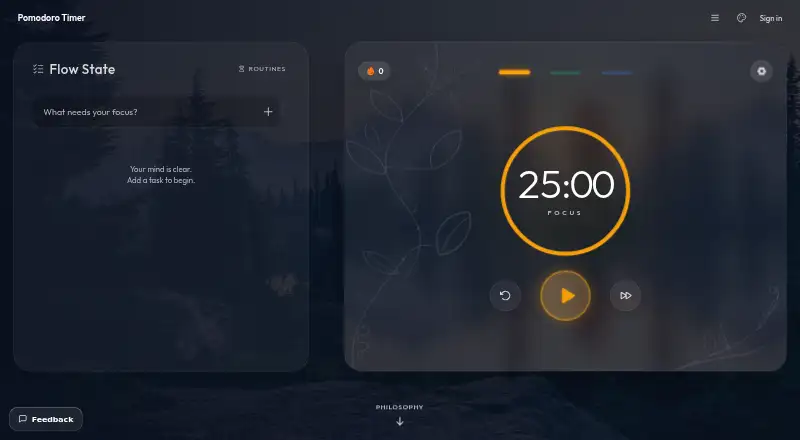
PomoTimer is a browser-based focus timer that runs 25-minute work sessions followed by breaks. It offers 25/5, 50/10, 90/20, and 15/3 presets, along with custom focus and break durations and automatic break starts. The web timer can open in an always-on-top Picture-in-Picture window in desktop Chrome and Edge. A free Windows desktop app adds a frameless floating window, adjustable opacity and frost, a draggable minimised keycap, in-window settings, chimes, and click-through mode; it continues running offline after installation. Completed sessions are saved locally in the browser for daily and total counts. Unsigned-in web users’ tasks, settings, and history remain in browser storage and are not sent to the site. Google sign-in is needed to download the desktop app and sync data. Signed-in users appear on the public leaderboard by default, but can turn off their listing in Preferences. The independent maker is Gazala Farheen.
Who it suits
PomoTimer suits people who want timed work-and-break cycles in a browser, or a floating timer on Windows. Users who want desktop downloads or syncing should be prepared to sign in with Google.
What it does well
- Several presets and custom timer durations.
- Web timer supports desktop Picture-in-Picture.
- Windows app works offline after installation.
- Unsigned-in web data stays in browser storage.
What to know first
- Native desktop app supports Windows only.
- Google sign-in is required for desktop downloads and syncing.
- Signed-in users appear on the public leaderboard by default.
- Support is by email, without a ticket system.
Limits
The free native desktop app is Windows only and requires Google sign-in to download. The free web timer runs in the browser without sign-up.
Plans
| Plan | Billed and limits | Price |
|---|---|---|
| Free desktop app | Windows only · Google sign-in required · unsigned build | Free |
| Free web timer | No sign-up · no paywall · runs in browser | Free |
As pomotimerapp.com lists them, read 3 Oct 2026. The maker's own page has the final word.
Getting started
- Open the website to use the browser timer without signing up.
- Choose a preset or set custom focus and break durations.
- Use the built-in task list and review saved daily or total session counts.
- Open the web timer in Picture-in-Picture in desktop Chrome or Edge, if desired.
- Sign in with Google to download the Windows app or sync data.
Verdict
PomoTimer offers flexible focus intervals in the browser and a free Windows floating timer. The desktop app is limited to Windows, and downloading it or syncing requires Google sign-in.
Questions
Is PomoTimer free?
Yes. The web timer and Windows desktop app are both listed as free.
Which platforms does it support?
The timer is available on the web and as a native Windows desktop app. The web Picture-in-Picture window works in desktop Chrome and Edge.
Do I need an account?
No sign-up is needed for the web timer. Google sign-in is required for desktop downloads and syncing.
Where is my data stored?
For unsigned-in web use, tasks, settings and session history stay in browser local storage and are not sent to the site. Signed-in data includes your email, account ID, sessions, task list and preferences.
Who makes PomoTimer, and how is support handled?
Gazala Farheen builds and maintains it independently. Support is by email, and there is no support desk or ticket system.
Can I hide my public leaderboard listing?
Signed-in users appear on the public leaderboard by default. You can turn off your listing in Preferences.
Facts from PomoTimer's own pages
- Analytics and advertising
- The site says it uses Google Analytics 4 and may show Google AdSense ads; in the EEA, UK and Switzerland, these cookies are off until consent. · pomotimerapp.com, 3 Oct 2026
- Data storage
- For unsigned-in web users, tasks, settings and session history stay in browser local storage and are not sent to the site. · pomotimerapp.com, 3 Oct 2026
- Desktop app
- A free native desktop app provides a frameless, always-on-top window and currently supports Windows only. · pomotimerapp.com, 3 Oct 2026
- Desktop features
- The desktop float includes adjustable opacity and frost, a minimised draggable keycap, in-window settings, chimes and click-through ghost mode. · pomotimerapp.com, 3 Oct 2026
- Floating timer
- The web timer can open in an always-on-top Picture-in-Picture window in Chrome and Edge on desktop. · pomotimerapp.com, 3 Oct 2026
- Leaderboard
- Signed-in users appear on the public leaderboard by default, and can turn off their listing in Preferences. · pomotimerapp.com, 3 Oct 2026
- Maker
- The about page says the timer is built and maintained by Gazala Farheen, working independently. · pomotimerapp.com, 3 Oct 2026
- Offline use
- The installed desktop app keeps running offline. · pomotimerapp.com, 3 Oct 2026
- Session tracking
- Completed sessions are saved locally in the browser so users can view daily and total counts. · pomotimerapp.com, 3 Oct 2026
- Support
- Support is by email to the independent maker, who aims to reply within a few days; there is no support desk or ticket system. · pomotimerapp.com, 3 Oct 2026
- Sync and account data
- Google sign-in is required for desktop downloads and syncing; signed-in data includes email, account ID, sessions, task list and preferences. · pomotimerapp.com, 3 Oct 2026
- Timer presets
- Presets include 25/5, 50/10, 90/20 and 15/3, and users can set custom focus and break durations. · pomotimerapp.com, 3 Oct 2026
- What it does
- A browser based focus timer that runs 25-minute work sessions followed by breaks. · pomotimerapp.com, 3 Oct 2026
Where PomoTimer stands on Freedom251
- Pomodoro Timer Apps#23 of 28