Freedom251 › Windows Compatibility Layers
PlayOnMac
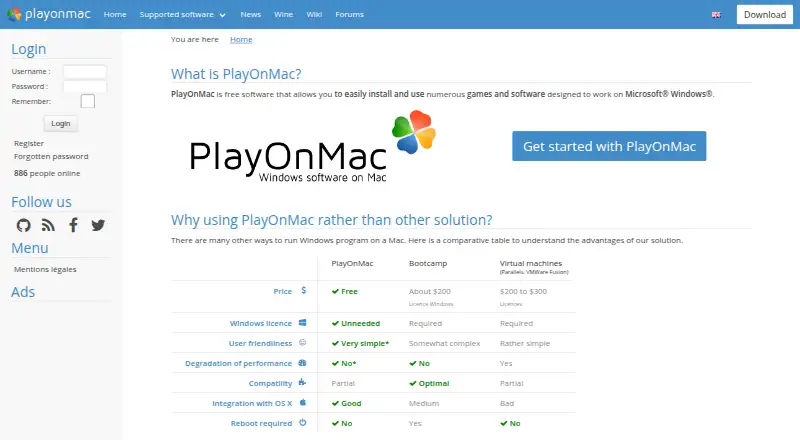
What PlayOnMac is
PlayOnMac is free software for installing and using games and other programs designed for Microsoft Windows on a Mac. The maker says a Windows license is not needed. Compatibility is partial, and ease of use and performance depend on whether a particular program is supported. The site shows examples of supported software, including Star Wars: The Old Republic, Trackmania Nation Forever, Photofiltre, and Internet Explorer 8. The download page offers PlayOnMac 4.4.4 for macOS 10.15 or macOS 11 and later, and version 4.3.3 for macOS versions before 10.15. It also says antivirus warnings about some PlayOnMac .exe files may be false positives connected to interaction with the emulated Windows registry. PlayOnMac is listed for macOS, with no Linux support. Its listed plan is free and requires a supported Windows program.
Who it suits
PlayOnMac may suit Mac users who want to install Windows-designed games or other software without a Windows license. It is most relevant when the specific program is supported.
What it does well
- Free software
- Does not require a Windows license
- Offers versions for older and newer macOS releases
- Includes a compatibility database
What to know first
- Compatibility is partial
- Ease of use and performance depend on program support
- No Linux support
- Requires a supported Windows program
Limits
The free software requires a supported Windows program, and compatibility is partial. Ease of use and performance depend on the program.
Plans
| Plan | Billed and limits | Price |
|---|---|---|
| PlayOnMac | Free software · requires a supported Windows program | Free |
As playonmac.com lists them, read 4 Oct 2026. The maker's own page has the final word.
Getting started
- Visit the PlayOnMac website.
- Choose the download matching your macOS version: 4.4.4 for macOS 10.15 or macOS 11 and later, or 4.3.3 for earlier versions.
- Install PlayOnMac on your Mac.
- Use it with a supported Windows program.
PlayOnMac is a no-cost macOS utility for installing Windows-built games and applications without buying a Windows license. It is best suited to Mac owners who already have a particular supported program in mind. The main qualification is that compatibility is partial, so the target software matters more than the general promise of running Windows programs.
Overview
PlayOnMac provides a way to run selected Windows software on a Mac, covering both games and conventional applications. The maker says no Windows license is required, which keeps the entry cost to the software itself at zero. That does not turn macOS into a universally compatible Windows environment: setup convenience and runtime performance vary with the program being used.
The project’s examples include Star Wars: The Old Republic, Trackmania Nation Forever, Photofiltre and Internet Explorer 8. Those examples show the range of intended use, from games to older utilities, but they should not be treated as a promise for every title or application.
Key features
- Compatibility database: A database of supported software lets you investigate a target program before spending time on installation. This is a meaningful advantage for users with one known app or game, while people seeking dependable support for an unchosen collection of Windows software should expect uncertainty.
- Prefix management: Prefix management helps keep separate Windows software environments organized. It is useful when applications need distinct configurations, but it cannot fix an unsupported program.
- DXVK graphics acceleration: DXVK provides a graphics-acceleration path for compatible workloads. Its presence may help supported games, though the maker still ties practical performance to program compatibility rather than promising uniform results.
- Version choices for older Macs: The download page offers version 4.4.4 for macOS 10.15 and macOS 11 or newer, plus version 4.3.3 for macOS releases before 10.15. Choosing the matching build is essential when running an older system.
- Antivirus warning context: The download information says some warnings about PlayOnMac .exe files can be false positives associated with interaction with the emulated Windows registry. That explains a possible warning, but users should still treat security prompts carefully.
Pricing
PlayOnMac has one plan: PlayOnMac costs nothing. It is free software and requires a supported Windows program. There are no paid tiers, seat allowances or trial-to-renewal terms to weigh, and the maker says a separate Windows license is unnecessary. The trade-off is not a subscription cap but software coverage: the value depends on whether the application you need is supported and performs acceptably.
Platforms
PlayOnMac supports macOS and does not support Linux. The two download builds cover macOS 10.15 and later through version 4.4.4, and earlier macOS versions through 4.3.3. It is therefore a Mac-specific choice rather than a cross-platform compatibility layer.
Who it's for
Choose PlayOnMac if you use a Mac, want a specific Windows game or application, and can confirm that it appears in the compatibility database. It is also appealing when avoiding the cost of a Windows license is important. It is a weaker fit for users who need guaranteed support for business-critical Windows software, broad coverage without checking individual programs, or Linux support.
Pros and cons
Pros
- No software charge or Windows license requirement: The complete PlayOnMac plan is free, with no separate Windows license required by the maker.
- Targeted compatibility information: The database gives prospective users a way to check a program before installation.
- Useful organization and graphics components: Prefix management and DXVK address configuration and graphics needs for supported software.
- Legacy macOS coverage: A separate older build keeps the utility relevant to Macs running versions before 10.15.
Cons
- Partial compatibility: A Windows application may not work, and ease of use and performance depend on its support status.
- macOS-only scope: Linux users need another solution.
- Warnings may complicate installation: Some antivirus products can flag .exe files associated with the emulated registry, which may require careful interpretation.
Alternatives
Browse Windows Compatibility Layers when you want a wider comparison of tools before choosing one.
- Boxedwine is a free, GPL-licensed option that runs across Linux, macOS, web and Windows, making it preferable when platform breadth or open-source licensing matters.
- PlayOnLinux is another free layer for Linux and macOS; choose it if its supported software fits your needs, while allowing for occasional performance decreases and incomplete game support.
- Crosswire is free, open source under GPL-3.0, and macOS-only, so it suits users who specifically prioritize that licensing model.
- GE-Proton is a free Linux-focused Proton compatibility tool for Steam gaming and requires compatible Vulkan drivers and packages.
- MacWrap offers a free macOS tier for wrapping software and compatibility analysis, plus a 7.99 EUR-per-month Premium tier for users who need its paid features.
- Porting Kit is a free macOS utility for installing Windows games and apps with Wineskin, an alternative approach for Mac users.
- Q4Wine is free open software for Linux and macOS, suited to readers who want that broader platform coverage.
- WINE@Etersoft targets Linux: its free Local plan covers one workstation for personal, noncommercial use without technical support, while Enterprise pricing is custom.
Verdict
PlayOnMac is a sensible first choice for a Mac user with a specific Windows program confirmed in its compatibility database, especially when avoiding a Windows license is valuable. Its free price, prefix management and DXVK support are useful advantages. Look elsewhere if your software is not supported, if dependable broad compatibility is essential, or if you need Linux coverage.
Verdict
PlayOnMac provides a free route to using some Windows-designed programs on a Mac without a Windows license. Compatibility varies by program, so support for the specific software is an important consideration.
Questions
How much does PlayOnMac cost?
The listed PlayOnMac plan costs nothing.
Does PlayOnMac require a Windows license?
The maker says a Windows license is not needed.
Which platforms does it support?
PlayOnMac is listed for macOS. Linux support is listed as unavailable.
Which macOS versions have downloads?
The download page offers version 4.4.4 for macOS 10.15 and macOS 11 or later, and version 4.3.3 for earlier macOS versions.
Who owns PlayOnMac?
The legal notice identifies Alius IT as the site owner.
Facts from PlayOnMac's own pages
- Antivirus notices
- The download page says antivirus warnings about some PlayOnMac .exe files may be false positives related to interaction with the emulated Windows registry. · playonmac.com, 4 Oct 2026
- Compatibility
- The maker describes compatibility as partial and notes that ease of use and performance depend on the program being supported. · playonmac.com, 4 Oct 2026
- Data retention
- The legal notice says identifying member data, including email address and IP address, is automatically deleted after two consecutive calendar years without a site login unless members request otherwise. · playonmac.com, 4 Oct 2026
- Hosting
- The legal notice identifies OVH in Roubaix, France, as the website host. · playonmac.com, 4 Oct 2026
- Mac versions
- The download page offers PlayOnMac 4.4.4 for macOS 10.15 or macOS 11 and later, and version 4.3.3 for macOS versions before 10.15. · playonmac.com, 4 Oct 2026
- Owner
- The legal notice identifies Alius IT as the site owner. · playonmac.com, 4 Oct 2026
- Privacy
- The legal notice says personal data is not commercialized and is used as needed or for statistics and analysis. · playonmac.com, 4 Oct 2026
- Publication contact
- The legal notice names Quentin Paris as publication director and webmaster. · playonmac.com, 4 Oct 2026
- Purpose
- PlayOnMac is free software for installing and using games and other software designed for Microsoft Windows on a Mac. · playonmac.com, 4 Oct 2026
- Security
- The legal notice describes security measures including protected networks, firewalls, pseudonymization, encryption and passwords, while stating that absolute security cannot be guaranteed. · playonmac.com, 4 Oct 2026
- Support examples
- The home page shows supported-software examples including Star Wars: The Old Republic, Trackmania Nation Forever, Photofiltre and Internet Explorer 8. · playonmac.com, 4 Oct 2026
- Windows license
- The maker’s comparison says a Windows license is not needed to use PlayOnMac. · playonmac.com, 4 Oct 2026
Where PlayOnMac stands on Freedom251
- Windows Compatibility Layers#12 of 26