Freedom251 › Windows Compatibility Layers
BottleLite
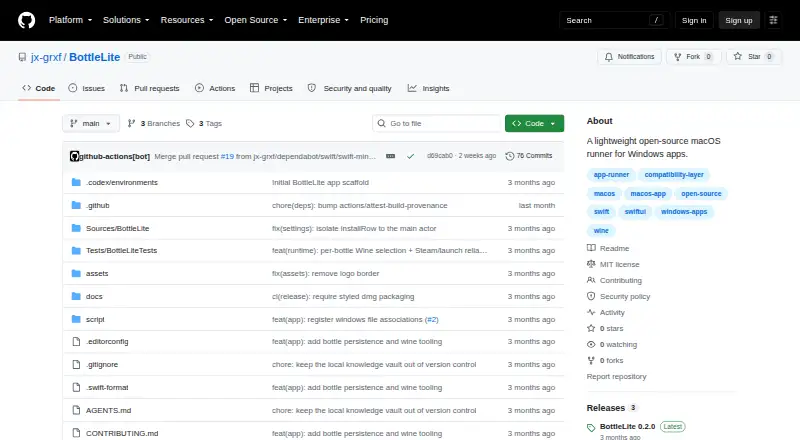
What BottleLite is
BottleLite is a free, open-source macOS app for managing bottles and running Windows programs through a Wine installation already on the computer. It requires macOS 14 or newer, and users install the Wine runtime separately. You can create, rename, and delete bottles, then import Windows .exe files. BottleLite checks the file extension and MZ header and keeps each imported program in its bottle. Bottle records and imported programs are saved under Application Support and restored when the app launches.
The app captures each program launch’s standard output and error in a log. It detects Windows console programs and can open them in Terminal.app, with a per-program setting to override that behavior. BottleLite includes tools to initialize a Wine prefix, open winecfg, run installers, reveal the C: drive in Finder, and install dependencies through winetricks. Per-bottle Game Mode enables msync/esync, large-address-aware, higher process priority, a macOS power assertion, and a Metal FPS overlay. The app can detect Wine and open a Homebrew Wine installer in Terminal. The project uses the MIT license, and its maker says the app has no telemetry, account, embedded browser, or bundled Wine runtime.
Who it suits
BottleLite suits macOS users who want to organize bottles and run Windows .exe programs through Wine. It is for people able to install and maintain a separate Wine runtime on macOS 14 or newer.
What it does well
- Create, rename, and delete bottles.
- Import .exe files with extension and MZ-header checks.
- Keep each imported program isolated in its bottle.
- Capture launch output and errors in per-program logs.
- Use winetricks for dependencies including .NET, Visual C++, DXVK, and DirectX 9.
- Released under the MIT license.
What to know first
- Requires macOS 14 or newer.
- Wine must be installed separately.
- Linux is not supported.
- The preview build is not Developer ID signed or notarized.
Limits
BottleLite requires macOS 14 or newer and a separately installed Wine runtime. The preview build is ad-hoc signed but not Developer ID signed or notarized, so its first launch requires right-clicking the app and choosing Open.
Getting started
- Download the DMG from the BottleLite GitHub project.
- Install Wine separately; BottleLite can detect an existing installation or open a Homebrew Wine installer in Terminal.
- Open BottleLite; for the preview build, right-click the app and choose Open on first launch.
- Create a bottle and import a Windows .exe file.
- Use the bottle tools to initialize a Wine prefix, install dependencies, or run the program.
Verdict
Choose BottleLite if you use macOS and want a small, MIT-licensed app to organize Wine bottles and Windows programs. It includes prefix and dependency tools, per-program logs, and per-bottle Game Mode. Look elsewhere if you need Linux support or an app with Wine bundled.
Questions
Is BottleLite free?
Yes. BottleLite is free and released under the MIT license.
Which operating system does it support?
BottleLite supports macOS 14 or newer. Linux is not supported.
Does BottleLite include Wine?
No. It does not bundle a Wine runtime; users need to install Wine separately.
What programs can I import?
BottleLite imports Windows .exe files, checks their extension and MZ header, and isolates each imported program in its bottle.
What is the latest release listed?
The release page identifies BottleLite 0.2.0 and describes per-bottle Wine selection and Steam launch improvements.
How does BottleLite handle its preview build at first launch?
The preview build is ad-hoc signed but not Developer ID signed or notarized. The README says to right-click the app and choose Open on first launch.
Facts from BottleLite's own pages
- Bottle management
- You can create, rename, and delete bottles; bottle records and imported programs are saved under Application Support and restored on launch. · github.com, 7 Oct 2026
- Console apps
- BottleLite detects Windows console programs and opens them in Terminal.app, with a setting to override the behavior per program. · github.com, 7 Oct 2026
- Current release
- The GitHub release page identifies version 0.2.0 and describes per-bottle Wine selection and Steam launch improvements. · github.com, 7 Oct 2026
- Dependencies
- BottleLite can use winetricks to install common dependencies including .NET, Visual C++, corefonts, DXVK, and DirectX 9. · github.com, 7 Oct 2026
- Distribution
- The project provides a DMG download with a SHA-256 file for checking the download; the README says the preview build is not Developer ID signed or notarized. · github.com, 7 Oct 2026
- Executable imports
- BottleLite imports `.exe` files and checks their extension and `MZ` header. · github.com, 7 Oct 2026
- Game Mode
- Per-bottle Game Mode enables msync/esync, large-address-aware, higher process priority, a macOS power assertion, and a Metal FPS overlay. · github.com, 7 Oct 2026
- Integrations
- The app detects an existing Wine installation, can open a Homebrew Wine installer in Terminal, and supports winetricks for one-click dependencies. · github.com, 7 Oct 2026
- Intended users
- The project describes BottleLite as a small macOS app for people who want to manage bottles and run `.exe` files through an existing Wine installation. · github.com, 7 Oct 2026
- Latest release
- The latest release page lists BottleLite 0.2.0 and describes per-bottle Wine selection and Steam launch improvements. · github.com, 7 Oct 2026
- Launch tools
- It captures each program launch’s standard output and error in a per-program log, and can open Windows console programs in Terminal.app. · github.com, 7 Oct 2026
- License
- The project is released under the MIT license. · github.com, 7 Oct 2026
- Platform requirement
- BottleLite requires macOS 14 or newer, and users need Wine installed separately to run programs. · github.com, 7 Oct 2026
- Privacy
- The maker says BottleLite has no telemetry, account, embedded browser, or bundled Wine runtime. · github.com, 7 Oct 2026
- Program import
- BottleLite accepts Windows .exe files, checks their extension and MZ header, and isolates each imported program in its bottle. · github.com, 7 Oct 2026
- Program logs
- Each launch captures standard output and error in a per-program log that can be opened from the app. · github.com, 7 Oct 2026
- Purpose
- BottleLite is a lightweight, open-source macOS app for managing bottles and running Windows apps through an existing Wine installation. · github.com, 7 Oct 2026
- Security and distribution
- The README says the preview build is ad-hoc signed but not Developer ID signed or notarized, so first launch requires right-clicking the app and choosing Open. · github.com, 7 Oct 2026
- Support
- The maker welcomes issues and focused pull requests and directs security reports to the repository’s security policy. · github.com, 7 Oct 2026
- System requirements
- BottleLite requires macOS 14 or newer and a separately installed Wine runtime to run programs. · github.com, 7 Oct 2026
- Tools
- BottleLite can initialize a Wine prefix, open winecfg, run installers, reveal the C: drive in Finder, and install dependencies through winetricks. · github.com, 7 Oct 2026
- Updates
- Stable and beta update channels use signed Sparkle appcasts published by GitHub Actions. · github.com, 7 Oct 2026
Where BottleLite stands on Freedom251
- Windows Compatibility Layers#8 of 26