Freedom251 › Windows Compatibility Layers

Porting Kit
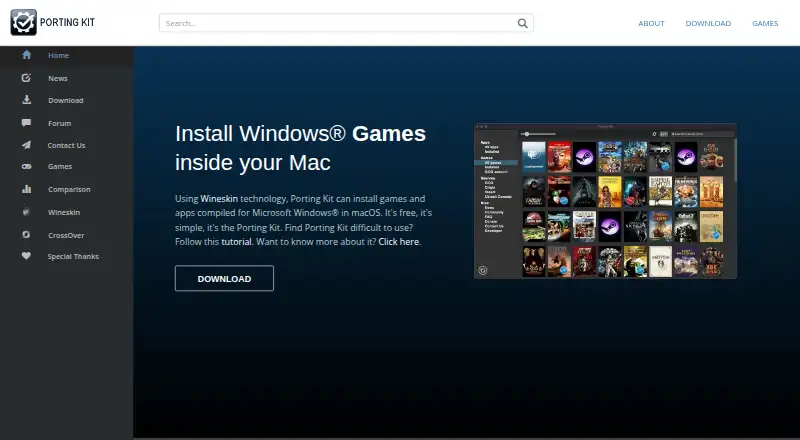
What Porting Kit is
Porting Kit uses Wineskin technology to install Windows-built games and apps on macOS. It is free, and the download page offers Porting Kit 7 for macOS 12.0 and later. Its installation instructions cover sources including GOG, Steam, Origin, Uplay, GamersGate, and CD/DVD. For Steam ports, the kit can install the Windows Steam client on a Mac, after which users can sign in and download games. The maker says support for Apple Silicon Macs is growing with newer engines and macOS versions, and the download page recommends watching a tutorial before installing game ports. Compatibility is not guaranteed for a particular computer; the maker recommends checking its video card ranking. The terms say the app should be used with legitimate copies, with an exception stated for abandonware. Ports are for personal use, and distribution requires the maker’s approval. The terms also say the app may collect video card and macOS details for rankings and Google Analytics, and that it does not obtain or share other information from the Mac. Copies obtained outside PortingKit.com are not considered legitimate and will not receive support.
Who it suits
Porting Kit suits Mac users who want to try installing Windows games or apps through Wineskin. Users should check compatibility guidance and the stated limits on legitimate copies and distribution.
What it does well
- Free to use.
- Download offers Porting Kit 7 for macOS 12.0 and later.
- Instructions cover several game sources.
- Can install the Windows Steam client for Steam ports.
- Apple Silicon support is growing, according to the maker.
What to know first
- The maker does not guarantee port compatibility.
- Ports are for personal use.
- Distribution requires the maker’s approval.
- Copies from outside PortingKit.com are not supported.
Limits
The download page offers Porting Kit 7 for macOS 12.0 and later. The maker does not guarantee that a port will work on a particular computer; ports are for personal use, and distributing them requires the maker’s approval.
Plans
| Plan | Billed and limits | Price |
|---|---|---|
| Porting Kit | Installs Windows games and apps in macOS using Wineskin | Free |
As portingkit.com lists them, read 2 Oct 2026. The maker's own page has the final word.
Getting started
- Visit PortingKit.com and open the download page.
- Download Porting Kit 7 for macOS 12.0 or later.
- Watch the tutorial recommended on the download page before installing a game port.
- Choose a game source such as GOG, Steam, Origin, Uplay, GamersGate, or CD/DVD.
- For a Steam port, install the Windows Steam client through Porting Kit, then sign in and download games.
Overview
Porting Kit is a free macOS utility for setting up Microsoft Windows games and applications through Wineskin. It best suits Mac users who already own Windows software from several game stores and are willing to check compatibility before installing. The appeal is a no-cost route to a broad range of titles; the compromise is that success depends on the individual game, Mac, and graphics hardware.
Rather than supplying games, Porting Kit guides installations from GOG, Steam, Origin, Uplay, GamersGate, and CD/DVD media. Steam support can install the Windows Steam client on the Mac, after which you sign in and download games normally. The terms expect legitimate copies, with an exception for abandonware, and do not promise that any particular port will run.
Key features
- Wineskin-based installation: The app creates a macOS setup for Windows games and applications, making it useful when a native Mac release is unavailable.
- Several game sources: Instructions cover major storefronts and physical media, so the method is not tied to one catalog. You still need to own or obtain each game separately.
- Windows Steam client: Steam ports can install the Windows client and let you download titles through it. This is convenient for an existing Steam library, but it adds another compatibility layer.
- Compatibility database and video-card ranking: These references help you judge a likely result before spending time on setup. They are guidance, not a guarantee.
- Prefix management: Prefix controls help keep Windows environments organized when different games need separate configurations.
- DXVK graphics acceleration: DXVK is listed as the graphics acceleration option, which can matter for demanding games, although the maker still makes no hardware-specific promise.
The download page recommends watching a tutorial before installing game ports. That advice is particularly relevant to newcomers, since the process is instruction-led rather than a guaranteed one-click conversion.
Pricing
Porting Kit has one free plan, free. It covers installing Windows games and applications in macOS with Wineskin, with no paid tier, seat limit, quota, trial period, or renewal charge to compare. For a player experimenting with a few owned titles, the absence of a subscription removes financial risk. The trade-off is time: checking rankings, following source-specific instructions, and troubleshooting an unsuccessful port are the practical costs.
The free price does not grant unrestricted distribution or support. The terms say ports made with Porting Kit are for personal use, and distributing them requires the maker's approval. Copies obtained outside PortingKit.com are not considered legitimate for support purposes, so users relying on unofficial packages should not expect help.
Platforms
Porting Kit targets macOS. Porting Kit 7 is offered for macOS 12.0 and later. Apple Silicon support is growing as newer engines and macOS versions arrive, and Apple Silicon is listed as supported, but the maker's wording indicates an evolving area rather than universal coverage. The app may also collect video-card and macOS details for rankings and Google Analytics; its terms say it does not obtain or share other information from the Mac.
Who it's for
Choose Porting Kit if you use a Mac, already have legitimate Windows games or applications, and are comfortable evaluating each title before installation. It is especially practical for libraries spread across GOG, Steam, Origin, Uplay, GamersGate, or discs, and for users who value a free option over guaranteed compatibility.
It is a poor fit when a game must work reliably without preparation, when you need official support for externally obtained copies, or when you cannot accept personal-use distribution terms. Windows software with uncertain graphics requirements may require more investigation than a native Mac application.
Pros and cons
Pros
- Free to use: There is no paid plan or recurring charge.
- Broad source coverage: Guidance spans major stores and CD/DVD installations.
- Useful assessment tools: A compatibility database, video-card ranking, prefix management, and DXVK are included in the listed capabilities.
- Steam workflow: Installing the Windows Steam client can connect the tool to an existing library.
Cons
- No compatibility guarantee: A port can fail on a particular Mac or graphics card even after preparation.
- Apple Silicon support is still expanding: Newer engines and macOS versions improve coverage, but results are not uniform.
- Personal-use restriction: Distribution of created ports needs maker approval.
- Support limitations: Copies obtained outside PortingKit.com are excluded from support under the terms.
Alternatives
Boxedwine is another free option, released under GPL v2 and available on Linux, macOS, Windows, and the web; choose it when open-source licensing or broader platform coverage matters more than Porting Kit's source-specific instructions.
PlayOnLinux is free on Linux and macOS, but not all games are supported and performance can occasionally decrease; it suits users who prefer that alternative compatibility-layer workflow.
Crosswire is free, open source under GPL-3.0, and macOS-only, making it a straightforward alternative for readers prioritizing an open-source Mac tool.
GE-Proton is a free Linux-focused custom Proton tool for Steam gaming and requires compatible Vulkan drivers and packages; pick it for that Linux Steam environment.
MacWrap offers a free tier for wrapping software and compatibility analysis, plus a €7.99 a month Premium plan; consider it when you want a freemium Mac wrapping service.
PlayOnMac is free macOS software that requires a supported Windows program, so it is an option for users seeking a simpler alternative with that prerequisite.
Q4Wine is free open software for Linux and macOS, suitable when a general Wine management tool is preferable.
WINE@Etersoft provides a free, personal noncommercial Local plan for one workstation without technical support, with an Enterprise plan at custom pricing; choose it when those licensing terms fit a Linux deployment.
For more options, browse Windows Compatibility Layers and Game Compatibility Layers.
Verdict
Porting Kit is a strong first choice for Mac users who want a free, multi-store route to legitimate Windows games and applications and are prepared to consult compatibility guidance. Its main reason to choose it is the combination of broad source instructions, Steam setup, and configuration tools at no cost. Look elsewhere if you need guaranteed results, official support for outside copies, or freedom to distribute the ports you create.
Verdict
Porting Kit offers a free route for installing Windows games and apps on macOS, with instructions for several sources. Compatibility is not guaranteed, and the terms limit distribution and support for outside copies.
Questions
How much does Porting Kit cost?
The maker describes Porting Kit as free. The listed plan is $0.00 per free.
Which operating system does it support?
Porting Kit is for macOS. Its download page offers version 7 for macOS 12.0 and later.
Does Porting Kit support Apple Silicon?
Yes. Apple Silicon support is listed, and the maker says it is growing with newer engines and macOS versions.
Which game sources are covered?
Instructions describe installing games from GOG, Steam, Origin, Uplay, GamersGate, and CD/DVD.
Does Porting Kit guarantee game compatibility?
No. The maker gives no warranty that a game port will work on a particular computer and recommends checking its video card ranking.
Can I distribute ports I create?
Ports are for personal use. Distribution requires the maker’s approval.
Facts from Porting Kit's own pages
- Apple Silicon
- The maker says support for Apple Silicon Macs is growing with newer engines and macOS versions. · portingkit.com, 2 Oct 2026
- Compatibility limits
- The maker gives no warranty that a game port will work on a user's computer and recommends checking its video card ranking. · portingkit.com, 2 Oct 2026
- Cost
- The maker describes Porting Kit as free. · portingkit.com, 2 Oct 2026
- Custom copies
- The terms say Porting Kit should be used to install legitimate copies of apps, with an exception stated for abandonware. · portingkit.com, 2 Oct 2026
- Distribution
- The terms say ports created with Porting Kit are for personal use, and distribution requires the maker's approval. · portingkit.com, 2 Oct 2026
- Download
- The download page offers Porting Kit 7 for macOS 12.0 and later. · portingkit.com, 2 Oct 2026
- Game sources
- Port instructions describe installing games through sources including GOG, Steam, Origin, Uplay, GamersGate, and CD/DVD. · portingkit.com, 2 Oct 2026
- Privacy
- The terms say the app may collect video card and macOS details for rankings and Google Analytics, and says it does not obtain or share other information from the Mac. · portingkit.com, 2 Oct 2026
- Purpose
- Porting Kit uses Wineskin technology to install games and apps compiled for Microsoft Windows in macOS. · portingkit.com, 2 Oct 2026
- Steam
- For Steam ports, Porting Kit can install the Windows Steam client on the Mac, after which users log in and download games. · portingkit.com, 2 Oct 2026
- Support
- The terms say copies obtained outside PortingKit.com are not considered legitimate and will not receive support. · portingkit.com, 2 Oct 2026
- Tutorial
- The download page recommends watching a tutorial before installing game ports. · portingkit.com, 2 Oct 2026
Where Porting Kit stands on Freedom251
- Windows Compatibility Layers#13 of 26
- Game Compatibility Layers#15 of 27