Freedom251 › Photo Resizing Software
Photo Size Optimizer
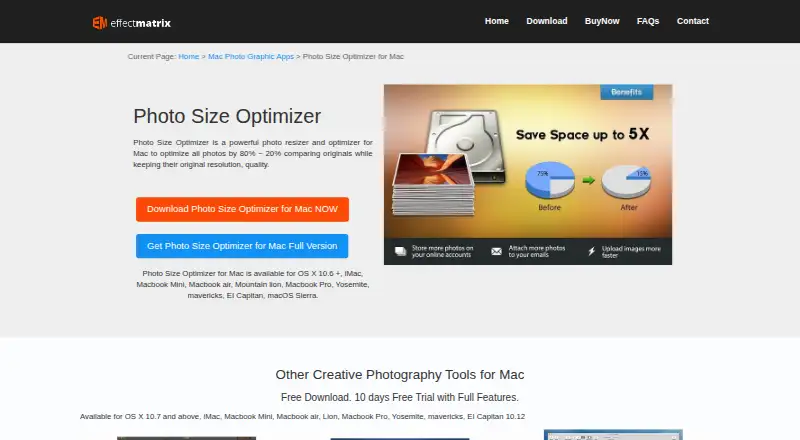
What Photo Size Optimizer is
Photo Size Optimizer is a Mac app for resizing and optimizing photos. It offers one-click processing, and dropping a folder into the app starts work immediately. Batch resizing can handle hundreds of photos, and the app supports more than 70 image formats. Its lossless mode saves more than 20% of space while retaining original resolution and quality; lossy mode saves more than 50% with minor quality loss. The maker also lists optimization of PNG, JPG and GIF photos by 80% ~ 20% while keeping original resolution and quality. Export prompts users to decide whether to overwrite original files. The app is listed as free with no in-app purchases, and an original price of $29.99, paid once is also shown. It supports Mac only, and the App Store listing requires macOS 10.6 or later. Apple’s listing says the developer does not collect data from the app.
Who it suits
Photo Size Optimizer suits Mac users who want to resize or compress image files, including batches of photos or folders. Its listed tools include both lossless and lossy modes.
What it does well
- Batch resizes hundreds of photos with one click.
- Supports more than 70 image formats.
- Lossless mode retains original resolution and quality.
- Export asks before overwriting original files.
What to know first
- Supports Mac only.
- App Store listing requires macOS 10.6 or later.
- No Windows or mobile platform is listed.
Limits
The free plan is listed as free with no in-app purchases. The app is Mac only; the listing also shows an original price of $29.99, paid once.
Plans
| Plan | Billed and limits | Price |
|---|---|---|
| Photo Size Optimizer | Free · Mac only · no in-app purchases · 2.8 MB | Free |
| Original price | Original $ 29.99 · Mac only | $29.99, paid once |
As effectmatrix.com lists them, read 1 Oct 2026. The maker's own page has the final word.
Getting started
- Open https://www.effectmatrix.com/mac-appstore/image-mini.htm.
- Use a Mac that meets the listed macOS 10.6 or later requirement.
- Open the app and drop in a folder to begin processing, or use one-click optimization.
- Choose resizing dimensions and quality controls as needed.
- Review the overwrite prompt during export.
Photo Size Optimizer is a Mac utility for shrinking and resizing image collections with one-click batch controls. It suits photographers, publishers, and anyone handling folders of mixed image files who wants a free desktop workflow. Its strongest case is straightforward bulk processing; users who need cross-platform access or highly granular editing should look elsewhere.
Overview
The app combines dimension-based resizing with compression designed to reduce file size without changing an image’s original resolution. Optimization is stated for PNG, JPG, and GIF files, while resizing supports more than 70 image formats. That distinction matters: a mixed-format folder can be resized broadly, but the headline compression behavior is confined to the three named formats.
Dragging a folder into the application starts processing immediately, and batches of hundreds of photos can be resized in one click. This is a practical fit for recurring export chores, website image preparation, or cleaning up a camera archive. It is less suitable when every file needs a different treatment or when a visual editor is required. The export flow asks before overwriting originals, providing a useful safeguard during large jobs.
Key features
Lossless and lossy compression
Lossless mode claims to save more than 20% of storage while retaining original resolution and quality. It is the prudent setting for archival images, client deliveries, or graphics where visible degradation is unacceptable, although the space reduction is comparatively modest. Lossy mode claims savings above 50% with minor quality loss. That makes it the better choice for email attachments, web uploads, and large personal libraries where storage and transfer speed outweigh pixel-perfect fidelity. “Minor” quality loss remains a trade-off, so important originals should be preserved separately.
Batch resizing and controls
Resizing is handled by dimensions, with quality controls available for output decisions. One-click processing and folder drops reduce repetitive work, while the overwrite prompt helps prevent accidental replacement of source files. The output list includes JPG, BMP, PNG, GIF, PDF, PSD, PNT, RGB, ARW, CRW, CR2, DNG, EPS, EXR, HDR, ICNS, ICO, JP2, JPE, JFIF, JPF, MPO, MAC, MRW and many other formats, giving broad flexibility for conversion-oriented batches.
Pricing
The free Photo Size Optimizer plan costs nothing, is billed Free, runs on Mac only, includes no in-app purchases, and has a 2.8 MB footprint. It is unusually direct for users who need basic bulk resizing and compression without a subscription or usage quota.
A separate Photo Size Optimizer entry shows an Original price of 29.99 USD, billed once as Original $ 29.99, also for Mac. The paid listing does not state additional capabilities, so the free plan is the logical starting point; pay only if that edition is the one you specifically need. There is no recurring renewal term to manage on either entry.
Platforms
Photo Size Optimizer is desktop software for macOS. The App Store requirement is macOS 10.6 or later, and there is no Windows, Linux, iOS, Android, or web version. Apple’s listing says the developer does not collect data from the app. EffectMatrix provides [email protected] for feedback and support.
Who it's for
Choose it for Mac-based batch work: photographers reducing a shoot, teams preparing image folders for publishing, or individuals reclaiming storage from large collections. Lossless processing serves quality-sensitive archives, while lossy processing favors web and sharing workflows. It is a poor match for mixed-device households, browser-first teams, or users who need mobile capture-to-export tools.
Pros and cons
- Pros: Free plan with no in-app purchases; one-click batches of hundreds of photos; folder drag-and-drop starts processing immediately; separate lossless and lossy modes; resizing across more than 70 formats; overwrite confirmation protects originals; no app data collection is stated by Apple.
- Cons: Mac-only support excludes other platforms; compression claims cover PNG, JPG, and GIF rather than every resizing format; lossy mode trades some visual quality for its larger savings; the paid 29.99 USD edition does not describe extra benefits.
Alternatives
For a wider platform mix, PixelMod runs on macOS, Windows, and the web, with a free tier that allows five web downloads monthly, unlimited desktop downloads, a 0.5 MP maximum, and a standard model; its Starter plan is $7 a month.
XnConvert is a freemium option for Linux, macOS, and Windows, with free private, educational, and nonprofit use and company licensing from 6.50 EUR for 100+ licenses. Converseen is free GNU GPL software for Linux, macOS, and Windows, making it preferable when open-source cross-platform coverage matters.
Batch Resize targets iOS and macOS; its free download contains advertising, while removing ads costs 34.99 USD once. Desqueeze is an iOS alternative with a free Basic plan for photos up to 4,032 x 3,024 pixels. Fotosizer serves Windows, offering a free Standard Edition and a 11.10 USD one-time Personal license for one computer.
Cantaloupe is a free, open-source dynamic image server for self-hosted and web use. FastStone Photo Resizer is free for personal and educational use on Windows.
See the broader Photo Resizing Software collection for more choices.
Verdict
Photo Size Optimizer is a sensible pick for Mac users who want free, no-subscription batch resizing with a clear choice between fidelity and maximum compression. Its folder workflow, broad resizing-format support, and overwrite warning make routine jobs efficient. Look elsewhere if you need Windows, Linux, mobile, or web access, or if compression across every supported format is essential.
Verdict
Photo Size Optimizer focuses on batch resizing and photo compression, with separate lossless and lossy modes. It is a Mac-only option, and its listed compatibility requirement is macOS 10.6 or later.
Questions
How much does Photo Size Optimizer cost?
It is listed as free, with no in-app purchases. An original price of $29.99, paid once is also listed.
Is there a free plan?
Yes. The listed plan is free and has no in-app purchases.
Which platforms does it support?
It supports Mac only. The App Store listing requires macOS 10.6 or later.
Can it resize multiple photos at once?
Yes. Batch resizing supports hundreds of photos with one click, and dropping a folder into the application starts processing.
What formats does it support?
It supports more than 70 image formats for resizing. Listed output formats include JPG, BMP, PNG, GIF, PDF, PSD, and many others.
Who makes Photo Size Optimizer?
EffectMatrix Software Studio makes the app. The studio says it was founded in 2002 and provides multimedia and photo graphic design software.
Facts from Photo Size Optimizer's own pages
- Batch processing
- It supports batch resizing of hundreds of photos with one click. · apps.apple.com, 1 Oct 2026
- Compatibility
- The App Store listing requires macOS 10.6 or later and supports Mac only. · apps.apple.com, 1 Oct 2026
- Compression
- It optimizes photos by 80% ~ 20% while keeping original resolution and quality in PNG, JPG and GIF formats. · effectmatrix.com, 1 Oct 2026
- Folder workflow
- Dragging a folder into the application starts processing immediately. · apps.apple.com, 1 Oct 2026
- Format support
- The app supports 70+ image formats for resizing. · apps.apple.com, 1 Oct 2026
- Lossless mode
- Lossless mode saves more than 20% of space while retaining original resolution and quality. · apps.apple.com, 1 Oct 2026
- Lossy mode
- Lossy mode saves more than 50% of space with minor quality loss. · effectmatrix.com, 1 Oct 2026
- Maker history
- EffectMatrix Software Studio says it was founded in 2002 and provides multimedia and photo graphic design software. · svgvector.com, 1 Oct 2026
- One-click operation
- The app provides one-click photo size optimization on Mac OS X. · effectmatrix.com, 1 Oct 2026
- Overwrite control
- The program asks whether to overwrite original files during export. · apps.apple.com, 1 Oct 2026
- Payment security
- EffectMatrix says PayPal encrypts customer personal information before it is sent to the company. · effectmatrix.com, 1 Oct 2026
- Privacy
- Apple’s listing says the developer does not collect data from this app. · apps.apple.com, 1 Oct 2026
- Purpose
- Photo Size Optimizer is a photo resizer and optimizer for Mac. · effectmatrix.com, 1 Oct 2026
- Support
- EffectMatrix lists [email protected] for feedback and support requests. · effectmatrix.com, 1 Oct 2026
Where Photo Size Optimizer stands on Freedom251
- Photo Resizing Software#13 of 28