Freedom251 › Photo Resizing Software

Batch Resize
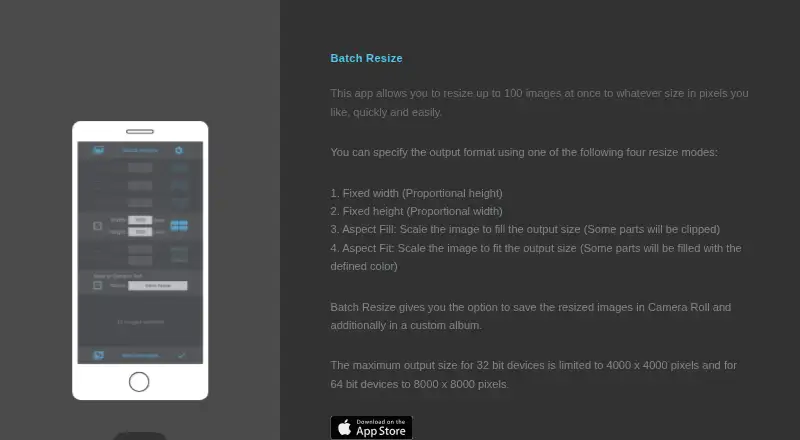
What Batch Resize is
Batch Resize is an image-resizing app for iOS and macOS that changes multiple images to a chosen pixel size. Its current App Store listing says it can process up to 500 images at once. Users can choose fixed width, fixed height, maximum pixel, aspect fill or aspect fit modes, then save results to Camera Roll or a custom album. Maximum output dimensions depend on device type: 4000 × 4000 pixels on 32-bit devices and 8000 × 8000 pixels on 64-bit devices. The listing names 11 languages, including English, Dutch, French, German, Italian, Japanese, Korean, Portuguese, Russian, Simplified Chinese and Spanish. The app is free to download and contains advertising. A 34.99 USD once in-app purchase removes the ads. The developer's privacy disclosure says usage data may be used to track users and may be collected for third-party advertising and analytics; Apple states that it has not verified this information. The App Store listing links to the developer's privacy policy and website.
Who it suits
Batch Resize suits people who want to resize batches of images on iOS or macOS and save them to Camera Roll or an album. Its multiple resize modes may help users working toward different pixel dimensions or aspect ratios.
What it does well
- Processes up to 500 images at once.
- Offers five resize modes.
- Saves images to Camera Roll or custom albums.
- Lists support for 11 languages.
What to know first
- The free app contains advertising.
- 32-bit devices are limited to 4000 × 4000 pixels.
- The privacy disclosure has not been verified by Apple.
Limits
The free download contains advertising. Output size is limited to 4000 × 4000 pixels on 32-bit devices and 8000 × 8000 pixels on 64-bit devices; removing ads costs 34.99 USD once.
Plans
| Plan | Billed and limits | Price |
|---|---|---|
| Free | Free download; contains advertising | Free |
| Remove Ads | In-app purchase to remove ads | $34.99, paid once |
As batchresize.com lists them, read 3 Oct 2026. The maker's own page has the final word.
Getting started
- Visit the Batch Resize website.
- Download the free app for iOS or macOS.
- Choose a resize mode and target dimensions.
- Save resized images to Camera Roll or a custom album.
- Purchase the 34.99 USD one-time in-app option to remove ads, if desired.
Batch Resize is an image-resizing app for iOS and macOS, best suited to people who want to change dimensions across a large group of images. Its batch capacity and five resizing modes make it practical for repeat jobs, while the device-dependent output ceiling and advertising may make other options a better fit.
Overview
Batch Resize focuses on resizing multiple images to a chosen pixel size. It is a focused utility rather than a broad image-editing app: the appeal is handling a group of images in one pass, with several ways to define the result.
Key features
Five modes cover common resizing needs: fixed width, fixed height, maximum pixel, aspect fill and aspect fit. This gives users a choice between setting a dimension directly and fitting images to a target, without suggesting a wider set of editing tools.
The app can resize up to 500 images at once, a generous batch for people working through large photo sets. Output is capped at 4,000 × 4,000 pixels on 32-bit devices and 8,000 × 8,000 pixels on 64-bit devices, so users handling high-resolution images should check that their device's limit suits the job. Results can be saved to Camera Roll or a custom album.
Batch Resize contains advertising, with an in-app purchase to remove it. It supports English, Dutch, French, German, Italian, Japanese, Korean, Portuguese, Russian, Simplified Chinese and Spanish. The developer indicates usage data may be used to track users and may be collected for third-party advertising and analytics; Apple says this information has not been verified by Apple.
Pricing
The Free plan costs nothing. It is a free download with advertising and provides the core resizing utility; there is no free trial because the app already has a free plan. Remove Ads costs $34.99, paid once and removes the advertising. That one-time purchase is the relevant choice for users who expect to use the app regularly and prefer an ad-free experience; it does not change the published output limits.
Platforms
Batch Resize is available on iOS and macOS, and is categorized as mobile software. It is not a choice for users who need a Windows or Linux version.
Who it's for
Choose Batch Resize for resizing sizable groups of images on Apple devices when dimension-based controls and saving to Camera Roll or a custom album meet the need. Look elsewhere if the output cap on a 32-bit device is too low, if advertising is unacceptable and the removal purchase is not worthwhile, or if the disclosed data practices are a concern.
Pros and cons
- Pro: Up to 500 images per batch makes it suitable for large collections rather than one-at-a-time resizing.
- Pro: Five resize modes and two save destinations give useful control over dimensions and organization.
- Con: Output limits vary by device architecture, with a lower ceiling on 32-bit devices.
- Con: The free download contains advertising, and the developer's disclosure says usage data may be used for tracking and third-party advertising and analytics.
Alternatives
Photo Resizing Software is a useful place to compare other image-resizing options. PixelMod is worth considering for users who need macOS, web and Windows coverage; its free plan includes 5 web downloads per month, unlimited desktop downloads and a 0.5 MP maximum. XnConvert suits people seeking Linux, macOS or Windows support, with freeware for private, educational and non-profit use. Converseen is another free option for Linux, macOS and Windows users.
Desqueeze is an iOS alternative. Fotosizer is for Windows users, with a free Standard Edition and paid personal and business options. Photo Size Optimizer offers a free Mac-only option. Cantaloupe is a free self-hosted or web image server, rather than a direct desktop or mobile resizing-app match. FastStone Photo Resizer is a Windows alternative free for personal and educational use.
Verdict
Batch Resize is a sensible pick for Apple-device users who need to resize large batches with straightforward dimension controls. Its 500-image capacity is the clearest reason to choose it; the device-dependent output cap, ads and disclosed data practices are the main reasons to compare alternatives.
Verdict
Batch Resize provides several ways to set output dimensions and supports large batches. Users should weigh the device-dependent output cap, advertising and the app's disclosed data practices.
Questions
How much does Batch Resize cost?
The app is free to download and contains advertising. A 34.99 USD one-time in-app purchase removes ads.
Is there a free plan or trial?
The app has a free plan. There is no free trial.
Which platforms does it support?
The listing names iOS and macOS.
How many images can it resize at once?
The current App Store listing says it can resize up to 500 images in one batch.
Where can resized images be saved?
They can be saved to Camera Roll or a custom album.
What does the privacy disclosure say?
The developer indicates usage data may be used to track users and may be collected for third-party advertising and analytics. Apple says this information has not been verified by Apple.
Facts from Batch Resize's own pages
- Advertising
- The app contains advertising, and the listing offers an in-app purchase to remove ads. · apps.apple.com, 3 Oct 2026
- Batch size
- The current App Store listing says it can resize up to 500 images at once. · apps.apple.com, 3 Oct 2026
- Languages
- The listing names English, Dutch, French, German, Italian, Japanese, Korean, Portuguese, Russian, Simplified Chinese, and Spanish. · apps.apple.com, 3 Oct 2026
- Output limits
- The maximum output size is 4000 × 4000 pixels on 32-bit devices and 8000 × 8000 pixels on 64-bit devices. · batchresize.com, 3 Oct 2026
- Platforms
- The App Store listing supports iPhone and iPad, and lists Mac compatibility on macOS 13 or later with an Apple M1 chip or later. · apps.apple.com, 3 Oct 2026
- Privacy disclosure
- The developer indicates usage data may be used to track users and may be collected for third-party advertising and analytics; Apple says this information has not been verified by Apple. · apps.apple.com, 3 Oct 2026
- Purpose
- Batch Resize resizes multiple images to a chosen pixel size. · batchresize.com, 3 Oct 2026
- Resize modes
- The app lists fixed width, fixed height, maximum pixel, aspect fill, and aspect fit modes. · apps.apple.com, 3 Oct 2026
- Save location
- Resized images can be saved to Camera Roll and to a custom album. · batchresize.com, 3 Oct 2026
- Support
- The App Store listing links to the developer’s privacy policy and website. · apps.apple.com, 3 Oct 2026
Where Batch Resize stands on Freedom251
- Photo Resizing Software#3 of 28