Freedom251 › Photo Resizing Software

Desqueeze
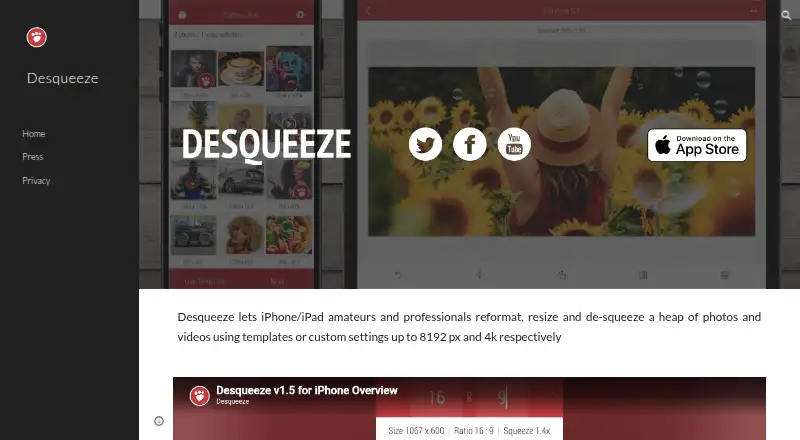
What Desqueeze is
Desqueeze is an iOS app for batch resizing, reformatting and de-squeezing photos, videos and Live Photos. Items can be sized by pixels, aspect ratios or percentages, using Stretch, Fill or Fit methods. Batch processing can cover a full Photo Library album, including mixed photos and videos. The app offers more than 100 standard templates, and users can make their own or modify copies of standard ones. Supported photo formats include PNG, JPEG, HEIC and TIFF; video formats include MP4, QuickTime MOV and M4V. Desqueeze supports HDR processing and offers 12 color profiles, including Original (Automatic). Exports can be saved to the Photo Library or Files app, or shared through services such as Instagram, Mail, Facebook and Messages. Basic is free, with photos up to 4,032 x 3,024 px and videos up to 1920 x 1080 px; the free version has additional limitations described in the app. PRO Monthly costs $4.49 a month, PRO Annual costs $34.99 a year, and Lifetime Access to PRO Version costs $59.99, paid once.
Who it suits
Desqueeze suits iPhone and iPad users who need to resize or reformat batches of photos and videos, including mixed albums. Its templates and multiple export options may also suit people preparing media for different uses.
What it does well
- Processes batches and mixed photo-video albums.
- Offers more than 100 standard templates.
- Supports HDR and 12 color profiles.
- Saves to Photo Library or Files app.
- Supports PNG, JPEG, HEIC and TIFF photos.
What to know first
- Basic photos are limited to 4,032 x 3,024 px.
- Basic videos are limited to 1920 x 1080 px.
- Requires iOS 17 or later on iPhone and iPad.
- PRO costs $4.49 a month, $34.99 a year or $59.99, paid once.
Limits
The free Basic plan limits photos to 4,032 × 3,024 pixels and videos to 1920 × 1080 pixels. PRO supports photos up to 18,000 × 12,000 pixels and videos up to 8K.
Plans
| Plan | Billed and limits | Price |
|---|---|---|
| Basic | Photos up to 4,032 x 3,024 px · videos up to 1920 x 1080 px · free version has additional limitations described in the app | Free |
| PRO Annual | Unlocks all features and removes Basic version limitations | $34.99 a year |
| PRO Monthly | Unlocks all features and removes Basic version limitations | $4.49 a month |
| Lifetime Access to PRO Version | Unlocks all features and removes Basic version limitations | $59.99, paid once |
As desqueeze.com lists them, read 3 Oct 2026. The maker's own page has the final word.
Getting started
- Open the Desqueeze website or find the app through its iOS listing.
- Install it on an iPhone or iPad running iOS 17 or later, or use a compatible Apple Vision device.
- Choose the Basic plan or a PRO option: $4.49 a month, $34.99 a year, or $59.99, paid once.
- Select photos, videos, Live Photos, or a full Photo Library album.
- Choose sizing controls, a resize method, and a template, then save or share the results.
Desqueeze is an iOS app for resizing and reformatting photos, videos and Live Photos in batches. It is a strong fit for iPhone and iPad users who need reusable presets and mixed-media album processing. The Basic plan is useful for standard-size output, but its resolution caps make PRO the practical choice for higher-resolution work.
Overview
Desqueeze combines image and video resizing, format conversion and de-squeezing in one mobile workflow. Users can specify pixel dimensions, aspect ratios or percentages, then choose Stretch, Fill or Fit. That range matters when an exact output size and the way an image fills its frame both matter; it is less compelling for anyone whose workflow depends on a desktop platform, since Desqueeze is for iOS.
Batch processing can take a full Photo Library album, including one with both photos and videos. Live Photos are supported too, so users can process more than still images and conventional video clips in the same app. This makes Desqueeze particularly useful for recurring jobs across a phone library, rather than one-off edits alone.
Key features
More than 100 standard templates provide ready-made sizing options, while personal templates and editable duplicates of standard templates let users adapt settings for repeat work. That is a meaningful convenience for people who regularly need the same output sizes, though it does not remove the need to choose an appropriate resize method for each job.
Photo formats include PNG, JPEG, HEIC and TIFF; video formats include MP4, QuickTime MOV and M4V. HDR processing and 12 color profiles, including Original (Automatic), offer options for color handling. Completed work can be saved to the Photo Library or Files, or shared through services such as Instagram, Mail, Facebook and Messages.
Pricing
Basic: free. It supports photos up to 4,032 × 3,024 pixels and videos up to 1920 × 1080 pixels, with additional limitations in the free version. Those ceilings suit standard-resolution resizing, but users handling larger photos or 4K and 8K video will need to move beyond Basic.
PRO Monthly: $4.49 a month. PRO Annual: $34.99 a year. Lifetime Access to PRO Version: $59.99, paid once. Each paid option unlocks all features and removes Basic version limitations. The monthly plan suits users who want PRO temporarily; the annual option costs less than twelve monthly payments, while lifetime access avoids recurring payments for those who expect to keep using the app. No trial terms are stated.
PRO raises photo output to 18,000 × 12,000 pixels and supports video up to 8K. That difference is the central buying decision: Basic costs nothing but has firm output caps, while paid plans remove its limitations and extend maximum resolution.
Platforms
Desqueeze requires iOS 17 or later on iPhone and iPad. Apple Vision compatibility is also listed, requiring visionOS 1 or later. It is a mobile option, not a cross-platform desktop tool. The developer indicates that identifiers, diagnostics and other data may be collected and linked to the user for analytics and app functionality; Apple says this information has not been verified by Apple. The privacy policy says collected data may be used for customer support, and questions can be sent to [email protected].
Who it's for
Desqueeze is best for iPhone and iPad users who resize batches of mixed photos and videos, rely on repeatable templates, or need more format and color-profile choices than a basic resize utility provides. Basic is a sensible starting point for output within its resolution limits. PRO is the better fit for higher-resolution photo and video work. Users who need Windows, macOS or Linux support should choose a platform-specific alternative instead.
Pros and cons
- Pros: Batch processing accepts full albums with mixed photos and videos, reducing the need to sort media before a job.
- Pros: More than 100 standard templates plus customizable personal templates help standardize recurring output sizes.
- Pros: Support for HDR, 12 color profiles and several photo and video formats gives users meaningful control over conversion and color handling.
- Cons: Basic caps photo output at 4,032 × 3,024 pixels and video at 1920 × 1080, excluding higher-resolution jobs unless users pay for PRO.
- Cons: The iOS focus rules it out for users who need a desktop workflow across Windows, macOS or Linux.
- Cons: The developer indicates that some data may be linked to users for analytics and functionality, a privacy consideration for people who prefer to minimize data collection.
Alternatives
Photo Resizing Software is a useful place to compare more options. Choose PixelMod instead if you need macOS, Windows or web access; its free plan offers unlimited desktop downloads but caps web downloads at five per month and output at 0.5 MP. XnConvert is a better fit for Linux, macOS or Windows users seeking a free option for private, educational or nonprofit use; company licensing is priced separately. Choose Converseen if you want free software for Linux, macOS or Windows.
Batch Resize is another iOS and macOS option; its free download contains advertising, with a 34.99 USD one-time purchase to remove ads. Fotosizer suits Windows users who want a free Standard Edition or a paid personal license for one computer. For a free Mac-only option with no in-app purchases, consider Photo Size Optimizer. Cantaloupe is a free, open-source dynamic image server for web or self-hosted use. Windows users seeking a free option for personal and educational use can also consider FastStone Photo Resizer.
Verdict
Choose Desqueeze if you work on iPhone or iPad and want batch resizing across mixed albums, reusable templates and broad photo and video format support. Its strongest reason to buy PRO is the jump from Basic's full-HD video and standard photo ceilings to output up to 8K video and 18,000 × 12,000-pixel photos. Look elsewhere if you need desktop support or want to avoid a paid upgrade for high-resolution work.
Verdict
Desqueeze combines batch resizing, templates and format support for photos and video on iOS. The free Basic version has stated output limits, while PRO removes Basic version limitations.
Questions
Is Desqueeze free?
Yes. The Basic plan costs nothing.
What does PRO cost?
PRO Monthly is $4.49 a month, PRO Annual is $34.99 a year, and Lifetime Access to PRO Version is $59.99, paid once.
Which devices does it support?
The listing requires iOS 17 or later on iPhone and iPad. Apple Vision compatibility with visionOS 1 or later is also listed.
Which file formats are supported?
Photo formats include PNG, JPEG, HEIC, and TIFF. Video formats include MP4, QuickTime MOV, and M4V.
Who operates Desqueeze?
The website identifies Aliaksei Khutarshchykau as the operator of Desqueeze and Desqueeze PRO.
Where can I send support questions?
The privacy policy says questions can be sent to [email protected].
Facts from Desqueeze's own pages
- Basic limits
- The listed Basic limits are 4,032 × 3,024 pixels for photos and 1920 × 1080 pixels for videos; PRO supports photos up to 18,000 × 12,000 pixels and videos up to 8K. · apps.apple.com, 3 Oct 2026
- Batch and album processing
- The app supports batch resizing and selecting a full Photo Library album, including mixed photo and video items. · desqueeze.com, 3 Oct 2026
- Export and sharing
- Results can be saved to the Photo Library or Files app and shared through services such as Instagram, Mail, Facebook, and Messages. · apps.apple.com, 3 Oct 2026
- Formats
- Supported photo formats include PNG, JPEG, HEIC, and TIFF, and supported video formats include MP4, QuickTime MOV, and M4V. · apps.apple.com, 3 Oct 2026
- HDR and color
- The app supports HDR processing and offers 12 color profiles, including Original (Automatic). · apps.apple.com, 3 Oct 2026
- Maker
- The website identifies Aliaksei Khutarshchykau as the operator of Desqueeze and Desqueeze PRO and provides [email protected]. · desqueeze.com, 3 Oct 2026
- Policy and support
- The privacy policy says collected data may be used to provide customer support and states that questions can be sent to [email protected]. · desqueeze.com, 3 Oct 2026
- Privacy practices
- The developer indicates that identifiers, diagnostics, and other data may be collected and linked to the user for analytics and app functionality; Apple says this information has not been verified by Apple. · apps.apple.com, 3 Oct 2026
- Purpose
- Desqueeze batch resizes, reformats, and de-squeezes photos, videos, and Live Photos. · desqueeze.com, 3 Oct 2026
- Resize controls
- It supports sizing in pixels, aspect ratios, and percentages, with Stretch, Fill, and Fit resize methods. · apps.apple.com, 3 Oct 2026
- Supported devices
- The App Store listing says Desqueeze requires iOS 17 or later on iPhone and iPad, and also lists Apple Vision compatibility with visionOS 1 or later. · apps.apple.com, 3 Oct 2026
- Templates
- It offers more than 100 standard templates and lets users create personal templates and modify duplicated standard templates. · apps.apple.com, 3 Oct 2026
Where Desqueeze stands on Freedom251
- Photo Resizing Software#5 of 28