Perl Debugger
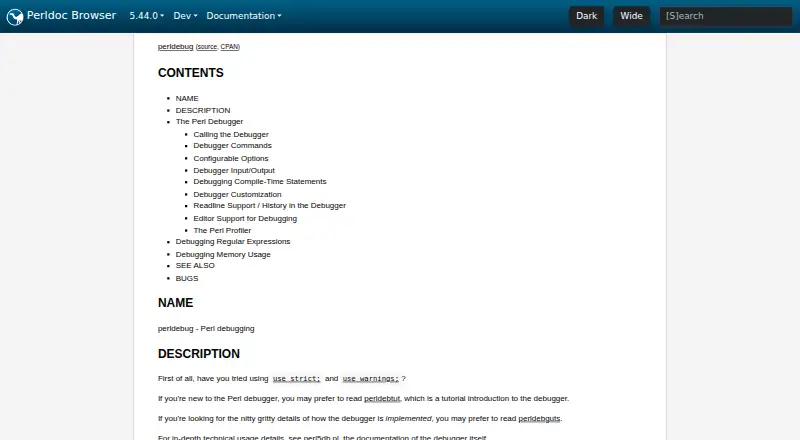
What Perl Debugger is
Perl Debugger is an interactive debugger included with Perl. Starting Perl with the `-d` flag loads the debugger and adds source information, so users can examine code while a script runs. It can pause at breakpoints, show stack backtraces, and let users change variable values. Commands support stepping into a subroutine, stepping over a call, and tracing execution. Conditional breakpoints can pause execution when a condition is met, and watches on global expressions can report when values change. The `x` command evaluates an expression and recursively pretty-prints nested data. Package variables can be displayed; showing lexical variables requires PadWalker version 0.08 or later. Debugger settings can be changed interactively, through the `PERLDB_OPTS` environment variable, or in `.perldb` files. The documentation also describes a GUI route using Devel::ptkdb. The debugger works with Perl programs that compile correctly. It is free and is listed for Linux, macOS, and Windows, with Perl available through Unix/Linux and macOS distributions and a Windows option through Strawberry Perl. Some command-line editing features require optional modules. The debugger cannot provide stack-frame information for functions that were not compiled by Perl, including C or C++ extension functions.
Who it suits
Perl Debugger suits developers who want to step through Perl scripts, inspect values, trace execution, and pause on conditions or watched global changes. It is a fit for programs that compile correctly and for users comfortable with Perl’s command-line debugger or its documented GUI option.
What it does well
- Included with Perl and free to use.
- Supports conditional breakpoints and global expression watches.
- Can step into or over subroutine calls.
- Recursively pretty-prints nested data structures.
- Options can be set interactively or in configuration files.
- Listed for Linux, macOS, and Windows.
What to know first
- The program must compile correctly before debugging.
- Lexical variable inspection requires PadWalker version 0.08 or higher.
- Cannot provide stack-frame information for C or C++ extension functions.
- Does not currently work with Perl's -W switch.
Limits
The debugger only works on code that compiles correctly. Lexical-variable display requires PadWalker version 0.08 or higher, and the debugger cannot provide stack-frame information for functions not compiled by Perl.
Plans
| Plan | Billed and limits | Price |
|---|---|---|
| Perl Debugger | Included with Perl; requires the program to compile correctly before debugging | Free |
As perldoc.perl.org lists them, read 7 Oct 2026. The maker's own page has the final word.
Getting started
- Install or access Perl for your platform.
- Run the program with Perl's `-d` flag to load the debugger.
- Use debugger commands to inspect source, set breakpoints, or step through execution.
- Install PadWalker version 0.08 or higher if lexical-variable inspection is needed.
- Use `perl -d:ptkdb` for the documented Devel::ptkdb GUI option.
Perl Debugger is the interactive source debugger built into Perl, best suited to developers tracing scripts written in the language. It brings breakpoints, stepping, and value inspection into the Perl runtime, with clear limits around compile-time execution and native extensions.
Overview
Start a script with Perl’s -d flag: Perl adds source information and loads the debugger library, so no separate debugger program is required. The script must compile successfully before debugging can begin. That makes Perl Debugger a practical first choice for investigating ordinary Perl execution, especially when keeping the workflow inside the language runtime matters.
Key features
At the prompt, users can inspect source, set conditional breakpoints, view stack backtraces, and change variable values. The s command steps into a subroutine; n runs over the call to the next statement. Tracing adds another way to follow execution. These controls are well suited to narrowing down behavior in a Perl script, though compile-time executable statements such as BEGIN, UNITCHECK, CHECK, and use are not stopped by the debugger. Some compile-time code can be traced with AutoTrace.
A global watch expression pauses execution when its value changes and reports the old and new values. The x command evaluates an expression and recursively pretty-prints nested data structures; package variables can also be displayed. Lexical-variable inspection requires PadWalker version 0.08 or higher, a meaningful extra dependency for developers whose debugging depends on lexical state.
Commands the debugger does not recognize are evaluated as Perl code in the current package, giving Perl users a direct way to probe the running program. Options can be set at the prompt, through PERLDB_OPTS, or in .perldb customization files. Since those files can run arbitrary commands, they must be owned by the superuser or current user and writable only by their owner. The LineInfo option can connect to client editors or visual debuggers, with vi, emacs, and ddd among the examples. A GUI route is also described through Devel::ptkdb using perl -d:ptkdb. Full command-line editing requires Term::ReadKey and a Term::ReadLine module.
Threaded programs can be debugged with -dt, but that invocation is experimental. The debugger also cannot show stack-frame information or debug functions that Perl did not compile, including C or C++ extension functions; workflows that cross into native code will need another approach. It does not currently work with Perl’s -W switch.
Pricing
Perl Debugger is free at free. The plan is included with Perl and supports Perl debugging, with the requirement that the program compile correctly first. There is no separate debugger purchase or trial to weigh; its practical cost is the optional modules needed for lexical inspection or full command-line editing.
Platforms
The debugger is available wherever Perl is available in the supported platform set: Linux, macOS, and Windows. Perl is included on Unix/Linux and macOS, while Strawberry Perl provides a Windows option.
Who it's for
Choose it if you write Perl and want an included debugger for stepping through scripts, setting conditional breakpoints, watching global values, and inspecting data without installing a separate debugger. It is less suitable if your work centers on compile-time code, native extension functions, or the -W switch. Learners can turn to learn.perl.org and the Perl Community for help.
Pros and cons
- Included with Perl and free: the -d flag loads the debugger without a separate debugger installation.
- Useful runtime controls: stepping, conditional breakpoints, global watches, backtraces, and nested-value display support focused script investigation.
- Flexible customization: options and editor connections can be configured, with an optional GUI path through Devel::ptkdb.
- Extra modules for some workflows: PadWalker is needed to inspect lexical variables, while full command-line editing needs Term::ReadKey and a Term::ReadLine module.
- Boundaries for mixed-language debugging: native extension functions lack debugger stack-frame information, and compile-time statements are not stopped.
- Experimental threaded mode and switch incompatibility: -dt is marked experimental, and the debugger does not work with -W.
Alternatives
Browse more debuggers if Perl Debugger’s language focus or runtime limits do not fit. Choose LLDB for a free, open-source debugger across Android, iOS, Linux, macOS, and Windows. IDA Pro is a paid option with a free tier for x86-32 and x86-64 disassembly and two cloud-based decompilers; its Pro Essential plan costs 1099.00 USD. PonyDebugger is a free option with an iOS client and gateway server. pyOCD is a free, Apache 2.0 open-source project. Choose Black Magic Debug for JTAG/SWD debugging of embedded microcontrollers when you have compatible probe hardware and a suitable toolchain. FlowStorm is free and open source. GDB is a free debugger whose source code is available under the GNU General Public License. OpenOCD is free open-source software distributed through operating-system packages or source code.
Verdict
Perl Debugger is the right choice for Perl developers who want a free, built-in way to inspect and control script execution. Its runtime stepping, breakpoints, watches, and data inspection cover the core debugging loop without a separate debugger program. Look elsewhere when you need stack-frame details for C or C++ extension functions, need to stop at compile-time statements, or depend on Perl’s -W switch.
Verdict
Choose Perl Debugger if you need a free, Perl-specific way to inspect execution, set breakpoints, and examine values. It is included with Perl rather than installed as a separate debugger. Look elsewhere if you need stack-frame details for functions compiled outside Perl, or if your workflow depends on the `-W` switch.
Questions
Does Perl Debugger cost anything?
It is free and included with Perl.
Which operating systems are supported?
It is listed for Linux, macOS, and Windows.
Which programming language does it debug?
It debugs Perl programs.
Is it a separate program?
No. Perl's `-d` flag loads the debugger when starting a program.
Is Perl open source?
Yes. Perl is licensed under either the Artistic License or the GNU General Public License.
What is required to inspect lexical variables?
Lexical-variable display requires PadWalker version 0.08 or higher.
Facts from Perl Debugger's own pages
- Breakpoints and watches
- Users can set conditional breakpoints and watch global expressions for changes. · perldoc.perl.org, 7 Oct 2026
- Built into Perl
- The debugger is not a separate program; Perl’s `-d` flag makes the compiler insert source information and preload the debugger library. · perldoc.perl.org, 7 Oct 2026
- Compile requirement
- The code must compile correctly for the debugger to work on it. · perldoc.perl.org, 7 Oct 2026
- Compile-time limit
- Compile-time executable statements such as BEGIN, UNITCHECK, CHECK, and use statements are not stopped by the debugger, though some compile-time code can be traced with AutoTrace. · perldoc.perl.org, 7 Oct 2026
- Compile-time limitation
- Compile-time executable statements such as `BEGIN`, `UNITCHECK`, `CHECK`, and `use` are not stopped by the debugger, though some can be traced with `AutoTrace`. · perldoc.perl.org, 7 Oct 2026
- Customizable
- Debugger options can be set interactively, through the PERLDB_OPTS environment variable, or in customization files. · perldoc.perl.org, 7 Oct 2026
- Customization
- Options can be set interactively, through `PERLDB_OPTS`, or in `.perldb` customization files. · perldoc.perl.org, 7 Oct 2026
- Editor connections
- The LineInfo option provides a mechanism to interact with client editors or visual debuggers, with vi, emacs, and ddd given as examples. · perldoc.perl.org, 7 Oct 2026
- GUI option
- The documentation describes debugging a program through the Devel::ptkdb GUI using `perl -d:ptkdb`. · perldoc.perl.org, 7 Oct 2026
- Inspect and control execution
- Debugger commands can examine source code, set breakpoints, show stack backtraces, and change variable values. · perldoc.perl.org, 7 Oct 2026
- Inspect values
- The x command evaluates an expression and pretty-prints nested data structures recursively. · perldoc.perl.org, 7 Oct 2026
- Interactive evaluation
- Commands the debugger does not recognize are evaluated as Perl code in the current package. · perldoc.perl.org, 7 Oct 2026
- Native extension limitation
- The debugger cannot provide stack-frame information or debug functions that were not compiled by Perl, such as C or C++ extension functions. · perldoc.perl.org, 7 Oct 2026
- Notable limit
- The debugger cannot provide stack-frame information for functions not compiled by Perl, such as those from C or C++ extensions. · perldoc.perl.org, 7 Oct 2026
- Optional dependencies
- Lexical variable inspection requires PadWalker, and full command-line editing requires Term::ReadKey and a Term::ReadLine module. · perldoc.perl.org, 7 Oct 2026
- Platform availability
- The Perl download page lists Perl as included on Unix/Linux and macOS, and provides a Windows option through Strawberry Perl. · perl.org, 7 Oct 2026
- Project licensing
- Perl is open source and is licensed under either the Artistic License or the GNU General Public License. · perl.org, 7 Oct 2026
- Purpose
- The Perl source debugger runs scripts interactively and lets users inspect source, set breakpoints, get stack backtraces, and change variable values. · perldoc.perl.org, 7 Oct 2026
- Security detail
- The documentation says .perldb may contain arbitrary commands and must be owned by the superuser or current user and writable only by its owner. · perldoc.perl.org, 7 Oct 2026
- Stepping and tracing
- Commands support single stepping, stepping over subroutine calls, and tracing execution. · perldoc.perl.org, 7 Oct 2026
- Step through code
- The s command steps into subroutine calls, while n executes over them to the next statement. · perldoc.perl.org, 7 Oct 2026
- Support
- The download page points learners to learn.perl.org and the Perl Community for help. · perl.org, 7 Oct 2026
- Threaded debugging
- The `-dt` invocation debugs a threaded program and is marked experimental. · perldoc.perl.org, 7 Oct 2026
- Variable inspection
- The debugger can pretty-print nested data and display package variables; lexical-variable display requires PadWalker version 0.08 or higher. · perldoc.perl.org, 7 Oct 2026
Where Perl Debugger stands on Freedom251
- Debuggers#11 of 27