Freedom251 › Virtual Classroom Software

Pencil Spaces
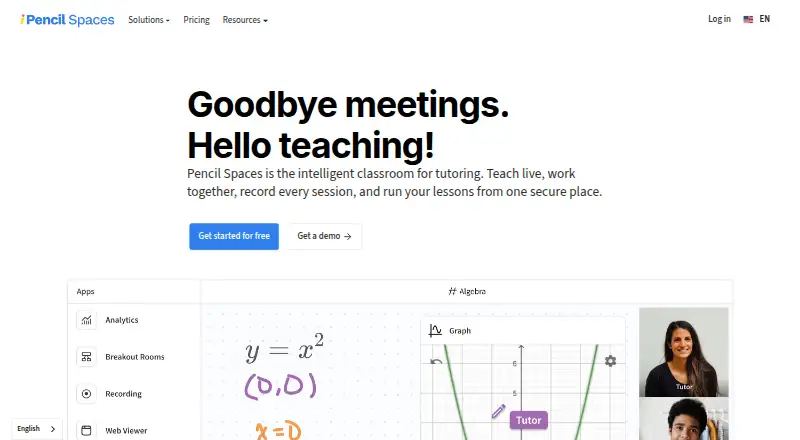
What Pencil Spaces is
Pencil Spaces is an online classroom for tutoring that combines live teaching, collaboration, recording, and lesson management. Its classroom includes video calling, persistent whiteboards, document annotation, built-in resources, and interactive web content. Teachers can set student views and permissions, open waiting rooms or breakout rooms, and receive private alerts when a student goes idle or switches tabs.
Scheduling features include attendance tracking, automated scheduling, reminders, and engagement insights. Sessions can be recorded locally or in the cloud; the pricing page lists 90-day cloud storage for Expert and 12 months for Master. Pencil Spaces runs in a browser without installation, though some mobile features may be unavailable. It lists Android, iOS, Linux, macOS, web, and Windows support. A free Starter plan and 14-day trial are available, with paid plans from $4/mo. Billing is in USD per session hour, not per person, and starts when a second person joins a Space. Listed integrations include Google Drive, OneDrive, Canvas, Zapier, and Pipedream.
Who it suits
It suits tutors and teachers who need live online lessons with classroom controls, scheduling, and recording. The Enterprise plan is described for teams running thousands of session hours monthly.
What it does well
- Persistent whiteboards and video calling are included.
- Attendance tracking and automated scheduling are listed.
- Teachers can use waiting and breakout rooms.
- Local and cloud session recording are supported.
- Browser access requires no installation.
What to know first
- Some mobile features may be unavailable.
- Billing starts when a second person joins a Space.
- Cloud recording storage varies by plan.
Plans
| Plan | Billed and limits | Price |
|---|---|---|
| Starter | The Pro plan includes Starter; free-plan features and limits are not stated on the opened pricing page | Free |
| Enterprise | Starting at $1,000/mo; custom pricing starting from $0.002 per participant minute · For teams running thousands of session hours a month · Multi-year plans · Dedicated support team | $1,000 a month |
As pencilspaces.com lists them, read 8 Oct 2026. The maker's own page has the final word.
Getting started
- Open the Pencil Spaces website in a browser; installs are not required.
- Choose the free Starter plan or review paid plans, which start at $4/mo.
- Use the 14-day trial.
- Invite another person to a Space to begin a session; billing starts when a second person joins.
Pencil Spaces is a browser-based tutoring workspace that combines live lessons, scheduling, collaboration, and classroom supervision. It suits tutors and teaching organizations that need operational controls around each session, while casual instructors may find its per-session-hour billing and extensive controls unnecessary.
Overview
Pencil Spaces puts the lesson and its administration in one service. Alongside live teaching, it supports attendance, automated scheduling, reminders, engagement insights, permissions, and recording. That combination is useful for tutoring teams coordinating recurring classes and reviewing how sessions run, rather than for a teacher who only needs a basic video call.
Desktop learners can join through a browser without installing software. Android and iOS access is supported, but some mobile features may be unavailable, so tablet- or phone-first programs should confirm that their required workflow works on mobile.
Key features
Teaching and classroom control
The virtual classroom includes persistent whiteboards, video calling, built-in resources, document annotation, and interactive web content. Persistent boards and reusable resources support lessons that continue over multiple sessions, while annotation and web content keep explanation and practice in the same space.
Teachers can control student views and permissions, place participants in waiting rooms or breakout rooms, and receive private alerts when a student goes idle or switches tabs. These controls are valuable for structured tutoring, supervised study, and lessons with multiple participants. They add less value when a tutor runs informal one-to-one calls.
Scheduling and integrations
Attendance tracking, automated scheduling, reminders, and engagement insights cover much of the work before and after class. Integrations include Wise, Oases, Teachworks, YoCoach, Bizstim, TutorCruncher, Canvas, LTI 1.3, Google Drive, OneDrive, Zapier, and Pipedream. Organizations already using those services can connect tutoring operations and learning systems instead of maintaining separate workflows.
Recording, security, and extensibility
Sessions can be recorded locally or in the cloud. Cloud recordings are stored for 90 days on Expert and 12 months on Master, making the higher tier more suitable when learners need longer replay access. Pencil Spaces describes COPPA, FERPA, GDPR, SOC 2, and HIPAA certification, and says privacy-aware recordings never capture student video.
For technical teams, iframe embedding, API authentication, APIs, webhooks, and custom collaborative apps support integration beyond the listed connectors. The service also advertises 24/7 support from real people, with an average reply time under one minute.
Pricing
Pencil Spaces uses a freemium model, with a free plan, paid plans from $4/mo, and a 14-day trial. Prices are in USD and billing is per session hour rather than per person; charges start when a second person joins a Space. That model can suit tutoring businesses that track teaching time, but costs rise with live usage even when a session has only a few participants.
| Plan | Price and terms | Best fit |
|---|---|---|
| Starter | free | Individuals evaluating the service or running sessions within the free allowance |
| Pro | Paid plans from $4/mo; includes Starter | Tutors needing more than the free tier |
| Enterprise | Starting at $1,000/mo; custom pricing starting from $0.002 per participant minute; multi-year plans and dedicated support team | Teams running thousands of session hours each month |
The opened pricing information does not state Starter’s feature or usage caps, so prospective users should verify that the free allowance covers their session volume. Enterprise’s participant-minute option and dedicated support target large operations rather than occasional teaching.
Platforms
Pencil Spaces supports Android, iOS, Linux, macOS, Windows, web access, and an API. Browser delivery avoids desktop installation, while mobile feature availability can differ from the desktop experience.
Who it's for
It is a strong match for tutors, tutoring companies, and education teams that need classroom tools, scheduling, attendance, recording, and integrations together. Enterprise is explicitly aimed at organizations running thousands of session hours monthly. A solo tutor with simple video-call needs, or a mobile-only program that depends on every feature being present on phones, should consider a simpler fit.
Pros and cons
Pros
- Broad tutoring workspace: Whiteboards, calls, annotation, resources, web content, scheduling, attendance, and engagement insights cover the full teaching cycle.
- Strong participant supervision: Permissions, waiting rooms, breakout rooms, and idle or tab-switch alerts support controlled lessons.
- Flexible connectivity: A wide integration list plus APIs, webhooks, and embedding options can fit established education operations.
- Privacy and support commitments: The stated compliance certifications, privacy-aware recording, and 24/7 human support address sensitive teaching environments.
Cons
- Usage-based billing: Per-session-hour charges begin when a second person joins, making costs depend on live teaching time rather than seats alone.
- Unclear free-tier boundaries: Starter’s published feature and usage limits are not defined in the pricing information.
- Mobile caveat: Some mobile features may be unavailable, which can complicate phone- or tablet-led delivery.
Alternatives
Choose alfaview if you want a free plan with one room or license, up to 50 participants per room, and 50 breakout rooms per room.
Choose LearnCube for a free virtual classroom with unlimited one-to-one classes and a materials library of up to 10 files.
Choose Lessonspace when per-participant-minute pricing and unlimited concurrent sessions matter more than a free plan.
Choose TrainerCentral for a free course-oriented plan supporting up to three courses, 10 active learners, unlimited learner accounts, and 5GB of storage.
Choose BrainCert Virtual Classroom for a paid annual Bronze plan capped at 25 attendees per session and 5,000 classroom minutes per month.
Choose Neukol if a free plan with one license, 90-minute classrooms, two lessons per month, 15 participants, 1GB storage, and seven-day replays fits your schedule.
Choose Classverse for a free-forever plan with up to five enrollments monthly, unlimited classrooms, 1GB media storage, and no video recording.
Choose Koala Go for a free plan supporting up to four students per session, worldwide invoicing, and a 4.5% Koala fee on invoices.
Verdict
Pencil Spaces is best for tutoring professionals and education teams that want supervised, recordable lessons tied to scheduling and operational integrations. Choose it for the breadth of classroom controls and developer connectivity; look elsewhere if per-session-hour billing, unspecified free-plan limits, or incomplete mobile feature coverage conflicts with your teaching model.
Verdict
Pencil Spaces brings teaching, classroom controls, scheduling, and recording into a browser-based service. Review per-session-hour billing and mobile feature availability when deciding whether it fits your teaching setup.
Questions
Is Pencil Spaces free?
Yes. Pencil Spaces lists a free Starter plan.
How much do paid plans cost?
Paid plans start at $4/mo. Enterprise is billed starting at $1,000/mo, with custom pricing starting from $0.002 per participant minute.
How is billing calculated?
Prices are in USD and billing is per session hour rather than per person. Charges begin when a second person joins a Space.
Which platforms does Pencil Spaces support?
It lists Android, API, iOS, Linux, macOS, web, and Windows. It runs in a browser without an install, though some mobile features may be unavailable.
Can sessions be recorded?
Yes. Sessions can be recorded locally or in the cloud. Cloud recording storage is 90 days on Expert and 12 months on Master.
What integrations does Pencil Spaces list?
Listed integrations include Wise, Oases, Teachworks, YoCoach, Canvas, LTI 1.3, Google Drive, Bizstim, TutorCruncher, OneDrive, Zapier, and Pipedream.
Facts from Pencil Spaces's own pages
- Billing detail
- The pricing page says prices are in USD, billing is per session hour rather than per person, and charges begin when a second person joins a Space. · pencilspaces.com, 8 Oct 2026
- Browser access
- Pencil Spaces runs in a browser without installs, and its help page lists desktop browsers and iOS and Android requirements; it notes that some mobile features may be unavailable. · pencilspaces.com, 8 Oct 2026
- Classroom tools
- Its virtual classroom includes persistent whiteboards, video calling, built-in resources, document annotation, and interactive web content. · pencilspaces.com, 8 Oct 2026
- Developer options
- The product page describes iframe embedding, API-based authentication, APIs, webhooks, and custom collaborative apps. · pencilspaces.com, 8 Oct 2026
- Integrations
- Listed integrations include Wise, Oases, Teachworks, YoCoach, Canvas, LTI 1.3, Google Drive, Bizstim, TutorCruncher, OneDrive, Zapier, and Pipedream. · pencilspaces.com, 8 Oct 2026
- Participant controls
- Teachers can control student views and permissions, use waiting rooms and breakout rooms, and receive private alerts when a student goes idle or switches tabs. · pencilspaces.com, 8 Oct 2026
- Product
- Pencil Spaces describes itself as an intelligent classroom for tutoring that brings live teaching, collaboration, session recording, and lesson management together. · pencilspaces.com, 8 Oct 2026
- Recording
- The product supports local and cloud session recording; its pricing page lists cloud recording with 90-day storage for Expert and 12 months for Master. · pencilspaces.com, 8 Oct 2026
- Scheduling
- Scheduling features include attendance tracking, automated scheduling, reminders, and engagement insights. · pencilspaces.com, 8 Oct 2026
- Security and compliance
- The product page describes COPPA, FERPA, GDPR, SOC 2, and HIPAA certification and says student video is never captured in privacy-aware recordings. · pencilspaces.com, 8 Oct 2026
- Support
- The pricing page advertises 24/7 support and states that replies are from real people, with an average support reply time under one minute. · pencilspaces.com, 8 Oct 2026
- Who it serves
- The pricing page describes Enterprise as intended for teams running thousands of session hours a month. · pencilspaces.com, 8 Oct 2026
Where Pencil Spaces stands on Freedom251
- Virtual Classroom Software#10 of 30