Freedom251 › File Compression Software
PeaZip
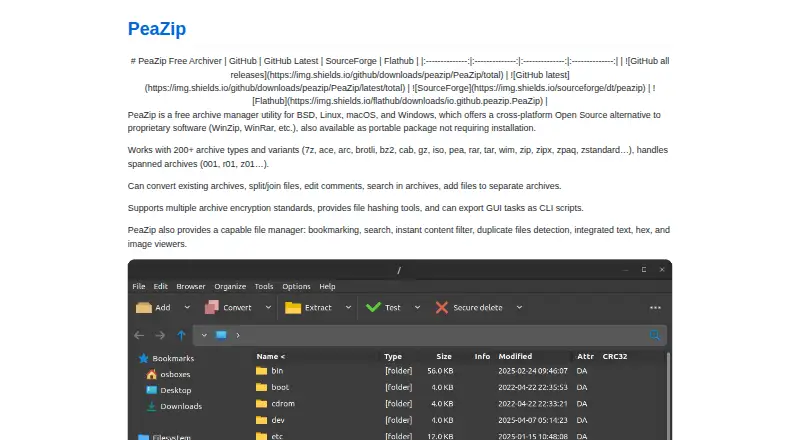
What PeaZip is
PeaZip is a free file archiver for creating, opening, and extracting archives on Linux, macOS, and Windows. It extracts more than 200 formats and variants, including 7Z, RAR, TAR, ZIP, Brotli, and Zstandard, and creates archives in supported formats. It can convert archives and split or join files. Its file manager offers browsing, search, bookmarks, duplicate detection, and built-in text, hex, and image viewers. Security options include strong encryption, authenticated encryption, and optional two-factor authentication using a password and keyfile. You can export tasks configured in the graphical interface as command-line scripts for reuse or automation. Portable packages are available for Linux, macOS, and Windows without installation. PeaZip is open-source software under GNU LGPLv3 and is free for personal, professional, and commercial use. RAR archive creation needs WinRAR, while opening and extracting ACE files requires the optional proprietary UNACE plugin. Packages are unsigned; the project publishes SHA256 hashes on its TLS-secured website for integrity checks.
Who it suits
PeaZip suits people who need to handle varied archive formats across Linux, macOS, or Windows, including users who want portable use or reusable command-line tasks.
What it does well
- Free for personal, professional, and commercial use
- Extracts more than 200 archive formats and variants
- Includes archive conversion and file splitting or joining
- Portable packages are available for three desktop platforms
What to know first
- Creating RAR archives requires WinRAR
- Opening ACE files requires the optional UNACE plugin
- Packages are not currently signed
Limits
Creating RAR archives requires WinRAR because standalone RAR compression is restricted by licensing limitations. Opening and extracting ACE files requires the optional proprietary UNACE plugin.
Plans
| Plan | Billed and limits | Price |
|---|---|---|
| PeaZip | Free for personal, professional, and commercial use · open-source GNU LGPLv3 | Free |
As peazip.github.io lists them, read 30 Sept 2026. The maker's own page has the final word.
Getting started
- Visit https://peazip.github.io/PeaZip/.
- Choose a package for Linux, macOS, or Windows.
- Install the package, or extract a portable package and use it without installation.
- Use the archive manager to open or extract files, or create an archive in a supported format.
PeaZip is a free, open-source archive manager for creating, extracting, converting, and organizing compressed files. It suits users who need broad format coverage, encryption, file-management tools, or repeatable command-line workflows rather than a basic unzip utility. Its wide extraction support and commercial-use license are balanced by dependencies for RAR creation and ACE extraction.
Overview
PeaZip runs on Linux, macOS, and Windows, with packages also supporting BSD. It is released under the GNU LGPLv3 and permits personal, professional, and commercial use at no charge. Portable packages for Linux, macOS, and Windows can be extracted and run without installation, useful on shared computers or systems where installing software is undesirable.
The application combines archive operations with browsing and inspection tools. It can extract more than 200 archive formats and variants, while creation is available in a defined group of formats. Online help, FAQ pages, and an issue tracker provide support channels.
Key features
Archive handling and file management
PeaZip opens and extracts more than 200 types, including 7Z, RAR, TAR, ZIP, Brotli, and Zstandard. It creates 7Z, ARC, BZ2, GZ, PAQ/LPAQ/ZPAQ, PEA, QUAD/BALZ/BCM, TAR, UPX, WIM, and ZIP/ZIPX archives, with RAR creation available only when WinRAR is installed. That makes PeaZip versatile for receiving archives from different systems, but less self-contained for users who must produce RAR files.
Existing archives can be converted, repaired, split, or joined. The integrated file manager adds browsing, search, bookmarks, and duplicate detection, while text, hex, and image viewers let users inspect common file contents inside the same interface. These tools make it a stronger choice for archive-heavy file organization than a narrowly focused extractor.
ACE files are another exception: opening and extracting them requires the optional proprietary UNACE plugin. Anyone who routinely handles ACE archives should plan for that additional component.
Encryption and automation
Strong encryption, authenticated encryption, and optional password-and-keyfile two-factor authentication support both ordinary protected archives and workflows needing an additional key file. Archive encryption is included in the free plan, as are archive repair and command-line tools.
Actions configured in the graphical interface can be exported as command-line scripts. That gives advanced users a way to turn a one-off archive task into a repeatable or automated process without recreating every setting manually.
Privacy and package checks
PeaZip does not collect or transmit users’ personally identifiable information, and its networking capability is limited to linking to online resources. The project says its website uses no cookies and does not collect visitors’ personally identifiable information. Packages are not currently signed; SHA256 hashes published over the project’s TLS-secured website provide an integrity and authenticity check instead.
Pricing
| Plan | Price | Includes |
|---|---|---|
| PeaZip | free | Free for personal, professional, and commercial use; open-source GNU LGPLv3 |
There is no trial because the software is free, and there are no paid tiers, seat quotas, renewal terms, or free-plan caps. The single plan includes archive encryption, split archives, command-line tools, a portable version, archive repair, and extraction of more than 200 formats. Commercial users get the same terms as personal users, making it suitable for organizations that need a no-cost desktop archiver.
Platforms
Supported platforms are BSD, Linux, macOS, and Windows. Portable packages are available for Linux, macOS, and Windows, allowing use without a conventional installation. The broad desktop coverage is useful for mixed-platform households and teams, although RAR creation still depends on WinRAR regardless of operating system.
Who it's for
Choose PeaZip if you need one free tool for creating and extracting many archive types, inspecting files, protecting archives, and exporting repeatable tasks. It is particularly well suited to technical users, administrators, and businesses that value scripting, archive repair, portable deployment, and commercial licensing.
A simpler utility may be preferable if your work is limited to occasional ZIP extraction, or if you need self-contained RAR creation or convenient ACE support without installing additional proprietary software.
Pros and cons
Pros
- Very broad extraction: support for more than 200 archive formats handles files from varied sources.
- Strong free license: GNU LGPLv3 permits personal, professional, and commercial use at no cost.
- More than compression: search, bookmarks, duplicate detection, viewers, conversion, repair, and file splitting add practical file-management depth.
- Security options: strong and authenticated encryption plus optional password-and-keyfile two-factor authentication protect archives.
- Automation path: graphical tasks can be exported as command-line scripts, and portable packages avoid installation.
Cons
- RAR creation dependency: WinRAR must be installed because licensing restrictions prevent standalone RAR compression.
- ACE extraction dependency: ACE files require the optional proprietary UNACE plugin.
- Unsigned packages: users must verify downloads with published SHA256 hashes rather than package signatures.
Alternatives
For a wider directory of compression tools, browse File Compression Software.
B1 Archiver is a free alternative for users who need Android and web support in addition to desktop platforms; its B1 Free Archiver plan costs nothing with no registration.
Zstandard is the better fit when an open-source reference library and command-line utility, rather than a graphical archive manager, is the priority.
7-Zip is another free Linux, macOS, and Windows archiver for readers who prefer that established alternative.
ALZip suits readers seeking a freemium option with Android support, while Bandizip is a macOS and Windows freemium choice with a free standard edition.
PowerArchiver is worth considering when a paid business edition or a non-commercial free edition is preferable. On macOS 10.13 or later, The Unarchiver is a focused free option with no in-app purchases for additional features.
Accessibility Test Framework for Android is a separate Android testing project, not a direct archive-manager substitute.
Verdict
PeaZip is a strong recommendation for anyone who wants broad archive extraction, serious file-management features, encryption, scripting, and unrestricted personal or commercial use without paying. Look elsewhere if standalone RAR creation, effortless ACE handling, or a minimal extractor is more important than its unusually broad toolkit.
Verdict
PeaZip combines broad archive extraction with file management, encryption, and scripting in a free package. Note the extra requirements for RAR creation and ACE extraction.
Questions
Is PeaZip free?
Yes. It is free for personal, professional, and commercial use under the GNU LGPLv3 license.
Which platforms does it support?
PeaZip supports Linux, macOS, and Windows. BSD is also listed as a supported platform.
Can PeaZip create RAR archives?
Yes, conditionally. WinRAR must be installed because standalone RAR compression is restricted by licensing limitations.
Can it open ACE files?
Opening and extracting ACE files requires installing the optional proprietary UNACE plugin.
Is PeaZip open source?
It is released under the GNU LGPLv3 license.
What support does the project provide?
The project provides online help, FAQ pages, and an issue tracker.
Facts from PeaZip's own pages
- ACE limitation
- Opening and extracting ACE files requires installing the optional proprietary UNACE plugin. · peazip.github.io, 30 Sept 2026
- Archive support
- It supports over 200 archive formats and variants, including 7Z, RAR, TAR, ZIP, Brotli, and Zstandard. · peazip.github.io, 30 Sept 2026
- Compression and conversion
- It can create archives in supported formats, convert existing archives, and split or join files. · peazip.github.io, 30 Sept 2026
- Encryption
- It supports strong encryption, optional password-and-keyfile two-factor authentication, and authenticated encryption. · peazip.github.io, 30 Sept 2026
- File management
- Its file manager includes browsing, search, bookmarks, duplicate detection, and integrated text, hex, and image viewers. · peazip.github.io, 30 Sept 2026
- Format limitation
- Creating RAR archives requires WinRAR to be installed because standalone RAR compression is restricted by licensing limitations. · peazip.github.io, 30 Sept 2026
- License
- The software is released under GNU LGPLv3 and is free for personal, professional, and commercial use. · peazip.github.io, 30 Sept 2026
- Package verification
- Packages are not currently signed; the project publishes SHA256 hashes over its TLS-secured website for checking integrity and authenticity. · peazip.github.io, 30 Sept 2026
- Portable use
- Portable packages for Linux, macOS, and Windows can be extracted and used without installation. · peazip.github.io, 30 Sept 2026
- Privacy
- The software does not collect or transmit users’ personally identifiable information, and its only networking capability is linking to online resources. · peazip.github.io, 30 Sept 2026
- Purpose
- PeaZip is a free file archiver and archive manager for creating, opening, and extracting archives. · peazip.github.io, 30 Sept 2026
- Scripting
- Tasks configured in the graphical interface can be exported as command-line scripts for reuse or automation. · peazip.github.io, 30 Sept 2026
- Support
- The project provides online help, FAQ pages, and an issue tracker for support and issue reporting. · peazip.github.io, 30 Sept 2026
- Website privacy
- The project says its website does not use cookies and does not collect visitors’ personally identifiable information. · peazip.github.io, 30 Sept 2026
Where PeaZip stands on Freedom251
- File Compression Software#14 of 36