Freedom251 › SEO Log File Analysis Tools

Patrick Stox Log File Analyzer
What Patrick Stox Log File Analyzer is
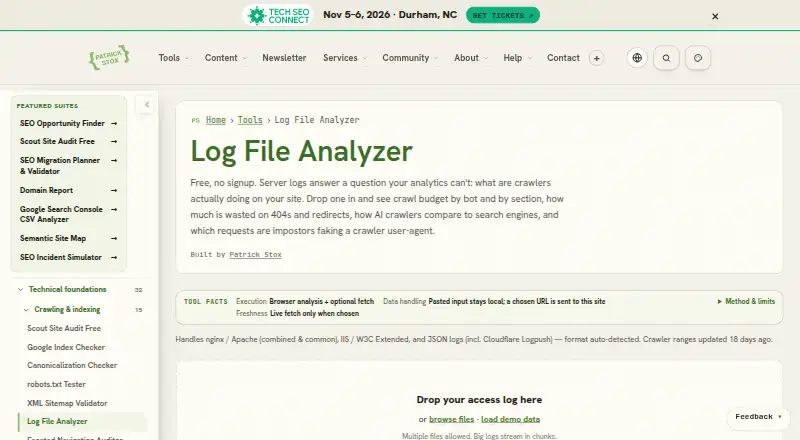
Patrick Stox Log File Analyzer is a free web tool for examining server access logs and understanding crawler activity. It automatically detects nginx, Apache, IIS/W3C Extended, and JSON formats, including Cloudflare Logpush. You can upload multiple files without signing up, and large logs are streamed in chunks. Parsing runs in the browser, so pasted or uploaded logs are not sent to the server. Reports show crawl budget by bot and site section, crawler activity by page type, wasted URLs, and daily trends when timestamps are present. Provide a sitemap or expected URL list to compare with crawler requests. The tool also returns ranked recommendations, copy-ready robots.txt lines, and CSV exports for bots and wasted URLs. It compares request IPs with published crawler ranges; those without checkable ranges are marked unverifiable. An optional suspicious-IP check sends one IP to a verifier API for reverse-DNS and ASN lookup. It only analyzes requests present in the logs and does not report indexing outcomes or explain why a crawler chose a URL.
Who it suits
This tool suits people measuring crawler activity, finding crawl-budget waste, comparing AI and search crawlers, or investigating possible bot spoofing. It runs in a browser and requires no signup.
What it does well
- Free web tool with no signup
- Automatically detects several log formats
- Parsing runs in the browser
- Exports bot and wasted-URL data as CSV
What to know first
- Analyzes only requests present in the logs
- Does not report indexing outcomes
- Cannot explain why crawlers select URLs
- Range matching may miss impostors using genuine crawler IPs
Limits
The analyzer can only report requests present in the logs and does not provide indexing outcomes or reasons for URL selection. Range matching may miss impostors using genuine crawler IPs, and crawlers without published ranges cannot be distinguished by range matching alone.
Plans
| Plan | Billed and limits | Price |
|---|---|---|
| Free | No signup · multiple files · large logs stream in chunks | Free |
As patrickstox.com lists them, read 4 Oct 2026. The maker's own page has the final word.
Getting started
- Open the Log File Analyzer website.
- Upload one or more server log files.
- Optionally provide a sitemap or expected URL list for comparison.
- Review crawler, crawl-waste, and trend reports.
- Export bot or wasted-URL data as CSV, or use the ranked recommendations.
Verdict
The analyzer turns access logs into crawler-focused reports, recommendations, and exports without sending uploaded logs to the server. Its findings are limited to logged requests and cannot establish indexing outcomes or explain URL selection.
Questions
How much does the analyzer cost?
The Free plan costs nothing.
Do I need to sign up?
No signup is required. Multiple files can be uploaded, and large logs are streamed in chunks.
Which log formats does it support?
It detects nginx, Apache, IIS/W3C Extended, and JSON logs, including Cloudflare Logpush.
Are uploaded logs sent to a server?
Log parsing runs in the browser, and pasted or uploaded logs are not sent to the server. An optional suspicious-IP check sends a single IP to a verifier API for reverse-DNS and ASN lookup.
What does it include in its reports?
Reports include crawl budget by bot and section, crawler activity by page type, wasted URLs, and daily trends when timestamps are present. It also provides ranked recommendations and CSV exports.
How does crawler verification work?
It compares request IPs with crawler operators’ published ranges. Crawlers without checkable ranges are marked unverifiable, and range matching may miss an impostor using a genuine crawler IP.
Facts from Patrick Stox Log File Analyzer's own pages
- Audience and use cases
- The maker describes use cases including measuring crawler activity, finding crawl-budget waste, comparing AI and search crawlers, and investigating possible bot spoofing. · patrickstox.com, 4 Oct 2026
- Crawler verification
- It compares request IPs with crawler operators’ published ranges and marks crawlers without checkable ranges as unverifiable. · patrickstox.com, 4 Oct 2026
- Expected URL comparison
- Users can supply a sitemap or expected URL list to compare against crawler requests. · patrickstox.com, 4 Oct 2026
- Limits
- It can only analyze requests present in the log and does not report indexing outcomes or explain why a crawler selected a URL. · patrickstox.com, 4 Oct 2026
- Local processing
- Log parsing runs in the browser, and pasted or uploaded logs are not sent to the server. · patrickstox.com, 4 Oct 2026
- Log formats
- It auto-detects nginx, Apache, IIS/W3C Extended, and JSON logs including Cloudflare Logpush. · patrickstox.com, 4 Oct 2026
- Optional network check
- The optional suspicious-IP spot-check sends a single IP to the verifier API for reverse-DNS and ASN lookup. · patrickstox.com, 4 Oct 2026
- Privacy detail
- Anonymous run-level outcome counters may be used for aggregate research, with no URLs, domains, IPs, or identifiers included and no statistic released below 100 runs. · patrickstox.com, 4 Oct 2026
- Purpose
- Analyzes server access logs to show crawler activity, crawl-budget waste, AI crawler traffic, and likely crawler impersonators. · patrickstox.com, 4 Oct 2026
- Recommendations and export
- It provides ranked recommendations with copy-paste robots.txt lines and CSV exports for bots and wasted URLs. · patrickstox.com, 4 Oct 2026
- Reports
- Reports include crawl budget by bot and section, crawler-by-page-type matrix, wasted URLs, and daily trends when logs contain timestamps. · patrickstox.com, 4 Oct 2026
- Support
- The page offers bug reports through a private triage queue and feature requests that are reviewed before appearing publicly. · patrickstox.com, 4 Oct 2026
- Verification limit
- IP-range matching may miss an impostor using a genuine crawler IP, and crawlers without published ranges cannot be distinguished by range matching alone. · patrickstox.com, 4 Oct 2026
Where Patrick Stox Log File Analyzer stands on Freedom251
- SEO Log File Analysis Tools#12 of 27