Freedom251 › SEO Log File Analysis Tools
Crawler Log Analyser
What Crawler Log Analyser is
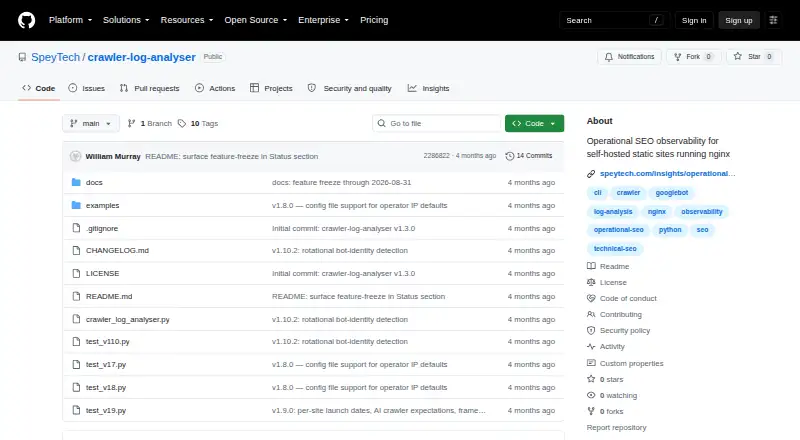
Crawler Log Analyser is a free, open-source tool for inspecting crawler activity on self-hosted static sites that run nginx. It reads nginx access logs in combined or extended seo_crawl format, including rotated .gz files, and separates search and AI crawlers. From their observed responses, it assesses Googlebot and broader search-crawler health. It can also identify issues around a deployment that affect crawlers, such as robots.txt failures, bursts of content 404 responses, and crawl gaps after 404s. Other checks look for user-agent spoofing on sitemap paths and changing bot identity claims from one IP address. The tool produces text, Markdown, or JSON reports, and can return a non-zero exit code when it finds critical issues, supporting cron and CI workflows. Its maker describes it as a single-file Python script with no telemetry, dashboards, database, external services, or external dependencies. It runs on Linux and requires Python 3.11 or later along with nginx logs. The project is licensed under AGPL-3.0-or-later, which permits commercial use and internal modification; modifications used to provide a network service must make corresponding source available. The project is at v1.10.2, with feature work frozen through 31 August 2026; bug and security fixes remain welcome.
Who it suits
It suits operators of self-hosted static sites who want to inspect actual search and AI crawler activity in nginx logs. Linux users who can run Python 3.11 or later and prefer reports for cron or CI workflows are a particularly close fit.
What it does well
- Reads combined and extended seo_crawl nginx logs, including rotated .gz files.
- Classifies search and AI crawlers and assesses crawler health.
- Flags several crawler-visible issues around deployments.
- Produces text, Markdown, and JSON reports.
- Can signal critical findings with a non-zero exit code.
- Single-file script with no telemetry or external dependencies.
What to know first
- Linux only, with no stated Apache or IIS support guarantee.
- Requires Python 3.11 or later and nginx logs.
- No Slack, Prometheus, Elasticsearch, or SaaS integrations.
- Feature work is frozen through 31 August 2026.
Limits
The tool requires Python 3.11 or later and nginx logs; Apache and IIS support is not guaranteed. It has no Slack, Prometheus, Elasticsearch, or SaaS integrations.
Getting started
- Open the project website on GitHub.
- Use a Linux environment with Python 3.11 or later.
- Provide nginx access logs in combined or extended seo_crawl format; rotated .gz logs are supported.
- Choose text, Markdown, or JSON output for reports.
- Use the non-zero exit behavior for critical findings in cron or CI workflows.
Verdict
Choose Crawler Log Analyser if you operate a self-hosted static site on nginx and need crawler-focused log reports or CI signals. Look elsewhere if you need Apache or IIS support, hosted dashboards, or integrations such as Slack, Prometheus, or Elasticsearch.
Questions
How much does Crawler Log Analyser cost?
It is free and open source.
What operating system does it support?
Linux is the listed platform.
What logs can it read?
It parses nginx access logs in combined or extended seo_crawl format, including rotated .gz logs.
Does it integrate with Slack or Prometheus?
No. Its stated integration boundary is JSON output, and it has no Slack, Prometheus, Elasticsearch, or SaaS integrations.
What license does it use?
It uses AGPL-3.0-or-later. Commercial use and internal modification are permitted; network-service modifications must make corresponding source available.
Who makes Crawler Log Analyser?
SpeyTech makes the project and lists its location as Inverness, Scottish Highlands, UK.
Facts from Crawler Log Analyser's own pages
- Additional detections
- It can detect sitemap-path user-agent spoofing and rotating bot identity claims from a single IP. · github.com, 4 Oct 2026
- Anomaly detection
- It detects crawler-visible deploy-window issues including robots.txt failures, content-404 bursts, and post-404 crawl gaps. · github.com, 10 Oct 2026
- Configuration
- A TOML config file can specify ignored source IPs, site launch dates, and an AI crawler discovery window. · github.com, 10 Oct 2026
- Crawler analysis
- It classifies search and AI crawlers and scores Googlebot and broader search-crawler health from observed responses. · github.com, 4 Oct 2026
- Crawler insights
- It classifies search and AI crawlers and scores Googlebot crawl health from observed responses. · github.com, 10 Oct 2026
- Data handling
- The README says the tool has no database, telemetry, or external services. · github.com, 10 Oct 2026
- Deploy anomalies
- It detects crawler-visible deploy-window issues such as robots.txt failures, content-404 bursts, and post-404 crawl gaps. · github.com, 4 Oct 2026
- Feature status
- The feature-freeze page says no new feature work was planned through 31 August 2026 and that bug fixes and security fixes remain welcome. · github.com, 10 Oct 2026
- Headquarters
- Inverness, Scottish Highlands, UK · github.com, 28 Sept 2026
- Integrations
- The README says JSON output is the integration boundary and lists no Slack, Prometheus, Elasticsearch, or SaaS integrations. · github.com, 10 Oct 2026
- Intended users
- The maker positions it for operators of self-hosted static sites who need to inspect real crawler behavior in nginx access logs. · github.com, 4 Oct 2026
- License
- The project is licensed under AGPL-3.0-or-later; network services based on modified versions must make corresponding source code available under the AGPL. · github.com, 10 Oct 2026
- Log analysis
- It parses nginx access logs, including rotated .gz logs, and supports combined and extended seo_crawl formats. · github.com, 10 Oct 2026
- Log parsing
- It parses nginx access logs in combined or extended seo_crawl format, including rotated .gz logs. · github.com, 4 Oct 2026
- Maker
- SpeyTech identifies Spey Systems Ltd as the company behind its repositories and describes it as a Scottish software and systems engineering company based in Inverness. · github.com, 10 Oct 2026
- Privacy and architecture
- The maker describes it as a single-file Python script with no telemetry, dashboards, database, external services, or external dependencies. · speytech.com, 4 Oct 2026
- Project status
- The repository identifies v1.10.2 as its status and says feature work was frozen through 31 August 2026, while bug fixes and security fixes remain welcome. · github.com, 4 Oct 2026
- Purpose
- The project describes itself as operational SEO observability for self-hosted static sites running nginx. · github.com, 10 Oct 2026
- Reports
- It emits text, Markdown, or JSON reports and can exit non-zero on critical findings for cron and CI use. · github.com, 4 Oct 2026
- Reports and automation
- It emits text, Markdown, or JSON reports and can exit non-zero on critical findings for cron and CI use. · github.com, 10 Oct 2026
- Requirements
- It requires Python 3.11 or later and has no external dependencies. · github.com, 10 Oct 2026
- Support
- The README welcomes pull requests and says project review may be slow because it is maintained as time permits. · github.com, 4 Oct 2026
- Support and maintenance
- The maintainer says review may be slow because the project is maintained as time permits. · github.com, 10 Oct 2026
Where Crawler Log Analyser stands on Freedom251
- SEO Log File Analysis Tools#8 of 27