Freedom251 › SEO Log File Analysis Tools

LogLens
What LogLens is
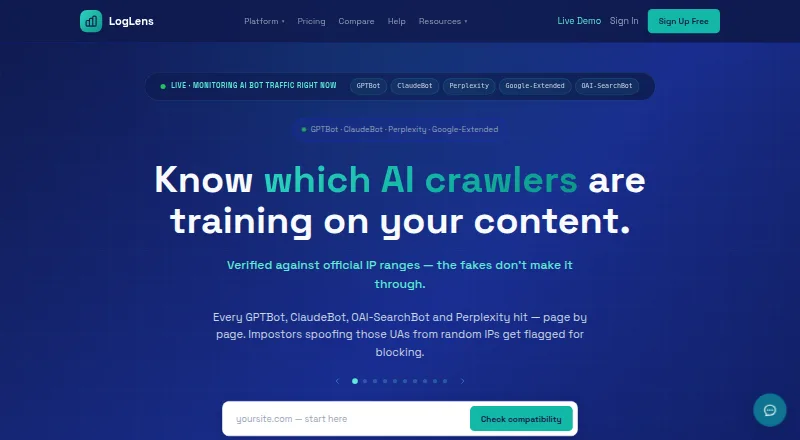
LogLens analyzes CDN and web-server access logs in real time to show SEO, crawler, security, and performance signals. It checks claimed bots against providers’ published IP ranges and says its coverage exceeds 200 bots. For SEO monitoring, it relates crawler activity to sitemaps, Google Search Console data, and robots.txt changes. Listed security detectors look for automated hacking probes, bot impersonation surges, and exposed secrets in URLs. The service describes 16 anomaly detectors, with alerts that identify affected IPs, paths, and crawlers. Alert timing depends on plan: hourly on Free, every 30 minutes on Solo, and every five minutes on Starter and above. Log uploads can include Apache, Nginx, CloudFront, or Events CSV files, which do not count against the monthly request quota. A 14-day full-access trial needs no credit card; after expiry, data remains for seven more days before deletion unless the account is claimed. Free includes 500K requests per month, one website, and 30 days of history; paid plans start at $19/mo.
Who it suits
LogLens may suit technical SEO teams, agencies, developers, DevOps leads, ecommerce managers, and security-conscious SEO teams. Its mix of crawler monitoring, log analysis, and security alerts is relevant to people responsible for site traffic and infrastructure.
What it does well
- Checks claimed bots against published IP ranges
- Connects crawler activity with sitemaps and Search Console
- Uploaded logs do not count against monthly request quota
- Trial lasts 14 days and requires no credit card
- Alerts identify affected IPs, paths, and crawlers
What to know first
- Free plan limits history to 30 days
- Free alert cadence is hourly
- Data is deleted seven days after trial expiry unless account is claimed
- Paid overage protection costs $2 per extra million requests
Limits
Free includes 500K requests per month, one website, 30 days of history, and hourly alerts. Its plan also includes 10 AI answers per month. The 14-day trial requires no credit card; after expiry, data remains for seven more days before deletion unless the account is claimed.
Plans
| Plan | Billed and limits | Price |
|---|---|---|
| Free | $0/month · 500K requests/month · 1 website · 30 days of history · real-time analytics · bot and AI crawler detection · 10 AI answers/month | Free |
| Growth | $149/month or $1,490/year — save 20% · 100M requests/month · 15 websites (up to 30 at +$10/mo each) · 2 years of history · priority support · unlimited users | $149 a month |
| Solo | $19/month or $190/year — save 20% · 5M requests/month · 1 website (up to 3 at +$10/mo each) · 6 months of history · sitemap and GSC integration · email and Slack alerts · CSV export · unlimited users | $19 a month |
| Starter | $49/month or $490/year — save 20% · 20M requests/month · 5 websites (up to 10 at +$10/mo each) · 1 year of history · public API · webhook integrations · unlimited users | $49 a month |
| Pro | $499/month or $4,990/year — save 20% · 500M requests/month · 50 websites plus unlimited extras at $10/mo each · 4 years of history · dedicated support · unlimited users | $499 a month |
| Enterprise | Custom · For 500M+ requests · custom request volume and retention · unlimited everything · SSO/SAML · DPA and custom MSA · uptime SLA · dedicated CSM and Slack | On request |
As loglens.ai lists them, read 29 Sept 2026. The maker's own page has the final word.
Getting started
- Open the LogLens website.
- Platforms include web, API, and self-hosted.
- Start with the Free plan or begin the 14-day full-access trial.
- Connect a listed real-time log source or upload Apache, Nginx, CloudFront, or Events CSV logs.
- Add sitemap and Google Search Console data for SEO monitoring.
LogLens is a real-time access-log analysis service for teams tracking search crawlers, security signals, and site performance. It is best suited to technical SEO, DevOps, ecommerce, and agency teams that need verified crawler data across live sources or imported logs. Its breadth is useful, but request, website, and alert-frequency limits make plan selection central to the fit.
Overview
LogLens checks claimed bots against providers’ published IP ranges and covers more than 200 bots, helping distinguish genuine crawler traffic from impersonation. It connects crawler activity with sitemaps, Google Search Console data, and robots.txt changes, giving SEO teams context beyond raw request counts. Security detectors cover automated hacking probes, bot-impersonation surges, and secrets exposed in URLs.
The service describes 16 anomaly detectors. Alerts identify affected IPs, paths, and crawlers, but cadence varies sharply: hourly on Free, every 30 minutes on Solo, and every five minutes on Starter and above. Free and Solo therefore suit observation more than rapid incident response.
Key features
Live sources and imports
Real-time inputs include Cloudflare, AWS CloudFront, Vercel, Kinsta, Shopify, Apache, and Nginx. You can upload Apache, Nginx, CloudFront, or Events CSV logs, and imports do not consume the monthly request quota. That combination supports continuous monitoring alongside historical investigations, although live ingestion remains subject to each plan's quota.
SEO, crawler, and security context
Crawler segmentation and crawl-waste reporting help teams separate useful visits from inefficient crawling. Sitemap and Search Console integration on Solo and above ties access patterns to search visibility signals. The detector set is relevant to security-conscious SEO teams, while affected-IP and path details make alerts more actionable than a simple anomaly count.
Deployment, alerts, and data handling
LogLens is offered through an API, web interface, or self-hosted deployment. Email and Slack alerts begin on Solo; Starter adds webhooks and a public API. Data is stored in AWS eu-west-2 in London, encrypted in transit and at rest, and not sold or aggregated across customers. A DPA is available on request. The stated retention is 180 days, while plan history limits range from 30 days to four years.
Pricing
The 14-day full-access trial requires no card. After it ends, data remains for seven days before deletion unless the account is claimed. Paid overage protection is optional: set a cap and pay $2 per extra million requests; without it, real-time ingestion pauses at quota while alerting continues.
| Plan | Price and limits | Best fit |
|---|---|---|
| Free | $0/month; 500K requests, one website, 30 days of history, real-time analytics, bot and AI-crawler detection, 10 AI answers monthly; hourly alerts | Small sites and evaluation, not frequent-response monitoring |
| Solo | $19/month or $190/year (20% saving); 5M requests, one website, six months of history, sitemap/GSC integration, email and Slack alerts, CSV export, unlimited users | One-site practitioners needing integrations and faster alerts than Free |
| Starter | $49/month or $490/year (20% saving); 20M requests, five websites, one year of history, public API and webhooks | Teams needing five-minute alerts and automation |
| Growth | $149/month or $1,490/year (20% saving); 100M requests, 15 websites, two years of history, priority support | Agencies and larger portfolios |
| Pro | $499/month or $4,990/year (20% saving); 500M requests, 50 websites, four years of history, dedicated support | High-volume organizations with long retention needs |
| Enterprise | Custom pricing for 500M+ requests, custom volume and retention, unlimited everything, SSO/SAML, DPA and custom MSA, uptime SLA, dedicated CSM and Slack | Organizations requiring contractual controls and bespoke capacity |
Solo allows up to three websites at $10 each; Starter up to 10, Growth up to 30, and Pro unlimited extras at $10 per month each. Every paid plan includes unlimited users. Growth and Pro add progressively stronger support, while the lower tiers give up history, websites, and alert speed to keep costs down.
Platforms
LogLens runs on the web, through an API, or in a self-hosted setup. Its supported live sources and upload workflow make it practical for both hosted pipelines and teams retaining operational control.
Who it's for
Technical SEO teams, SEO agencies, AI-GEO specialists, developers, DevOps leads, ecommerce managers, and security-focused SEO teams are the clearest audiences. It is less compelling for a tiny site that only needs occasional, manually reviewed logs, where the free tier's hourly alerts and 500K-request ceiling may be sufficient but its broader monitoring is unnecessary.
Pros and cons
Pros
- Verified coverage of more than 200 bots reduces reliance on user-agent claims.
- SEO, crawler, and security signals are combined, including Search Console and sitemap context.
- CSV imports are quota-exempt, useful for large historical reviews.
- Self-hosted, API, and web options accommodate different deployment policies.
- Five-minute alerts, webhooks, and public API arrive at Starter rather than only the top tier.
Cons
- Free alerts are hourly and capped at 500K requests and one website.
- Solo remains limited to one included website and 30-minute alerting.
- Live ingestion stops at quota unless paid overage protection is enabled.
- Costs rise quickly for many websites, high request volumes, or extended history.
Alternatives
For a free local open-source option, choose SEO Log Auditor, which runs on Linux, macOS, Windows, and the web under an MIT license. Spider-Lens is another open-source self-hosted choice with no stated usage limits.
Choose Screaming Frog SEO Log File Analyser for desktop analysis with a 1,000-line free tier and a $139 annual paid license. CrawlGenius Log Analyzer suits web users wanting a 10,000-line monthly free allowance and a seven-day visible window. Log File Bot Traffic Cost Analyzer is aimed at size-based browser, CLI, or BigQuery workflows. SEOMER offers quick checks with limited daily usage and token top-ups. AuditLabs SEO Log File Analyzer is a web alternative with a $7.99 monthly Supporter plan. Crawl Lab is free, requires no sign-up, and has no server-side size limit. For a broader directory of comparable tools, see SEO Log File Analysis Tools.
Verdict
Choose LogLens when you need one system to verify crawlers, connect logs to SEO data, and surface security anomalies across live or imported sources. Its main reason to look elsewhere is cost and quota complexity: smaller sites may prefer a simpler free tool, while high-volume teams must budget carefully for the tier, extra websites, retention, and possible overages.
Verdict
LogLens combines log analysis with crawler, SEO, and security monitoring, and includes a no-card trial plus a free tier. Compare request quotas, alert intervals, and history length against your monitoring needs.
Questions
Is LogLens free?
Yes. The Free plan is billed at $0/month and includes 500K requests per month, one website, and 30 days of history.
What does the 14-day trial include?
It provides full access and requires no credit card. After it expires, data stays for seven more days before deletion unless the account is claimed.
What platforms does LogLens support?
LogLens is available on the web, as an API, and as self-hosted software.
What does the Solo plan cost?
Solo costs $19 a month, billed at $19/month or $190/year. The annual option is listed as saving 20%.
Which log sources can I connect or import?
Listed real-time sources include Cloudflare, AWS CloudFront, Vercel, Kinsta, Shopify, Apache, and Nginx. Users can also upload Apache, Nginx, CloudFront, or Events CSV logs.
Where is LogLens data stored?
The FAQ says data is stored in AWS eu-west-2 (London), encrypted at rest and in transit, and not sold or aggregated across customers. A DPA is available on request.
Facts from LogLens's own pages
- Alerts
- The site describes 16 anomaly detectors and says alerts include affected IPs, paths, and crawlers; alert cadence is five minutes on Starter and above, 30 minutes on Solo, and hourly on Free. · loglens.ai, 29 Sept 2026
- Crawler verification
- It checks claimed bots against providers’ published IP ranges and says it covers more than 200 bots. · loglens.ai, 29 Sept 2026
- Data handling
- The FAQ says data is stored in AWS eu-west-2 (London), encrypted at rest and in transit, and not sold or aggregated across customers; a DPA is available on request. · loglens.ai, 29 Sept 2026
- Integrations
- Listed real-time sources include Cloudflare, AWS CloudFront, Vercel, Kinsta, Shopify, Apache, and Nginx; it also integrates with sitemaps and Google Search Console. · loglens.ai, 29 Sept 2026
- Intended users
- The site names technical SEO teams, SEO agencies, AI-GEO specialists, developers and DevOps leads, ecommerce managers, and security-conscious SEO teams as target audiences. · loglens.ai, 29 Sept 2026
- Log imports
- Users can import Apache, Nginx, CloudFront, or Events CSV logs, and the site says imports do not count against the monthly request quota. · loglens.ai, 29 Sept 2026
- Overages
- Paid-plan overage protection is opt-in with a user-set cap and costs $2 per extra million requests; without opt-in, real-time ingestion pauses at quota while alerting continues. · loglens.ai, 29 Sept 2026
- Purpose
- LogLens analyzes CDN and web-server access logs in real time for SEO, crawler, security, and performance insights. · loglens.ai, 29 Sept 2026
- Security monitoring
- Its listed detectors include automated hacking probes, bot impersonation surges, and exposed secrets in URLs. · loglens.ai, 29 Sept 2026
- SEO monitoring
- It correlates live crawler activity with sitemaps, Google Search Console data, and robots.txt changes. · loglens.ai, 29 Sept 2026
- Support
- The pricing page lists priority support for Growth and dedicated support for Pro; Enterprise includes a dedicated CSM and Slack. · loglens.ai, 29 Sept 2026
- Trial terms
- The 14-day full-access trial requires no credit card; after expiry, data stays for seven more days before deletion unless the account is claimed. · loglens.ai, 29 Sept 2026
Where LogLens stands on Freedom251
- SEO Log File Analysis Tools#4 of 27