Freedom251 › SEO Log File Analysis Tools
Log File Bot Traffic Cost Analyzer
Visit Log File Bot Traffic Cost Analyzer Alternatives Pricing
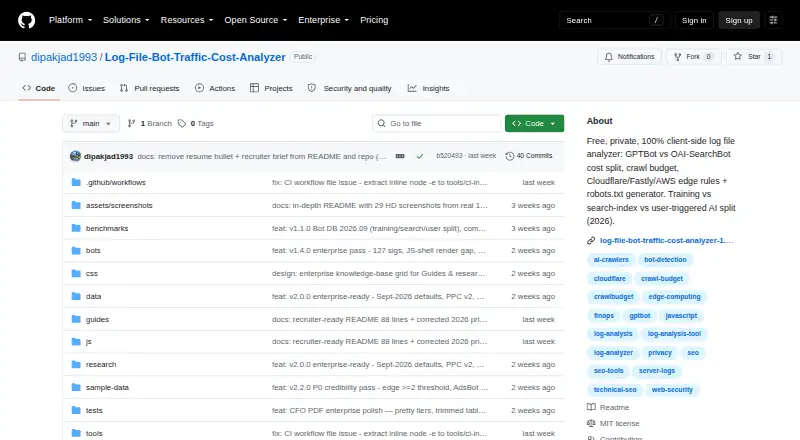
What Log File Bot Traffic Cost Analyzer is
Log File Bot Traffic Cost Analyzer examines server logs to break down AI bot traffic, estimate associated costs, quantify crawl budget, and produce edge rules. The project describes its processing as client-side, with logs staying on the user's machine. It says it makes no XHR, WebSocket, or sendBeacon calls; the only stated network request is for a demo file that the user chooses to load. The analyzer groups traffic using 127 bot signatures and 18 browser patterns, with bandwidth, IP, and TTFB details by category. Verification draws on vendor IP data, TLS, cloud ASN heuristics, and behavior; heuristic findings are marked low confidence, and optional DoH reverse DNS is listed. Cost estimates use measured bytes and CDN pricing presets, with copyable rules for Cloudflare, Fastly, and AWS. Inputs include JSON, JSONL/NDJSON, Apache Combined, Nginx, W3C Extended, AWS ALB, Cloudflare Logpush, and gzip files. Browser analysis under 500 MB is sampled triage; CLI analysis from 500 MB to 50 GB is described as exact, with BigQuery for 50 GB and above. It is free and MIT-licensed.
Who it suits
It suits users who need private log triage or want to inspect crawler traffic and crawl waste. The project specifically positions it for cases where logs cannot leave the machine.
What it does well
- Client-side processing keeps logs on the user's machine.
- Classifies traffic with 127 bot signatures and 18 browser patterns.
- Generates copyable Cloudflare, Fastly, and AWS rules.
- Exports CSV and PDF reports.
What to know first
- Browser analysis under 500 MB is sampled triage.
- CLI analysis is described as exact only from 500 MB to 50 GB.
- BigQuery is specified for 50 GB and above.
Limits
The Free plan describes browser analysis under 500 MB as sampled triage, CLI analysis from 500 MB to 50 GB as exact, and BigQuery for 50 GB and above.
Plans
| Plan | Billed and limits | Price |
|---|---|---|
| Free | Browser: under 500 MB triage · CLI: 500 MB–50 GB exact · BigQuery: 50 GB+ | Free |
As github.com lists them, read 4 Oct 2026. The maker's own page has the final word.
Getting started
- Open the project website on GitHub.
- Use the browser version deployed on Cloudflare Pages, or its GitHub Pages backup.
- Upload supported log files for browser analysis below 500 MB.
- For 500 MB to 50 GB exact analysis, use the CLI route documented by the project.
- For 50 GB and above, use the listed BigQuery route.
- Use the documented Docker run command if deploying with Docker.
Overview
Log File Bot Traffic Cost Analyzer is a free, open-source tool for examining server logs, especially AI crawler traffic and its estimated delivery costs. It is best suited to SEO and infrastructure teams that need private log triage or want to turn crawler findings into edge rules. Its breadth is compelling, but the right analysis path depends on file size, and bot verification is not definitive.
Key features
The analyzer groups activity using 127 bot signatures and 18 browser patterns, with bandwidth, IP addresses, and TTFB by category. That detail can help teams find which crawlers consume bandwidth or crawl budget. Verification combines vendor IP data, TLS, cloud ASN signals, and behavior; the project marks its heuristics low confidence, so use the results to guide investigation, not as conclusive identification. Optional DoH reverse DNS supplies another signal.
Cost estimates use measured bytes and CDN pricing presets. Copyable rules for Cloudflare, Fastly, and AWS give teams a direct way to act on findings. Other modules cover crawl traps, render gaps, bot-versus-human performance, traffic bursts, 404 clusters, a GSC overlay, and security anomalies. CSV and PDF downloads, plus generated robots.txt, llms.txt, and crawlers.json policies, support reporting and policy work.
Input can be JSON, JSONL/NDJSON, Apache Combined, Nginx, W3C Extended, AWS ALB, Cloudflare Logpush, or gzip. The project describes processing as client-side, says logs stay on the machine, and says it uses no XHR, WebSocket, or sendBeacon; its only network request is for a demo file when the user clicks to load it. That is a strong fit for sensitive log triage, including cases where DPDP/RBI logs cannot leave the machine.
Pricing
| Plan | Price | What it includes |
|---|---|---|
| Free | free | Browser analysis under 500 MB for sampled triage; CLI analysis from 500 MB to 50 GB for exact processing; BigQuery for 50 GB and above. |
The free plan is the whole offer described: the project is MIT-licensed and open source. The tiers are analysis routes rather than paid upgrades. Browser mode is not exact at its stated scale; larger logs call for CLI or BigQuery, so users must be comfortable with those workflows. No paid tier is described.
Platforms
The project supports Linux, self-hosted use, and web access. Cloudflare Pages is its primary deployment, GitHub Pages its backup, and a Docker run command is documented. Browser, CLI, and BigQuery analysis serve different scales: under 500 MB is sampled browser triage, 500 MB to 50 GB is exact CLI analysis, and 50 GB or more is directed to BigQuery. The browser route is useful for quick inspection, not exhaustive analysis of larger datasets.
Who it's for
Choose it if you need a free way to segment bot traffic, estimate CDN costs, assess crawl waste, or produce edge rules while keeping logs local. It is particularly relevant to teams with privacy constraints. Look elsewhere if you need browser analysis to process large logs exactly, or if low-confidence verification heuristics are insufficient for your decisions.
Pros and cons
- Pro: Broad log-format support makes it usable with several common server and CDN exports.
- Pro: Traffic breakdowns, cost estimates, edge rules, and policy exports connect analysis to practical follow-up.
- Pro: Local processing and the stated network behavior suit sensitive log review.
- Con: Browser analysis under 500 MB is sampled, so it is not a substitute for exact processing at larger sizes.
- Con: The project labels verification heuristics low confidence, which limits their value as proof of bot identity.
- Con: Exact large-file work requires the CLI or BigQuery rather than the browser workflow.
Alternatives
- SEO Log File Analysis Tools is a directory category to compare more options.
- SEO Log Auditor is another free, open-source MIT option that runs locally; choose it if its broader Linux, macOS, web, and Windows platform coverage better matches your environment.
- Spider-Lens is a free, open-source self-hosted option with no paid plans or usage limits stated; consider it if self-hosting is your priority.
- Screaming Frog SEO Log File Analyser has a free tier capped at 1,000 log event lines and one project, plus a paid plan at $139 a year; choose it if you want a bounded free trial of the workflow and a paid option.
- CrawlGenius Log Analyzer offers a free allowance of 10,000 log lines per month for one project with a seven-day visible window, plus paid plans; it may suit readers who prefer a web service with a stated monthly quota.
- LogLens offers a free plan capped at 500K requests per month for one website with 30 days of history and real-time analytics; choose it if those request and history limits suit your monitoring needs.
- SEOMER has free quick page checks with limited daily use and paid top-ups; consider it if occasional checks and a small one-time package fit better than log-file analysis.
- AuditLabs SEO Log File Analyzer is a web alternative with a paid Supporter plan; choose it if a web tool is preferable.
- Crawl Lab is a free web option with no sign-up, no paid tier, and no server-side size limit; consider it if those terms are a better fit.
Verdict
Log File Bot Traffic Cost Analyzer is a strong choice for SEO and infrastructure practitioners who want free, locally processed log triage with bot segmentation, cost estimates, and ready-to-copy edge rules. Its key advantage is combining those operational outputs with broad format support; its main reason to look elsewhere is the need for exact browser analysis at scale or stronger certainty in bot verification.
Verdict
This free tool covers bot traffic, estimated costs, and several log formats, with an emphasis on local processing. Note the different analysis paths and scale limits for browser, CLI, and BigQuery use.
Questions
How much does Log File Bot Traffic Cost Analyzer cost?
The listed Free plan costs nothing. The project describes the software as open source and MIT-licensed.
What platforms does it support?
The listed platforms are Linux, self-hosted, and web. Cloudflare Pages is identified as the primary deployment and GitHub Pages as a backup.
Does it keep uploaded logs private?
The project describes the tool as client-side and says logs do not leave the user's machine. It says the only network request is for a demo file the user chooses to load.
What log sizes can it analyze?
Browser analysis under 500 MB is sampled triage. CLI analysis from 500 MB to 50 GB is described as exact, with BigQuery for 50 GB and above.
What can it export?
It lists CSV and PDF downloads, as well as generated robots.txt, llms.txt, and crawlers.json policies.
What log formats are supported?
Supported inputs include JSON, JSONL/NDJSON, Apache Combined, Nginx, W3C Extended, AWS ALB, Cloudflare Logpush, and gzip files.
Facts from Log File Bot Traffic Cost Analyzer's own pages
- Bot classification
- It lists 127 bot signatures and 18 browser patterns, with bandwidth, IPs, and TTFB by category. · github.com, 4 Oct 2026
- Bot verification
- Verification uses vendor IP data, TLS, cloud ASN heuristics, and behavior, with heuristics labeled low confidence; optional DoH reverse DNS is listed. · github.com, 4 Oct 2026
- Cost and edge rules
- It estimates costs from measured bytes and CDN pricing presets and offers copyable Cloudflare, Fastly, and AWS rules. · github.com, 4 Oct 2026
- Deployment
- The project identifies Cloudflare Pages as its primary deployment and GitHub Pages as a backup, and documents a Docker run command. · github.com, 4 Oct 2026
- Exports
- The README lists CSV and PDF downloads plus generated robots.txt, llms.txt, and crawlers.json policies. · github.com, 4 Oct 2026
- Intended users
- The README positions it for quick private log triage, including cases where DPDP/RBI logs cannot leave the machine. · github.com, 4 Oct 2026
- License and support
- The repository is MIT-licensed, welcomes pull requests, and labels some issues as good first issues. · github.com, 4 Oct 2026
- Log formats
- Supported inputs include JSON, JSONL/NDJSON, Apache Combined, Nginx, W3C Extended, AWS ALB, Cloudflare Logpush, and gzip files. · github.com, 4 Oct 2026
- Network behavior
- The README says it uses no XHR, WebSocket, or sendBeacon, and that the only network request is for a demo file the user clicks to load. · github.com, 4 Oct 2026
- Other features
- Listed modules cover crawl traps, render gaps, bot versus human performance, traffic bursts, 404 clusters, a GSC overlay, and security anomalies. · github.com, 4 Oct 2026
- Private processing
- The project describes itself as 100% client-side and says logs do not leave the user's machine. · github.com, 4 Oct 2026
- Purpose
- Analyzes server logs to break down AI bot traffic and estimated costs, quantify crawl budget, and generate edge rules. · github.com, 4 Oct 2026
- Scale limits
- The README describes browser analysis under 500 MB as sampled triage, CLI analysis from 500 MB to 50 GB as exact, and BigQuery for 50 GB and above. · github.com, 4 Oct 2026
Where Log File Bot Traffic Cost Analyzer stands on Freedom251
- SEO Log File Analysis Tools#3 of 27