Freedom251 › SEO Log File Analysis Tools

AuditLabs SEO Log File Analyzer
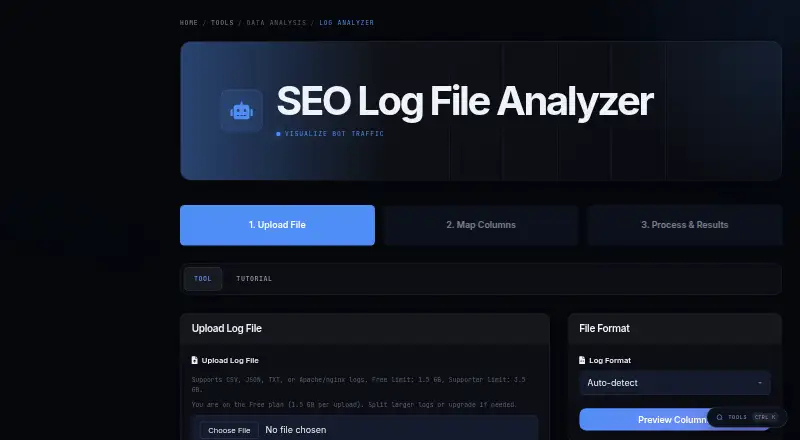
What AuditLabs SEO Log File Analyzer is
AuditLabs SEO Log File Analyzer examines web server access logs to show AI bot visits, referrals from large language model services, and how crawlers move through a site. It can identify GPTBot, ClaudeBot, and Perplexity traffic, as well as referrals from services such as ChatGPT and Claude. Crawl analysis covers patterns, session depth, and navigation flows.
Upload logs as CSV with headers, JSON, JSON Lines, Apache or nginx combined logs, or Cloudflare logs. Before processing, preview the file and map its columns so the analyzer can recognize the fields. AuditLabs estimates 10–30 seconds for files under 100 MB, 1–3 minutes for files from 100 MB to 1 GB, and 3–15 minutes for files above 1 GB. A detailed report is available to download, with a free account required for full results.
The Free plan includes 20 standard runs and 2 heavy runs per month, with files up to 1.5 GB. Supporter costs $7.99 a month and provides 200 tool runs, up to 10 runs per hour, files up to 3.5 GB, priority processing, and email support. AuditLabs says SEO practitioner Antonio Maculus, Director of AI Content Strategy at Better Collective, builds its tools.
Who it suits
This analyzer suits SEOs who want to inspect AI crawler activity, LLM referrals, or crawl behavior in server logs. The Supporter plan is described for SEOs running tools regularly across multiple sites.
What it does well
- Detects GPTBot, ClaudeBot, and Perplexity traffic.
- Identifies referrals from ChatGPT and Claude.
- Accepts CSV, JSON, Apache/nginx, and Cloudflare logs.
- Previews uploads and supports column mapping.
- Offers priority processing and email support on Supporter.
What to know first
- Free accounts are limited to 20 standard and 2 heavy runs monthly.
- Free uploads are capped at 1.5 GB per file.
- Downloading full results requires a free account.
Limits
Free accounts get 20 standard runs and 2 heavy runs per month, with a 1.5 GB per-file upload limit and up to 2 runs per hour. Supporter costs $7.99 a month and includes 200 runs monthly, up to 10 runs per hour, and uploads up to 3.5 GB per log.
Plans
| Plan | Billed and limits | Price |
|---|---|---|
| Supporter | 200 tool runs per month · access to all 14 tools · up to 10 runs per hour · priority processing · email support · 3.5 GB per log upload | $7.99 a month |
| Free | 20 tool runs per month · access to all 14 tools · up to 2 runs per hour · community support · 1.5 GB per log upload | On request |
As auditlabs.co lists them, read 8 Oct 2026. The maker's own page has the final word.
Getting started
- Open the AuditLabs log analyzer website.
- Upload a supported CSV, JSON, JSON Lines, Apache/nginx combined, or Cloudflare log.
- Preview the uploaded data and map columns as needed.
- Run the analysis within the applicable monthly and per-file limits.
- Create a free account to download full results, or choose Supporter for its listed run and support allowances.
Verdict
Choose AuditLabs SEO Log File Analyzer to examine AI bot activity, LLM referrals, and crawl paths from supported server logs. Supporter may suit regular multi-site use; users who need more than 200 monthly runs or larger uploads exceed the listed plan limits.
Questions
Is there a free plan?
Yes. Free includes 20 standard runs and 2 heavy runs per month, with community support.
How much does Supporter cost?
Supporter costs $7.99 a month and includes 200 tool runs per month.
What log formats can I upload?
Supported inputs include CSV with headers, JSON, JSON Lines, Apache/nginx combined logs, and Cloudflare logs.
What platforms does it support?
The analyzer is available on the web.
Who makes AuditLabs tools?
AuditLabs says its tools are built by SEO practitioner Antonio Maculus, Director of AI Content Strategy at Better Collective.
Can I download the report without an account?
A free account is required to download full results.
Facts from AuditLabs SEO Log File Analyzer's own pages
- Account usage
- The site says free accounts receive 20 standard runs and 2 heavy runs per month. · auditlabs.co, 8 Oct 2026
- Bot detection
- The analyzer identifies AI bot traffic including GPTBot, ClaudeBot, and Perplexity. · auditlabs.co, 8 Oct 2026
- Column mapping
- Users can preview uploaded logs and map columns to ensure fields are detected correctly. · auditlabs.co, 8 Oct 2026
- Crawl analysis
- It analyzes crawl patterns, session depth, and navigation flows. · auditlabs.co, 8 Oct 2026
- Input formats
- Supported formats include CSV with headers, JSON or JSON Lines, Apache/nginx combined logs, and Cloudflare logs. · auditlabs.co, 8 Oct 2026
- Intended users
- The Supporter plan is described as being for SEOs running tools regularly across multiple sites. · auditlabs.co, 8 Oct 2026
- Maker
- AuditLabs says its tools are built by SEO practitioner Antonio Maculus, who is Director of AI Content Strategy at Better Collective. · auditlabs.co, 8 Oct 2026
- Processing
- The page estimates 10–30 seconds for files under 100 MB, 1–3 minutes for 100 MB–1 GB, and 3–15 minutes for files above 1 GB. · auditlabs.co, 8 Oct 2026
- Purpose
- Analyzes web server access logs to identify AI bot traffic and LLM referrals. · auditlabs.co, 8 Oct 2026
- Referral analysis
- It identifies referrals from services such as ChatGPT and Claude. · auditlabs.co, 8 Oct 2026
- Report export
- Users can download a detailed report, and the page says a free account is required to download full results. · auditlabs.co, 8 Oct 2026
- Support
- The free plan includes community support; Supporter includes email support and priority processing. · auditlabs.co, 8 Oct 2026
- Upload limits
- Free uploads are limited to 1.5 GB per file and Supporter uploads to 3.5 GB per file. · auditlabs.co, 8 Oct 2026
Where AuditLabs SEO Log File Analyzer stands on Freedom251
- SEO Log File Analysis Tools#1 of 27