Freedom251 › SEO Log File Analysis Tools
LogWerk
What LogWerk is
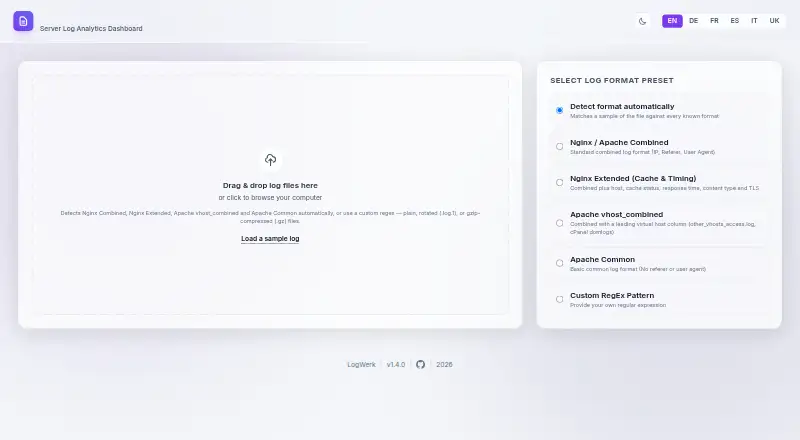
LogWerk is a free browser-based server log analyzer for developers, sysadmins, and site operators who want traffic insight without setting up a full analytics stack. It can read plain or gzip-compressed rotated logs, detect Nginx and Apache formats, and accept manual presets or custom regular expressions. Its dashboard summarizes traffic over time, HTTP statuses, paths, client IPs, browsers, operating systems, referrers, and other traffic details. It classifies more than 70 known bots and crawlers by provider and purpose, including AI crawlers. The Security tab reports listed attack patterns, suspicious IPs, 404 paths, and failed logins. Requests can be grouped by IP address and user agent into chronological session timelines. The maker says logs are parsed in the browser and never uploaded, and no account is needed. The latest log is cached in IndexedDB and restored after refresh; filtered results can be exported as CSV. The interface supports six languages. Its MIT license permits use, copying, modification, distribution, sublicensing, and sale subject to its conditions.
Who it suits
LogWerk suits people who want to inspect server traffic and crawler activity in a browser without setting up a full log analytics stack. It is designed for developers, sysadmins, and site operators.
What it does well
- Reads plain and gzip-compressed rotated logs.
- Recognizes Nginx and Apache formats automatically.
- Classifies more than 70 bots and crawlers.
- Parses logs in-browser without uploading them.
- Exports filtered results as CSV.
What to know first
- Modern browsers restrict local modules over file://.
- A local server is recommended for setup.
- CDN resources must be vendored for fully offline use.
Limits
A fully offline build requires locally vendoring the Tailwind CSS, Chart.js and Google Fonts resources that the interface loads from CDNs. Modern browsers restrict local JavaScript modules when opened over file://, so the project recommends serving the folder from a local server.
Getting started
- Open the LogWerk website.
- Use a modern web browser.
- Serve the project folder from a local server rather than opening it over file://.
- Load a plain or gzip-compressed log file.
- Use the dashboard or Security tab, then export filtered results as CSV if needed.
Verdict
LogWerk brings traffic, crawler, security, and session views together in a browser-based analyzer. Its setup and CDN requirements matter for people seeking fully local offline use.
Questions
Is LogWerk free?
Yes. It is free and has a free plan.
Does LogWerk upload log files?
Its maker says logs are parsed in the browser and never uploaded. No account is needed.
What log formats does it support?
It automatically detects Nginx and Apache formats, and supports manual presets and custom regular expressions. It can load plain and gzip-compressed rotated logs.
Can I use LogWerk fully offline?
The interface loads Tailwind CSS, Chart.js and Google Fonts from CDNs. The maker recommends vendoring these resources locally for a fully offline build.
What license does LogWerk use?
It is licensed under MIT, which permits use, copying, modification, distribution, sublicensing and sale subject to its stated conditions.
Which languages are supported?
The interface supports English, German, French, Spanish, Italian and Ukrainian.
Facts from LogWerk's own pages
- Audience
- It is built for developers, sysadmins, and site operators. · github.com, 8 Oct 2026
- Browser storage
- The most recently loaded log is cached in IndexedDB and restored after a page refresh. · github.com, 8 Oct 2026
- Compressed logs
- It can load gzip-compressed and plain rotated log files in the browser. · github.com, 8 Oct 2026
- Crawler analysis
- It classifies more than 70 known bots and crawlers by provider and purpose, including AI crawlers. · github.com, 8 Oct 2026
- Export
- Users can export the currently filtered results as CSV. · github.com, 8 Oct 2026
- Export and persistence
- It exports filtered results as CSV and caches the last loaded log in browser IndexedDB for restoration after refresh. · github.com, 8 Oct 2026
- Integrations and dependencies
- The project loads Tailwind CSS, Chart.js, and Google Fonts from CDNs. · github.com, 8 Oct 2026
- Intended users
- It is built for developers, sysadmins, and site operators who want to understand traffic without setting up a full log analytics stack. · github.com, 8 Oct 2026
- Languages
- Its interface supports English, German, French, Spanish, Italian, and Ukrainian. · github.com, 8 Oct 2026
- License
- The project is licensed under MIT, which permits use, copying, modification, distribution, sublicensing, and sale subject to its stated conditions. · github.com, 8 Oct 2026
- Log formats
- It detects Nginx and Apache log formats automatically and also supports manual presets and custom regular expressions. · github.com, 8 Oct 2026
- Offline use
- The maker says the interface loads resources from CDNs and recommends vendoring them locally for a fully offline build. · github.com, 8 Oct 2026
- Privacy
- The maker says logs are parsed in the browser and never uploaded; no account is needed. · github.com, 8 Oct 2026
- Purpose
- LogWerk is an offline-first server log analyzer that runs in a web browser. · github.com, 8 Oct 2026
- Security analysis
- Its Security tab detects listed attack patterns and reports suspicious IPs, 404 paths, and failed logins. · github.com, 8 Oct 2026
- Security features
- Its Security tab detects listed attack patterns and reports suspicious IPs, 404 paths, and failed logins. · github.com, 8 Oct 2026
- Session analysis
- It groups requests by IP address and user agent into chronological session timelines. · github.com, 8 Oct 2026
- Session journeys
- It groups requests by IP and user agent into chronological session timelines. · github.com, 8 Oct 2026
- Setup limit
- The README says modern browsers restrict local JavaScript modules over file:// and recommends serving the folder from a local server; it also describes a Safari workaround. · github.com, 8 Oct 2026
- Traffic analysis
- Its dashboard reports traffic over time, HTTP statuses, paths, client IPs, browsers, operating systems, referrers, and other traffic insights. · github.com, 8 Oct 2026
- What it does
- LogWerk is an offline-first server log analyzer that runs in a web browser. · github.com, 8 Oct 2026
Where LogWerk stands on Freedom251
- SEO Log File Analysis Tools#14 of 27