Freedom251 › Food Truck POS Software
ParcelPOS
What ParcelPOS is
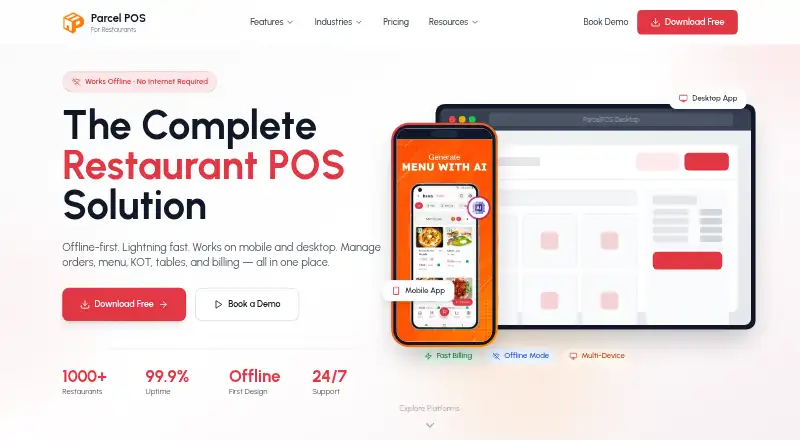
ParcelPOS is an offline-first restaurant point-of-sale app for billing and day-to-day operations. It handles dine-in, takeaway, delivery and parcel orders, with fast billing and kitchen order ticket (KOT) status tracking. Menus can include categories, variants, add-ons and combos, with stock-level tracking. For Indian tax billing, it calculates tax automatically and generates invoices with CGST and SGST shown separately. Staff roles and attendance, customer order history, and tools to merge, split or transfer tables are also included. The app stores data locally when offline and syncs again when the connection returns; cloud sync is listed with Pro. Integrations include Swiggy and Zomato delivery orders, UPI and payment gateways, and Bluetooth and USB thermal printers. The free plan costs nothing and includes up to 30 orders per day, unlimited menu items and users, KOT printing and basic reporting. ParcelPOS is available on Android and Windows 10 or later, and is designed for Indian restaurants such as cafes, cloud kitchens, bakeries and food trucks.
Who it suits
ParcelPOS suits Indian restaurants that need billing, order handling and kitchen-ticket tracking, including cafes, QSRs, bakeries, bars, food trucks and dhabas. It may fit operators who need to keep working offline or manage multiple locations.
What it does well
- Works without internet and syncs when connected.
- Free plan includes unlimited menu items and users.
- Supports CGST/SGST invoices with automatic tax calculation.
- Integrates with Swiggy and Zomato delivery orders.
- Available for Android and Windows 10 or later.
What to know first
- Free plan is limited to 30 orders per day.
- Cloud sync is listed as a Pro feature.
- The App Store version is still listed as coming soon.
Limits
The Free plan allows 30 orders per day. Unlimited orders, cloud sync, and multi-branch support are listed with Pro; Pro pricing is provided by contacting the maker.
Plans
| Plan | Billed and limits | Price |
|---|---|---|
| Free | Free forever · 30 orders/day · unlimited menu items · unlimited users · KOT printing · basic reporting | Free |
| Pro | Contact us for current pricing · Unlimited orders · cloud sync · multi-branch support · priority support | On request |
As parcelpos.app lists them, read 30 Sept 2026. The maker's own page has the final word.
Getting started
- Visit the ParcelPOS website.
- Choose Android through the linked Play Store, or download the Windows installer for Windows 10 or later.
- Start with the Free plan, which is billed Free forever.
- Contact ParcelPOS for current Pro pricing if you need unlimited orders, cloud sync, or multi-branch support.
ParcelPOS is an offline-first point-of-sale system built for Indian restaurants, from cafés and bakeries to cloud kitchens, bars, food trucks and dhabas. It suits operators who need billing, kitchen coordination and stock-aware menus on Android or Windows, including during connectivity outages. The free tier is capable for a small operation, while growing or multi-branch businesses will need to weigh its daily order ceiling against the Pro upgrade.
Overview
ParcelPOS brings dine-in, takeaway, delivery and parcel orders into one workflow. Fast billing and kitchen order ticket (KOT) status tracking connect front-of-house ordering with kitchen progress. Table merge, split and transfer tools handle changing seating arrangements, while staff roles, attendance and customer order history cover useful operational tasks beyond checkout.
Its menu system supports categories, variants, add-ons and combos, with stock-level tracking to help keep availability aligned with what the kitchen can actually prepare. GST invoices automatically calculate tax and show a CGST/SGST breakdown, making the product particularly relevant to Indian food businesses rather than general retailers.
Key features
Offline service and order control
The app stores data locally and continues operating without an internet connection, then synchronizes when connectivity returns. That is a meaningful safeguard for restaurants where an outage should not halt sales. Cloud sync is reserved for Pro, however, so the free plan's offline resilience does not deliver the same continuity across devices or locations.
Menus, inventory and tables
Variants, modifiers, add-ons and combos give restaurants room to represent real menus without duplicating every item. Stock tracking adds a practical check on availability. Table merge, split and transfer functions are most valuable for dine-in venues; takeaway-only businesses are unlikely to gain as much from them.
Payments, integrations and data protection
ParcelPOS supports offline payments and online ordering. Its integrations page includes Swiggy and Zomato delivery orders, UPI and payment gateways, plus Bluetooth and USB thermal printers. The maker says device data is kept in an encrypted SQLite database, while Pro cloud backups are encrypted, and that business data is not accessed without permission.
Support
Email support is stated to reply within 24 hours, or within four hours for Pro customers. Phone support is offered Monday to Friday and on Saturday during specified IST hours, giving paid users a clearer escalation route.
Pricing
Free
The Free plan costs nothing, billed Free forever. It allows 30 orders per day, unlimited menu items, unlimited users, KOT printing and basic reporting. This is a sensible fit for a small, single-site restaurant with modest daily volume. The order quota is the decisive restriction: a busy service can reach it quickly, and the plan does not include cloud sync or multi-branch support.
Pro
Pro uses custom pricing, billed as “Contact us for current pricing.” It removes the order limit and adds cloud sync, multi-branch support and priority support. Restaurants expanding across locations, or those needing centralized data and faster assistance, have a clear reason to move up; businesses that remain within 30 orders a day may find the paid tier unnecessary.
Platforms
ParcelPOS runs on Android and Windows. The download page provides a Windows installer for Windows 10 or later and links to the Android Play Store. An App Store release is described as coming soon, so iPhone and iPad users should not plan around native iOS access today.
Who it's for
This is a strong match for Indian cafés, cloud kitchens, QSRs, bakeries, bars, food trucks and dhabas that want GST-aware billing, KOT workflows and menu controls in one system. A small restaurant can start without a subscription and keep operating through internet interruptions. It is less suitable for iOS-first teams, restaurants that need cloud synchronization without Pro, or operations whose regular volume exceeds the Free plan's 30 daily orders.
Pros and cons
Pros
- Offline-first operation keeps billing and order handling available during connectivity loss.
- Orders, KOT status, tables, staff permissions, attendance and customer history cover core restaurant workflows.
- Categories, variants, add-ons, combos and stock tracking support detailed menus.
- Automatic CGST/SGST calculation makes invoices practical for Indian restaurants.
- Free forever pricing, unlimited users and unlimited menu items lower the barrier for a small venue.
- Swiggy, Zomato, payment and thermal-printer integrations can connect ordering and fulfilment tools.
Cons
- The Free plan stops at 30 orders per day, which can constrain a busy service.
- Cloud sync and multi-branch support require Pro, limiting centralized management on the free tier.
- Windows support starts at Windows 10, and iOS access is not yet offered.
- Pro pricing requires contacting the maker, making the upgrade cost harder to budget in advance.
Alternatives
For a wider shortlist, see Food Truck POS Software.
- Biyo POS is the better comparison for businesses needing broad Android, iOS, Linux, macOS, web and Windows coverage, with a US-only free plan and a $47.00 per month Standard plan.
- Loyverse suits operators who want Android, iOS, web and API access; its Unlimited sales history plan costs $5.00 per month per store.
- SpotOn Restaurant is for buyers seeking bundled POS hardware, ordering, payments and table layouts under a paid, two-year-minimum arrangement.
- CartFlow is a better fit for event-focused selling, with a Free plan capped at three events and 20 sales records per month.
- FuegoPOS offers a freemium alternative with self-hosted and API platforms.
- Zeller is aimed at businesses willing to use a Zeller Terminal and pay transaction fees instead of a monthly software licence.
- Avocado POS is an iOS-only option that charges payment-based fees rather than a monthly bill.
- HunoMenu is another freemium restaurant-menu option spanning Android, iOS, web and Windows.
Verdict
Choose ParcelPOS if you run an Indian restaurant and want a capable free starting point with offline billing, GST invoices, KOT tracking and restaurant-specific menu and table tools. Look elsewhere if you require iOS now, need cloud or multi-branch management without a paid plan, or regularly process more than 30 orders a day on a single location.
Verdict
ParcelPOS covers core restaurant billing, ordering, menu and staff workflows, with offline use and integrations listed for Indian restaurants. Check the free plan’s daily order cap and whether Pro features such as cloud sync fit your needs.
Questions
How much does ParcelPOS cost?
The Free plan costs nothing and is billed Free forever. Pro pricing is available by contacting the maker.
What does the Free plan include?
It includes up to 30 orders per day, unlimited menu items and users, KOT printing, and basic reporting.
Which devices can run ParcelPOS?
ParcelPOS is available for Android and Windows. The Windows installer is for Windows 10 or later; the download page says the App Store is coming soon.
Can ParcelPOS work without internet?
Yes. It stores data locally while offline and syncs when the connection returns. Cloud sync is a Pro feature.
Which integrations are listed?
Listed integrations include Swiggy and Zomato delivery orders, UPI and payment gateways, and Bluetooth and USB thermal printers.
Who makes ParcelPOS?
ParcelPOS says it was founded by Eagleminds Technologies in Bangalore and launched in 2024.
Facts from ParcelPOS's own pages
- Device support
- The download page offers a Windows installer for Windows 10 or later and links to the Android Play Store; it says the App Store is coming soon. · parcelpos.app, 30 Sept 2026
- Founded
- 2024 · parcelpos.app, 28 Sept 2026
- GST billing
- It generates invoices with CGST/SGST breakup and automatic tax calculation. · parcelpos.app, 30 Sept 2026
- Headquarters
- Bangalore, Karnataka, India · parcelpos.app, 28 Sept 2026
- Integrations
- The integrations page lists Swiggy and Zomato delivery orders, UPI and payment gateways, and Bluetooth and USB thermal printers. · parcelpos.app, 30 Sept 2026
- Intended users
- The product is designed for Indian restaurants and the maker names cafes, cloud kitchens, QSRs, bakeries, bars, food trucks, and dhabas as industries served. · parcelpos.app, 30 Sept 2026
- Maker
- ParcelPOS says it was founded by Eagleminds Technologies in Bangalore and launched in 2024. · parcelpos.app, 30 Sept 2026
- Menu and stock
- Menu tools support categories, variants, add-ons, combos, and stock-level tracking. · parcelpos.app, 30 Sept 2026
- Offline and sync
- The app works without internet, stores data locally, and syncs when the connection returns; cloud sync is listed among Pro features. · parcelpos.app, 30 Sept 2026
- Order handling
- It supports dine-in, takeaway, delivery, and parcel orders, with fast billing and KOT status tracking. · parcelpos.app, 30 Sept 2026
- Purpose
- ParcelPOS is an offline-first restaurant POS for billing, orders, menus, kitchen tickets, tables, and restaurant operations. · parcelpos.app, 30 Sept 2026
- Restaurant operations
- Features include table merge, split, and transfer; staff roles and attendance; and customer order history. · parcelpos.app, 30 Sept 2026
- Security
- The maker says device data is stored in an encrypted SQLite database and Pro cloud backups are encrypted; it says it does not access business data without permission. · parcelpos.app, 30 Sept 2026
- Support
- Email support replies within 24 hours, or within 4 hours for Pro; phone support is listed Monday to Friday and Saturday during specified IST hours. · parcelpos.app, 30 Sept 2026
Where ParcelPOS stands on Freedom251
- Food Truck POS Software#12 of 29