Freedom251 › Meeting Notes Software
Opisense Workspace
What Opisense Workspace is
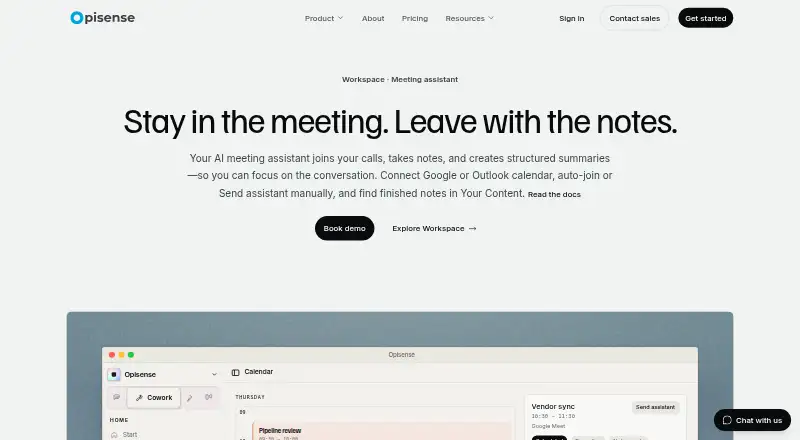
Opisense Workspace is an AI meeting assistant that joins calls, transcribes them and prepares structured notes for teams. Its bot supports Zoom, Google Meet, Microsoft Teams and Webex. Users can connect a Google or Outlook calendar and enable automatic joining, or send the assistant a meeting link manually. After a call, a document in Your Content can include a summary, key decisions, action items, follow-ups and a searchable full transcript; it may take a few minutes to appear, depending on call length. Other capabilities include pre-meeting briefs, transcript enhancement, meeting templates and action-item tracking. When a CRM is connected, action items can be pushed to HubSpot. Notes can be shared internally or with external guests through a view-only link. Native Android and iOS apps sync with the web workspace, while specialist agents, skills management, admin settings, full search and comment sharing are web-only today. Opisense describes Workspace as an execution environment for organizations that need permissions, provenance and audit trails. The free plan includes 1,500 AI credits per month for up to one member; paid Starter and Growth plans add higher credit allowances and team capacity.
Who it suits
Opisense Workspace suits teams that want call transcription, structured notes and action tracking across supported meeting platforms. Its permissions, provenance and audit-trail focus may also fit organizations ranging from start-ups to established enterprises.
What it does well
- Transcribes meetings and creates structured summaries
- Supports Zoom, Google Meet, Microsoft Teams and Webex
- Connects Google or Outlook calendars for auto-joining
- Includes searchable transcripts, decisions and follow-ups
- Notes can be shared with external guests by view-only link
What to know first
- Free plan is limited to one member and 1,500 monthly AI credits
- Several workspace features are web-only
- Notes may take a few minutes to appear after calls
Limits
The Free plan includes 1,500 AI credits per month and supports up to one member. Starter is listed at €29 a month with 12,000 AI credits per seat per month and up to five members; Growth is €59 a month with 75,000 AI credits per seat per month and unlimited members.
Plans
| Plan | Billed and limits | Price |
|---|---|---|
| Free | 1,500 AI credits/mo · up to 1 member | Free |
| Starter | Monthly · 12,000 AI credits/seat/mo · up to 5 members · usage top-ups | €29 a month |
| Growth | Monthly · 75,000 AI credits/seat/mo · unlimited members · usage top-ups · workflows · priority support | €59 a month |
| Starter | Billed annually · 17% off · 12,000 AI credits/seat/mo · up to 5 members · usage top-ups | €24.17 a year |
| Growth | Billed annually · 17% off · 75,000 AI credits/seat/mo · unlimited members · usage top-ups · workflows · priority support | €49.17 a year |
| Onboarding pack | One-time fee, invoiced upfront, ex. VAT · Requires Starter or above · 1–2 custom workflows · 250,000 upfront AI credits · 30 days priority onboarding support | €5,000, paid once |
| Enterprise | Custom pricing · Sovereign deployment · SSO · dedicated CSM · invoiced billing · custom data residency | On request |
As opisense.com lists them, read 9 Oct 2026. The maker's own page has the final word.
Getting started
- Open https://www.opisense.com/en/products/workspace/meeting-assistant/ on the web or use the Android or iOS app
- Choose the Free plan or a paid plan that fits your team
- Connect a Google or Outlook calendar and enable auto-join, or send the assistant a meeting link
- Use a supported meeting platform: Zoom, Google Meet, Microsoft Teams or Webex
- Open the meeting note in Your Content after the call ends
Verdict
Choose Opisense Workspace if your team needs meeting capture, searchable notes and follow-up tools in a shared workspace. Look elsewhere if you need the web-only capabilities on mobile, or if the free plan’s one-member limit is too restrictive.
Questions
Is Opisense Workspace free?
Yes. Its Free plan costs nothing and includes 1,500 AI credits per month for up to one member.
What do the paid plans cost?
Starter is €29 a month and Growth is €59 a month. Enterprise is listed without a price.
Which meeting platforms does it support?
The meeting bot supports Zoom, Google Meet, Microsoft Teams and Webex.
Which platforms have native apps?
Opisense offers native iOS and Android apps that sync with the web workspace. Specialist agents, skills management, admin settings, full search and comment sharing are web-only today.
What appears in a meeting note?
A note can include a summary, key decisions, action items, follow-ups and a searchable full transcript. Notes are generated after a meeting ends and may take a few minutes to appear.
What does Opisense say about security and compliance?
Opisense says data is encrypted in transit with TLS and at rest with AES-256, with MFA, role-based permissions and default action logging. Its Trust Center lists GDPR and the EU AI Act as compliant, ISO 27001 and ISO 42001 as in progress, and SOC 2 Type 2 as planned; it says these are not certification claims.
Facts from Opisense Workspace's own pages
- Calendar connection
- Users can connect a Google or Outlook calendar, enable auto-join, or send the assistant to a meeting link manually. · opisense.com, 9 Oct 2026
- Calendar integrations
- Yes · opisense.com, 20 Sept 2026
- Compliance status
- The Trust Center lists GDPR and the EU AI Act as compliant, ISO 27001 and ISO 42001 as in progress, and SOC 2 Type 2 as planned; it says these statuses are not certification claims. · opisense.com, 9 Oct 2026
- Data residency and retention
- Cloud regions can be aligned to residency requirements, and configurable retention includes zero-retention options for supported workloads. · opisense.com, 9 Oct 2026
- Free plan
- Yes · opisense.com, 20 Sept 2026
- Headquarters
- Trondheim, Norway · opisense.com, 28 Sept 2026
- Integrations
- The maker describes connected apps for linking external SaaS and says event triggers for workflows are in early access and invite-only. · opisense.com, 9 Oct 2026
- Intended teams
- Opisense describes Workspace as an execution environment for organizations that need permissions, provenance, and audit trails, from start-ups to established enterprises. · opisense.com, 9 Oct 2026
- Meeting assistant
- The AI meeting assistant joins calls, takes notes, and creates structured summaries. · opisense.com, 9 Oct 2026
- Meeting capture
- bot · opisense.com, 20 Sept 2026
- Meeting intelligence
- The product offers pre-meeting briefs, transcript enhancement, meeting templates, and action-item tracking, with HubSpot push when CRM is connected. · opisense.com, 9 Oct 2026
- Meeting notes
- After a call, a meeting-note document in Your Content includes a summary, key decisions, action items, follow-ups, and a searchable full transcript. · opisense.com, 9 Oct 2026
- Meeting platforms
- Opisense Notetaker records meetings on Zoom, Google Meet, Microsoft Teams, and Webex. · opisense.com, 9 Oct 2026
- Mobile apps
- Opisense offers native iOS and Android apps that sync with the web workspace; specialist agents, skills management, admin settings, full search, and comment sharing are web-only today. · opisense.com, 9 Oct 2026
- Note processing time
- Notes are generated after a meeting ends and may take a few minutes to appear, depending on call length. · opisense.com, 9 Oct 2026
- Security
- Opisense says data is encrypted in transit with TLS and at rest with AES-256, access is gated by MFA and role-based permissions, and user and agent actions are logged by default. · opisense.com, 9 Oct 2026
- Sharing
- Meeting notes can be shared internally or through a view-only link with external guests. · opisense.com, 9 Oct 2026
- Summaries and action items
- Yes · opisense.com, 20 Sept 2026
- Support
- Growth includes priority support, and Enterprise includes a dedicated customer success manager. · opisense.com, 9 Oct 2026
- Transcription
- Yes · opisense.com, 20 Sept 2026
Where Opisense Workspace stands on Freedom251
- Meeting Notes Software#24 of 112
- AI Meeting Assistants#37 of 82
- Meeting Intelligence Software#16 of 33