Openza Tasks
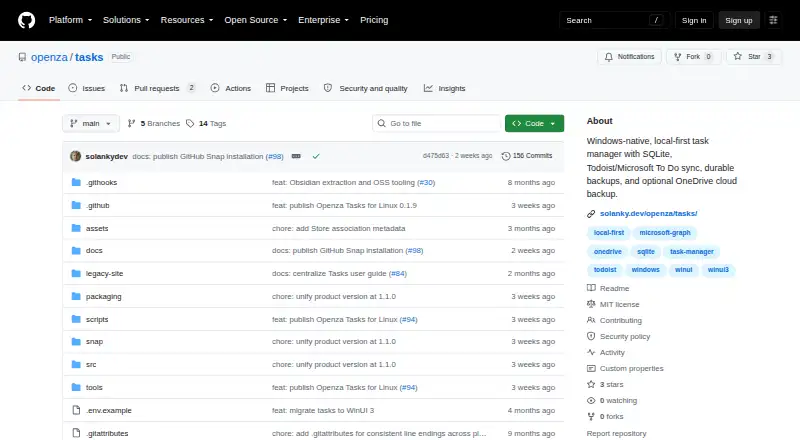
What Openza Tasks is
Openza Tasks is a free, local-first desktop task manager for Windows, macOS, and Linux. It stores tasks, projects, labels, backups, imports, provider snapshots, account identifiers, and preferences on your device, and it can work without an account or another connected service. You can organize work with projects, labels, dates, priorities, notes, saved views, and subtasks. Markdown checkboxes can be imported, and tasks can be exported as Markdown files. Local backups and automatic or manual SQLite restore points support rollback within the app package state. Optional connections add Todoist and Microsoft To Do synchronization, GitHub issue creation and linking, and OneDrive backup snapshots. The project says it collects no telemetry, analytics, or personal usage data, runs no hosted sync service, and does not sell user data. Provider sync, GitHub actions, and OneDrive backups send data to those selected services. Windows uses Credential Locker for credentials, while Linux uses Secret Service. The source and documentation are MIT-licensed, and Deependra Solanky maintains the project.
Who it suits
It suits people who want a desktop task manager with local storage, offline use, and optional service connections. It also fits users who need subtasks, Markdown exchange, restore points, or integrations with Todoist, Microsoft To Do, GitHub, or OneDrive.
What it does well
- Works on Windows, macOS, and Linux
- Tasks can stay local and work offline
- Supports projects, labels, dates, priorities, and subtasks
- Imports and exports Markdown task files
- Offers local backups and SQLite restore points
What to know first
- Linux Snap Store automatic updates are unavailable pending publication
- Optional integrations send data to selected services
- No hosted sync service is provided
Verdict
Openza Tasks combines local task management with optional integrations and restore tools. Its free plan, offline storage, Markdown support, and broad desktop availability make it suitable for users who prefer keeping task data on their devices.
Facts from Openza Tasks's own pages
- Availability
- The README lists a Microsoft Store release for Windows and a Linux Snap release, with Snap Store publication pending. · github.com, 12 Oct 2026
- Backups
- The app supports local backups and optional backup snapshots in OneDrive. · solanky.dev, 12 Oct 2026
- Credential security
- Windows uses Credential Locker and a protected MSAL cache; Linux uses Secret Service through the Secret Portal in the Snap. · github.com, 12 Oct 2026
- Credential storage
- Windows stores provider credentials in Credential Locker, while the Linux desktop uses Secret Service for provider tokens, Microsoft token caches, and backup passphrases. · github.com, 12 Oct 2026
- Data sharing
- Provider sync, GitHub issue creation, and OneDrive backup send data to the selected service when used. · github.com, 12 Oct 2026
- Free plan
- Yes · github.com, 22 Sept 2026
- Hosted service
- The maker says Openza Tasks does not operate a hosted sync service or sell user data. · github.com, 12 Oct 2026
- Integrations
- Optional task sync is available with Todoist and Microsoft To Do. · solanky.dev, 12 Oct 2026
- License
- The source code and documentation are available under the MIT License. · github.com, 12 Oct 2026
- Linux distribution
- The Linux release is distributed as a strictly confined Snap, and automatic Snap Store updates are unavailable until its Store listing is released. · github.com, 12 Oct 2026
- Linux features
- The Linux desktop app includes smart lists, Spaces, projects, search, sorting, filtering, task details, labels, subtasks, restore points, and connected-task intake. · github.com, 12 Oct 2026
- Local data
- Task data, provider snapshots, account identifiers, and preferences are stored locally on the device. · github.com, 12 Oct 2026
- Markdown
- Users can import Markdown checkboxes and export tasks as Markdown files. · solanky.dev, 12 Oct 2026
- Offline storage
- Tasks can be kept on the device and used without creating an account or connecting another service. · solanky.dev, 12 Oct 2026
- Organization
- Users can organize tasks with projects, labels, dates, priorities, notes, and saved views. · solanky.dev, 12 Oct 2026
- Privacy
- Openza Tasks says it does not collect telemetry, analytics, or personal usage data. · github.com, 12 Oct 2026
- Product
- Openza Tasks is a local-first desktop task manager with optional Todoist and Microsoft To Do sync. · solanky.dev, 12 Oct 2026
- Restore
- Automatic and manual SQLite restore points support rollback within the app package state. · github.com, 12 Oct 2026
- Storage
- Tasks, projects, labels, backups, and imports are stored locally on the device. · github.com, 12 Oct 2026
- Subtasks
- Yes · github.com, 22 Sept 2026
- Support and maintenance
- The project is maintained by Deependra Solanky as a personal open-source project. · github.com, 12 Oct 2026
- Supported platforms
- Windows,macOS compatibility,Linux · github.com, 22 Sept 2026
- Windows distribution
- The Windows-native WinUI 3 app is available through the Microsoft Store. · github.com, 12 Oct 2026
Where Openza Tasks stands on Freedom251
- To-do list apps#93 of 150