Freedom251 › Travel Itinerary Apps
Pappus Travel Planner
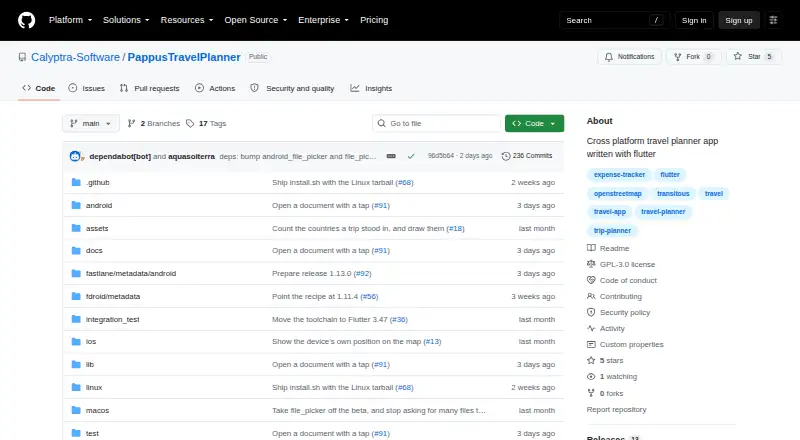
What Pappus Travel Planner is
Pappus Travel Planner is a trip-planning app for building day-by-day itineraries with destinations, transport, times, and alternative plans. It can track trip costs by category and person, including multiple currencies, custom categories, and exchange rates, then show spending statistics and settle-up calculations. Itineraries can include places, transport legs, shared-ticket groups, and reorderable items. Optional connection searches use Transitous for public transport, trains, buses, and other operator routes; results can be imported and live times refreshed. Maps use OpenStreetMap tiles, and GPX tracks can be added to itinerary legs. The app works offline except for optional connection searches and map tiles. Trip data is kept in a portable SQLite file; the app says it needs no account or server and uploads nothing. Photos and documents can be stored with a trip. Trips can be shared in importable .tpt bundles or exported as PDF or .ics, but PDF and calendar exports cannot be imported back. It is free under GPL version 3 or later, with no warranty stated.
Who it suits
It suits travelers who want to organize itineraries and costs in one place, including people planning shared trips. Its offline use and portable trip database may also suit travelers who want trip data on their own device.
What it does well
- Build day-by-day itineraries with alternatives.
- Track costs across multiple currencies.
- Works offline apart from optional network features.
- Share trips in importable .tpt bundles.
- Free software under GPL version 3 or later.
What to know first
- Calendar sync is not available.
- PDF and .ics exports cannot be imported back.
- Android has no store listing yet.
- Windows builds are unsigned.
Limits
The app is free software at no cost. There is no stated free-plan quota; PDF and .ics exports cannot be imported back, and calendar synchronization is unavailable.
Plans
| Plan | Billed and limits | Price |
|---|---|---|
| Free software | GPL-3.0-or-later; no warranty stated | Free |
As github.com lists them, read 5 Oct 2026. The maker's own page has the final word.
Getting started
- Open the project website on GitHub.
- Choose a platform: Android, iOS, Linux, macOS, web or Windows.
- Android, Linux and Windows builds are available from Releases.
- Create an itinerary with destinations, transport legs and times.
- Add optional connection searches, maps, costs or attachments as needed.
Pappus Travel Planner is a trip planner for organizing daily schedules, transport and shared expenses. It suits travelers who want offline planning and a portable copy of their trip data. Its standout trade-off is strong file-based control without calendar syncing.
Overview
Trips live in a SQLite database on the user's device: Pappus requires no account or server and says it uploads nothing. That is a good fit for travelers who value keeping their plans under their own control, and the app works offline apart from optional connection searches and map tiles. The trade-off is that calendar entries do not sync automatically.
For sharing or moving a trip, an importable .tpt bundle can include attachments. PDF and .ics exports offer formats for reading or adding calendar entries elsewhere, but they cannot be imported back into Pappus. Keep the bundle if you need an editable, round-trip copy.
Key features
The itinerary can hold places, timed transport legs, shared-ticket groups and alternative plans; entries can be reordered. That flexibility is useful for trips with changing plans or tickets shared across a group, rather than just a straightforward list of stops. Optional Transitous searches cover public transport, trains, buses and other operator routes; search results can be imported and live times refreshed. Since searches require a network connection, the core itinerary remains usable offline, but finding connections does not.
Maps use OpenStreetMap tiles, and GPX tracks can be attached to itinerary legs. Expense tracking supports multiple currencies, custom categories and exchange rates, with spending statistics and settle-up calculations. Photos and documents can be attached to a trip, group or itinerary entry and are stored inside the database file. Together, these tools make Pappus more useful for coordinating a group's plans and shared costs than a basic itinerary alone, though map tiles are another online dependency.
English and German are supported, with light, dark and system themes. Pappus is free software under GNU GPL version 3 or any later version; the license disclaims warranty. Security reports should go through the separate route identified by the project, not public issues.
Pricing
Free software: free. The plan includes Pappus's itinerary, transport search, maps, expense tracking, attachments and exports, with no paid tier identified. There are no account or server requirements, but the plan's key limits are practical rather than a stated trip quota: PDF and .ics exports are one-way, and calendar sync is absent.
Platforms
Pappus supports Android, iOS, Linux, macOS, web and Windows. Android, Linux and Windows builds are available from Releases; Android has no store listing yet, and Windows builds are unsigned. Those download conditions may put off people who prefer an app-store install or signed Windows software. The app's offline mode is useful across trips without reliable connectivity, but optional searches and map tiles still need a network.
Who it's for
Pappus is a strong choice for independent travelers and groups who want detailed day-by-day plans, shared cost calculations, offline access and a portable database they control. It is less suitable for travelers who need calendar changes to sync automatically, or who depend on easily installed Android and signed Windows builds.
Pros and cons
- Pro: A portable SQLite database, no account or server requirement, and offline planning give travelers control over their trip data.
- Pro: Alternative plans, shared-ticket groups and settle-up calculations address the coordination and cost-sharing needs of group trips.
- Pro: Importable .tpt bundles preserve attachments for sharing or transfer.
- Con: PDF and .ics exports cannot be imported back, and automatic calendar sync is unavailable.
- Con: Connection searches and map tiles rely on network services, so those features are not fully offline.
- Con: The Android build has no store listing and Windows builds are unsigned, making installation less convenient for some users.
Alternatives
For more options, browse Travel Itinerary Apps or To-do list apps. Consider these specific alternatives when their platform or plan differences better match your needs:
- Lambus is another free-to-start option for Android, iOS and web; its PRO plan is €24.99 a year, billed as a one-time gift purchase for one year.
- Pilot is a free option on Android, iOS and web with an itinerary builder, route and map tools, file and reservation import, and real-time collaboration.
- Stippl has a free plan with unlimited trips, destinations, activities, co-planners, expenses and journal entries, plus AI generation, PDF export and calendar sync.
- TREK is a free, self-hosted option for Android, iOS, Linux and web under AGPL-3.0.
- TripCraftr offers a free plan with unlimited trips and invitees, plus a free trial; its free plan caps documents at five per trip and Lorenzo replies at five per day on the nearest trip.
- TripIt is available on Android, iOS, macOS and web; its free plan allows three document uploads per trip, while TripIt Pro is $49 a year and allows 25.
- TripMapper has a free plan with card and list views, images, notes, a mobile app, start and end times, tasks and premade itineraries; Trip+ costs £3.99 a month.
- Wanderlog offers a free website and app with unlimited trips and collaborators, alongside a paid Pro subscription.
Verdict
Choose Pappus if your priority is a detailed, offline-capable trip plan stored in a portable file, with group expenses and attachments in the same place. Look elsewhere if automatic calendar syncing or a straightforward Android or signed Windows installation matters more.
Verdict
Pappus Travel Planner combines itinerary planning, cost tracking, maps, and trip sharing in a free app. Note that calendar sync is absent and PDF and .ics exports are one-way.
Questions
How much does Pappus Travel Planner cost?
The Free software plan costs nothing. It is available under GNU GPL version 3 or, at the user's option, any later version; the license disclaims warranty.
Which platforms does it support?
The listed platforms are Android, iOS, Linux, macOS, web and Windows. Android, Linux and Windows builds are available from Releases; Android has no store listing yet, and Windows builds are unsigned.
Can I use it offline?
Yes. The app works offline except for optional connection searches and map tiles, which use network services.
Does Pappus require an account or upload trip data?
Trip data is stored in a portable SQLite file. The app says it requires no account or server and uploads nothing.
Can I export or share an itinerary?
Trips can be shared in importable .tpt bundles or exported as PDF or .ics. PDF and .ics exports cannot be imported back.
Does it sync with calendars?
No. Calendar sync is listed as unavailable; trips can be exported as .ics files.
Facts from Pappus Travel Planner's own pages
- Attachments
- Photos and documents can be attached to an itinerary entry, group, or trip and are stored inside the database file. · github.com, 5 Oct 2026
- Calendar sync
- No · github.com, 21 Sept 2026
- Costs
- Costs can be tracked in multiple currencies with custom categories and exchange rates, and the app provides spending statistics and settle-up calculations. · github.com, 5 Oct 2026
- Data ownership
- Trip data is stored in a portable SQLite file, and the app says it requires no account or server and uploads nothing. · github.com, 5 Oct 2026
- Downloads
- The README says Android, Linux, and Windows builds are available from Releases; Android has no store listing yet, and Windows builds are unsigned. · github.com, 5 Oct 2026
- Exports
- Trips can be shared in an importable .tpt bundle with attachments, or exported as PDF or .ics; PDF and calendar exports cannot be imported back. · github.com, 5 Oct 2026
- Free plan
- Yes · github.com, 21 Sept 2026
- Itineraries
- Users can build day-by-day itineraries with places, transport legs, times, shared-ticket groups, reorderable items, and alternative plans. · github.com, 5 Oct 2026
- Languages and themes
- The app supports English and German, with light, dark, and system theme options. · github.com, 5 Oct 2026
- License
- Pappus Travel Planner is free software under GNU GPL version 3 or, at the user's option, any later version, and the license disclaims warranty. · github.com, 5 Oct 2026
- Maps
- Trip maps use OpenStreetMap tiles and support importing GPX tracks onto itinerary legs. · github.com, 5 Oct 2026
- Offline use
- The app works offline except for optional connection searches and map tiles, which use network services. · github.com, 5 Oct 2026
- Platforms
- The project describes Android as its primary target and says the same codebase runs on web, Linux, Windows, macOS, and iOS. · github.com, 5 Oct 2026
- Purpose
- Pappus plans trips day by day, including destinations, transport, and costs by category and person. · github.com, 5 Oct 2026
- Support and security
- The README directs security reports through a separate route and says they should not be posted as public issues. · github.com, 5 Oct 2026
- Transport search
- Optional real connection search uses Transitous to find public transport, trains, buses, and other operator routes, and can import results and refresh live times. · github.com, 5 Oct 2026
Where Pappus Travel Planner stands on Freedom251
- Travel Itinerary Apps#8 of 45
- To-do list apps#90 of 150