Freedom251 › AI Travel Planners

TREK
What TREK is
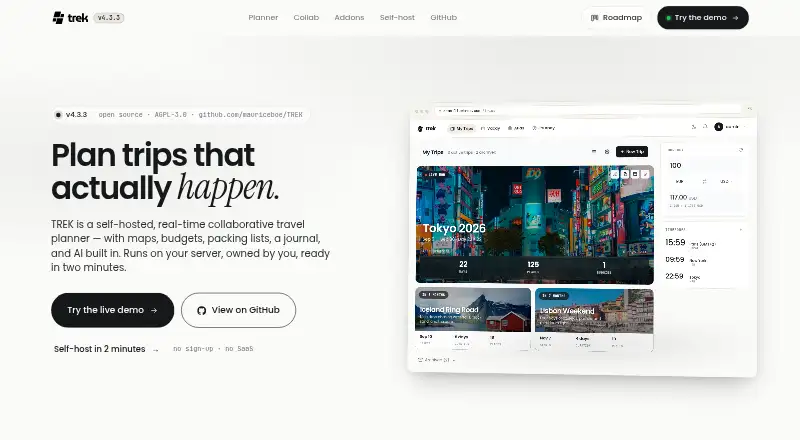
TREK is a free, self-hosted travel planner for coordinating trips with other people. Collaborators can edit itineraries in real time, chat, run polls, record attendance, and share read-only public links. Places can be moved between days, routes optimized by distance, and a day sent to Google Maps for turn-by-turn directions. Reservation records can hold confirmation numbers, files, and statuses for flights, stays, and restaurants. Budgets handle multiple currencies and per-person or per-day totals; packing lists support templates and assigning items to people. OpenStreetMap is the default place search, Google Places is optional, and forecasts cover 16 days through Open-Meteo without API keys. TREK stores trip data in a SQLite file on hardware the operator controls and offers scheduled snapshots with retention policies. Deployment options include Docker, Kubernetes, Unraid, Proxmox, Raspberry Pi, and Apple Silicon. It is open source under AGPL-3.0 and free for personal and internal company use.
Who it suits
TREK suits people planning trips together who want shared itineraries, reservations, budgets, and packing lists. Its self-hosted setup is for operators who want to run the planner on hardware they control.
What it does well
- Collaborators can edit itineraries together in real time.
- Budgets support multiple currencies and per-person totals.
- Stores reservation details, files, and statuses.
- Scheduled snapshots support retention policies.
- Free for personal and internal company use.
What to know first
- Trip data is stored in a SQLite file on operator-controlled hardware.
- Google Places is optional; OpenStreetMap is the default.
- The live demo resets every hour.
Limits
The free self-hosted plan is for personal and internal company use under AGPL-3.0. The live demo resets every hour.
Plans
| Plan | Billed and limits | Price |
|---|---|---|
| TREK (self-hosted) | Free for personal and internal company use · AGPL-3.0 | Free |
| TREK self-hosted | Free for personal or internal company use · AGPL-3.0 · self-hosted deployment | Free |
As liketrek.com lists them, read 30 Sept 2026. The maker's own page has the final word.
Getting started
- Open the live demo without providing an email or signing up.
- Choose a deployment route such as Docker, Docker Compose, Helm/Kubernetes, Unraid, Proxmox, Raspberry Pi, or Apple Silicon.
- Run TREK on hardware you control; the documented images support AMD64 and ARM64.
- Install it as a PWA and add it to a device's home screen for mobile use.
- Invite collaborators to edit itineraries, chat, vote in polls, and mark attendance.
Overview
TREK is a collaborative trip planner for people willing to run their own software. It brings schedules, reservations, budgets, packing, and trip notes into one workspace; its strongest case is for groups that value control over where their trip data lives.
The trade-off is operational: self-hosting gives the operator control of the hardware and backups, but also responsibility for deployment and upkeep. Travelers who want a conventional hosted service should look elsewhere.
For other itinerary tools, compare Travel Itinerary Apps and AI Travel Planners.
Key features
Group itineraries and coordination
People on a trip can edit the itinerary together, see live presence, chat, run polls, and track attendance. Read-only public links let a group share its plans without opening them to edits. That combination is useful when a trip involves both active planners and people who only need to follow along.
Routes and reservations
Places can be moved between days, routes optimized by distance, and a day's plan sent to Google Maps for turn-by-turn directions. This makes TREK useful for organizing a schedule, though Google Maps handles the final navigation. Reservation records cover flights, stays, and restaurants, with space for confirmation numbers, files, and statuses; reservation import is supported.
Budgets, packing, and journaling
Budgets handle multiple currencies and can be totaled per person or per day, giving groups practical ways to divide and track trip costs. Packing lists support templates and assigning items to people, which helps make shared preparation concrete. A journal is included, with the optional Journey addon able to sync photos from Immich or Synology Photos.
Maps, weather, and addons
Place search defaults to OpenStreetMap, with Google Places as an option. Forecasts extend to 16 days through Open-Meteo without requiring API keys. Optional addons broaden the package with Atlas travel statistics, Vacay vacation planning, Journey journaling, and MCP integration; the MCP server supports OAuth 2.1 for use with Claude, Cursor, or another agent.
Control and deployment
TREK stores trip data in a SQLite file on a volume and supports scheduled snapshots with retention policies. Operators can deploy it with Docker, Docker Compose, Helm/Kubernetes, Unraid, Proxmox, Raspberry Pi, or Apple Silicon; AMD64 and ARM64 images are supported. Listed security options include JWT sessions, OAuth 2.1, OIDC single sign-on, TOTP multi-factor authentication, and compatibility with Authelia, Authentik, and Keycloak. This is a substantial set of controls for a self-hosted planner, but configuring and maintaining them falls to the operator.
The web app can be installed as a PWA on a device's home screen. Android, iOS, and Linux are also listed platforms. A public demo needs no email or sign-up, but resets every hour, so it is better suited to a brief look than to keeping trip work.
Pricing
TREK (self-hosted) costs nothing. The free plan is for personal and internal company use under the AGPL-3.0 license, and there is no free trial because the product is free. The published license and use terms make it a fit for individuals and internal teams; running it still entails managing the service yourself.
Platforms
TREK is primarily a web app, with Android, iOS, Linux, and self-hosted platforms listed. Its PWA support provides a home-screen entry on mobile devices, while deployment choices range from small systems such as Raspberry Pi to Kubernetes setups. Offline access and calendar sync are supported.
Who it's for
TREK is best for technically capable travelers, groups, and internal teams that want shared planning while keeping the service and trip data on hardware they control. Its reservation records, flexible budgets, packing assignments, and coordination tools give a group more than a bare itinerary. It is a weaker fit for people who do not want to operate software or who expect a standard hosted app.
Pros and cons
- Pros: Live collaborative editing, chat, polls, attendance, and read-only sharing cover several parts of group coordination.
- Pros: Itinerary, reservation records, multi-currency budgets, packing assignments, and a journal keep trip details together.
- Pros: Self-hosting, scheduled snapshots, and multiple authentication options give operators control over storage and access.
- Cons: Self-hosting means the operator must handle deployment and ongoing upkeep.
- Cons: The demo resets every hour, limiting its usefulness for sustained planning.
Alternatives
Choose Stippl if you want a free-plan option described as having unlimited trips, destinations, activities, co-planners, expenses, and journal entries, plus AI generation, PDF export, and calendar sync.
Pilot is another free web, Android, and iOS option, with an itinerary builder, route and map tools, file and reservation import, and real-time collaboration.
TripBuddy suits readers seeking a free option described as covering every trip, every day, and any crew size.
Mindtrip is a web and iOS alternative with Basic and Premium plans described in terms of admins, messages, indexed pages, and guides.
Layla is a web, iOS, and Android alternative whose Premium plan offers unlimited app access.
NxVoy Trips is a mobile and web freemium alternative with a free plan capped at 5 chats and 50 messages per session.
Navly is an iOS and macOS alternative with a free AI travel-planning assistant, map context, and itinerary building; its Day Pass costs $2.99, paid once and lasts 24 hours without automatic renewal.
SMOVECITY is a free alternative for iOS and Android.
Verdict
Choose TREK if your group wants a capable, open-source trip workspace and is prepared to run it on its own hardware. Its breadth of planning and coordination tools, paired with control over data and backups, is the main reason to choose it. Look elsewhere if you want the convenience of a hosted service without deployment and maintenance responsibilities.
Verdict
TREK brings trip planning and collaboration into a self-hosted package, with itinerary, reservation, budget, and packing tools. Its free AGPL-3.0 license and deployment options suit users prepared to operate it themselves.
Questions
How much does TREK cost?
The self-hosted plan is free. It is free for personal and internal company use under AGPL-3.0.
Can I try TREK without signing up?
Yes. The live demo requires no email or sign-up, and it resets every hour.
Which platforms does TREK support?
TREK lists Android, iOS, Linux, self-hosted, and web. It can also be installed as a PWA on a device's home screen.
Is TREK open source?
Yes. TREK is open source under the AGPL-3.0 license.
Can collaborators work on the same trip?
Yes. They can edit itineraries together with live presence, use trip chat and polls, mark attendance, and share read-only public links.
What integrations does TREK support?
Its MCP server supports OAuth 2.1 for use with Claude, Cursor, or another agent. Journey can sync photos from Immich or Synology Photos.
Facts from TREK's own pages
- Addons
- Optional addons include Atlas travel statistics, Vacay vacation planning, Journey travel journaling, and MCP integration. · liketrek.com, 30 Sept 2026
- Authentication security
- Supported login protections include OIDC, passkeys, TOTP two-factor authentication, rate limits, encrypted secrets and SSRF protection. · github.com, 14 Oct 2026
- Booking imports
- Reservation confirmations can be imported from EML, PDF, PKPass, HTML and TXT files using KItinerary. · github.com, 14 Oct 2026
- Budget and packing
- Budgets support multiple currencies and per-person or per-day totals, while packing lists support templates and assigning items to people. · liketrek.com, 30 Sept 2026
- Changelog: v4.2.1
- Release 4.2.1 addressed offline PWA update behavior, redirect credential handling and several sharing and synchronization bugs. · github.com, 14 Oct 2026
- Changelog: v4.3.3
- The September 26, 2026 release fixed OIDC login failures caused by IPv6 link-local DNS records. · github.com, 14 Oct 2026
- Collaboration
- WebSocket synchronization makes edits appear live for people viewing the same trip. · github.com, 14 Oct 2026
- Data and backups
- TREK runs on hardware the operator controls and offers scheduled snapshots with retention policies; trip data is stored in a SQLite file on a volume. · liketrek.com, 30 Sept 2026
- Day planning
- Places, notes and bookings can be dragged between days and reordered with undo support. · github.com, 14 Oct 2026
- Demo
- The live demo requires no email or sign-up and resets every hour. · liketrek.com, 30 Sept 2026
- Deployment
- Official deployment paths include Docker, Docker Compose and Helm/Kubernetes, with a default application port of 3000. · github.com, 14 Oct 2026
- Documentation
- The repository includes a wiki, environment-variable reference, installation guides, update instructions, security policy and plugin documentation. · github.com, 14 Oct 2026
- Expense tracking
- Costs support integer-cent splitting, custom shares, multiple payers, settlement suggestions, settlement history and CSV export. · github.com, 14 Oct 2026
- Free plan
- Yes · liketrek.com, 21 Sept 2026
- Independent project activity
- GitHub Highlights reported 13,616 stars, 1,337 stars added during its discovery window, a March 19, 2026 creation date and version 4.2.1 on September 6, 2026. · highlightsx.github.io, 14 Oct 2026
- Integrations
- The MCP server supports OAuth 2.1 and is described for use with Claude, Cursor, or another agent; Journey can sync photos from Immich or Synology Photos. · liketrek.com, 30 Sept 2026
- Itinerary planning
- Users can move places between days, optimize routes by distance, and send a day to Google Maps for turn-by-turn directions. · liketrek.com, 30 Sept 2026
- Licence
- TREK is licensed under AGPL-3.0; modified network deployments must provide corresponding source under the same licence. · github.com, 14 Oct 2026
- License and audience
- TREK is open source under AGPL-3.0 and is free for personal and internal company use. · liketrek.com, 30 Sept 2026
- Limit: expense customization
- Reddit users request custom expense categories, more flexible payer and split relationships, and subaccounts for spouses or children. · reddit.com, 14 Oct 2026
- Limit: external services
- Independent coverage notes that routing, transit, POI lookup, currency rates and other functions depend on public third-party services that may become unavailable. · highlightsx.github.io, 14 Oct 2026
- Limit: integrations
- The maintainer said integration with Dawarich was not yet available when a Reddit user asked about it. · reddit.com, 14 Oct 2026
- Limit: road-trip workflow
- A Reddit user says planning a personal-car road trip feels awkward because the car transport form expects booking-style return and confirmation fields. · reddit.com, 14 Oct 2026
- Limit: self-hosting effort
- Independent coverage says the product requires users to operate their own server, database, uploads, backups and upgrades instead of using a hosted SaaS service. · highlightsx.github.io, 14 Oct 2026
Where TREK stands on Freedom251
- AI Travel Planners#1 of 161
- Travel Itinerary Apps#1 of 45