Freedom251 › AI Travel Planners
Onytrip
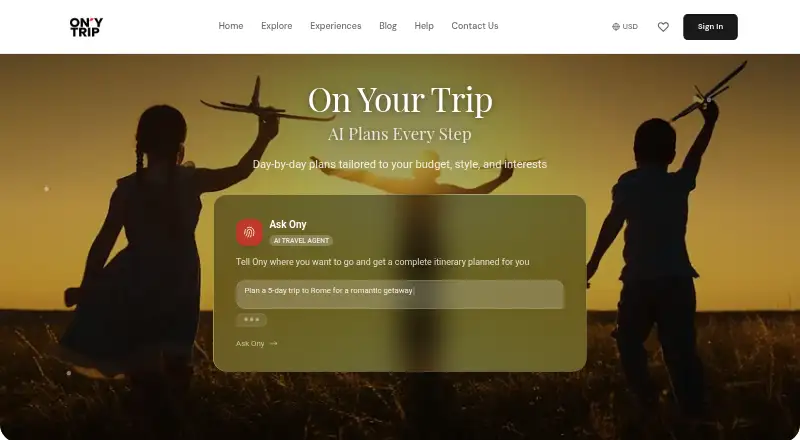
What Onytrip is
Onytrip is a free trip-planning service for creating itineraries, organizing plans with other travelers, and keeping trip details accessible in different formats. Its AI-generated itineraries give travelers a starting point for planning. Interactive maps provide a map view of the trip, and booking links let travelers book experiences. Collaborative planning allows people traveling together to work on the plan as a group. When the itinerary is ready, travelers can export it as a PDF or add its schedule to a calendar. The listed Free plan costs nothing and includes AI-generated itineraries, collaborative trip planning, PDF and calendar export, interactive maps, and experience booking. The plan is described as completely free, with no hidden fees and no premium tiers. Onytrip’s listed features cover creating and coordinating an itinerary, viewing it on a map, arranging experiences, and taking the schedule into a PDF or calendar. The service is available at onytrip.com.
Who it suits
Onytrip suits travelers who want help creating an itinerary and coordinating plans with their travel group. It also fits people who want to view a trip on a map, book experiences, or export plans to PDF or a calendar.
What it does well
- AI-generated itineraries help create trip plans.
- Collaborative planning supports group coordination.
- Interactive maps provide a map view of trips.
- Booking links support experience booking.
- PDF and calendar export take plans beyond the service.
- The Free plan has no hidden fees or premium tiers.
What to know first
- The listed Free plan is the only plan.
Plans
| Plan | Billed and limits | Price |
|---|---|---|
| Free | No subscriptions, hidden fees, premium tiers, or credit card required · Trip dates up to 15 days · unlimited edits · unlimited PDF/calendar exports · unlimited bookings · all destinations and features | Free |
As onytrip.com lists them, read 15 Oct 2026. The maker's own page has the final word.
Getting started
- Visit https://onytrip.com/.
- Start with the Free plan, listed as free.
- Create an itinerary with AI-generated plans.
- Collaborate on the trip, view it on an interactive map, and use experience booking links.
- Export the itinerary as a PDF or to a calendar.
Onytrip is an AI-assisted travel planner for turning preferences, budgets and interests into structured daily schedules. It is best suited to individuals or groups who want a practical itinerary they can edit together and carry into calendar, PDF and link-sharing workflows. The free offering is unusually broad, but the 15-day trip ceiling makes it less suitable for long journeys.
Overview
Onytrip builds personalized, day-by-day plans from a travel style, budget and stated interests. Its AI combines suggested activities, lesser-known attractions, estimated costs and routes, then arranges them into timed days. That emphasis on organization suits travelers who want more than a list of places but do not need a dedicated booking platform or travel journal.
Planning is available on Android, iOS and the web, so a trip can be prepared on a larger screen and referred to from a phone. Every plan is free, with no premium tier, but each trip can cover no more than 15 days.
Key features
AI itineraries and schedules
The AI turns trip preferences into an hour-by-hour itinerary with activity timing and estimated costs. This is useful when a blank map or broad destination guide leaves too many decisions open. It also means recommendations are only as useful as the preferences supplied, and a tightly timed schedule may need editing when circumstances change.
Maps, weather and bookings
Interactive maps show itinerary stops and provide driving or walking directions between them, helping users judge whether a day is geographically realistic. Trip-date forecasts add temperature ranges, rain chances, outdoor scores and packing tips, giving weather a direct role in deciding which activities fit each day.
Activity booking links are handled through Viator. That creates a direct path from an idea to a bookable activity, while Onytrip may earn commissions from resulting bookings. Readers who prefer to compare providers independently should treat these links as a convenience rather than a complete marketplace.
Group editing and exports
Travel companions can edit a shared itinerary in real time, making Onytrip a stronger choice for group coordination than a schedule maintained by one person. Plans can be exported to Apple Calendar, Google Calendar or Outlook as events, saved as PDFs and shared by link. Unlimited edits and exports make those handoffs practical even on the free plan.
Data and support
The privacy policy names Google Gemini and OpenAI as itinerary-generation providers and says non-identifying trip details are sent to them. Onytrip’s safety page claims industry-standard security, bank-level encryption, GDPR compliance and no sale of user data to third parties. Personalized assistance is available through the support team via the help center.
Pricing
| Plan | Price | What you get |
|---|---|---|
| Free | free | All features, no premium tiers, unlimited edits and exports, up to 15 days per trip |
There is no free trial because the product is free rather than trial-based, and there are no paid upgrades or renewal terms to budget for. The main constraint is duration: travelers planning more than 15 days must split the journey into separate trips or choose another planner.
Platforms
Onytrip runs on the web and has apps for Android and iOS. That combination supports desktop planning and mobile access while traveling.
Who it's for
Choose Onytrip for solo travelers or companions who want AI-generated structure, route-aware maps, weather context, shared editing and broad export options without a subscription. It is especially suitable for trips of 15 days or fewer where collaborators need to keep one schedule current. Look elsewhere if a single itinerary must cover a longer journey, or if you want booking choices beyond the Viator pathway.
Pros and cons
- Pros: AI combines preferences, costs, timing and routes into a usable schedule.
- Pros: Real-time collaborative editing supports group decisions.
- Pros: Calendar, PDF and link exports make plans portable.
- Pros: Maps and weather details connect logistics with day-by-day choices.
- Cons: Trips are capped at 15 days.
- Cons: Activity links currently run through Viator, and bookings may generate commissions for Onytrip.
- Cons: Itinerary generation sends non-identifying trip details to Google Gemini and OpenAI.
Alternatives
For a broader directory of comparable tools, see AI Travel Planners.
- TREK is the better pick for users wanting a free, AGPL-3.0 self-hosted option, including Linux support.
- Layla suits travelers who want a freemium app with an unlimited-access Premium plan or no-subscription booking through Layla.ai.
- Stippl is preferable when unlimited trips, destinations, co-planners, expenses, journal entries, AI generation, PDF export and calendar sync matter.
- Pilot fits users seeking file and reservation import alongside route tools and real-time collaboration.
- TripBuddy offers every trip, every day and any crew size on its free plan.
- TripGenie is a free Android and iOS alternative with no specific usage limits stated.
- SMOVECITY combines free planning and routing with an AI Buddy; partner bookings may earn it a commission.
- Traveln.ai provides a free pilot phase with a free trial and no credit card required.
Verdict
Onytrip is a strong free choice for travelers who want AI-planned, collaborative itineraries with maps, weather context and exports. Its decisive limitation is the 15-day maximum, while Viator-centered booking links and third-party AI processing may not suit every traveler. Pick it for organized short-to-medium trips; look elsewhere for longer itineraries or a different booking and data model.
Verdict
Choose Onytrip if you want AI itinerary creation, group planning, maps, booking links, and exports in a free plan. Its listed features focus on trip planning and organization, so travelers seeking other kinds of software should look elsewhere.
Questions
How much does Onytrip cost?
Its Free plan costs nothing and is described as completely free, with no hidden fees or premium tiers.
What does the free plan include?
It includes AI-generated itineraries, collaborative trip planning, PDF and calendar export, interactive maps, and experience booking.
Can travelers plan together?
Yes. Collaborative trip planning is included in the Free plan.
Can I export an itinerary?
Yes. The plan includes PDF and calendar export.
Does Onytrip include maps and booking links?
Yes. The listed features include interactive maps and experience booking.
Where can I find Onytrip?
The website is https://onytrip.com/.
Facts from Onytrip's own pages
- Age requirement
- The Terms require users to be at least 13 years old or the applicable digital-consent age in their country. · onytrip.com, 15 Oct 2026
- AI planning
- Its AI uses trip preferences to suggest activities, hidden gems, cost estimates, and routes. · onytrip.com, 11 Oct 2026
- AI providers
- The privacy policy says itinerary generation uses Google Gemini and OpenAI APIs with non-identifying trip details. · onytrip.com, 15 Oct 2026
- AI travel agent
- The product includes a conversational assistant called Ony that generates a complete itinerary from a natural-language request. · onytrip.com, 15 Oct 2026
- API status
- The Terms mention APIs and rate limits only conditionally (“if available”); no public API reference, SDK, or developer portal is linked from the official site pages reviewed. · onytrip.com, 15 Oct 2026
- Authentication
- The service supports email/password accounts, Google Sign-In through OAuth 2.0, and optional phone verification using Firebase Authentication. · onytrip.com, 15 Oct 2026
- Booking integration
- Tours, activities, and experiences are bookable through a third-party provider identified as Viator, a TripAdvisor company. · onytrip.com, 15 Oct 2026
- Booking links
- Yes · onytrip.com, 21 Sept 2026
- Booking payment handling
- Payment-card data for activities is collected by the hosted booking provider and is not transmitted to or stored on On Your Trip servers. · onytrip.com, 15 Oct 2026
- Bookings
- The maker says activity bookings are handled through its booking partner, currently Viator, and may earn commissions from bookings. · onytrip.com, 11 Oct 2026
- Calendar export
- Yes · onytrip.com, 21 Sept 2026
- Calendar integration
- Itineraries can be exported as .ics files compatible with Apple Calendar, Google Calendar, and Microsoft Outlook, with destination-time-zone handling. · onytrip.com, 15 Oct 2026
- Calendar integrations
- Itineraries can be exported to Apple Calendar, Google Calendar, or Outlook as calendar events. · onytrip.com, 11 Oct 2026
- Collaboration
- Travel companions can edit a shared itinerary in real time. · onytrip.com, 11 Oct 2026
- Collaborative planning
- Yes · onytrip.com, 21 Sept 2026
- Documentation
- The public Help Center is organized into Getting Started, Account & Authentication, Trip Planning, Itinerary & Recommendations, Technical Support, and Privacy & Security categories. · onytrip.com, 15 Oct 2026
- Free plan
- Yes · onytrip.com, 21 Sept 2026
- GDPR claim
- The safety page explicitly describes the service as GDPR compliant. · onytrip.com, 15 Oct 2026
- Group collaboration
- Travel companions can be invited to view and edit the same itinerary simultaneously, with changes synchronized in real time. · onytrip.com, 15 Oct 2026
- Guest-mode limit
- Guest trips remain only on the device, are unavailable on other devices, have limited features, and are automatically deleted after seven days. · onytrip.com, 15 Oct 2026
- Hour-by-hour schedules
- Generated plans can contain timed daily activities, estimated costs, suggested durations, addresses, and travel times between stops. · onytrip.com, 15 Oct 2026
- Interactive maps
- Itineraries include interactive route maps with driving or walking directions and distance and time estimates between attractions. · onytrip.com, 15 Oct 2026
- Licence
- The official pages reviewed do not identify an open-source licence or publish source code; the Terms prohibit reverse engineering and creating competing services. · onytrip.com, 15 Oct 2026
- Limit: account recovery
- The Terms warn that revoking Google access without first setting another authentication method can prevent account access and may cause data loss. · onytrip.com, 15 Oct 2026
Where Onytrip stands on Freedom251
- AI Travel Planners#7 of 161