Freedom251 › Unified Endpoint Management Software

OpenUEM
What OpenUEM is
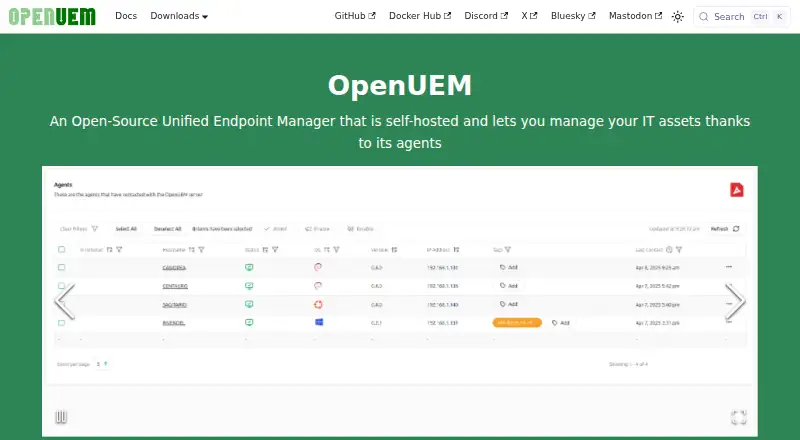
OpenUEM is a free, open-source endpoint manager that uses agents to administer IT assets from a self-hosted installation. Its inventory can report hardware, memory, disks, shared resources, printers, network adapters, and installed software. It can check Windows update history, antivirus and BitLocker status, as well as pending Linux security updates. Software deployment covers Windows apps through Winget, Linux apps through Flatpak, and macOS apps through Brew; HomeBrew itself must be installed manually. Configuration profiles can automate package management, local user and group management, and scripts across Windows, Linux, and macOS endpoints. Remote tools include SFTP file browsing and transfers, plus VNC, Wayland RDP for Gnome, or RustDesk assistance. One installation can contain multiple organizations and sites. Console access supports passwords, certificates, and configured OpenID Connect, as well as listed identity providers including Authelia, Authentik, Keycloak, and Zitadel. The code uses the Apache 2.0 license. A non-Docker server installation requires PostgreSQL and DNS that resolves endpoint names.
Who it suits
OpenUEM suits IT teams seeking a self-hosted tool to inventory and manage Windows, Linux, and macOS endpoints. Teams should be prepared to provide its database and DNS requirements and manage agent deployment.
What it does well
- Inventory covers hardware and installed software.
- Deploys apps through Winget, Flatpak, and Brew.
- Profiles automate tasks across Windows, Linux, and macOS.
- A single installation can contain multiple organizations and sites.
What to know first
- Non-Docker installation requires PostgreSQL and endpoint-resolving DNS.
- HomeBrew must be installed manually.
- Windows Server agent support is limited.
- Some Windows Server report data may be missing.
Limits
A non-Docker server installation requires PostgreSQL and DNS that resolves endpoint names; Docker Compose can launch PostgreSQL. HomeBrew must be installed manually, and Windows Server agent support is limited, with some report data potentially missing.
Plans
| Plan | Billed and limits | Price |
|---|---|---|
| OpenUEM | Open-source · self-hosted | Free |
As openuem.eu lists them, read 8 Oct 2026. The maker's own page has the final word.
Getting started
- Visit the OpenUEM website.
- Choose a server installation route; a non-Docker installation requires PostgreSQL and DNS that resolves endpoint names.
- Install the server components on a documented Windows or Linux distribution.
- Install agents on Windows, Linux, or macOS endpoints.
- Configure console authentication, including OpenID Connect if needed.
- Install HomeBrew manually on macOS endpoints that need it for application deployment.
OpenUEM is a free, open-source unified endpoint manager for teams that want to run inventory and endpoint controls on their own infrastructure. It is best suited to small and midsize IT groups managing mixed Windows, Linux, and macOS fleets. The value is substantial breadth without a licence bill, provided you can operate the required server stack and accept a few platform limitations.
Overview
OpenUEM manages desktop, laptop, tablet, and server assets through agents. Its Apache 2.0 licence permits use of the source, while self-hosting keeps the system under your control rather than moving management data to a vendor service. That is attractive for organizations with technical staff, internal hosting requirements, or a preference for open software. It is less suitable when you want a turnkey cloud service or vendor-managed operations.
A deployment can contain multiple organizations and sites, making one installation practical for service providers or groups with separate locations. The trade-off is infrastructure ownership: a non-Docker installation needs PostgreSQL and DNS with a domain resolving endpoint names. Docker Compose can launch PostgreSQL, but it does not remove the need to administer the surrounding server and endpoint environment.
Key features
Agents inventory hardware, memory, disks, shared resources, printers, network adapters, and installed software. This gives administrators a useful baseline for asset records and troubleshooting across a heterogeneous fleet. OpenUEM also reports Windows update history and antivirus status, pending Linux security updates, and BitLocker status on logical disks, so routine security checks can sit beside inventory rather than in a separate tool.
Software deployment follows each operating system's package ecosystem: Winget for Windows, Flatpak for Linux, and Brew for macOS. Configuration profiles can automate package operations, local user and group management, and scripts on all three platforms. macOS administrators must install Homebrew themselves because the agent cannot add it as a dependency; that extra preparation matters in unattended rollouts.
Remote administration includes SFTP browsing and file transfer, plus assistance through VNC, RDP for Gnome using Wayland, or RustDesk. Profiles and remote tools make OpenUEM more than an inventory database, although teams should expect to choose the protocol appropriate to each endpoint rather than rely on one universal method.
Security controls include certificate-based communication and TLS, with a user certificate required for console login. The console also supports username and password and can use OpenID Connect after configuration, with Authelia, Authentik, Keycloak, and Zitadel available as identity-provider integrations.
Windows Server agent support is limited, and some report data may be missing there. That is a material qualification for server-heavy estates, even though desktop-oriented Windows, Linux, and macOS coverage is broad.
Pricing
| Plan | Price | What it includes |
|---|---|---|
| OpenUEM | free | Open-source, self-hosted endpoint management |
There is no paid tier or free trial to evaluate: the software is free. The saving is on licensing, not necessarily on operations, because you provide the server, database, DNS, certificates, upgrades, and administration. Support is community-based through GitHub discussions and Discord, with bugs directed to the affected repository.
Platforms
Server components are documented for Windows and Linux distributions. Agents run on Windows, Linux, and macOS, including both Intel and Apple Silicon Macs. Supported Linux families include Debian, Ubuntu, Linux Mint, Fedora, Alma Linux, Rocky Linux, and Red Hat. The console is web-based, while the overall deployment model is self-hosted.
Who it's for
OpenUEM fits technically capable internal IT teams, schools, small businesses, and multi-site organizations that need one control plane for mixed desktop operating systems and want to avoid per-device charges. It also suits teams comfortable with agents, package managers, certificates, and community support. Look elsewhere if your priority is hosted delivery, formal vendor support, or dependable reporting from Windows Server endpoints.
Pros and cons
Pros
- Broad coverage without licence fees: inventory, security-status checks, deployment, profiles, and remote assistance are combined in a free Apache 2.0 package.
- Useful cross-platform automation: Winget, Flatpak, Brew, package tasks, account management, and scripts cover Windows, Linux, and macOS workflows.
- Flexible access controls: TLS, certificates, and several identity-provider options support security-conscious deployments.
- Multi-tenant structure: organizations and sites can share one installation.
Cons
- Self-hosting burden: PostgreSQL, DNS, certificates, and ongoing administration are your responsibility.
- Windows Server qualification: limited agent support can leave gaps in reports for server estates.
- macOS setup dependency: Homebrew must be installed separately before Brew-based deployment works.
- Community support model: help is centered on GitHub and Discord rather than a stated commercial support plan.
Alternatives
FileWave is the better direction for buyers wanting a paid product with a free trial and a free Community Edition capped at 15 computers, 15 tablets, and 15 Chrome devices.
myMDM suits smaller fleets seeking a freemium service: its free plan covers up to 25 devices across six platforms with core MDM policies, basic app management, and community support.
Relution offers a free plan for up to five devices, shared cloud or on-premises deployment, and unlimited duration.
Miradore is worth choosing when a 14-day trial followed by a free allowance of up to 50 devices is preferable; its Premium plan is $2.75 a month per device.
SureAsset focuses on asset lifecycle management, hardware and software licence tracking, and API access in a free plan.
ManageEngine Endpoint Central provides a free edition for 25 endpoints and paid on-premises plans for teams needing a commercial product.
UNO UEM is a paid, per-device platform with access scaled to fleet size and support for six platforms.
BlackBerry AtHoc is a paid option priced through a demo or sales inquiry.
Verdict
Choose OpenUEM if you want wide, cross-platform endpoint management, open licensing, and full control of deployment costs and data. Its strongest case is a technically staffed organization that can run PostgreSQL, DNS, certificates, and agents while benefiting from inventory, automation, deployment, and remote assistance in one system. Choose another product if hosted convenience, commercial support, or complete Windows Server reporting is more important than eliminating licence fees.
Verdict
OpenUEM combines asset inventory, software deployment, update checks, and remote assistance in a self-hosted package. Plan for its infrastructure requirements and note the stated limitations around Windows Server agents and reporting.
Questions
Is OpenUEM free and open source?
The OpenUEM plan is listed as free, and the source code is available under the Apache 2.0 license.
Which platforms can run OpenUEM?
Server components are documented for Windows and Linux distributions. Agents are available for Windows, Linux, and macOS on Intel and Apple Silicon, and the product includes a web console.
What does OpenUEM manage?
It reports endpoint inventory and security status, deploys applications, applies configuration profiles, and supports remote assistance and SFTP file transfers.
Which application deployment tools does it support?
It supports Windows application installation with Winget, Linux applications with Flatpak, and macOS applications with Brew. HomeBrew must be installed manually.
What server infrastructure is required?
A non-Docker installation requires PostgreSQL and a DNS server with a domain resolving endpoint names. The Docker Compose installation can launch PostgreSQL.
Which identity providers can I use?
Console authentication can use Authelia, Authentik, Keycloak, or Zitadel. OpenID Connect requires configuration.
Facts from OpenUEM's own pages
- Authentication
- The console supports username and password, digital certificates, and OpenID Connect, with OpenID Connect requiring configuration. · openuem.eu, 8 Oct 2026
- Automation
- Configuration profiles can apply automated tasks to Windows, Linux, and macOS endpoints, including package management and scripts. · openuem.eu, 8 Oct 2026
- Configuration profiles
- Profiles can run platform-specific tasks including package management, local user and group management, and scripts. · openuem.eu, 8 Oct 2026
- Deployment limitation
- HomeBrew must be installed manually because the OpenUEM agent cannot install it as a dependency. · openuem.eu, 8 Oct 2026
- Deployment requirements
- A non-Docker installation requires a Postgres database and a DNS server with a domain resolving endpoint names. · openuem.eu, 8 Oct 2026
- Endpoint management
- It can check Windows updates and antivirus status, Linux security updates, and BitLocker status on logical disks. · openuem.eu, 8 Oct 2026
- Infrastructure requirement
- A server installation requires a PostgreSQL database and DNS that resolves endpoint names; the Docker Compose installation can launch PostgreSQL. · openuem.eu, 8 Oct 2026
- Integrations
- Console users can authenticate through Authelia, Authentik, Keycloak, or Zitadel identity providers. · openuem.eu, 8 Oct 2026
- Inventory
- OpenUEM can report endpoint hardware, memory, disks, shared resources, printers, network adapters, and installed software. · openuem.eu, 8 Oct 2026
- License
- The source code is available under the Apache 2.0 license. · openuem.eu, 8 Oct 2026
- Maintainer
- The About page identifies Miguel Cabrerizo as a freelance DevOps engineer located in Spain. · openuem.eu, 8 Oct 2026
- Maker
- The About page identifies Miguel Cabrerizo as a freelance DevOps engineer located in Spain. · openuem.eu, 8 Oct 2026
- Multi-tenancy
- One installation can contain multiple organizations and sites. · openuem.eu, 8 Oct 2026
- Notable limit
- Support for installing the agent on a Windows Server endpoint is limited, and some report data may be missing. · openuem.eu, 8 Oct 2026
- Platforms
- Server components are available for Windows and Linux, and agents are available for Windows, Debian-based and RedHat-based Linux distributions, and macOS on Intel and Apple Silicon. · openuem.eu, 8 Oct 2026
- Platform support
- Server components are documented for Windows and Linux distributions, while agents are available for Windows, Linux, and macOS Intel and Apple Silicon. · openuem.eu, 8 Oct 2026
- Product
- OpenUEM is a self-hosted, open-source unified endpoint manager for managing IT assets through agents. · openuem.eu, 8 Oct 2026
- Purpose
- OpenUEM is a self-hosted, open-source Unified Endpoint Manager that manages IT assets through agents. · openuem.eu, 8 Oct 2026
- Remote assistance
- It offers remote assistance through VNC, RDP for Gnome using Wayland, or RustDesk. · openuem.eu, 8 Oct 2026
- Remote management
- Features include SFTP file browsing and transfer, plus remote assistance with VNC, Wayland RDP, or RustDesk. · openuem.eu, 8 Oct 2026
- Security
- OpenUEM uses digital certificates for secure communication and TLS, and its console requires a user certificate to log in. · openuem.eu, 8 Oct 2026
- Security status
- It can report Windows update history, pending Linux security updates, Windows antivirus status, and BitLocker status. · openuem.eu, 8 Oct 2026
- Software deployment
- It supports installing Windows applications with Winget, Linux applications with Flatpak, and macOS applications with Brew. · openuem.eu, 8 Oct 2026
- Support
- The project directs users to GitHub discussions and its Discord community, and asks bug reporters to open issues in the affected repository. · openuem.eu, 8 Oct 2026