Freedom251 › Game UI Design Software
OpenPencil
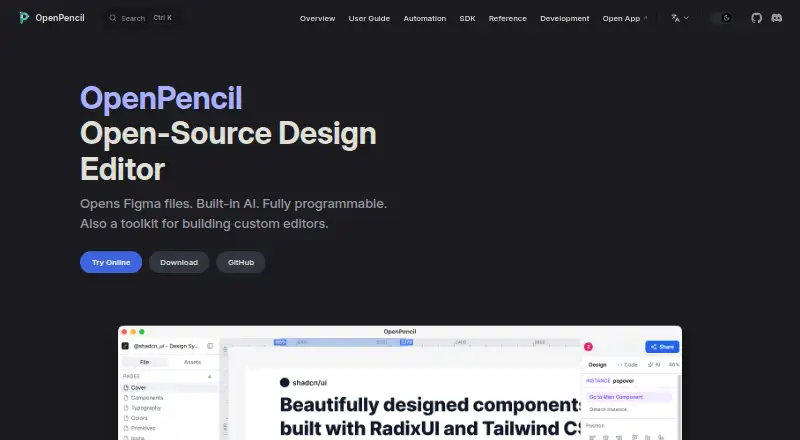
What OpenPencil is
OpenPencil is a free, open-source design editor compatible with Figma files, and it also provides a toolkit for building custom editors. It opens and saves native .fig files and supports copying and pasting between OpenPencil and Figma. Its design tools include vector drawing, rich text, flexbox and CSS Grid auto-layout, components, variables, and multi-page documents. Designs can be exported as PNG, JPG, WEBP, SVG, or Tailwind JSX, with image scales from 0.5× to 4×. The AI assistant offers more than 90 tools for design editing and analysis and can connect to Anthropic, OpenAI, Google AI, or OpenRouter; users supply a provider key, and the feature has no OpenPencil subscription or backend. The CLI can inspect, export, and analyze .fig files, including JSON output. Real-time collaboration uses peer-to-peer WebRTC without an account. OpenPencil describes itself as local-first, with no account or server required; local chat history is not cloud-synchronized or backed up. Desktop apps are available for macOS, Windows, and Linux, while the web app can be installed as a touch-optimized mobile PWA.
Who it suits
OpenPencil suits designers who work with Figma files and teams building custom editors. Its Vue SDK is intended for teams embedding a focused canvas or editing workflow in another product.
What it does well
- Opens and saves native Figma .fig files
- Exports to image, SVG, and Tailwind JSX formats
- Peer-to-peer collaboration without an account
- Desktop apps and mobile-installable web app
What to know first
- AI features require a user-provided provider key
- Local chat history is not cloud-synchronized or backed up
- No developer handoff capability listed
- No UI animation support listed
Plans
| Plan | Billed and limits | Price |
|---|---|---|
| Free | No account · no subscription · MIT-licensed open-source editor | Free |
As openpencil.dev lists them, read 7 Oct 2026. The maker's own page has the final word.
Getting started
- Visit the OpenPencil website
- Choose a desktop binary for macOS, Windows, or Linux, or open the web app
- Install the web app as a PWA on mobile if desired
- Open or save a native .fig file, or start a multi-page design
- Provide a model-provider key to use the AI assistant
OpenPencil is a free, open-source editor for Figma-compatible interface design and for embedding a canvas inside other software. It is strongest for Figma users, local-first teams, and developers building focused editing workflows. The broad design and automation set is impressive at no cost, but the absence of prototyping and developer handoff makes it a poor fit for teams that need those delivery stages.
Overview
OpenPencil reads and writes native Figma .fig files and supports copy-and-paste in both directions. That makes it a practical companion to Figma rather than an isolated replacement, especially when a team needs to move existing files between tools. Its local-first model requires no account or server, while real-time collaboration connects peers directly through WebRTC. This is attractive for privacy-conscious work and quick sessions, though it also means collaboration depends on direct peer connections.
The product doubles as a toolkit. Its Vue SDK is aimed at teams embedding a focused canvas in an internal workflow, template editor, or AI-assisted product. That is a meaningful advantage for software makers; a designer seeking only a standalone editor may gain little from the SDK.
Key features
Design and file handling
Vector drawing, rich text, components, variables, multi-page documents, and flexbox and CSS Grid auto-layout cover serious interface-production needs. Export targets include PNG, JPG, WEBP, SVG, and Tailwind JSX, with raster scales from 0.5× through 4×. The formats suit both visual assets and developer-oriented output, although there is no developer-handoff capability or UI animation support.
AI and automation
The assistant provides more than 90 tools for editing and analysis and can connect to Anthropic, OpenAI, Google AI, or OpenRouter. OpenPencil charges no subscription or backend fee for this feature: you supply a provider key and connect directly to that provider. That keeps the application cost low but puts model access and usage billing under your control. An MCP server works with Claude Code, Cursor, Windsurf, and other MCP clients over stdio or HTTP. The CLI can inspect, export, and analyze .fig files and return machine-readable JSON, making repeatable or scripted workflows considerably more practical.
Privacy and collaboration
Peer-to-peer WebRTC collaboration works without accounts and sends design data between participants instead of through a central service. The local-first approach also means local chat history is not synchronized to the cloud or backed up. For automation, the MCP HTTP server enables authentication by default, listens on 127.0.0.1 by default, limits file access to a configured root, and rejects symlink escapes. Those safeguards are useful when exposing tooling, but teams still need to manage their own provider keys and local data.
Pricing
OpenPencil has one plan: Free at free. It includes a no-account, no-subscription editor under the MIT license, with real-time collaboration and design-system support. There is no free trial because the product is already free, and no paid tier or seat charge is described. This is the natural choice for individual designers, open-source projects, and teams comfortable operating their own AI provider connections. It offers no prototype capabilities and no developer handoff, so a zero price does not remove the need for another tool in a full product-design process.
Platforms
OpenPencil is offered on Android, iOS, Linux, macOS, Windows, and the web, with API access. Desktop binaries cover macOS, Windows, and Linux; the macOS build is signed and notarized. On phones, the web app can be installed as a progressive web app and uses a touch-oriented interface. The primary experience is web desktop, while the broad platform list helps distributed teams use the same editor across devices.
Who it's for
Choose OpenPencil if you need Figma file interchange without committing every workflow to Figma, want account-free peer collaboration, or are building a custom canvas into another product. It is especially compelling for developers who can take advantage of the Vue SDK, CLI, and MCP integrations. Look elsewhere if interactive prototypes, animations, or formal developer handoff are central requirements, or if your team wants cloud-synchronized chat history and a managed AI bill.
Pros and cons
- Pros: Native Figma file support and copy-paste ease migration; broad layout and component tools handle substantial UI work; five export formats plus Tailwind JSX cover design and implementation needs; 90-plus AI tools and MCP/CLI automation suit technical workflows; peer-to-peer collaboration requires no account; MIT licensing and the free plan remove subscription and seat costs.
- Cons: No prototyping, animation, or developer-handoff features; AI requires your own provider key and direct provider billing; local chat history is not cloud-backed up; WebRTC collaboration relies on peers connecting directly rather than a central workspace.
Alternatives
Fluid UI is a better fit when you want a freemium product with a free lifetime account, trial access, and paid Solo capacity. Choose Framer instead for a freemium web-design service with a free domain, 1 GB bandwidth, CMS collections, and AI credits. UXPin suits teams prioritizing prototype work and AI credits, with a limited free plan after its 14-day trial. Justinmind offers a free editor plan with one project, unlimited screens and viewers, and interactive input forms. MasterGo is worth considering for a managed freemium workspace with draft-file, member, page, and layer limits. Mockplus provides a free-forever Basic plan for 10 users, 10 active projects, and unlimited designs. ProtoPie is the alternative when cloud prototypes and scene-based interaction matter. FlowMapp is oriented toward site planning, with a free one-project plan and a paid Pro tier.
For more options, browse Game UI Design Software.
Verdict
OpenPencil is an excellent choice for Figma-compatible design on a zero-subscription, local-first foundation, particularly for open-source users and teams embedding a custom editor. Choose it for file interoperability, automation, and account-free collaboration. Choose another product when prototyping, animation, developer handoff, or managed cloud history is more important than control and flexibility.
Verdict
OpenPencil combines Figma-compatible editing, multiple export formats, and account-free peer-to-peer collaboration. Keep its local chat-history limitation and provider-key requirement in mind if using the AI assistant.
Questions
How much does OpenPencil cost?
The Free plan is listed as free. It requires no account or subscription and is MIT-licensed open-source software.
Can OpenPencil open and save Figma files?
Yes. It opens and saves native Figma .fig files and supports copying and pasting between Figma and OpenPencil.
Which platforms are available?
Desktop binaries are available for macOS, Windows, and Linux. The web app can be installed as a touch-optimized PWA on mobile.
Does the AI assistant require a paid OpenPencil plan?
No OpenPencil subscription or backend is used for the AI feature. Users provide a key that connects directly to a model provider such as Anthropic, OpenAI, Google AI, or OpenRouter.
Does OpenPencil support real-time collaboration?
Yes. Collaboration uses peer-to-peer WebRTC and does not require an account; design data goes directly between peers rather than through a central server.
Is OpenPencil open source?
Yes. The Free plan describes the editor as MIT-licensed open-source software.
Facts from OpenPencil's own pages
- AI assistant
- The built-in AI assistant offers 90+ tools for design editing and analysis and can connect to providers including Anthropic, OpenAI, Google AI, and OpenRouter. · openpencil.dev, 7 Oct 2026
- AI billing
- The AI feature has no OpenPencil subscription or backend; users provide a key that connects directly to the model provider. · openpencil.dev, 7 Oct 2026
- Automation
- The CLI can inspect, export, and analyze .fig files, and supports machine-readable JSON output. · openpencil.dev, 7 Oct 2026
- Collaboration
- Real-time collaboration uses peer-to-peer WebRTC, requires no account, and sends design data directly between peers rather than through a central server. · openpencil.dev, 7 Oct 2026
- Design tools
- The editor includes vector drawing, rich text, flexbox and CSS Grid auto-layout, components, variables, and multi-page documents. · openpencil.dev, 7 Oct 2026
- Desktop platforms
- Desktop binaries are available for macOS, Windows, and Linux; the macOS app is signed and notarized. · openpencil.dev, 7 Oct 2026
- Exports
- Designs can be exported as PNG, JPG, WEBP, SVG, or Tailwind JSX, with image export scales from 0.5× to 4×. · openpencil.dev, 7 Oct 2026
- Figma files
- It opens and saves native Figma .fig files and supports copying and pasting between Figma and OpenPencil. · openpencil.dev, 7 Oct 2026
- Integrations
- The MCP server connects with Claude Code, Cursor, Windsurf, and other MCP clients over stdio or HTTP. · openpencil.dev, 7 Oct 2026
- Intended users
- The Vue SDK is intended for teams embedding a focused canvas, internal workflow tool, template editor, or AI-assisted editing surface in another product. · openpencil.dev, 7 Oct 2026
- Local data
- The product describes itself as local-first, with no account or server required, and says local chat history is not cloud-synchronized or backed up. · openpencil.dev, 7 Oct 2026
- Mobile
- The web app can be installed as a PWA on mobile and has a touch-optimized interface. · openpencil.dev, 7 Oct 2026
- Product
- OpenPencil is an open-source, Figma-compatible design editor that also serves as a toolkit for building custom editors. · openpencil.dev, 7 Oct 2026
- Security
- The MCP HTTP server enables authentication by default, binds TCP to 127.0.0.1 by default, and restricts file operations to a configured root while rejecting symlink escapes. · openpencil.dev, 7 Oct 2026
Where OpenPencil stands on Freedom251
- Game UI Design Software#10 of 32