Freedom251 › Ui Ux Designing Software
MockFlow
What MockFlow is
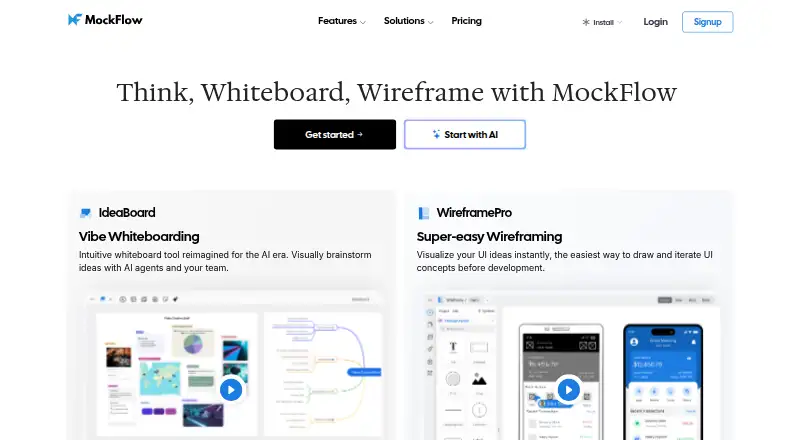
MockFlow is a visual workspace for turning ideas into diagrams, mind maps, flowcharts, moodboards, storyboards, wireframes and lite prototypes. WireframePro is part of every plan, so users can wireframe and create lite prototypes across the product’s plan options. MockFlow runs on the web, macOS and Windows, and is also available as a desktop app and browser extension. Its listed integrations include Slack, Microsoft Teams, Office 365, Jira, Confluence, Trello, Google Drive, Google Docs and MCP.
Mida AI uses a monthly credit pool, and Bridge can run compatible AI agents on the user’s machine. Plus adds team chat, audio comments and meetings, role-based sharing, collaborative components and multiplayer board editing. Max includes connectors to more than 20 business apps, Figma export, Build mode, SSO, SAML, SCIM and an offline desktop app. The free Basic plan is for personal and nonprofit use; business and commercial work requires a paid plan. MockFlow is developed by A Produle Systems (P) Limited. The company says customer data is backed up continuously, sensitive information is encrypted with a 256-bit key, and data transmission uses SSL/HTTPS.
Who it suits
MockFlow suits people who need visual tools for planning ideas, mapping processes, or creating wireframes and lite prototypes. Basic is intended for personal and nonprofit use, Plus serves solo or team ideation, and Max is aimed at businesses seeking advanced collaboration and integrations.
What it does well
- WireframePro is included on every plan.
- Works on the web, macOS and Windows, with desktop and extension options.
- Integrates with Slack, Jira, Google Drive and other listed apps.
- Plus includes team chat, audio meetings and multiplayer board editing.
- Max includes SSO, SAML, SCIM and an offline desktop app.
What to know first
- Basic is limited to personal and nonprofit use.
- Commercial and business work requires a paid plan.
- Basic allows one editor and four projects.
Limits
Basic is restricted to personal and nonprofit use and includes one editor, five reviewers, four projects, 500 components and 100 AI credits per month. Plus includes 800 AI credits per editor per month; Max includes 2,000 AI credits per editor per month.
Plans
| Plan | Billed and limits | Price |
|---|---|---|
| Basic | $0 forever · 1 editor · 5 reviewers · public sharing · 4 projects · 500 components · 100 AI credits/month | Free |
| Max | Per month, billed yearly; price not displayed on the opened page · 2,000 AI credits/month per editor · connectors to 20+ business apps · SSO/SAML/SCIM · offline desktop app | On request |
| Plus | Per month, billed yearly; price not displayed on the opened page · Unlimited boards and components · unlimited viewers · 800 AI credits/month per editor · 60-day revision history | On request |
| Day Pass | One payment; price not displayed on the opened page · 10 days of full premium access | On request |
As mockflow.com lists them, read 5 Oct 2026. The maker's own page has the final word.
Getting started
- Open mockflow.com.
- Choose the web app, desktop app or browser extension.
- Select a plan: Basic is free, while Plus, Max and Day Pass are also listed.
- Use WireframePro for wireframing and lite prototyping, or choose another visual tool.
- Connect any of the listed integrations you need.
MockFlow is a visual planning suite that combines diagrams, mind maps, flowcharts, moodboards, storyboards, wireframes and lightweight prototypes. It suits solo creators, nonprofits, product teams and larger organizations that want ideation and interface planning together. The main decision is whether Basic’s noncommercial scope is enough or whether collaborative and enterprise controls justify a paid tier.
Overview
MockFlow brings early visual thinking and interface definition into one workspace. WireframePro is included on every plan, so a project can move from a rough flow or storyboard into wireframes and interactive prototypes without changing products. Prototype sharing, design systems and developer handoff make it relevant beyond initial sketches.
The product is offered as a cloud service, desktop software and browser extension, with macOS and Windows support. MockFlow is developed by A Produle Systems (P) Limited and has operated since 2009. Its documented integrations include Slack, Microsoft Teams, Office 365, Jira, Confluence, Trello, Google Drive, Google Docs, MCP and a Chrome extension.
Key features
The visual toolkit covers both structured diagrams and looser concept work. That breadth is useful for planning user flows, organizing ideas and presenting direction before detailed UI production. Interactive prototyping and sharing help stakeholders review concepts, while design-system support and developer handoff address the transition toward implementation.
Mida AI uses a monthly credit pool, so AI-heavy workflows are constrained by the allowance attached to each plan. Bridge can run compatible AI agents on the user’s machine, giving technically inclined users a local execution option. Real-time collaboration is available, but the depth of group work depends on the tier.
Plus adds team chat, audio comments, audio meetings, role-based sharing, collaborative components and multiplayer board editing. Those features are meaningful for distributed workshops and ongoing product critique, rather than merely sharing a finished board. Max goes further with Figma export, Build mode, connectors to more than 20 business apps, SSO, SAML, SCIM and an offline desktop app.
Security controls include two-factor authentication and SSO/SAML support on the relevant tier. MockFlow says data is encrypted with a 256-bit key, transmitted over SSL/HTTPS and continuously backed up. Hosting runs on AWS, with storage services certified to SOC 2 and ISO 27001.
Pricing
Basic — free (billed $0 forever) is for personal and nonprofit use. It provides one editor, five reviewers, public sharing, four projects, 500 components and 100 AI credits per month. The commercial-use restriction is decisive: businesses must move to a paid plan, and the project and component caps can constrain a growing personal workspace.
Plus — custom pricing (billed per month, billed yearly) supplies unlimited boards and components, unlimited viewers, 800 AI credits per editor each month and 60-day revision history, alongside its collaboration tools. It fits solo ideation that needs generous capacity or teams actively editing together, but the published plan terms do not show a price.
Max — custom pricing (billed per month, billed yearly) raises the AI allowance to 2,000 credits per editor monthly and adds 20-plus business-app connectors, SSO/SAML/SCIM and an offline desktop app, plus Figma export and Build mode. It is the sensible tier for organizations with identity, integration or offline requirements, though cost must be obtained directly.
Day Pass — custom pricing is a one-time payment for 10 days of full premium access. It is suited to a short workshop or evaluation window, not a continuing team workflow. There is no free trial, so Basic or a Day Pass are the available low-commitment routes.
Platforms
MockFlow runs in the web browser and as a browser extension, with desktop deployment on macOS and Windows. Max’s offline desktop app is particularly relevant where connectivity or controlled work environments matter.
Who it's for
Basic is appropriate for personal projects, visual learners and nonprofit work that can stay within four projects and 500 components. Plus is better for solo or team ideation requiring unlimited working space, richer review and live co-editing. Max targets businesses and enterprises integrating visual planning with established systems, identity management and developer workflows. Companies needing commercial use should not plan around Basic.
Pros and cons
Pros
- WireframePro on every plan connects brainstorming to wireframes and lite prototypes.
- Plus provides substantial collaboration, including audio discussion and multiplayer editing.
- Max adds enterprise identity controls, offline access, Figma export and 20-plus connectors.
- Security measures include encryption, backups, SOC 2 and ISO 27001-certified storage services.
Cons
- Basic forbids commercial and business use, limiting its usefulness as a free workplace tool.
- Basic’s four-project, 500-component and 100-credit monthly caps can arrive quickly.
- Paid plan prices are custom, making budget comparison difficult.
- AI usage is metered through monthly credits, with no unlimited allowance described.
Alternatives
Choose Fluid UI if you want Android and iOS support plus a free trial and a freemium wireframing option. Mockplus is a fit when a free plan with 10 users, 10 active projects and unlimited designs is the priority. Pick Justinmind for a free editor plan offering one project with unlimited screens and viewers.
Quickmock suits readers seeking a free, open-source option. Frame0 is a desktop-focused alternative with a no-time-limit free tier. Pencil Project is another completely free desktop app for Linux, macOS and Windows.
Choose Banani for a web-based, credit-metered design option. Draftium is aimed at prototype creation with a free tier allowing up to three prototypes.
For broader comparisons, see Wireframing Software, Web Design Software, UI design tools, AI Wireframe Generators and Game UI Design Software.
Verdict
Choose MockFlow when you want one product for visual brainstorming, wireframing and lightweight prototyping, with a clear path to collaborative and enterprise workflows. Its strongest case is breadth plus the Plus and Max collaboration and integration layers. Look elsewhere if you need unrestricted commercial work at no cost, transparent paid pricing or uncapped AI usage.
Verdict
Choose MockFlow if you want wireframing and lite prototyping alongside a broad set of visual brainstorming tools. Basic can serve personal and nonprofit projects; teams needing collaborative features or businesses requiring advanced integrations should consider Plus or Max. The paid plan prices are not displayed in the listed plan details.
Questions
Is MockFlow free?
Yes. Basic costs nothing, and MockFlow lists Plus, Max and Day Pass as other plans.
Can I use MockFlow for business projects on Basic?
No. Basic is for personal and nonprofit use; commercial and business work requires a paid plan.
Which platforms does MockFlow support?
Listed platforms are web, macOS, Windows and extension. Deployment options include cloud, desktop and browser extension.
What does Plus add?
Plus includes team chat, audio comments and meetings, role-based sharing, collaborative components and multiplayer board editing.
What does Max include?
Max includes connectors to more than 20 business apps, Figma export, Build mode, SSO, SAML, SCIM and an offline desktop app.
Who develops MockFlow?
MockFlow says it is developed by A Produle Systems (P) Limited.
Facts from MockFlow's own pages
- AI
- Its Mida AI features include a monthly credit pool, and its Bridge option can run compatible AI agents on the user's machine. · mockflow.com, 5 Oct 2026
- Collaboration
- Plus includes team chat, audio comments, audio meetings, role based sharing, collaborative components and multiplayer board editing. · mockflow.com, 5 Oct 2026
- Company size fit
- solo, small, mid market, enterprise · mockflow.com, 21 Sept 2026
- Compliance
- SOC 2, iso27001, sso saml, two factor · mockflow.com, 21 Sept 2026
- Deployment
- cloud, desktop, browser extension · mockflow.com, 21 Sept 2026
- Enterprise features
- Max includes connectors to more than 20 business apps, Figma export, Build mode, SSO, SAML, SCIM and an offline desktop app. · mockflow.com, 5 Oct 2026
- Founded
- 2009 · mockflow.com, 28 Sept 2026
- Free plan limit
- Basic is limited to personal and nonprofit use; the pricing page says commercial and business work requires a paid plan. · mockflow.com, 5 Oct 2026
- Hosting
- MockFlow says its service is hosted on AWS and that customer data is stored using services with SOC 2 and ISO 27001 certifications. · mockflow.com, 5 Oct 2026
- Integrations
- The integrations documentation lists MCP, a Chrome extension, Google Drive, Google Docs, Jira, Confluence, Slack, MS Teams and Microsoft 365 integrations. · mockflow.com, 5 Oct 2026
- Intended users
- The pricing page describes Basic for visual thinking, Plus for solo or team ideation, and Max for businesses needing advanced collaboration and integrations. · mockflow.com, 5 Oct 2026
- Maker
- MockFlow says it is developed by A Produle Systems (P) Limited. · mockflow.com, 5 Oct 2026
- Product
- MockFlow provides visual brainstorming tools including diagrams, mind maps, flowcharts, moodboards, storyboards, wireframing and lite prototyping. · mockflow.com, 5 Oct 2026
- Security
- MockFlow says customer data is continuously backed up and sensitive information is encrypted with a 256-bit key; data transmission uses SSL/HTTPS. · mockflow.com, 5 Oct 2026
- Support
- The integrations documentation links to MockFlow support and video tutorials, and its contact form lists [email protected]. · mockflow.com, 5 Oct 2026
- Support channels
- docs · mockflow.com, 21 Sept 2026
- Wireframing
- WireframePro is included on every plan for wireframing and lite prototyping. · mockflow.com, 5 Oct 2026
Where MockFlow stands on Freedom251
- Ui Ux Designing Software#3 of 22
- Wireframing Software#4 of 29
- Interface Design Tools#5 of 26
- Web Design Software#8 of 41
- UI design tools#8 of 37
- Wireframe Tools#5 of 22
- AI Wireframe Generators#8 of 34
- Game UI Design Software#8 of 32
- UI/UX Design Tools#7 of 26