Freedom251 › Wireframing Software

Frame0
What Frame0 is
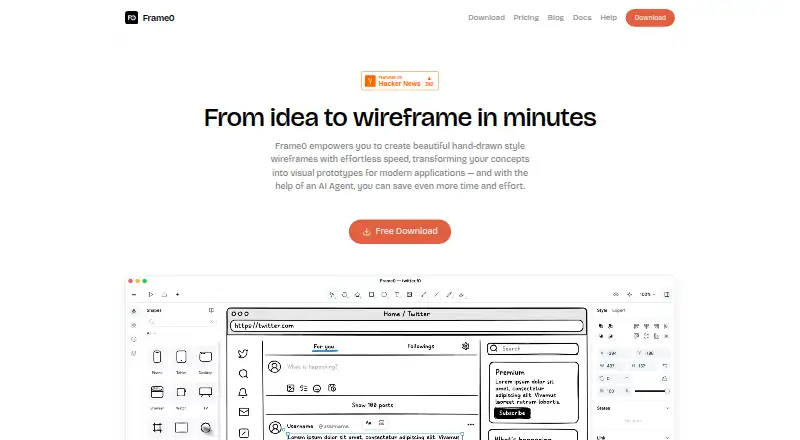
Frame0 is desktop software for making low-fidelity, sketch-style wireframes and prototypes. Its component library covers desktop, mobile, smartwatch, and web interfaces, with adjustable component states. The app includes more than 1,500 sketch-style icons based on Lucide, and shapes can link to pages, external URLs, or navigation actions. Prototypes can be shown in presentation mode or exported as interactive single HTML or PDF files; exported PDFs may omit characters that the selected font does not contain. Frame0 also supports flowcharts, entity-relationship diagrams, and UML use case and class diagrams. Its experimental AI Agent can use API keys from OpenAI, Anthropic, Google Gemini, or xAI Grok, with provider usage billed separately. Frame0 is file-based, storing each document in one file, and its documentation suggests syncing files with iCloud, Dropbox, Google Drive, or Microsoft OneDrive. The free plan has no time limit and includes non-premium features, built-in shapes, and all 1,500 icons. Paid options are priced per month, with VAT excluded: Solo is 99.00 USD for one device, Duo is 159.00 USD for two, and Team is 79.00 USD for three or more devices.
Who it suits
Frame0 suits people creating sketch-style wireframes, prototypes, or diagrams on a desktop computer. It may also suit users who want interactive prototype exports or an MCP connection to compatible desktop AI services.
What it does well
- Available for Linux, macOS, and Windows.
- Free plan has no time or size limit.
- Includes more than 1,500 icons.
- Can export interactive prototypes as HTML or PDF.
What to know first
- PDF exports may omit unavailable font characters.
- AI provider usage is billed separately.
- Major-version upgrades may require an additional payment.
- Paid prices exclude VAT.
Limits
The Free plan costs nothing, has no time or size limit, and includes non-premium features, built-in shapes and all 1,500 icons. Paid plans are listed as Solo at $99 a month for one device, Duo at $159 a month for two devices, and Team at $79 a month for three or more devices; VAT is excluded.
Plans
| Plan | Billed and limits | Price |
|---|---|---|
| Free | No time limit · All non-premium features · all built-in shapes · all 1,500 icons · no time or size limit | Free |
| Duo | One-time payment; VAT excluded · 2 devices · no watermarks · libraries · templates · perpetual license | $159, paid once |
| Team | Per device; VAT excluded · 3 or more devices · no watermarks · libraries · templates · perpetual license | $79, paid once |
| Solo | One-time payment; VAT excluded · 1 device · no watermarks · libraries · templates · perpetual license | $99, paid once |
As frame0.app lists them, read 7 Oct 2026. The maker's own page has the final word.
Getting started
- Visit https://frame0.app/.
- Choose the download for Linux, macOS or Windows.
- Check the system requirement for your operating system: macOS 15 or later, Windows 10 or later, Ubuntu 22.04 or Fedora 40 or later.
- Start with the Free plan or choose a paid plan by device count.
- Create a document and use the included components, icons, wireframing or diagramming tools.
Frame0 is a desktop app for sketch-style wireframes, interactive prototypes and several diagram types. It suits designers who want to work in files across Linux, macOS or Windows; its no-time-limit free plan makes it possible to start without a subscription.
Overview
Frame0 focuses on low-fidelity work: its component library spans desktop, mobile, smartwatch and web interfaces, and components have adjustable states. That breadth is useful when sketching across device types, while the sketch-style approach is less suited to teams seeking a polished, high-fidelity design environment.
Documents are stored as individual files, which can be synced through services such as iCloud, Dropbox, Google Drive or Microsoft OneDrive. This keeps the work in a familiar file-based workflow, but it is not the same as a built-in shared workspace. Frame0 supports prototype sharing through exported files rather than relying only on a live presentation: prototypes can be exported as a single HTML or PDF file. PDFs may omit characters that the selected font does not support.
Key features
Shapes can link to other pages, external URLs or navigation actions, and presentation mode lets users demonstrate the resulting prototype. This provides a practical path from a rough screen flow to a shareable demo without requiring a separate prototyping app.
The library includes more than 1,500 sketch-style icons based on Lucide. Diagramming covers flowcharts, entity-relationship diagrams, UML use case diagrams and UML class diagrams, extending Frame0 beyond interface mockups for teams that also map processes or software structures.
An experimental AI Agent can connect to OpenAI, Anthropic, Google Gemini or xAI Grok using the user's API keys; usage is billed by those providers separately. Frame0 also offers an MCP server for compatible desktop AI services, including Claude Desktop and Cursor. These integrations are options for users already working with those services, not a reason to assume AI usage is included in the app price.
Pricing
The Free plan costs nothing, has no time or size limit, and includes all non-premium features, built-in shapes and 1,500 icons. It is a substantial way to evaluate the file-based workflow, though premium features are excluded.
Paid plans are priced monthly, with VAT excluded, and are organized around device allowances: Solo costs $99 a month for 1 device, Duo costs $159 a month for 2 devices, and Team costs $79 a month for 3 or more devices. Solo and Duo fit individual use across the stated device counts; Team is the lower per-plan price for three or more devices, but the pricing is not presented as a per-seat charge. The published plan details do not establish a time-limited trial or a separate seat quota.
A purchased license is perpetual, but major-version upgrades may require an additional payment. Refunds are available within 14 days of purchase. That makes the paid license terms worth weighing against the monthly prices, particularly for buyers expecting ongoing access to major upgrades.
Platforms
Frame0 runs on Linux, macOS and Windows. The download requirements are macOS 15 or later, Windows 10 or later, and Ubuntu 22.04 or Fedora 40 or later on Linux, so older systems may not qualify even though their platform is supported generally.
Who it's for
Frame0 is a good fit for designers who want sketch-style wireframes, clickable flows and lightweight diagrams in one desktop app, especially when a no-time-limit free plan is enough to get started. Its file-based storage also suits people who prefer syncing documents through their own cloud-storage service. Teams that need a built-in shared workspace, or buyers who require certainty about major-version upgrade costs, should compare alternatives before committing.
Pros and cons
- Pro: The free plan has no time or size limit and includes all built-in shapes and icons, so users can explore the core workflow without hitting a stated project cap.
- Pro: Clickable navigation, presentation mode and HTML or PDF exports cover several steps between wireframing and showing a prototype.
- Pro: Flowcharts and three types of UML or data-structure diagrams broaden its use beyond interface sketches.
- Con: Files are stored individually, so collaboration depends on syncing and sharing those files rather than a stated built-in team workspace.
- Con: AI-provider usage is billed separately, and PDF exports may lose characters unsupported by the chosen font.
- Con: Paid plans are monthly and major-version upgrades may cost extra despite the perpetual license.
Alternatives
For a broader comparison, browse Wireframing Software, Prototyping Software or UI design tools.
Choose Fluid UI if you want to compare a freemium option with a free trial and support across mobile, web and desktop platforms. Mockplus is worth considering when its free Basic plan's 10 users and 10 active projects matter more than Frame0's file-based approach. Justinmind offers a free plan with one project, unlimited screens and viewers, and UI design and wireframing; it is a relevant alternative when those project terms fit your work.
Quickmock is another option if you prefer a free, open-source project. MockFlow may suit users who want a free Basic plan with one editor, five reviewers and public sharing. Pencil Project is a completely free desktop app for Linux, macOS and Windows. For a web-based option, Banani has a free plan with monthly and daily credits, while Draftium allows up to three prototypes on its free plan.
Verdict
Choose Frame0 if you want a desktop-first tool for sketch-style wireframes, clickable prototypes and useful diagram types, with a genuinely open-ended free plan. Its strongest case is the combination of device-spanning components, prototype exports and diagramming; look elsewhere if your priority is a built-in collaborative workspace or predictable major-version upgrade costs.
Verdict
Frame0 covers wireframing, interactive prototyping, and several diagram types in a file-based desktop app. Its free plan has no time limit, while paid plans specify device allowances and monthly prices.
Questions
Is Frame0 free?
Yes. Its Free plan costs nothing, has no time or size limit, and includes all non-premium features, built-in shapes and 1,500 icons.
What are the paid plan prices?
Solo is $99 a month for one device, Duo is $159 a month for two devices, and Team is $79 a month for three or more devices. VAT is excluded.
Which platforms does Frame0 support?
Frame0 is available for Linux, macOS and Windows. The listed requirements are macOS 15 or later, Windows 10 or later, and Ubuntu 22.04 or Fedora 40 or later for Linux.
Can Frame0 export prototypes?
Yes. Interactive prototypes can be exported as a single HTML or PDF file. PDF exports may omit characters unavailable in the selected font.
Can I use AI services with Frame0?
The experimental AI Agent can use API keys from OpenAI, Anthropic, Google Gemini or xAI Grok; those providers bill usage separately. Frame0 also offers an MCP server for compatible desktop AI services, including Claude Desktop and Cursor.
Is a paid license perpetual?
A purchased license is perpetual. Major-version upgrades may require an additional payment, and refunds are available within 14 days of purchase.
Facts from Frame0's own pages
- AI integrations
- Frame0 offers an MCP server for desktop AI services that support MCP, including Claude Desktop and Cursor. · docs.frame0.app, 7 Oct 2026
- AI providers
- The experimental AI Agent can use API keys from OpenAI, Anthropic, Google Gemini, or xAI Grok, with provider usage billed separately by those providers. · docs.frame0.app, 7 Oct 2026
- Cloud storage
- Frame0 is a file-based desktop application that stores each document as one file, and its docs suggest syncing files with iCloud, Dropbox, Google Drive, or Microsoft OneDrive. · docs.frame0.app, 7 Oct 2026
- Components
- Its UI component library covers desktop, mobile, smartwatch, and web interfaces, with adjustable component states. · frame0.app, 7 Oct 2026
- Diagramming
- The app supports flowcharts, entity-relationship diagrams, UML use case diagrams, and UML class diagrams. · docs.frame0.app, 7 Oct 2026
- Exports
- Frame0 can export interactive prototypes as single HTML or PDF files; exported PDFs may omit characters unavailable in the selected font. · docs.frame0.app, 7 Oct 2026
- Free plan
- Yes · frame0.app, 21 Sept 2026
- Icons
- Frame0 includes more than 1,500 sketch-style icons based on Lucide. · frame0.app, 7 Oct 2026
- License limits
- A purchased license is perpetual, but major-version upgrades may require an additional payment; refunds are available within 14 days of purchase. · frame0.app, 7 Oct 2026
- Privacy
- MKLabs says it does not process sensitive personal information and describes organizational and technical safeguards, while noting that it cannot guarantee 100% security. · frame0.app, 7 Oct 2026
- Prototyping
- Shapes can link to pages, external URLs, or navigation actions, and prototypes can be demonstrated in presentation mode. · docs.frame0.app, 7 Oct 2026
- Purpose
- Frame0 is desktop wireframing software for quickly creating low-fidelity, sketch-style wireframes and prototypes. · docs.frame0.app, 7 Oct 2026
- Support
- The maker lists [email protected] as its support contact. · frame0.app, 7 Oct 2026
- System requirements
- The download page requires macOS 15 or later, Windows 10 or later, and Ubuntu 22.04 or Fedora 40 or later for Linux. · frame0.app, 7 Oct 2026
Where Frame0 stands on Freedom251
- Wireframing Software#3 of 29
- Prototyping Software#4 of 30
- UI design tools#5 of 37
- Wireframe Tools#6 of 22
- Prototyping tools#15 of 30