Freedom251 › Interface Design Tools
Marvel
by Marvel
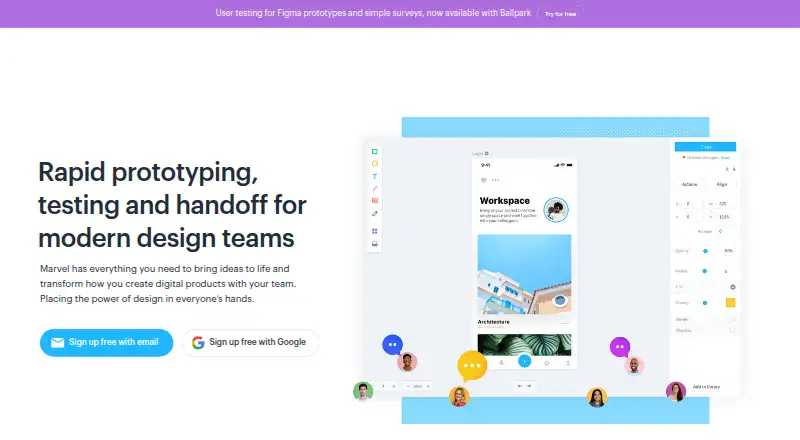
What Marvel is
Marvel is a design platform for creating wireframes, mockups and interactive prototypes, then preparing design specifications for development. From a browser, users can design websites and apps for different devices and share prototypes that demonstrate interactions without coding. Its Handoff tool produces downloadable assets and CSS, Swift and Android XML code that updates with design changes. Teams can arrange work in folders, create teams and add comments or annotations. Marvel lists integrations such as Sketch, Jira, Confluence, Dropbox Paper and Microsoft Teams, and offers a GraphQL API for project and design data. Mobile apps support creating, viewing and sharing prototypes, including offline viewing and Sketch syncing. The free plan covers one user and one project; Pro is $12/user/mo (annual), and a 7-day trial is listed. Marvel is headquartered in London and was founded in 2013.
Who it suits
Marvel suits individuals and teams designing and presenting app or website concepts, especially where developer handoff and shared feedback are useful. Its API and enterprise security controls may also suit teams with integration or access-control needs.
What it does well
- Build wireframes and prototypes in a browser.
- Share interactive prototypes without coding.
- Handoff generates assets and platform-specific code.
- Mobile apps support offline prototype viewing.
- Enterprise controls include SSO and access logs.
What to know first
- Free plan is limited to one project.
- Pro starts at $12/user/mo (annual).
- No desktop app is listed.
Limits
The Free plan includes one user and one project. Downgrading to Free limits the account to one project and makes other projects inactive.
Plans
| Plan | Billed and limits | Price |
|---|---|---|
| Pro | yearly · 1 user · unlimited projects · 3 active user tests · prototype/design downloads · remove Marvel branding | $12 a month |
| Team | yearly · starts at 3 users · unlimited projects · 10 active user tests · downloads · remove Marvel branding · premium support · 7-day free trial | $42 a month |
| Free | 1 user · 1 project · no time limit | Free |
| Enterprise | custom quote · unlimited users · unlimited projects · unlimited user tests · dedicated support · invite-only projects · advanced security settings · SSO · invoice/custom billing | On request |
As marvelapp.com lists them, read 15 Oct 2026. The maker's own page has the final word.
Getting started
- Open the Marvel website or use its Android or iOS app.
- Start with the Free plan or review Pro and Team options.
- Use a browser to create wireframes, mockups or prototypes.
- Share a prototype or use Handoff to prepare development assets and code.
Marvel is a browser-based design platform for turning screen ideas into interactive prototypes and developer-ready specs. It suits designers and product teams that want design, review and handoff connected; whether it suits a larger team depends on the project-test quotas and annual seat costs.
Overview
Marvel covers wireframing, mockups and website or app prototypes in one browser workspace. Teams can organize work into folders, create separate teams and attach comments and annotations to projects, which helps keep review alongside the design rather than in a separate feedback channel. Its no-code interactive prototypes are suited to presenting realistic interactions, but Marvel is not a desktop app.
The Handoff tool generates downloadable assets and CSS, Swift and Android XML, with outputs synchronized to design changes. That makes Marvel more useful than a presentation-only prototyping tool when developers need implementation-oriented material. A GraphQL API exposes project data, prototypes, interactions, designs, collaborators, comments and beta user testing. Integrations include Sketch, Jira, Confluence, Dropbox Paper, Microsoft Teams, YouTube, Niice, Smartmockups and Zeroheight.
Key features
Prototypes, feedback and mobile
Teams can build and share interactive prototypes without coding, then collect comments and annotations in the project. Marvel's mobile apps can create, play and share prototypes, support offline viewing and sync with Sketch. That is useful when work needs to be reviewed away from a browser, though the free plan's one-project ceiling makes it a limited long-term workspace.
Handoff and enterprise controls
Generated assets and code in CSS, Swift and Android XML give developers concrete outputs, and synchronization with design changes reduces the risk of handing over stale specs. Enterprise controls include SSO, IP restriction, access logs, user permissions and project-level password protection. Marvel says it uses EU-hosted infrastructure, is GDPR compliant, and operates in data centers with SOC 1, SOC 2, SOC 3 and ISO27001 certifications; it also says traffic uses 256-bit SSL/TLS 1.2 encryption and data is encrypted at rest. A 99.98% uptime SLA and 24/7 global support coverage are relevant for organizations that need operational assurances, but the advanced controls are reserved for Enterprise.
Pricing
Marvel is freemium, with a seven-day trial for paid use. The Free plan costs nothing and is for one user and one project. It is a sensible way for an individual to try the workflow, but not a durable option for managing multiple projects: downgrading to Free leaves only one project active and makes the others inactive.
Pro costs $12 a month, billed yearly, for one user, unlimited projects, three active user tests, prototype and design downloads, and removal of Marvel branding. It fits a solo designer who needs multiple projects and branded exports, though the single seat and three-test quota constrain collaboration and research. Team costs $42 a month, billed yearly, starts at three users and includes unlimited projects, ten active user tests, downloads, unbranded output and premium support. It is the more appropriate paid tier for a small team, but its annual billing and test cap matter if usage is seasonal or grows quickly.
Enterprise has custom pricing, unlimited users and projects, advanced security settings, Single Sign-On and custom billing. It is the tier for organizations needing centralized access controls; smaller teams should compare its custom terms with the fixed-seat plans before committing.
Platforms
Marvel supports Android, iOS, web and API access. It has no desktop app, so teams seeking a native desktop design environment should look elsewhere. The combination of browser design, mobile prototype apps and a GraphQL API suits distributed workflows spanning design, review and connected project systems.
Who it's for
Marvel is strongest for individuals and teams that need a path from wireframes and mockups to interactive review and developer handoff. Solo users can start with Free, while Pro provides room for more projects and export without branding. Teams that need shared work, more active user tests or premium support have a clearer case for Team; organizations requiring SSO and tighter security controls should consider Enterprise. It is less compelling for anyone who needs a desktop app or wants several projects on the free tier.
Pros and cons
- Pro: Wireframing, interactive prototypes, feedback and developer handoff sit in one workflow, reducing the need to separate these stages across tools.
- Pro: Handoff generates downloadable assets and synchronized CSS, Swift and Android XML, giving developers more than a static presentation.
- Pro: Mobile apps support offline viewing and Sketch syncing, extending prototype review beyond the browser.
- Con: Free is restricted to one user and one project, and other projects become inactive after a downgrade.
- Con: Pro is one seat and includes only three active user tests; Team starts at three users and includes ten, so research-heavy groups may hit the quota.
- Con: Paid plan prices are billed yearly, and there is no desktop app.
Alternatives
For a workflow centered on Marvel's connected design and handoff, browse Prototyping Software, UI design tools or Developer Handoff Software. Readers organizing journeys can compare the User Flow Software category, while website-focused work can start with Web Design Software; game interface projects have a separate Game UI Design Software category.
- FlowSnap is worth considering for a mobile-focused option with a free plan covering up to three projects and PNG exports with a watermark.
- Zeplin Flows offers a free web and desktop plan with one project, 100 screens and unlimited members, making it an option when those caps and platforms fit better.
- Rheo is a mobile freemium alternative with an Indie plan covering one app and one seat.
- BenchCanvas is a web and extension alternative with comments, annotations and PDF/PNG export in its Pro plan.
- Figr offers a free plan with three canvases and export to Figma, which may suit users whose workflow centers on that export.
- Wireflow is a free, MIT-licensed web and self-hosted option that can be forked or self-hosted.
- Sketchflow.ai is a freemium alternative available on Android, iOS and web.
- Slickplan is a freemium web and API alternative with a free trial.
Verdict
Choose Marvel if your priority is a connected route from wireframes and interactive prototypes to feedback and synchronized developer handoff. Its strongest fit is a solo designer on Pro or a small team that can work within Team's annual pricing and user-test quota. Look elsewhere if you need a desktop app, multiple active projects at no cost, or more flexibility than the fixed annual plans provide.
Verdict
Marvel brings concept design, interactive presentations and developer handoff into one platform. Check the one-project free-plan limit and annual Pro pricing against your team's needs.
Questions
Does Marvel have a free plan?
Yes. Free costs nothing and includes one user and one project.
How much does Pro cost?
Pro costs $12 a month, billed yearly, for one user.
Which platforms does Marvel support?
Marvel lists Android, iOS, web and an API. No desktop app is listed.
What does Handoff provide?
It generates downloadable assets and CSS, Swift and Android XML code that stays synchronized with design changes.
Does Marvel offer integrations and an API?
It lists integrations including Sketch, Jira, Confluence, Dropbox Paper and Microsoft Teams, plus a GraphQL API.
Where is Marvel based?
Marvel was founded in 2013 and is headquartered in London, United Kingdom.
Facts from Marvel's own pages
- API
- Marvel offers a GraphQL API that exposes project data, prototypes, share links, interactions, designs, team membership, collaborators, comments and beta user-testing data. · help.marvelapp.com, 15 Oct 2026
- API authentication
- The API supports personal access tokens, OAuth 2 authorization-code and implicit grants, and PKCE for native or public clients. · marvelapp.com, 15 Oct 2026
- API endpoint and tooling
- API calls use POST requests to https://api.marvelapp.com/graphql/; Marvel provides GraphiQL, schema documentation, tutorials and open-source examples. · marvelapp.com, 15 Oct 2026
- Audience
- Marvel says it serves individuals and teams of all sizes, from startups to Fortune 100 companies and schools. · marvelapp.com, 1 Oct 2026
- Availability and support
- Marvel advertises a 99.98% uptime SLA and 24/7 global support coverage. · marvelapp.com, 1 Oct 2026
- Browser design
- Users can create wireframes, mockups and website or app prototypes for any device from a browser. · marvelapp.com, 1 Oct 2026
- Collaboration
- Teams can use shared folders, real-time activity notifications, comments, annotations and role-based permissions. · marvelapp.com, 15 Oct 2026
- Company history
- Marvel says it began as a side project in 2013 and now serves more than 2 million individuals and teams. · marvel.marvelapp.com, 15 Oct 2026
- Company profile
- Gartner lists Marvel as a private company founded in 2013, headquartered in London, with 11–50 employees. · gartner.com, 15 Oct 2026
- Compliance and hosting
- Marvel says its infrastructure is EU hosted, GDPR compliant and hosted in data centers with SOC 1, SOC 2, SOC 3 and ISO27001 certifications. · marvelapp.com, 1 Oct 2026
- Design
- Users can create wireframes, mockups and website or app prototypes for any device, upload images, sync Sketch designs and use stock assets. · marvelapp.com, 15 Oct 2026
- Developer handoff
- Handoff generates design specifications and exportable CSS, Swift and Android XML code from mockups. · getapp.com, 15 Oct 2026
- Encryption
- Marvel says traffic is encrypted in transit with 256-bit SSL/TLS 1.2 and data is encrypted at rest. · marvelapp.com, 1 Oct 2026
- Extensibility
- Marvel highlights BotBot, Dashboard, Keynote and Userflows as API or Labs projects, and invites developers to publish integrations. · marvelapp.com, 15 Oct 2026
- Founded
- 2013 · marvelapp.com, 23 Sept 2026
- Free plan
- Yes · marvelapp.com, 19 Sept 2026
- Free-plan limit
- Downgrading to the free plan limits an account to one project and makes other projects inactive. · help.marvelapp.com, 1 Oct 2026
- Funding news
- TechCrunch reported on December 1, 2014 that Marvel raised a £525,000 seed round from Connect Ventures, ustwo and angel investors. · techcrunch.com, 15 Oct 2026
- Headquarters
- London, United Kingdom · marvelapp.com, 23 Sept 2026
- Integrations
- Listed integrations include Sketch, Jira, Confluence, Dropbox Paper, Microsoft Teams, YouTube, Niice, Smartmockups and Zeroheight. · marvelapp.com, 15 Oct 2026
- Limit: advanced capabilities
- GetApp reviewers report that Marvel lacks some advanced features available in competing products and can be difficult to organize for complex projects. · getapp.com, 15 Oct 2026
- Limit: feature depth
- Capterra reviews include complaints that the product is basic or not robust enough, with requests for richer interactions, gestures and animation features. · capterra.com, 15 Oct 2026
- Limit: pricing and free tier
- GetApp reviewers say the free plan is limited and paid plans may become expensive for larger needs. · getapp.com, 15 Oct 2026
- Limit: PSD handoff
- An Apple App Store reviewer reports that PSD files can be imported but do not provide handoff specifications, slowing developer work. · apps.apple.com, 15 Oct 2026
Where Marvel stands on Freedom251
- Interface Design Tools#4 of 26
- Prototyping Software#5 of 30
- Web Design Software#7 of 41
- Wireframe Tools#4 of 22
- Game UI Design Software#6 of 32
- UI design tools#7 of 37
- User Flow Software#4 of 20
- Design Collaboration Software#6 of 28
- UI/UX Design Tools#6 of 26
- Prototyping tools#7 of 30
- Developer Handoff Software#6 of 25