OpenEOS
What OpenEOS is
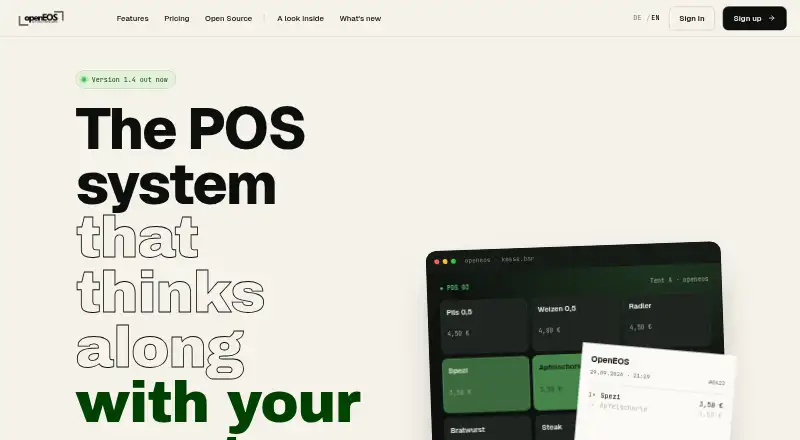
OpenEOS is a point-of-sale system for clubs, events, and festival catering, covering planning, ordering, kitchen work, checkout, and analytics. Staff can use its mobile POS on a phone or tablet around a venue, while guests can place orders through QR codes. A real-time display provides kitchen and pickup views. OpenEOS identifies SumUp integration for card payments, and receipt printing is described as automatic via Raspberry Pi.
Organizers can plan and assign shifts, with online volunteer sign-up, and use real-time reports and dashboards. The software is released under AGPLv3 and can be self-hosted and customized. Its self-hosted plan is free forever, includes all features and unlimited events, and provides community support. The SaaS plan costs € 25/ event day and includes hosting, backups, automatic updates, and premium support by email, phone, and WhatsApp. Internet gateway rental costs € 30/ day, while hardware rental costs € 50/ device / day. The maker says there is no setup fee, minimum term, or hidden cost. Listed platforms are Android, iOS, self-hosted, and web.
Who it suits
OpenEOS suits clubs and event or festival catering organizers who need tools for ordering, checkout, kitchen coordination, and shift planning. It offers both self-hosted use and a hosted SaaS option.
What it does well
- Free self-hosted plan includes all features
- Unlimited events on the self-hosted plan
- Guests can order by QR code
- Includes shift assignment and online volunteer sign-up
- SaaS includes hosting, backups, and automatic updates
What to know first
- Self-hosted plan provides community support
- SaaS costs € 25/ event day
- Internet gateway rental costs € 30/ day
- Hardware rental costs € 50/ device / day
Limits
The self-hosted plan includes all features and unlimited events, with community support. The SaaS plan costs € 25/ event day and includes all features.
Plans
| Plan | Billed and limits | Price |
|---|---|---|
| Self-hosted | forever · AGPLv3 · all features · unlimited events · one organization · community support | Free |
| SaaS | per event day · all features · hosting · backups · automatic updates · email, phone and WhatsApp support · 20% first-event starter bonus | €25, paid once |
| Internet gateway rental | per day · LTE/5G · unlimited data · Wi-Fi access point · LAN ports · plug-and-play | €30, paid once |
| Hardware rental | per device per day · POS tablets · ESC/POS printers · kitchen and pickup displays · configured on request | €50, paid once |
As openeos.de lists them, read 15 Oct 2026. The maker's own page has the final word.
Getting started
- Visit the OpenEOS website.
- Choose the self-hosted plan to run it on your server, or the SaaS plan for hosted service.
- For self-hosting, use the AGPLv3 release to self-host and customize the software.
- If needed, arrange internet gateway rental or hardware rental for the event.
Overview
OpenEOS is a point-of-sale system for clubs, events and festival catering, designed for organizers coordinating sales and service across a venue. It suits teams that need volunteer scheduling alongside ordering and checkout; its main trade-off is choosing between managing your own server and paying for hosting by event day.
Both software plans include all features, so the decision is about hosting and support rather than functionality. Self-hosting costs nothing but comes with community support, while SaaS adds managed hosting and premium support for a per-event-day fee.
Key features
Staff can take orders on a phone or tablet around the venue, and guests can order through QR codes. A real-time display provides separate kitchen and pickup views, connecting order-taking with preparation and collection. That breadth suits event service better than a checkout-only setup, though organizers still need to plan for the equipment and connectivity their venue requires.
Card payments use SumUp integration. Receipt printing is described as automatic via Raspberry Pi, making that hardware relevant to the setup. Shift tools let organizers assign shifts and accept online volunteer sign-ups, while real-time reports and dashboards provide a view of activity.
OpenEOS is released under AGPLv3 and can be self-hosted and customized. That is useful for organizations that want deployment control, but self-hosting also means taking responsibility for their own server. The maker says there is no setup fee, minimum term or hidden cost.
Pricing
Self-hosted: free, billed Free / forever. It includes all features and unlimited events, runs on your server and comes with community support. This is the strongest fit for clubs with the capacity to manage hosting; it avoids software charges but does not include the SaaS plan's hosting, backups, automatic updates or premium support.
SaaS: €25, paid once, billed € 25/ event day, pay-as-you-go with a monthly invoice. It includes all features, hosting, backups, automatic updates and premium support by email, phone and WhatsApp. Event-based billing avoids a stated minimum term, but recurring event days bring recurring charges, so it may be less attractive for organizers who can reliably run their own server.
Internet gateway rental: €30, paid once, billed € 30/ day. It provides an LTE/5G router with unlimited data, Wi-Fi and LAN ports, a practical option when an event needs its own internet connection.
Hardware rental: €50, paid once, billed € 50/ device / day. It includes tablets for POS, ESC/POS receipt printers, and kitchen and pickup displays, configured on request. This can reduce the burden of sourcing event equipment, but the per-device, per-day charge matters when planning a larger setup.
Platforms
OpenEOS supports Android, iOS, web and self-hosted use. The self-hosted option is particularly relevant to organizers who want to run the software on their own server; SaaS provides the hosted alternative.
Who it's for
OpenEOS is best suited to clubs, event organizers and festival caterers coordinating volunteer shifts and food or drink service across a venue. It is a good fit when QR ordering, kitchen and pickup views, and venue-wide mobile checkout matter together. Organizations without server capacity can choose SaaS, while teams seeking a fixed subscription rather than event-day pricing may prefer another model.
Pros and cons
Pros
- All features are included in both software plans, so hosted use does not require a higher feature tier.
- The free self-hosted plan has unlimited events, making it viable for frequent use when the organization can manage its own server.
- Event-day SaaS combines hosting, backups, automatic updates and premium support without a stated minimum term.
- Mobile POS, guest QR ordering, kitchen and pickup views, and volunteer sign-up address multiple parts of event operations in one system.
Cons
- Self-hosting requires the organization to provide and manage a server, with community rather than premium support.
- SaaS is charged per event day, so costs recur with each billed event rather than staying flat across the year.
- Receipt printing relies on Raspberry Pi, and rented hardware carries a separate per-device daily charge.
Alternatives
Club Bar is worth considering for clubs that want a free self-hosted option with no subscriptions and can supply their own hosting and hardware.
GymPoint may suit gyms seeking member management and billing alongside scheduling, POS, kiosk and portal functions; its free plan requires GymPoint Payments.
Bepoz Club POS is another club POS option to compare.
TouchPoint is another gym POS option to compare.
clubcloud is another paid club software option to compare.
Echino.Access is another paid web-based option to compare.
EPOS Solutions Gym POS is another paid web-based gym POS option to compare.
German POS Gym POS may suit a gym looking for published monthly tiers, with Starter at $59 a month and Professional at $99 a month.
For a broader category comparison, see Gym POS Software.
Verdict
Choose OpenEOS if your club, event or festival needs ordering, kitchen flow, volunteer shifts and checkout in one system, and you value either full-featured self-hosting or managed SaaS by event day. Look elsewhere if you need a fixed recurring price or do not want event-based charges and equipment considerations to shape your costs.
Verdict
OpenEOS covers POS workflows from guest ordering through kitchen display, checkout, and reporting. The free self-hosted plan and € 25/ event day SaaS option offer different hosting and support arrangements.
Questions
Does OpenEOS have a free plan?
Yes. The self-hosted plan costs nothing and includes all features and unlimited events.
How much does the SaaS plan cost?
It is listed as €25, paid once, billed at € 25/ event day on a pay-as-you-go basis with a monthly invoice.
Can OpenEOS be self-hosted?
Yes. It is released under AGPLv3 and can be self-hosted and customized.
Which platforms does OpenEOS list?
Android, iOS, self-hosted and web.
What does the SaaS plan include?
It includes hosting, backups, automatic updates and premium support by email, phone and WhatsApp.
What payment integration does it identify?
The product page identifies SumUp integration for card payments.
Facts from OpenEOS's own pages
- Analytics
- The product provides live dashboards and reports for revenue and event activity. · openeos.de, 15 Oct 2026
- API architecture
- The public backend repository describes a NestJS REST API with WebSocket communication, JWT refresh-token authentication, multi-tenancy, rate limiting and Swagger/OpenAPI documentation. · github.com, 15 Oct 2026
- API scope
- Documented endpoint groups cover organizations, events, products, orders, payments, devices, printers, QR ordering, invoices, reports and inventory. · github.com, 15 Oct 2026
- API technology
- The API repository specifies Node.js 20 LTS, NestJS 10, TypeScript 5, TypeORM, PostgreSQL 16, Redis 7 and Socket.IO 4. · github.com, 15 Oct 2026
- Card payments
- Card checkout is integrated with SumUp. · openeos.de, 15 Oct 2026
- Changelog news
- Version 1.6 dated 8 October 2026 added redesigned checkout, floor-plan tables, table service, integration controls and product icons. · openeos.de, 15 Oct 2026
- Data minimization
- OpenEOS says its error reports were changed to exclude personal details and screen recordings. · openeos.de, 15 Oct 2026
- Documentation depth
- The documentation repository is a bilingual Docusaurus manual with source documents, translated English content, screenshots and deployment files. · github.com, 15 Oct 2026
- Headquarters
- St. Georgen im Schwarzwald, Germany · openeos.de, 28 Sept 2026
- Hosting terms
- The SaaS service includes hosting, maintenance, updates, security patches, support and backups. · openeos.de, 15 Oct 2026
- Kitchen display
- Kitchen and pickup screens show incoming orders in real time. · openeos.de, 15 Oct 2026
- Licence
- OpenEOS is distributed under the GNU Affero General Public License version 3. · openeos.de, 15 Oct 2026
- License and hosting
- OpenEOS is released under AGPLv3 and can be self-hosted and customized. · openeos.de, 4 Oct 2026
- Limit: payment dependency
- The advertised card-payment workflow depends on enabling the SumUp integration and supplying provider credentials. · openeos.de, 15 Oct 2026
- Limit: self-hosted scope
- The self-hosted edition is intentionally limited to one organization and has no billing or self-registration. · openeos.de, 15 Oct 2026
- Limit: support tier
- Self-hosted customers receive community support, while the SaaS plan provides direct support channels. · openeos.de, 15 Oct 2026
- Maker legal identity
- The imprint identifies Lukas Lukic-Spitznagel as the operator at Brunnenstraße 6, 78112 St. Georgen im Schwarzwald, Germany. · openeos.de, 15 Oct 2026
- Mobile POS
- The till interface runs on phones or tablets so staff can sell around the venue. · openeos.de, 15 Oct 2026
- Payments
- The product page identifies SumUp integration for card payments. · openeos.de, 4 Oct 2026
- Payment terms
- Paid event days are activated after card or direct-debit payment processed through Stripe, with invoices emailed and downloadable. · openeos.de, 15 Oct 2026
- Pricing terms
- The maker states there is no setup fee, minimum term or hidden cost. · openeos.de, 4 Oct 2026
- Printer agent
- The printer agent is Python software for Raspberry Pi or Linux that receives print jobs over Socket.IO and supports USB, network and Bluetooth printers. · github.com, 15 Oct 2026
- Printer requirements
- The printer agent requires Python 3.11 or newer, Raspberry Pi OS/Debian/Ubuntu and an ESC/POS-compatible thermal printer. · github.com, 15 Oct 2026
- Purpose
- OpenEOS is a POS system for clubs, events and festival catering, covering planning, ordering, kitchen, checkout and analytics. · openeos.de, 4 Oct 2026
Where OpenEOS stands on Freedom251
- Gym POS Software#1 of 18