Freedom251 › Secure File Transfer Software
OnionShare
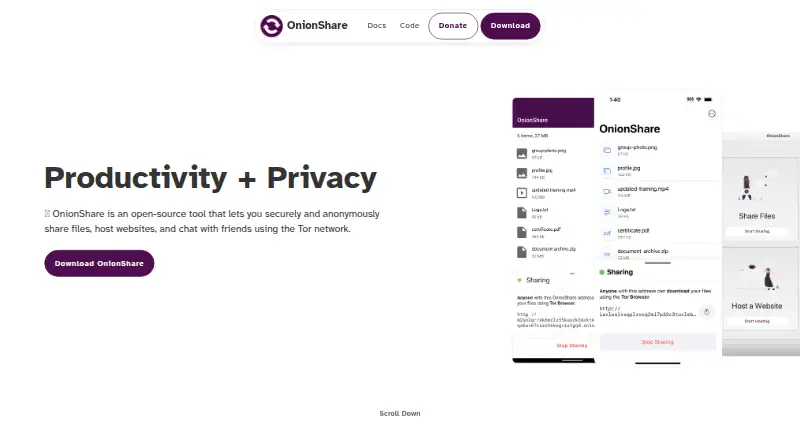
What OnionShare is
OnionShare is a free, open-source app for sharing files, receiving uploads, hosting onion websites, and chatting through the Tor network. It runs web servers on your computer and makes them reachable as Tor onion services. With Receive mode, people can send files anonymously to your computer; it can also send an HTTP POST to a webhook you configure when someone submits files or messages. You can create private chat rooms that do not retain chat history. OnionShare’s security documentation says shared files are not uploaded to a third-party server, Tor onion service connections are end-to-end encrypted, and services use a private key by default. A file share normally closes after a recipient finishes downloading. The app is available for Windows, macOS, Linux, Android, and iOS, and is included with QubesOS, Tails, and ParrotOS. OnionShare is a Lockdown Systems collective project licensed under GPLv3. The project says its apps do not collect analytics or behavioral tracking; website logs are kept for two weeks without IP addresses. Its documentation cautions that files received from others may be malicious and that OnionShare does not protect your computer from them.
Who it suits
OnionShare suits people who want to share files, accept uploads, host onion websites, or chat using Tor. It may also suit people looking for an open-source option available on desktop and mobile systems.
What it does well
- Free to use and released under the GPLv3.
- Receive mode accepts anonymous uploads directly to your computer.
- Hosts onion websites from your computer.
- Private chat rooms do not log chat history.
- Available for Windows, macOS, Linux, Android, and iOS.
- Apps collect no analytics or behavioral tracking, according to the project.
What to know first
- Received files may be malicious, and OnionShare adds no system protection against them.
- File sharing normally stops after a recipient finishes downloading.
- The project notes that the software may contain bugs or vulnerabilities.
Limits
There is no paid plan listed. The documentation warns that received files can be malicious and OnionShare does not protect your system from them; sharing also stops after a recipient completes a download unless you disable that setting.
Getting started
- Visit https://onionshare.org/.
- Choose the app for Windows, macOS, Linux, Android, or iOS.
- Install or open the app on your device.
- Select file sharing, Receive mode, website hosting, or chat for the task you want to do.
OnionShare is a free, open-source Tor application for people who want to exchange files, collect anonymous submissions, host an onion website, or chat without putting content on a conventional hosting service. It is best suited to privacy-conscious individuals and groups willing to run a service from their own computer. The trade-off is clear: you retain control of the data, but you also retain responsibility for the computer and anything uploaded to it.
Overview
OnionShare starts web servers locally and publishes them as Tor onion services. Files therefore remain on your computer instead of being sent to a third-party server, and Tor onion-service connections are end-to-end encrypted. A private key protects services by default, so access is not based solely on discovering an onion address.
The same architecture supports several jobs: sending files, receiving anonymous uploads, hosting onion websites, and running private chat rooms that do not log chat history. Its private-dropbox workflow is particularly useful when people need to submit material without identifying themselves. This local model is a strong fit for journalists, activists, researchers, and anyone avoiding centralized file hosts; it is less convenient for users who want a managed service that stays online independently of their computer.
Key features
File sharing and receiving
Send files directly from your computer through a Tor service. Sharing stops automatically after a recipient finishes downloading unless you disable that setting, which limits the window in which a link can be used. Receive mode reverses the flow: another person can upload files anonymously to your machine. That suits tip lines, application intake, and private submissions, but it requires careful operational judgment because the documentation warns that uploads may be malicious and provides no system-protection mechanism for them.
Onion sites and chat
OnionShare can publish a website from your computer as an onion service, useful for small, temporary, or privacy-sensitive sites rather than conventional public hosting. Its chat rooms are private and do not retain chat history, making the feature appropriate for conversations where persistence is undesirable.
Notifications and privacy
Receive mode can issue an HTTP POST to a webhook URL when files or messages arrive, allowing an external workflow to react without polling the application. OnionShare says its desktop and mobile apps collect no analytics or behavioral tracking. Website logs are retained for two weeks without IP addresses. The project is maintained by the worker-owned Lockdown Systems collective and released under GPLv3; it also cautions that, like any software, it may contain bugs or vulnerabilities.
Pricing
OnionShare is free, open source, and released under the GPLv3 license. There is no paid tier, subscription, quota, seat allowance, or free-trial period to weigh. That makes it suitable when budget is zero and local control matters more than hosted convenience. The price advantage does not remove the practical cost of operating your own computer, protecting it from dangerous uploads, and keeping it available when others need access.
Platforms
Desktop downloads are available for Windows, macOS, and Linux, with mobile apps for Android and iOS. Android users can also obtain a de-Googled build through F-Droid. The mobile applications are developed with Guardian Project and The Calyx Institute. OnionShare is preinstalled in QubesOS, Tails, and ParrotOS, which makes it an especially natural option for users of those systems. A desktop app is available, and download tracking is provided.
Who it's for
Choose OnionShare for anonymous file collection, direct private transfers, ephemeral chat, or a small onion site when you can keep the host computer secure and online as needed. It is a poor fit for teams that need centralized administration, guaranteed availability, or automatic malware screening for incoming files. The upload warning is decisive for public dropboxes: isolate and inspect received material before it reaches the rest of your system.
Pros and cons
- Pros: Files stay on your computer rather than a third-party server; Tor onion connections are end-to-end encrypted; private-key protection is enabled by default; sending can end automatically after download; anonymous receiving, onion hosting, and no-history chat share one free tool; apps collect no analytics or behavioral tracking.
- Cons: Received files may be malicious, and OnionShare does not protect your system from them; locally hosted services depend on your computer; Tor-based access is not a substitute for endpoint security; the project acknowledges possible bugs or vulnerabilities.
Alternatives
For a broader selection, see Secure File Transfer Software and File transfer services.
- WinSCP is a free, open-source Windows client for SFTP, FTP, FTPS, SCP, WebDAV, and S3; choose it for protocol-based server transfers instead of Tor-hosted sharing.
- SendSafely offers Android, iOS, Linux, macOS, web, Windows, an API, and an extension; its Personal plan allows 50 MB per month and Basic costs $10 a month for 250 MB monthly with expiration control, making it preferable when you want a hosted freemium workflow.
- FileZilla Client is a free Windows, macOS, and Linux client for FTP, FTPS, and SFTP; pick it for conventional server access.
- ExaVault provides a self-hosted appliance free for up to 50 users; choose it when user administration and a managed file-transfer installation matter more than anonymous Tor services.
- TransferNow has a free-forever plan with 5 GB per transfer and seven days of availability; choose it for straightforward hosted links.
- MASV charges $0.25 per GB after the first 15 GB free each month on its on-demand plan; choose it for usage-based large-transfer pricing.
- Tresorit offers encrypted links and storage across major desktop and mobile platforms; choose it when managed encrypted storage is the priority.
- CrushFTP is a paid, self-hosted and web-capable option; choose it when you need a commercial managed file-transfer server.
Verdict
OnionShare is the right choice for privacy-focused users who want free, open-source file exchange, anonymous intake, onion hosting, or no-history chat without surrendering files to a hosting provider. Its decisive advantage is direct local control through Tor. Look elsewhere if you need hosted uptime, centralized controls, or safer handling of untrusted uploads.
Verdict
Choose OnionShare if you want a free, open-source way to share or receive files, host onion websites, or chat over Tor. Consider the risks of handling uploads: the documentation warns that received files may be malicious and are not screened by the app.
Questions
How much does OnionShare cost?
OnionShare is free and open source. No free trial is offered.
Which platforms support OnionShare?
Desktop downloads are listed for Windows, macOS, and Linux, with mobile apps for Android and iOS. The project says it comes preinstalled in QubesOS, Tails, and ParrotOS.
Is OnionShare open source?
Yes. It is released under the GPLv3 license.
Where do files go when someone shares them with me?
Receive mode lets people upload files directly to your computer. The security documentation says file sharing does not upload files to a third-party server.
Does OnionShare protect against malicious uploads?
No. Its documentation warns that uploaded files may be malicious and says the app does not add safety mechanisms to protect your system from them.
Facts from OnionShare's own pages
- Access control
- OnionShare services are protected by a private key by default, according to the security documentation. · docs.onionshare.org, 9 Oct 2026
- Anonymous chat
- OnionShare can create private chat rooms that do not log chat history. · docs.onionshare.org, 9 Oct 2026
- Bundled distributions
- The official site says OnionShare comes preinstalled in QubesOS, Tails, and ParrotOS. · onionshare.org, 9 Oct 2026
- Chat
- OnionShare includes a chat feature. · onionshare.org, 10 Oct 2026
- Desktop app
- Yes · onionshare.org, 21 Sept 2026
- Desktop platforms
- OnionShare is available for Windows, Mac, and Linux. · onionshare.org, 10 Oct 2026
- Download tracking
- Yes · onionshare.org, 21 Sept 2026
- File sharing
- The site describes OnionShare as a tool for privately sharing files. · onionshare.org, 10 Oct 2026
- Included with operating systems
- The site says OnionShare comes preinstalled in QubesOS, Tails, and ParrotOS. · onionshare.org, 10 Oct 2026
- License
- OnionShare is open source and released under the GPLv3. · onionshare.org, 10 Oct 2026
- Local hosting
- OnionShare starts web servers locally on the user's computer and makes them accessible as Tor onion services. · docs.onionshare.org, 9 Oct 2026
- Maker
- Lockdown Systems describes itself as a worker-owned collective building freedom and privacy technologies. · lockdown.systems, 10 Oct 2026
- Mobile partners
- OnionShare's mobile applications are developed with Guardian Project and The Calyx Institute. · onionshare.org, 10 Oct 2026
- Mobile platforms
- The site links to OnionShare apps for Android, de-Googled Android through F-Droid, and iOS. · onionshare.org, 10 Oct 2026
- Privacy policy
- OnionShare says its desktop and mobile apps collect no analytics or behavioral tracking, and its website logs are retained for two weeks without IP addresses. · onionshare.org, 9 Oct 2026
- Private dropbox
- The site says OnionShare can create a private dropdown. · onionshare.org, 10 Oct 2026
- Project and license
- OnionShare is a project of the Lockdown Systems collective and is released under GPLv3. · onionshare.org, 9 Oct 2026
- Project organization
- OnionShare is a project of the Lockdown Systems collective. · onionshare.org, 10 Oct 2026
- Purpose
- OnionShare is an open-source tool for securely and anonymously sharing files, hosting websites, and chatting over the Tor network. · onionshare.org, 10 Oct 2026
- Receive files
- Receive mode lets people anonymously upload files directly to the user's computer. · docs.onionshare.org, 9 Oct 2026
- Security
- The security documentation says OnionShare file sharing does not upload files to a third-party server and Tor onion service connections are end-to-end encrypted. · docs.onionshare.org, 9 Oct 2026
- Security caveat
- The site notes that OnionShare, like all software, may contain bugs or vulnerabilities. · onionshare.org, 10 Oct 2026
- Sharing behavior
- File sharing stops automatically after a recipient finishes downloading unless the user disables that setting. · docs.onionshare.org, 9 Oct 2026
- Supported systems
- The official site lists desktop downloads for Windows, macOS, and Linux and mobile apps for Android and iOS. · onionshare.org, 9 Oct 2026
Where OnionShare stands on Freedom251
- Secure File Transfer Software#8 of 28
- File transfer services#68 of 105