Freedom251 › Managed File Transfer - Enterprise Software

ExaVault
by ExaVault
What ExaVault is
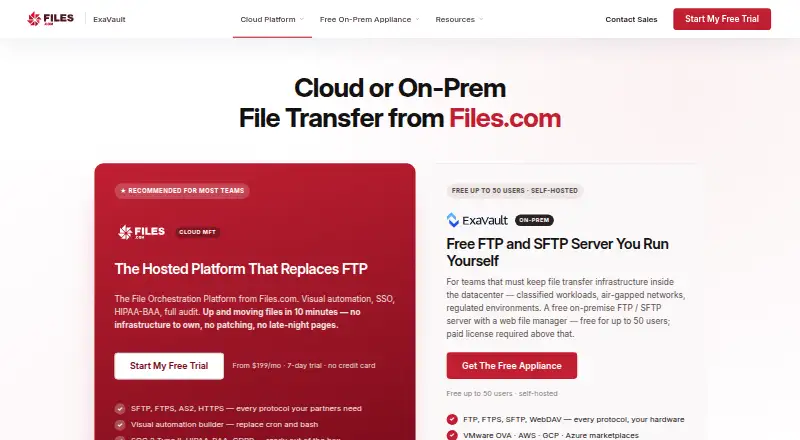
ExaVault is a self-hosted file-transfer appliance for teams that need file exchange inside infrastructure they operate, including a datacenter, VPC, or air-gapped network. ExaVault Cloud has been sunset, but the appliance continues to be shipped and maintained; Files.com acquired ExaVault in 2022. It supports FTP, SFTP, FTPS, and WebDAV, with a browser file manager, user and group controls, folder permissions, share links, notifications, and activity records. Its documented identity options include SAML, SCIM, Active Directory, and LDAP. Deployment options include VMware vSphere and the AWS, Google Cloud, and Microsoft Azure marketplaces; Hyper-V requires converting the VMware image. The appliance encrypts data in flight and provides audit logs, while at-rest encryption depends on the customer's VM environment. The free edition has no expiration and supports up to 50 user accounts. Paid licenses are required above that limit. The appliance needs a 64-bit Intel CPU, four cores, 12 GB RAM, a 100 GB primary disk, and a data drive; ARM is unsupported.
Who it suits
It suits organizations that need file transfer within infrastructure they operate, including datacenters, VPCs, or air-gapped networks. Teams should be prepared to manage their own compliance posture and meet the appliance's system requirements.
What it does well
- Supports FTP, SFTP, FTPS, and WebDAV.
- Includes user controls, folder permissions, and share links.
- Free edition has no expiration and supports up to 50 accounts.
- Offers SAML, SCIM, Active Directory, and LDAP.
- Available through major cloud marketplaces and VMware vSphere.
What to know first
- ExaVault Cloud has been sunset.
- API access is not available.
- ARM processors are unsupported.
- Encryption at rest depends on the customer's VM environment.
Limits
The free edition does not expire and is capped at 50 user accounts; a paid license is required above that. Free users have self-serve documentation support.
Plans
| Plan | Billed and limits | Price |
|---|---|---|
| Free | Up to 50 users · self-hosted appliance · self-serve support | Free |
| Paid | per 50-user pack · Required above 50 users · email and phone support · automatic updates · SAML SSO · optional SCIM · SMS two-factor authentication · automatic SSL · SIEM syslog export | $99 a month |
| Enterprise | per 50 users · 24/7/365 support · managed SIEM integration assistance · deployment and migration support · larger deployments quoted on request | $7,499 a year |
As exavault.com lists them, read 29 Sept 2026. The maker's own page has the final word.
Getting started
- Visit https://www.exavault.com/.
- Choose a deployment route: VMware vSphere, AWS Marketplace, Google Cloud Marketplace, or Microsoft Azure Marketplace.
- For Hyper-V, convert the VMware image.
- Prepare a 64-bit Intel system with four cores, 12 GB RAM, a 100 GB primary disk, and a data drive.
- Start with the free edition for up to 50 user accounts, or select a paid license above that limit.
ExaVault is a file-transfer appliance for organizations that want exchanges to run inside infrastructure they operate. It is best for teams with the capacity to deploy and administer a virtual appliance; it is not a hosted service that removes that operational burden.
Overview
Launched in 2009 and acquired by Files.com in 2022, ExaVault continues as a maintained self-hosted appliance after ExaVault Cloud was sunset. Its focus is teams running transfers in their own datacenter, VPC, or air-gapped network. Buyers seeking a hosted ExaVault service should look elsewhere.
Key features
FTP, SFTP, FTPS, and WebDAV support gives organizations several established ways to connect users and systems. A browser-based file manager combines user and group controls, folder permissions, share links, password protection, configurable link expiration, notifications, and activity records. These controls suit managed exchange workflows, though they do not eliminate the work of operating the underlying environment.
SAML, SCIM, Active Directory, and LDAP support authentication and account provisioning. Paid licensing adds SAML SSO, optional SCIM, SMS two-factor authentication, automatic SSL, automatic updates, and SIEM syslog export. Encryption in flight and audit logging are included, but encryption at rest depends on the customer's VM environment. Compliance for frameworks such as SOC 2, HIPAA, GDPR, FedRAMP, and FIPS also remains the customer's responsibility.
Pricing
The free edition costs nothing and does not expire. It includes the self-hosted appliance and self-serve support for up to 50 user accounts. That is a useful way for a smaller team to use the appliance without a license fee, but organizations exceeding the cap must move to paid licensing.
Paid costs $99 a month, billed per 50-user pack. It is required above 50 users and adds email and phone support, automatic updates, SAML SSO, optional SCIM, SMS two-factor authentication, automatic SSL, and SIEM syslog export. This tier fits teams needing those controls and business-hours assistance, though the pack-based pricing means larger user counts require additional licensing.
Enterprise costs $7,499 a year, billed per 50 users. It adds 24/7/365 support, managed SIEM integration assistance, and deployment and migration support; larger deployments are quoted on request. It is the option for organizations that need round-the-clock support or help with rollout, at a substantially higher annual commitment. There is no free trial.
Platforms
The appliance is offered for VMware vSphere, AWS Marketplace, Google Cloud Marketplace, and Microsoft Azure Marketplace. Hyper-V is supported by converting the VMware image. Its requirements—64-bit Intel CPU, four cores, 12 GB RAM, a 100 GB primary disk plus a data drive—make this a poor fit for constrained hardware; ARM processors are unsupported. A web interface is available, but the product is self-hosted rather than a hosted transfer service. API access is not available.
Who it's for
ExaVault is most compelling for organizations that need file transfer within infrastructure they control, including datacenters, VPCs, and air-gapped networks, and can take responsibility for deployment, encryption at rest, and compliance. Teams wanting managed hosting, API access, or a service that assumes those responsibilities should choose another approach.
Pros and cons
- Pros: FTP, SFTP, FTPS, and WebDAV cover varied transfer needs; identity integrations and granular file controls support administered sharing.
- Pros: A non-expiring free edition accommodates up to 50 users, making it possible to run the appliance without a paid license at that scale.
- Cons: Customers own VM-level encryption at rest and compliance posture, adding meaningful security and governance work.
- Cons: The 50-user free cap, hardware requirements, and absence of API access limit its fit for some growing or integration-heavy teams.
Alternatives
For a free Windows file-transfer client with open-source licensing, consider WinSCP; it supports SFTP, FTP, FTPS, SCP, WebDAV, and S3, but is a client rather than a self-hosted appliance. FileZilla Client is another free option for Linux, macOS, and Windows, with FTP, FTPS, and SFTP support.
SendSafely suits readers looking for a multi-platform freemium option with a free trial; its Basic plan is $10 a month for 250 MB/month and expiration controls. TransferNow offers a transfer-service alternative: its free tier allows 5 GB per transfer with seven days' availability, while the Starter plan is €3 a month billed for two years.
MASV is worth considering for pay-as-you-go transfers, with 15 GB free each month and usage billed at $0.25 per GB thereafter. Tresorit is an alternative for encrypted-link and storage needs across desktop and mobile platforms; its Basic plan includes 3 GB storage and a 500 MB maximum file size.
CrushFTP is another self-hosted option, with a Small Business plan at $70 a month under a perpetual license and yearly maintenance renewal after the first year. For enterprise managed file transfer, Kiteworks Managed File Transfer offers secure managed transfer as an add-on to its Enterprise package.
Browse more options in Secure File Transfer Software or File transfer services.
Verdict
Choose ExaVault if your team needs file transfer inside infrastructure it controls and can manage the appliance, security, and compliance responsibilities. Its maintained self-hosted deployment, protocol breadth, and 50-user free edition are strong reasons to consider it. Look elsewhere if you need hosted service, API access, or a provider to own encryption at rest and compliance work.
Verdict
ExaVault is a self-hosted option for teams that need file transfer in infrastructure they control. Its appliance remains maintained, but buyers must account for the 50-user free limit, hardware requirements, and responsibility for compliance and at-rest encryption.
Questions
Is ExaVault free?
Yes. The free edition does not expire and supports up to 50 user accounts.
How much does a paid plan cost?
The Paid plan is $99 a month, billed per 50-user pack. Enterprise is $7,499 a year, billed per 50 users; larger deployments are quoted on request.
Which platforms does it support?
It is self-hosted and web-based. Deployment options include VMware vSphere and the AWS, Google Cloud, and Microsoft Azure marketplaces; Hyper-V requires converting the VMware image.
Which file-transfer protocols are supported?
The appliance supports FTP, SFTP, FTPS, and WebDAV.
What support comes with the plans?
Free users get self-serve documentation. Paid includes business-hours email and phone support, while Enterprise includes 24/7/365 support.
Who is responsible for compliance and encryption at rest?
The customer is responsible for compliance posture, including frameworks such as SOC 2, HIPAA, GDPR, FedRAMP, and FIPS. Encryption at rest comes from the customer's VM environment.
Facts from ExaVault's own pages
- API access
- No · exavault.com, 22 Sept 2026
- Company history
- ExaVault launched in 2009, and Files.com acquired it in 2022; ExaVault is no longer a standalone company. · exavault.com, 29 Sept 2026
- Compliance responsibility
- Because the appliance runs in the customer's environment, compliance posture for frameworks such as SOC 2, HIPAA, GDPR, FedRAMP, and FIPS is the customer's scope. · exavault.com, 29 Sept 2026
- Deployment options
- The appliance is offered for VMware vSphere, AWS Marketplace, Google Cloud Marketplace, and Microsoft Azure Marketplace, with Hyper-V available by converting the VMware image. · exavault.com, 29 Sept 2026
- File management
- It includes a browser-based file manager, user and group controls, folder permissions, share links, notifications, and activity records. · docs.exavault.com, 29 Sept 2026
- Founded
- 2009 · exavault.com, 28 Sept 2026
- Free plan
- Yes · exavault.com, 22 Sept 2026
- Free tier limits
- The free edition does not expire and supports up to 50 user accounts; a paid license is required above that cap. · exavault.com, 29 Sept 2026
- Identity integrations
- Its documentation lists SAML, SCIM, Active Directory, and LDAP for authentication and account provisioning. · docs.exavault.com, 29 Sept 2026
- Intended users
- The appliance is presented for teams that need file transfer inside their own datacenter, VPC, or air-gapped network. · exavault.com, 29 Sept 2026
- Product status
- ExaVault Cloud has been sunset and its mission continued as Files.com; the ExaVault self-hosted appliance is still shipped and maintained. · exavault.com, 29 Sept 2026
- Protocols
- The appliance supports FTP, SFTP, FTPS, and WebDAV. · exavault.com, 29 Sept 2026
- Security controls
- The appliance includes encryption in flight and audit logging; encryption at rest comes from the customer's VM environment. · exavault.com, 29 Sept 2026
- Support
- Free users get self-serve documentation, the Paid tier includes business-hours email and phone support, and Enterprise includes 24/7/365 support. · exavault.com, 29 Sept 2026
- System requirements
- The appliance requires a 64-bit Intel CPU, 4 cores, 12 GB RAM, and a 100 GB primary disk plus a data drive; ARM processors are unsupported. · exavault.com, 29 Sept 2026
- What it does
- ExaVault is a self-hosted file-transfer appliance for organizations that need file transfer and sharing in infrastructure they operate. · docs.exavault.com, 29 Sept 2026
Where ExaVault stands on Freedom251
- Managed File Transfer - Enterprise Software#1 of 17
- Secure File Transfer Software#2 of 28
- File transfer services#12 of 105