Freedom251 › Time Management Apps

OmniFocus
by OmniFocus
What OmniFocus is
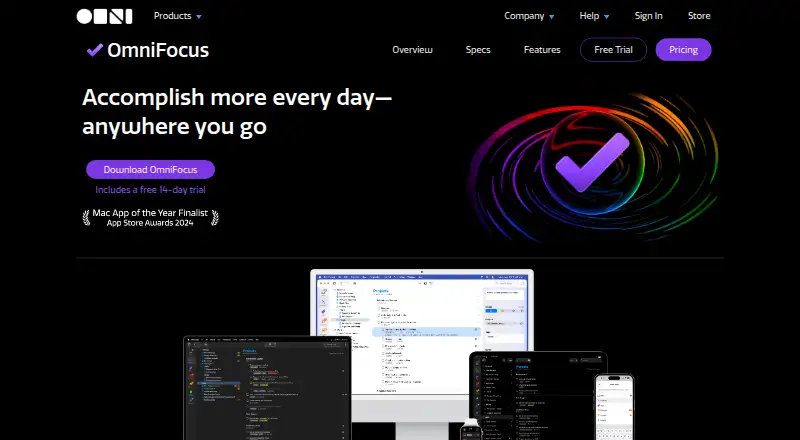
OmniFocus is task management software for busy professionals, available on iOS, macOS, and the web. Quick Entry captures actions, while the Inbox holds them until they are organized into projects and folders. Users can add multiple tags, due and deferred dates, reminders, recurring tasks, and subtasks. Forecast arranges actions and calendar events in a reorderable list, but calendar-event integration is unavailable on the web. Review prompts users to revisit projects and mark them reviewed. Custom Perspectives filter and group projects and tags, and Omni Automation plug-ins require Pro; AppleScript automation is for Mac. The product also lists Shortcuts actions, Siri AI in beta, widgets, Spotlight interaction, notifications, and calendar integration on supported Apple platforms. Omni offers syncing with end-to-end encryption, with WebDAV as another option. There is no free plan, but a 14-day trial is available. Plans include a $99.99 a year subscription and perpetual licenses, while web access for perpetual license owners is $4.99 a month.
Who it suits
OmniFocus suits busy professionals who want to capture, schedule, and review tasks across Apple devices and the web. Its project organization, automation options, and calendar features may fit people managing detailed workflows.
What it does well
- Quick Entry captures actions from anywhere.
- Projects support tags, due dates, and deferred dates.
- Forecast combines actions and calendar events.
- Syncing includes end-to-end encryption.
- A 14-day trial is available.
What to know first
- There is no free plan.
- Calendar-event integration is unavailable on the web.
- Custom Perspectives and Omni Automation require Pro.
- Web companion subscription requires an existing setup.
Limits
There is no free plan. The $4.99 a month Web companion requires an existing OmniFocus setup and a v3+ database format; Custom Perspectives and Omni Automation require Pro.
Plans
| Plan | Billed and limits | Price |
|---|---|---|
| v4 Standard License | Universal purchase for Mac, iPhone, iPad, Apple Watch, and Apple Vision Pro · Includes all 4.x updates | $74.99 a month |
| v4 Pro License | Universal purchase for Mac, iPhone, iPad, Apple Watch, and Apple Vision Pro · Includes Pro features | $149.99 a month |
| OmniFocus for the Web Subscription | Auto-renews until canceled · Web companion for perpetual license owners; requires existing OmniFocus setup and v3+ database format | $4.99 a month |
| OmniFocus Subscription | Auto-renews until canceled · Latest Pro version; Mac, iPhone, iPad, Apple Watch, Apple Vision Pro, and Web; supported OS versions required | $99.99 a year |
| OmniFocus 4 Pro License | Purchase once; includes all 4.x updates · Mac, iPhone, iPad, Apple Watch, Apple Vision Pro; Pro features; requires macOS 15.2, iOS/iPadOS 18.2, or visionOS 2.2 or newer | $149.99, paid once |
| OmniFocus for the Web Subscription | Auto-renews until canceled · Web companion for perpetual license owners; requires existing OmniFocus setup and v3+ database format | $49.99 a year |
| OmniFocus 4 Standard License | Purchase once; includes all 4.x updates · Mac, iPhone, iPad, Apple Watch, Apple Vision Pro; requires macOS 15.2, iOS/iPadOS 18.2, or visionOS 2.2 or newer | $74.99, paid once |
As omnigroup.com lists them, read 21 Sept 2026. The maker's own page has the final word.
Getting started
- Open the OmniFocus website
- Start the 14-day trial or choose a listed license or subscription
- Install OmniFocus on supported Mac, iPhone, iPad, Apple Watch, or Apple Vision Pro devices
- Use Quick Entry to capture actions into the Inbox
- Organize actions into projects and folders with tags and dates
- Enable Omni syncing or configure your own WebDAV server
- Add the Web companion when using an existing perpetual-license setup
Verdict
OmniFocus combines task capture, project organization, review, and calendar planning for Apple-platform workflows. Check the web limitations and plan requirements, especially if you need Pro features or web access with a perpetual license.
Questions
Is there a free plan or trial?
There is no free plan, but OmniFocus offers a 14-day trial.
Which platforms are supported?
OmniFocus supports iOS, macOS, and the web. Listed licenses also cover Mac, iPhone, iPad, Apple Watch, and Apple Vision Pro.
How much does OmniFocus cost?
The Web subscription is $4.99 a month, the OmniFocus Subscription is $99.99 a year, and perpetual Standard and Pro licenses are listed at $74.99, paid once and $149.99, paid once.
What requires Pro?
Custom Perspectives and Omni Automation require Pro. The Pro license includes Pro features.
How does syncing work?
Omni provides free syncing with end-to-end encryption. You can also sync through your own WebDAV server; the Web version requires Omni’s Sync Server for cross-device sync.
Facts from OmniFocus's own pages
- Automation
- OmniFocus supports cross-platform Omni Automation plug-ins and Mac-only AppleScript automation; Omni Automation requires Pro. · omnigroup.com, 7 Oct 2026
- Calendar sync
- Yes · omnigroup.com, 21 Sept 2026
- Company
- The Omni Group describes itself as an employee-owned company founded in Seattle, Washington, and lists its office address in Seattle. · omnigroup.com, 7 Oct 2026
- Compatibility
- The current download listing shows OmniFocus 4.9.2 for macOS 15.2 and an older 4.8.13 version for macOS 14. · omnigroup.com, 7 Oct 2026
- Customization
- Custom Perspectives filter and group projects and tags, and require OmniFocus Pro. · omnigroup.com, 7 Oct 2026
- Free plan
- No · omnigroup.com, 21 Sept 2026
- Headquarters
- Seattle, Washington, United States · omnigroup.com, 28 Sept 2026
- Integrations
- The product lists Shortcuts actions, Siri AI in beta, widgets, Spotlight interaction, notifications, and calendar integration across supported Apple platforms. · omnigroup.com, 7 Oct 2026
- Organization
- Users can organize actions into projects and folders, apply multiple tags, and assign due or deferred dates. · omnigroup.com, 7 Oct 2026
- Planning
- Forecast displays actions and calendar events in a reorderable list, though calendar event integration is unavailable on the Web version. · omnigroup.com, 7 Oct 2026
- Privacy
- Omni says it does not share app or website data with social media or advertising services and does not use Google Analytics on its website. · omnigroup.com, 7 Oct 2026
- Purpose
- OmniFocus is task management software aimed at busy professionals. · omnigroup.com, 7 Oct 2026
- Recurring tasks
- Yes · omnigroup.com, 21 Sept 2026
- Review
- The Review feature periodically reminds users to check projects and actions and mark projects reviewed. · omnigroup.com, 7 Oct 2026
- Subtasks
- Yes · omnigroup.com, 21 Sept 2026
- Support
- The company says it provides long-term support and lists phone availability Monday through Friday, 10 a.m. to 5 p.m. Pacific Time. · omnigroup.com, 7 Oct 2026
- Supported platforms
- web,macos,ios · omnigroup.com, 21 Sept 2026
- Sync and encryption
- Omni offers free syncing with end-to-end encryption, and OmniFocus can also sync through a user’s own WebDAV server. · omnigroup.com, 7 Oct 2026
- Task capture
- Quick Entry lets users add actions from anywhere, and the Inbox stores items for later organization. · omnigroup.com, 7 Oct 2026
- Task reminders
- Yes · omnigroup.com, 21 Sept 2026
- Web limitation
- OmniFocus for the Web requires syncing through Omni’s Sync Server when used with the cross-device sync feature. · omnigroup.com, 7 Oct 2026
Where OmniFocus stands on Freedom251
- Time Management Apps#20 of 35
- Task Management Software#47 of 59
- To-do list apps#132 of 150