Okular
What Okular is
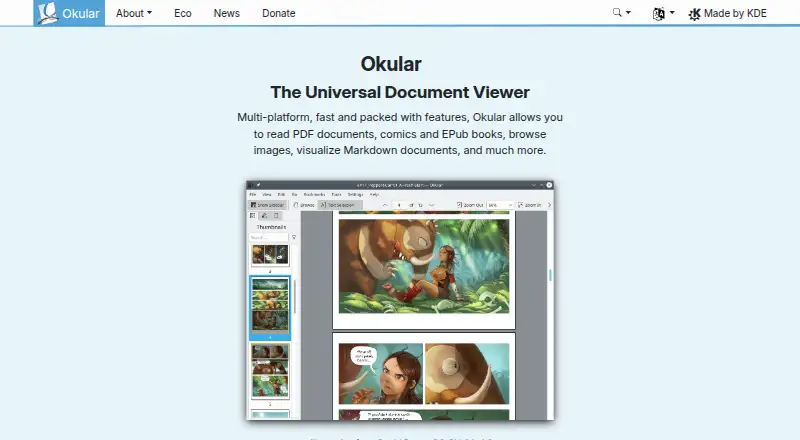
Okular is a free, cross-platform document viewer associated with KDE. It opens PDFs, EPUB books, comics and images, and can display Markdown documents. Its format support also includes PostScript, TIFF, DjVu, DVI, XPS, FictionBook, Plucker and fax. Selection tools can copy text, areas and tables, and a magnifier enlarges small text.
For document review, annotation mode can add inline or popup notes, highlighting, underlining and text. Okular can fill forms and provide text-to-speech. For PDFs, it can view and verify digital signatures, detect document modifications and sign files. OCR support is not included.
Okular is released as free software under GPLv2+, with its source code available in KDE's GitLab repository. KDE says its software does not transmit information from end-user devices except after explicit user action; where telemetry is provided, it is opt-in and disabled by default. The project received the Blue Angel ecolabel in 2022 for resource and energy efficiency. Linux packages are available through distribution software stores and Flathub, and the Microsoft Store is the recommended Windows installation source. The project also offers nightly builds for Windows and macOS ARM and Intel, described as untested. Support and development communication channels include a mailing list, IRC, Matrix, a forum and KDE's bug tracker.
Who it suits
Okular suits readers who need one free application for viewing and annotating documents, books, comics and images across Linux, Windows or macOS. It also fits users who want open-source software with PDF form filling, text-to-speech and signature tools.
What it does well
- Free software released under GPLv2+.
- Supports PDFs, EPUB, comics, images and Markdown.
- Annotations include notes, highlighting and underlining.
- Can fill forms and provide text-to-speech.
- Can verify and sign PDF signatures.
- Available for Linux, Windows and macOS.
What to know first
- OCR support is not included.
- Nightly builds for Windows and macOS are untested.
- Windows installation is recommended through the Microsoft Store.
Plans
| Plan | Billed and limits | Price |
|---|---|---|
| Free Software | GPLv2+ | Free |
As okular.kde.org lists them, read 30 Sept 2026. The maker's own page has the final word.
Getting started
- Visit the Okular website.
- Install it through a Linux distribution software store or Flathub, or use the Microsoft Store on Windows.
- On macOS, choose the available build for your system; nightly builds are offered for ARM and Intel.
- Open a supported document, image or comic file.
- Use annotation, form filling, text-to-speech or PDF signature tools as needed.
Overview
Okular is a document viewer for people who move between PDFs, ebooks, comics, images and other formats. Its broad coverage, annotation tools and PDF signing make it a capable everyday reader; the lack of OCR rules it out for workflows that need text recognized from scans.
Released under the GPLv2+, Okular is free software with source code available through KDE's GitLab repository. KDE's site announces version 26.08, released on 20 August 2026, and accepts donations through PayPal and other methods.
Key features
Reading and annotating
Okular handles PDF, EPUB, DjVu, PostScript, TIFF, DVI, XPS, FictionBook, Plucker and fax files, as well as Markdown, images and CBR or CBZ comics. That breadth suits readers who want one application for mixed documents and media rather than a PDF-only tool. It can also fill forms and read text aloud.
Selection tools copy text, areas and tables, and a magnifier enlarges small text. Annotation mode adds inline or popup notes, highlights, underlines and text. These tools make Okular useful for reviewing and working with documents, not just viewing them. It does not support OCR, so scanned pages that need text recognition call for another tool.
PDF signatures
Okular can sign PDFs, verify signatures and detect document modifications. That combination is useful for handling signed files and checking whether they have changed, while keeping the application focused on document work rather than OCR.
Privacy and sustainability
KDE says its software does not transmit information from users' devices without explicit action; where telemetry is offered, it is opt-in and disabled by default. Okular also received the Blue Angel ecolabel in 2022 for resource and energy efficiency. These are meaningful considerations for privacy- and resource-conscious users.
Pricing
Okular's Free Software plan costs nothing under the GPLv2+. There is no paid tier to weigh against it, so the full application is the straightforward choice for individuals and organizations that want a free, open-source viewer. Users can also donate to KDE, but donations are optional.
Platforms
Okular runs on Linux, Windows and macOS, with support also extending to BSD. Linux users can install it through distribution software stores or Flatpak on Flathub; the Microsoft Store is the recommended Windows source. Untested nightly builds are offered for Windows and macOS on ARM and Intel, so users who prioritize stable releases should prefer the regular installation routes.
Installations can include separate modules for particular formats and interface translations. Removing the application does not remove data viewed, created or modified with it. Support and development communication take place through a mailing list, IRC, Matrix, a forum and KDE's bug tracker.
Who it's for
Okular is a strong fit for readers, students and document reviewers who need a free viewer across desktop platforms and value annotations, form filling, text-to-speech or PDF signature checks. Its format range is especially useful when reading tasks include ebooks, comics, images or Markdown alongside PDFs. Choose another tool if OCR is essential.
Pros and cons
- Broad format coverage: Handles common documents alongside ebooks, comics, images and Markdown, reducing the need for separate viewers.
- Useful document tools: Annotations, selection, form filling and text-to-speech support more than passive reading.
- PDF signature handling: Can sign and verify signatures and detect modifications.
- Free and open-source: The GPLv2+ license and cross-platform support make it accessible across Linux, Windows and macOS.
- No OCR: Scanned documents that require text recognition need another application.
- Installation varies by platform: Users need to choose a route suited to their operating system, and nightly builds are explicitly untested.
Alternatives
For a different free option with broad platform support, ViewAnyFile.app is available on Android, iOS, Linux, macOS, the web and Windows. XnConvert may suit readers focused on image conversion; it is free for private, educational and non-profit use, with paid company licensing. Geeqie is another free GPLv2 image-viewing option.
HFSExplorer is a free GPLv3 alternative. nomacs is free for private and commercial use under GPLv3. Universal File Opener offers a free plan and a trial on Android and Windows, with file-size and compatibility limits applying to its free plan. Evince is a free Linux alternative. FastStone Image Viewer may be worth considering for Windows users comparing personal-use and commercial licensing.
Browse more options in File Viewer Software or PDF Readers.
Verdict
Choose Okular if you want a free, open-source desktop viewer that combines wide format support with annotation and PDF signature tools. Its main weakness is decisive for some readers: it cannot perform OCR, so scanned-document recognition requires a separate solution.
Verdict
Choose Okular for a free, open-source viewer with broad document-format support, annotation tools and PDF signature features. Look elsewhere if OCR is required, since Okular does not support it. It is available across Linux, Windows and macOS, with installation routes varying by platform.
Questions
Does Okular cost anything?
Okular is free software under the GPLv2+ license. The listed Free Software plan costs nothing.
Which platforms does Okular support?
It works on Linux, Windows, macOS and other platforms, including BSD.
What file formats can it open?
Supported formats include PDF, EPUB, DjVu, Markdown, JPEG, PNG, GIF, TIFF, WebP, comics, PostScript, DVI, XPS, FictionBook, Plucker and fax.
Is Okular open source?
Yes. It is released under GPLv2+, and its source code is available in KDE's GitLab repository.
Can Okular annotate and sign documents?
It supports notes, highlighting, underlining and text annotations. For PDFs, it can view and verify signatures, detect modifications and sign files.
Does Okular support OCR?
No. OCR support is listed as none.
Facts from Okular's own pages
- Annotation tools
- Can add notes, highlight or underline text, and add custom text to PDFs. · okular.kde.org, 27 Sept 2026
- Annotations
- Annotation mode adds inline and popup notes, highlighting, underlining and text. · okular.kde.org, 30 Sept 2026
- Annotation tools
- Yes · okular.kde.org, 24 Sept 2026
- Desktop platforms
- Okular works on Linux, Windows, macOS and other platforms including BSD. · apps.kde.org, 30 Sept 2026
- Digital signatures
- Okular can view and verify PDF signatures, detect changes after signing and sign PDFs. · okular.kde.org, 30 Sept 2026
- Distribution
- Linux packages are available through distribution software stores, Flatpak is available from Flathub, and Microsoft Store is the recommended Windows installation source. · okular.kde.org, 30 Sept 2026
- Document viewer
- Okular is a multi-platform universal document viewer for PDFs, comics, EPUB books, images, Markdown documents and more. · okular.kde.org, 30 Sept 2026
- Document viewing
- Reads PDFs, comics, and EPub books, browses images, and visualizes Markdown. · okular.kde.org, 27 Sept 2026
- Donation option
- The site offers donations to KDE via PayPal and other ways. · okular.kde.org, 27 Sept 2026
- Eco certification
- Okular received the Blue Angel ecolabel in 2022 and was the first computer software worldwide to receive it. · okular.kde.org, 30 Sept 2026
- Environmental label
- Okular received the Blue Angel ecolabel for resource and energy efficiency. · okular.kde.org, 27 Sept 2026
- Format support
- Supported formats include PDF, PS, TIFF, DjVu, images, DVI, XPS, FictionBook, comic books, Plucker, EPUB and fax. · apps.kde.org, 30 Sept 2026
- Form filling
- Yes · okular.kde.org, 24 Sept 2026
- Free plan
- Yes · okular.kde.org, 24 Sept 2026
- Free software
- Okular is fully free software released under GPLv2+. · okular.kde.org, 27 Sept 2026
- Latest release
- The page announces Okular 26.08, released on 20 August 2026. · okular.kde.org, 27 Sept 2026
- License
- Okular is released under the GPLv2+ and its source code is available in KDE's GitLab repository. · okular.kde.org, 30 Sept 2026
- Maintained by
- The site and project are maintained by KDE Webmasters and associated with KDE. · okular.kde.org, 27 Sept 2026
- Modular installation
- Installations can include separate modules for specific formats and interface translations. · okular.kde.org, 30 Sept 2026
- Nightly builds
- Untested nightly builds are offered for Windows and macOS ARM and Intel. · okular.kde.org, 30 Sept 2026
- Platform support
- Okular is described as multi-platform. · okular.kde.org, 27 Sept 2026
- Pricing page status
- The pricing URL returns a 404 page and does not list paid plans. · okular.kde.org, 27 Sept 2026
- Privacy
- KDE software does not transmit information from end-user devices except after explicit user action, and telemetry is opt-in and disabled by default where provided. · kde.org, 30 Sept 2026
- Support channels
- The Okular team provides a mailing list, IRC, Matrix, a forum and KDE's bug tracker for support and development communication. · okular.kde.org, 30 Sept 2026
Where Okular stands on Freedom251
- PDF Software#5 of 35
- File Viewer Software#8 of 31
- File Reader Software#13 of 24
- PDF Readers#13 of 24