Freedom251 › Employee Communication Software
Netpresenter
by Netpresenter
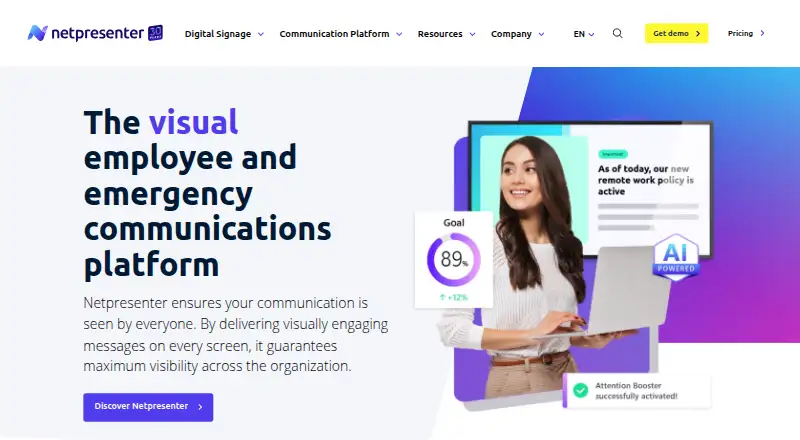
What Netpresenter is
Netpresenter is a visual platform for employee and emergency communications, distributing content across organizational screens and devices. Its channels include a corporate screensaver, employee app, desktop alerts, digital signage, lock screen, wallpaper, desktop ticker, and employee SMS. Publishers can target people or devices using criteria such as department or location, while employees can respond through polls, comments, and reactions. The AI Assistant can generate and refine communication content, and Smart Campaigns deliver employee training. Netpresenter Alerts are designed to reach employees during cyberattacks, system outages, and severe weather. Listed integrations include SharePoint, Microsoft Teams, Power BI, Outlook Calendar, Excel, Entra ID, Workspace 365, social media, RSS, Canva, and YouTube. The maker says data is hosted in Germany by default, with US hosting available, and guarantees 99.9% uptime for cloud services. Licenses include onboarding, training, support, customer success, and updates. Paid pricing is quote-based; a 14-day trial is listed.
Who it suits
Netpresenter suits organizations that need to distribute employee communications through screens, apps, alerts, and other listed channels. It may also suit teams seeking audience targeting, feedback features, or emergency alerts.
What it does well
- Multiple employee communication channels
- Audience targeting by department or location
- Polls, comments, and reactions
- Designed for emergency alerts
- 14-day trial
What to know first
- No free plan
- Paid pricing is quote-based
- Email publishing is not available
Limits
The free trial lasts 14 days. Paid plans are quote-based, with pricing depending on the selected tools and number of employees or devices; optional premium add-ons can be included in a quote.
Plans
| Plan | Billed and limits | Price |
|---|---|---|
| Free trial | 14 days | Free |
| Desktop Alerts | Quote-based; pricing depends on selected tools and number of employees or devices | On request |
| Wallpaper | Quote-based; pricing depends on selected tools and number of employees or devices | On request |
| Employee SMS | Quote-based; pricing depends on selected tools and number of employees or devices | On request |
| Digital Signage | Quote-based; pricing depends on selected tools and number of employees or devices | On request |
| Employee App | Quote-based; pricing depends on selected tools and number of employees or devices | On request |
| Lock Screen | Quote-based; pricing depends on selected tools and number of employees or devices | On request |
| Desktop Ticker | Quote-based; pricing depends on selected tools and number of employees or devices | On request |
The first 8 of 9 plans, as netpresenter.com lists them, read 29 Sept 2026. The maker's own page has the final word. Every plan
Getting started
- Visit https://www.netpresenter.com/.
- Start the 14-day free trial.
- Select the communication tools and channels your organization needs.
- Request a quote based on selected tools and the number of employees or devices.
- Use the included onboarding and training to get started.
Netpresenter brings employee messaging, audience targeting, and emergency alerts into one visual communications platform. There is no free plan, and paid pricing depends on selected tools and organization size.
Overview
Netpresenter combines workplace screens, desktop messaging, an employee app, and SMS in one publishing platform. Targeting by department, location, person, or device can help organizations direct updates to the right audiences instead of broadcasting every message to everyone. Polls, comments, and reactions support two-way engagement, and content approvals suit teams that need a managed publishing process. Email publishing is not supported, so it is not a complete fit for organizations that require email in the same workflow.
Routine communications sit alongside Netpresenter Alerts, intended for emergencies such as cyberattacks, system outages, and severe weather. The company says it was founded in 1995 and is headquartered in Beek, Limburg, Netherlands. Its cloud services carry a 99.9% uptime guarantee; data is hosted in Germany by default, with US hosting offered. Netpresenter states that it is ISO 27001:2022 and NIS2 Supply Chain certified, and its Trust Center lists SSO, two-factor authentication, role-based access control, encryption at rest and in transit, and a secure API.
Key features
The channel mix is the platform’s clearest advantage: corporate screensaver, digital signage, lock screen, wallpaper, desktop ticker, desktop alerts, employee app, and employee SMS. Organizations can select channels suited to their workforce rather than relying on a single screen or device. The maker describes frontline channels as full, and the employee app supports Windows, macOS, Linux, iOS, and Android; operating-system version requirements are specified in its helpdesk FAQ.
AI Assistant can generate and refine communication content, while Smart Campaigns deliver AI-powered employee training. These extend the platform beyond distributing announcements, though organizations should assess whether those functions match their specific training needs. Integrations include SharePoint, Microsoft Teams, Power BI, Outlook Calendar, Excel, Entra ID, Workspace 365, social media, RSS, Canva, and YouTube, giving teams options to connect existing workplace tools and content.
Onboarding, training, technical support, customer success, and continuous updates are included with licenses. That support can help organizations rolling out multiple channels, though buyers should account for implementation alongside the quoted software cost.
Pricing
Netpresenter has no free plan. Its Free trial costs free for 14 days, providing a time-limited way to evaluate the platform before committing.
Paid options use custom pricing, with quotes depending on selected tools and the number of employees or devices. The available options are Desktop Alerts, Wallpaper, Employee SMS, Digital Signage, Employee App, Lock Screen, Desktop Ticker, and Screensaver. This modular approach may suit organizations that want to choose channels, but it makes direct price comparison difficult until buyers define their requirements. There is no strict minimum number of users or devices, and optional premium add-ons can be included in a quote.
Organizations should compare quotes against the channels and audience size they actually need. The lack of published paid rates or an ongoing free tier makes Netpresenter a weaker fit for small teams seeking predictable self-service pricing.
Platforms
Netpresenter lists Android, iOS, Linux, macOS, web, and Windows, as well as an API. A mobile app is available. The broad platform coverage is useful for organizations with mixed device environments, while specific employee-app operating-system versions still matter when planning deployment.
Who it's for
Netpresenter is best suited to organizations that need targeted employee communications across workplace screens and devices, especially those that want emergency alerts, audience controls, and rollout support in the same platform. It is less suitable for teams that require email publishing, a free ongoing plan, or clearly priced packages before contacting the vendor.
Pros and cons
- Pros: Broad screen, desktop, app, and SMS channels let organizations reach employees through different workplace touchpoints.
- Pros: Person- and device-specific targeting, approvals, and employee reactions support controlled, audience-aware communications.
- Pros: Emergency alerts, security controls, and a 99.9% cloud uptime guarantee address operational and continuity needs.
- Pros: Licenses include onboarding, training, technical support, customer success, and updates.
- Cons: No free plan and custom paid pricing make it harder for budget-conscious teams to evaluate cost without a quote.
- Cons: No email publishing means organizations that depend on email for internal communications need a separate channel or tool.
Alternatives
Employee Communication Software and Digital Signage Software directories can help compare options by category.
Choose HubEngage if a free plan matters: its Starter plan is free for up to 200 users and includes communications, social, recognitions, surveys, and instant messaging. Choose Appspace Workplace if a free entry point with defined usage allowances is preferable; its Free plan includes 2 Premium Users, 1 Appspace Device ID, 5GB storage per month, 5GB bandwidth per month, and 2 Admins. Cerkl Broadcast offers a free Foundations plan with 5,000 email sends per month, 3 communicator seats, and 1 instance, making it worth considering when those email and seat limits fit.
Frontlyne is another paid option for Android, iOS, and web. Consider LumApps if you want a paid subscription that includes user provisioning, site and content management, branding, and analytics, with price upon request. Talkspirit starts at €5 a month billed per user per month and includes chat and video meetings, among other features. theEMPLOYEEapp offers a free plan for organizations under 50 employees, while its Pro plan has minimum pricing of $7,500/year. Blink is a paid alternative with a free trial; its Core plan is $4.50 a month billed per user per month and includes custom company branding, internal communications, real-time collaboration, and a knowledge hub.
Verdict
Choose Netpresenter if your organization needs targeted employee communications across screens and devices, with emergency alerts and structured rollout support. Its channel breadth and audience controls are compelling for multi-channel operations, but the lack of email publishing and custom pricing are meaningful trade-offs. Look elsewhere if you need a free ongoing option, transparent package pricing, or email as part of the same communications platform.
Verdict
Netpresenter brings employee messaging, audience targeting, and emergency alerts into one visual communications platform. There is no free plan, and paid pricing depends on selected tools and organization size.
Questions
Does Netpresenter have a free plan?
No free plan is listed. A 14-day free trial is available.
How is Netpresenter priced?
Paid pricing is quote-based and depends on selected tools and the number of employees or devices. Optional premium add-ons can be included in a quote.
Which platforms does it support?
The employee app supports Windows, macOS, Linux, iOS, and Android. OS version requirements are specified in its helpdesk FAQ.
What integrations are listed?
Integrations include SharePoint, Microsoft Teams, Power BI, Outlook Calendar, Excel, Entra ID, Workspace 365, social media, RSS, Canva, and YouTube.
Where is customer data hosted?
The maker says data is hosted in Germany by default and offers US hosting.
What is included with a license?
The pricing page says licenses include onboarding, training, technical support, customer success, and continuous updates.
Facts from Netpresenter's own pages
- AI and campaigns
- Its AI Assistant can generate and refine communication content, and Smart Campaigns deliver AI-powered employee training. · netpresenter.com, 29 Sept 2026
- Communication tools
- The platform includes a corporate screensaver, employee app, desktop alerts, digital signage, lock screen, wallpaper, desktop ticker, and employee SMS. · netpresenter.com, 29 Sept 2026
- Company history
- Netpresenter says it was founded in 1995 and identifies Frank Hoen as its founder and CEO. · netpresenter.com, 29 Sept 2026
- Emergency alerts
- Netpresenter Alerts are designed to reach employees during emergencies such as cyberattacks, system outages, and severe weather. · netpresenter.com, 29 Sept 2026
- Engagement
- The platform supports employee polls, comments, and reactions to gather feedback and encourage interaction. · netpresenter.com, 29 Sept 2026
- Founded
- 1995 · netpresenter.com, 28 Sept 2026
- Free plan
- No · netpresenter.com, 21 Sept 2026
- Headquarters
- Beek, Limburg, Netherlands · netpresenter.com, 28 Sept 2026
- Hosting and uptime
- The maker says data is hosted in Germany by default, offers US hosting, and guarantees 99.9% uptime for cloud services. · netpresenter.com, 29 Sept 2026
- Integrations
- Listed integrations include SharePoint, Microsoft Teams, Power BI, Outlook Calendar, Excel, Entra ID, Workspace 365, social media, RSS, Canva, and YouTube. · netpresenter.com, 29 Sept 2026
- Mobile app
- Yes · netpresenter.com, 21 Sept 2026
- Pricing limit
- The maker says there is no strict minimum number of users or devices, and optional premium add-ons can be included in a quote. · netpresenter.com, 29 Sept 2026
- Product
- Netpresenter is a visual platform for employee and emergency communications that distributes content across organizational screens. · netpresenter.com, 29 Sept 2026
- Security certification
- Netpresenter states that it is ISO 27001:2022 certified and NIS2 Supply Chain certified. · netpresenter.com, 29 Sept 2026
- Security controls
- The Trust Center lists SSO, two-factor authentication, role-based access control, data encryption at rest and in transit, and a secure API. · netpresenter.com, 29 Sept 2026
- Support and onboarding
- The pricing page says licenses include onboarding, training, technical support, customer success, and continuous updates. · netpresenter.com, 29 Sept 2026
- Supported systems
- The employee app supports Windows, macOS, Linux, iOS, and Android, with OS version requirements specified in its helpdesk FAQ. · netpresenter.com, 29 Sept 2026
- Targeting
- Publishers can target person- or device-specific audiences using criteria such as department or location. · netpresenter.com, 29 Sept 2026
Where Netpresenter stands on Freedom251
- Employee Communication Software#7 of 34
- Digital Signage Software#78 of 207